If you're searching "how to calculate chatbot ROI," you're probably trying to justify a budget to your CFO, choose between different chatbot approaches, or build a repeatable model you can use across multiple projects. Maybe you're tired of pilots that "look cool" but can't prove business impact.
The timing matters. Gartner reported in December 2024 that 85% of customer service leaders planned to explore or pilot customer-facing conversational GenAI in 2026. The problem? Many AI initiatives stumble because of unclear business value. ROI is where enthusiasm meets accountability.
This guide breaks down exactly how to prove chatbot ROI (cleanly, defensibly, without double counting) so you can answer the question everyone's asking: Will this actually pay for itself?
What Success Looks Like
By the end of this guide, you'll be able to:
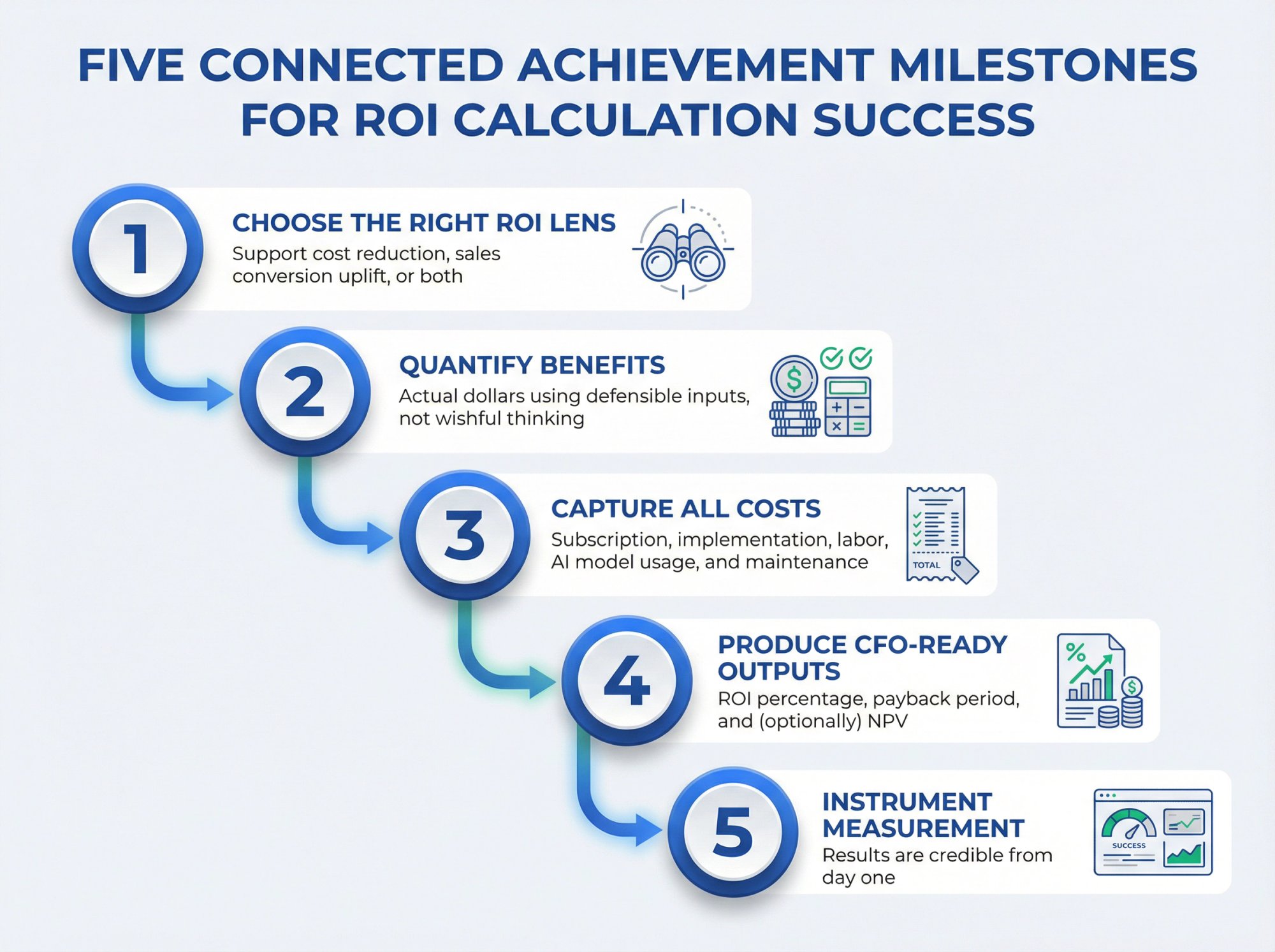
Choose the right ROI lens for your business (support cost reduction, sales conversion uplift, or both)
Quantify benefits in actual dollars using defensible inputs, not wishful thinking
Capture all costs including subscription, implementation, labor, AI model usage, and maintenance
Produce CFO-ready outputs like ROI percentage, payback period, and (optionally) NPV
Instrument measurement so your results are credible from day one
The Honest Truth About Chatbot ROI
Chatbot ROI is rarely "we replaced humans." It's usually something more nuanced and, frankly, more sustainable.
It's usually one (or more) of these:
• You increase first-response coverage during nights, weekends, and peak traffic periods
• You reduce repetitive workload through containment and deflection
• You shorten handle time via better routing, pre-qualification, and agent-assist summaries
• You capture more leads and revenue by answering faster and escalating correctly
• You avoid tool sprawl and training costs by meeting agents where they already work
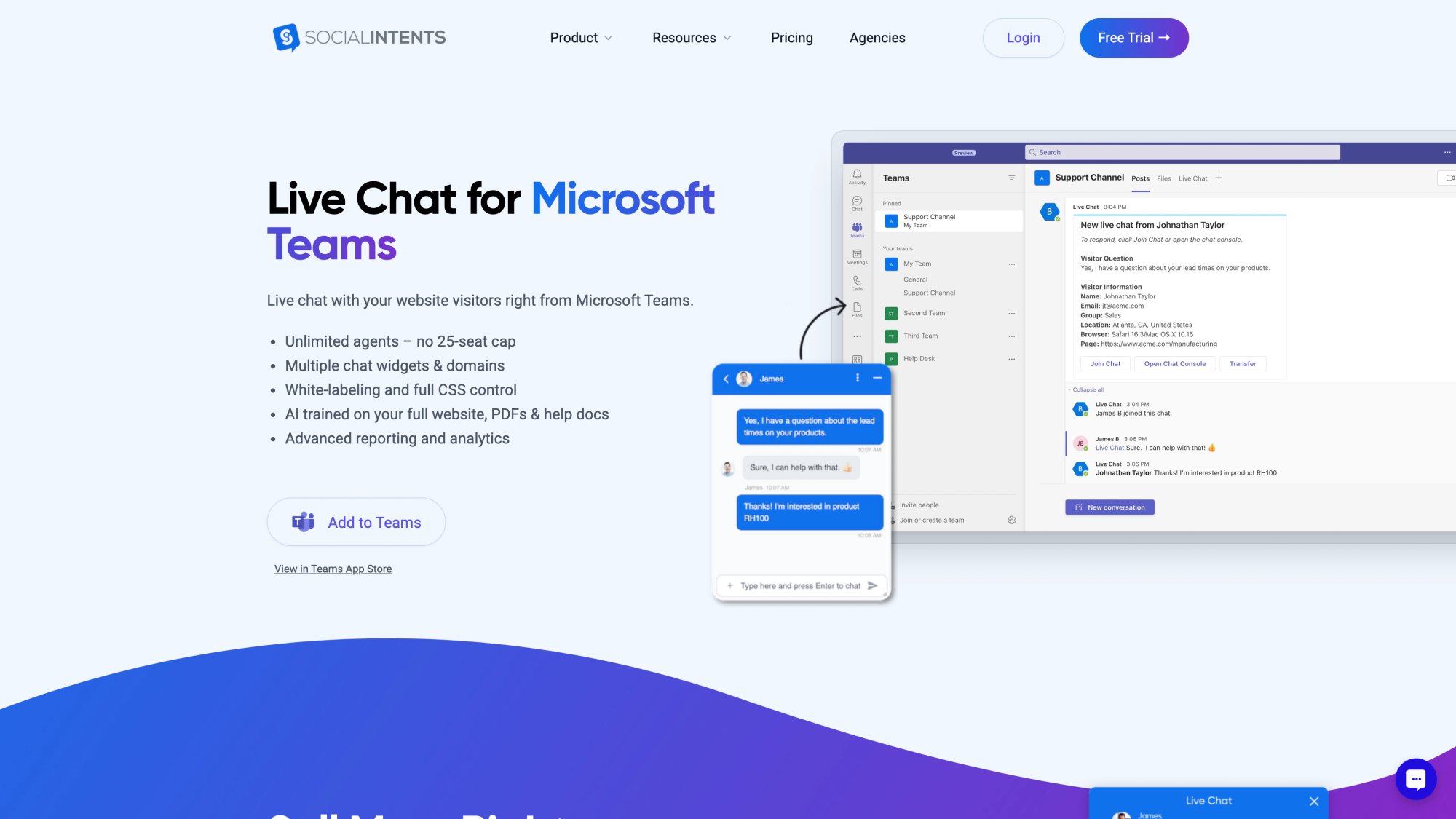
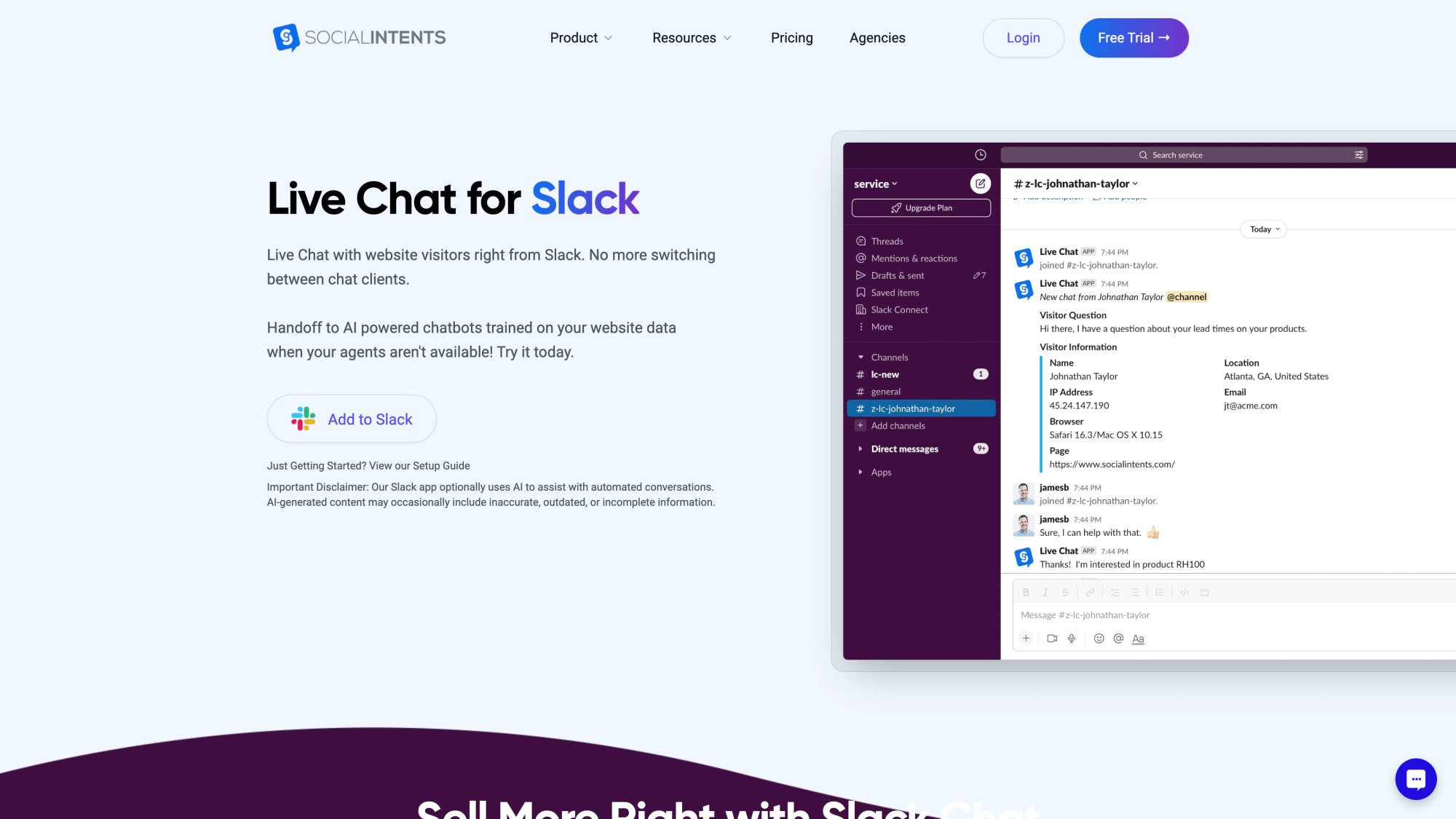
That last point is core to how Social Intents works. Website chats can route directly into Microsoft Teams, Slack, Google Chat, Zoom, or Webex, so your team responds without adopting a new helpdesk UI. No learning curve. No context switching.
Chatbot ROI Formula (One-Liner)
ROI (%) = (Total Benefits – Total Costs) ÷ Total Costs
Where:
| Component | What It Includes |
|---|---|
| Benefits | Cost savings + incremental profit + avoided costs |
| Costs | Subscription + implementation + labor + AI usage + ongoing maintenance |

Worth noting: ROI is a finance model, not a chatbot feature. If you don't define what "benefit" is in dollars and how you'll measure it, you don't have ROI. You have enthusiasm.
One-Page Chatbot ROI Model
Step 1: Define Your Outcome (Pick 1-2 Primary Levers)
Most chatbot business cases come from these levers:
① Cost Savings (Support Efficiency)
• Containment and deflection (fewer agent-handled contacts)
• Lower average handle time on contacts that still reach agents
• Avoided hiring as you absorb capacity gain
② Revenue And Profit Uplift (Sales + E-Commerce)
• Higher conversion rate for chat-engaged visitors
• Higher lead capture rate after hours
• Higher close rate for qualified leads
• Increased average order value profit (not revenue, which is a common mistake)
③ Risk + Operational Resilience
• Better consistency of answers (fewer compliance errors)
• Reduced missed chats and abandonment
• Faster response time that improves customer satisfaction and retention
Step 2: Capture Your Baseline (Before Chatbot)
You need four baseline numbers:
→ Volume: contacts per month (by intent and channel if possible)
→ Cost: fully loaded cost per agent hour (or cost per contact)
→ Time: average handle time per contact
→ Conversion: conversion rate and lead-to-close metrics
If you don't have contact costs, start with a baseline labor model. The U.S. Bureau of Labor Statistics lists median pay for customer service representatives (May 2024 data). Use that, then add your overhead multiplier for benefits, tools, management, and facilities.
Step 3: Estimate Chatbot Impact
You need only two support-side performance metrics to start:
Containment rate (resolved by bot without an agent)
AHT reduction on remaining chats (agent-assist effect from better intake, routing, and context)
Step 4: Convert To Dollars (Monthly)
Here's a clean formula approach:
Cost per contact (labor) = (AHT_minutes / 60) * loaded_agent_cost_per_hour
Monthly savings from containment = monthly_contacts * containment_rate * cost_per_contact
Monthly savings from AHT reduction = remaining_contacts * minutes_saved * (loaded_agent_cost_per_hour / 60)
Revenue uplift (profit) = incremental_conversions * gross_profit_per_conversion
Monthly costs = chatbot_platform + maintenance_labor + AI_model_usage + other_fees
Net monthly benefit = (containment_savings + AHT_savings + profit_uplift) - monthly_costs
Payback period (months) = one_time_implementation_cost / net_monthly
Step 5: CFO Outputs (Year 1)
year1_benefits = monthly_benefits * 12
year1_costs = monthly_costs * 12 + one_time_cost
year1_roi = (year1_benefits - year1_costs) / year1_costs
If you need a discount-rate-based model (NPV), we'll cover that in the deep dive section.
CFO-Ready Deep Dive
What You Can Credibly Count As Benefits
Cost Savings In Customer Support
This is typically the most immediate and easiest to prove.
ContactBabel's 2025 U.S. contact center report highlights that the average cost of an inbound call is $7.16, and that calls are significantly more expensive than digital channels. The report notes calls are around 42% more expensive than web chat and about 18% more expensive than email.
Why this matters for ROI: If your chatbot shifts demand to cheaper channels or contains routine questions, the savings are real. But only if you measure correctly.
What to count:
Avoided contacts (bot-contained conversations that would've become agent work)
Reduced handle time (when the bot collects order number, account email, intent, and context upfront)
Avoided hires (if volume growth is absorbed without headcount)
What NOT to count (common double-counting mistake):
Don't claim both "$X saved per contact using industry benchmark" and separate AHT savings on the same contacts unless you're absolutely certain the benchmark doesn't already include labor.
Revenue Uplift (Sales + E-Commerce)
This is often bigger than cost savings, but it's harder to prove because you need attribution.
Revenue uplift shows up when your chatbot:
• Answers purchase questions instantly (reducing bounce and abandonment)
• Captures lead info when the sales team is offline
• Routes high-intent visitors to the right human quickly
• Qualifies leads before handing off (so reps focus on higher-probability conversations)
Key modeling rule: Use gross profit, not revenue. A chatbot that "drives $50k in sales" isn't a $50k ROI impact if margin is 30% and fulfillment costs exist.
Avoided Risk + Operational Resilience
These are real, but CFOs hate vague benefits. You can still quantify them if you tie them to dollars.
Examples of quantifiable risk and ops benefits:
Reduced missed chats which means fewer "lost" leads (measurable if you track chat availability and lead capture)
Reduced rework (fewer follow-ups due to incomplete intake)
Reduced escalations (if your bot resolves "where's my order" and eliminates repeat contacts)
What You Must Include As Costs
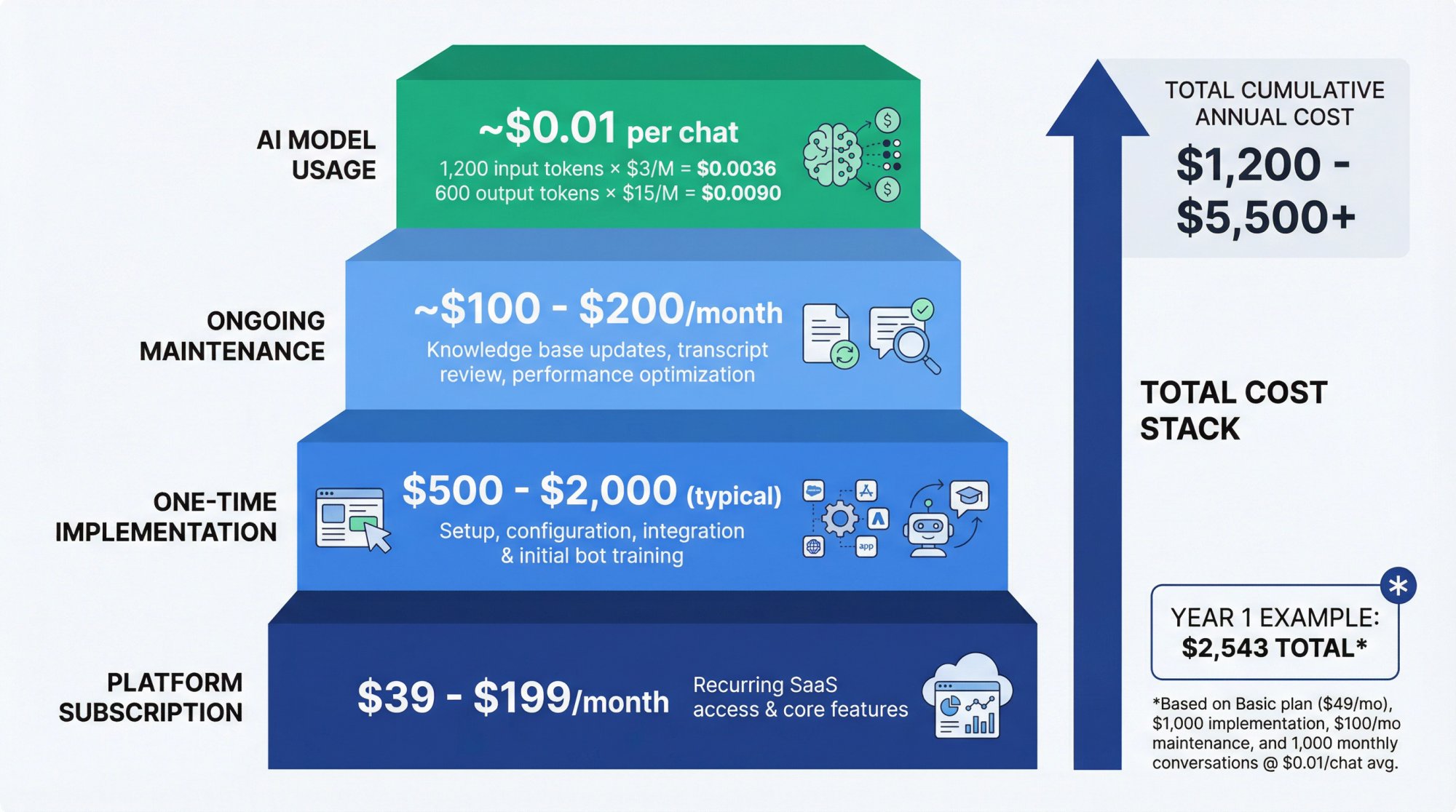
Platform Subscription
For Social Intents specifically, pricing is straightforward and (importantly for ROI modeling) most plans include unlimited agents while scaling by usage (monthly conversations) and features.
To translate platform cost into ROI-friendly numbers, calculate cost per allowed conversation:
| Plan | Monthly Price (Annual Billing) | Conversations | Cost Per Conversation |
|---|---|---|---|
| Starter | $39 | 200 | ~$0.195 |
| Basic | $69 | 1,000 | ~$0.069 |
| Pro | $99 | 5,000 | ~$0.020 |
| Business | $199 | 10,000 | ~$0.020 |
Why this matters: If you're comparing vendors, "per agent" versus "per conversation" pricing changes your cost curve dramatically as you scale.
One-Time Implementation
This includes:
• Widget install and routing (Teams, Slack, etc.)
• Initial bot training and guardrails
• Escalation rules and handoff settings
• Integrations (CRM, ticketing, order status)
• Analytics instrumentation (GA4, CRM attribution)
With Social Intents, setup is designed to be fast, and the platform supports AI chatbot plus human handoff modes. Even if the platform setup is quick, your organization's real implementation time is usually dominated by content, integrations, and measurement.
Ongoing Maintenance (Don't Ignore This)
This is where "ROI evaporates" for many teams.
Ongoing work includes:
• Updating knowledge articles when products change
• Reviewing transcripts for failure modes
• Expanding intents and training coverage
• Monitoring hallucination risk and escalation accuracy
• Updating API integrations (like Social Intents' AI Actions) when systems change
Gartner explicitly called out knowledge management as a barrier. In their 2024 survey write-up, they noted many leaders face knowledge backlog and lack formal processes for revising outdated content. This directly impacts conversational AI success.
AI Model Usage (Token Costs + Tool Fees)
If you're using LLM-based chatbots (ChatGPT, Claude, Gemini), you should model usage costs even if they're small, so your ROI is complete.
How it works in Social Intents: Social Intents supports connecting AI chatbots with OpenAI ChatGPT and other models, and their integration guide notes OpenAI's API requires an active billing setup (it's not enabled on free plans).
Token cost math (simple and powerful)
Most providers price by input tokens and output tokens.
Example using Claude Sonnet 4.5 pricing (published by Anthropic):
• $3 per million input tokens
• $15 per million output tokens
If your average bot-contained chat uses 1,200 input tokens and 600 output tokens, then estimated LLM cost per contained conversation:
• (1,200 / 1,000,000) * $3 = $0.0036
• (600 / 1,000,000) * $15 = $0.0090
• Total ≈ $0.0126 (about 1.3 cents)
That's why, for many support use cases, labor dominates ROI and token cost is often a rounding error unless you're doing extremely long conversations, heavy tool use, or retrieval over large documents.
ROI best practice: Model AI costs as a variable line item per contained conversation, and update it quarterly.
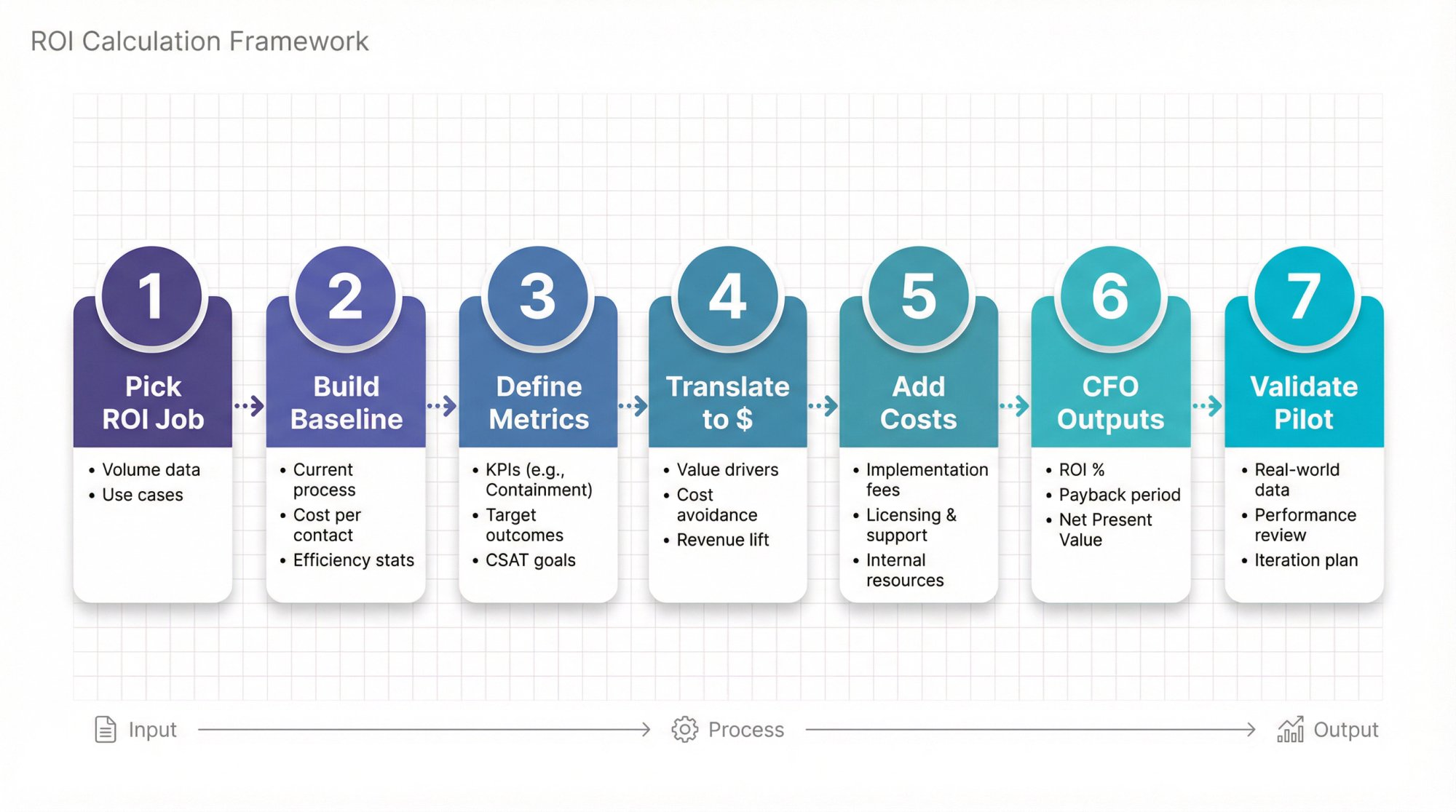
7-Step Method To Calculate Chatbot ROI
Step 1: Pick Your "ROI Job To Be Done"
Chatbot ROI is different depending on your primary objective:
| Use Case | Primary ROI Metric |
|---|---|
| Support ROI | Reduce ticket volume + handle time |
| Sales ROI | Increase lead capture + qualified handoffs |
| E-Commerce ROI | Increase conversion + reduce cart abandonment |
| Internal Helpdesk ROI | Deflect repetitive IT/HR questions (often very high ROI) |
Write a one-sentence objective like:
"Reduce human-handled 'order status' contacts by 20% while improving first-response coverage after hours."
Step 2: Build Your Baseline Dataset (Before Launch)
Minimum baseline dataset:
Volume
• Contacts per month (ideally by intent: "order status," "refund," "pricing," "technical issue")
Time
• Average handle time per contact (including after-contact work)
Cost
• Loaded cost per agent hour (or loaded cost per contact)
Outcome
• For support: resolution rate, repeat contact rate, CSAT
• For sales: lead conversion rate, pipeline created, close rate
• For e-commerce: conversion rate, average order value, gross margin
If you don't have cost per contact, build it using wage data from the Bureau of Labor Statistics as a starting point, then apply your overhead assumptions. Or use your finance team's loaded labor cost model.
Step 3: Define Your Chatbot Performance Metrics
You'll see a lot of vanity metrics in chatbot dashboards. For ROI, focus on these:
Support ROI Metrics
| Metric | Formula | Purpose |
|---|---|---|
| Containment Rate | bot-resolved ÷ total chatbot conversations | Measures automation effectiveness |
| Deflection Rate | avoided tickets ÷ total contacts | Measures channel shift impact |
| Handoff Rate | escalations to humans ÷ total chatbot conversations | Measures when human help is needed |
| AHT Reduction | (baseline AHT – post-bot AHT) ÷ baseline AHT | Measures efficiency gain |
| Cost Per Resolution | total cost ÷ resolved cases | Measures economic efficiency |
Sales ROI Metrics
Chat-To-Lead Rate = leads captured via chat ÷ chat sessions
Lead-To-Opportunity Rate = opportunities ÷ chat leads
Chat-Assisted Pipeline = pipeline amount influenced by chat
Time-To-Response for high-intent visitors
Step 4: Translate Metrics Into Dollars (Avoid The 3 Classic Traps)
Trap #1: Double Counting
If you count containment savings as avoided labor cost, don't also count those same contacts in an AHT reduction pool.
Trap #2: Counting Revenue, Not Profit
Use gross profit per order or deal.
Trap #3: Claiming "Saved Time" Without Proving You Can Use It
AHT reduction only becomes real ROI when it:
• Avoids hiring, or
• Enables higher volume with same staff, or
• Frees staff to do measurable higher-value work
Step 5: Add The Full Cost Stack
At minimum:
• Subscription
• One-time implementation labor
• Ongoing maintenance labor
• AI model usage costs (tokens + tool calls)
• Any channel fees (WhatsApp, SMS, etc.)
• Any integration costs (if using third-party middleware)
Social Intents specifically offers unlimited agents on most plans, which changes the scaling math compared to per-seat pricing models. The platform's AI chatbots can hand off to humans in Teams, Slack, Google Chat, and other collaboration tools your team already uses.
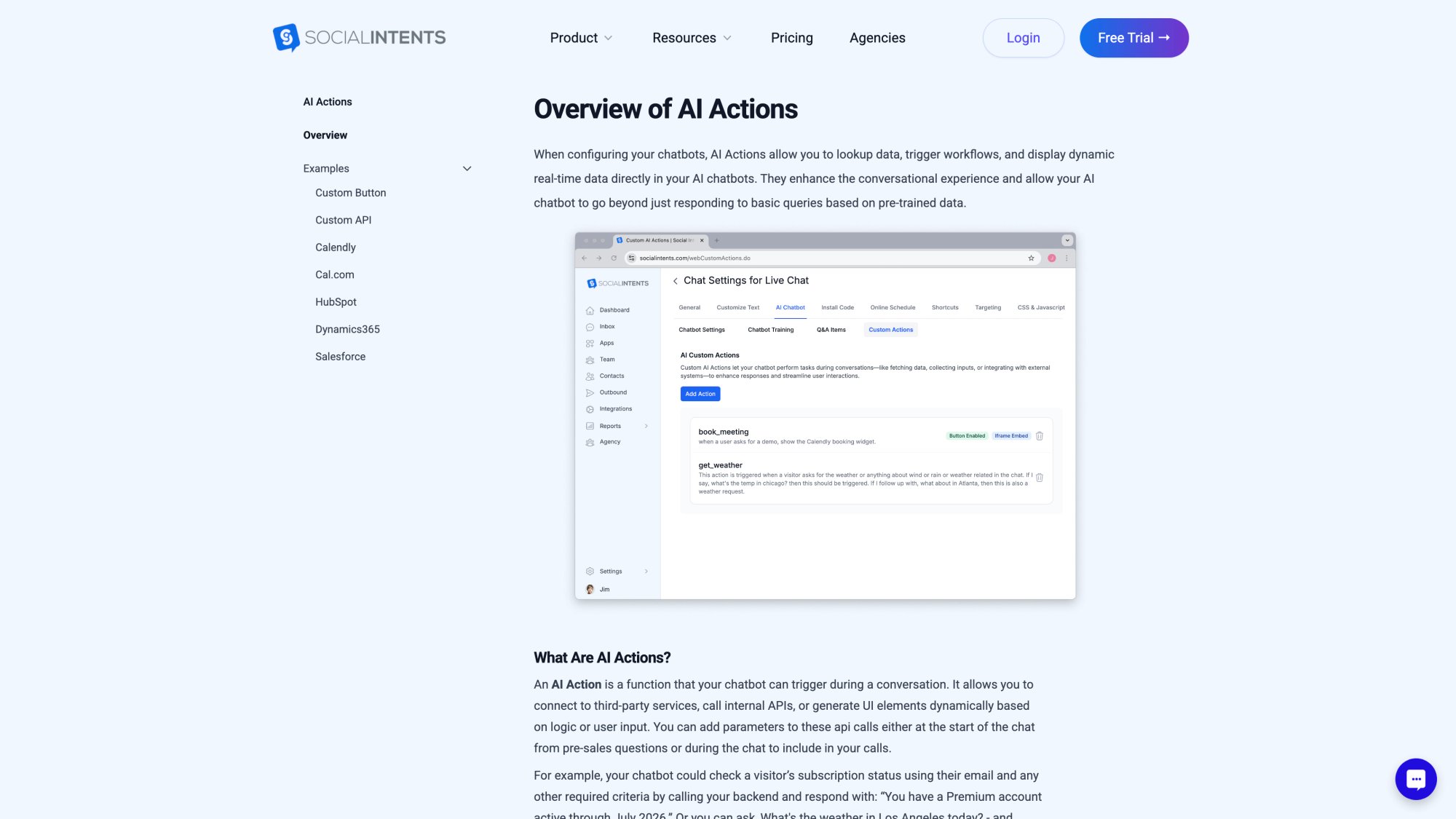
Custom AI Actions can integrate with external systems to check order status, create support tickets, or fetch CRM details. These integrations materially increase ROI by reducing handle time and enabling true transactional resolution.
Step 6: Produce CFO Outputs
ROI And Payback (Minimum Viable Finance Model)
• ROI % (Year 1)
• Payback period (months)
NPV (For Bigger Deployments Or Multi-Year Contracts)
If you need a finance-grade model, use discounted cash flows:
NPV = Σ (cash_flow_t / (1 + r)^t) - initial_investment
Where r is your discount rate (WACC or required return).
Forrester's TEI studies often use discount rates in a range like 8%-16% depending on assumptions and company profiles. Use your company's rate if you have it.
Step 7: Validate ROI With A Pilot
A credible pilot has:
A defined baseline period (e.g., 2-4 weeks)
A defined pilot period (e.g., 4-8 weeks)
Clear success metrics
A method to isolate impact:
• A/B test (best)
• Holdout group (good)
• Before/after with seasonality controls (acceptable)
Important reality check: AI adoption isn't automatic. Gartner has reported (in 2026 research communication) that willingness to adopt GenAI assistants varies by customer segment and channel preferences. Your rollout strategy must include human fallback and careful experience design.
Worked Example: Support ROI (Conservative Vs Expected)
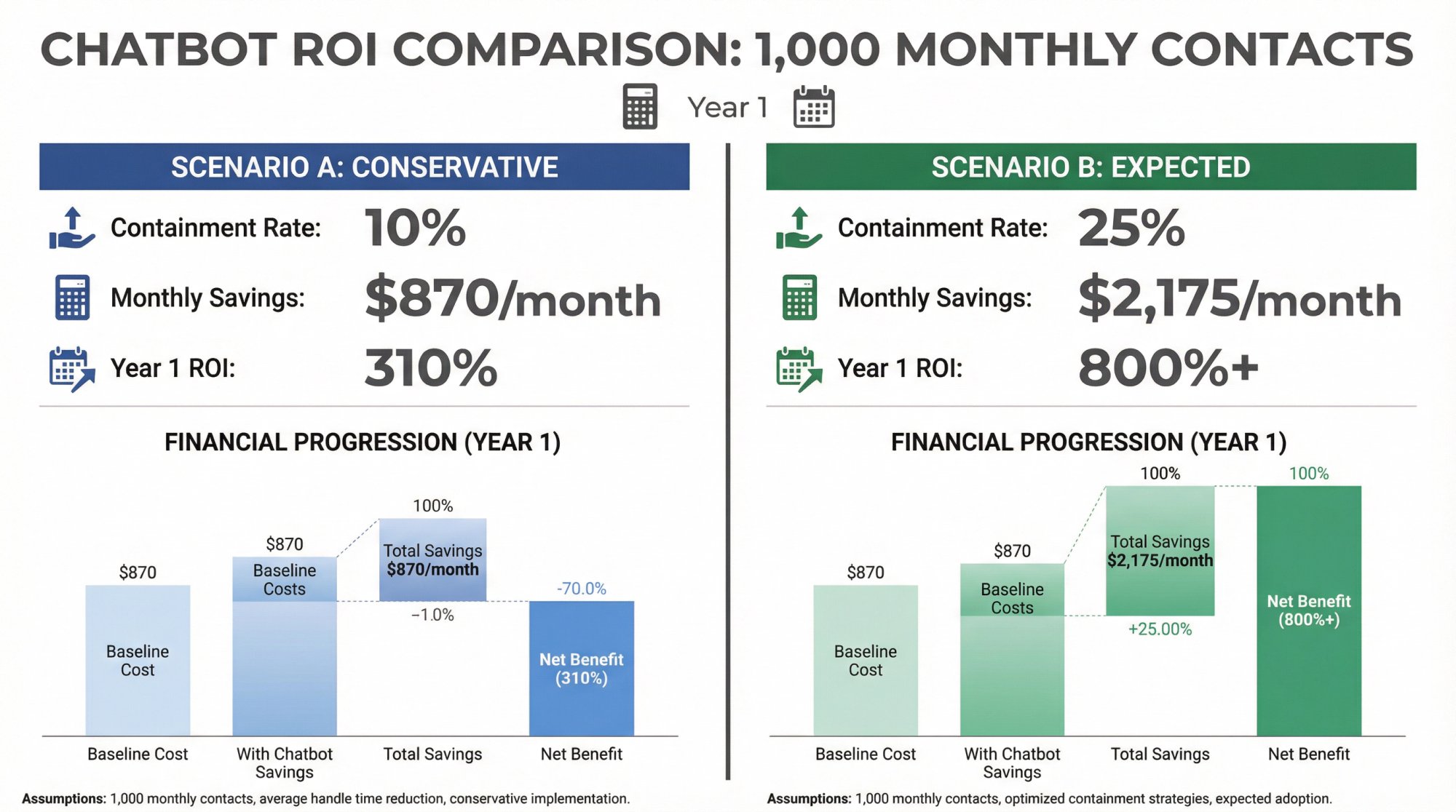
Let's model a small team handling 1,000 contacts per month via web chat and tickets.
Inputs (Example Only)
• Monthly contacts: 1,000
• AHT: 12 minutes
• Loaded agent cost: $30/hour (Use your own fully loaded cost; BLS wage data is a starting point, but real loaded costs are higher.)
• Social Intents subscription (example): $69/month annual-billed equivalent (Basic)
• Maintenance: 2 hours/month at $50/hour
• One-time implementation: 10 hours at $50/hour
• LLM cost per contained chat: ~1-2 cents (example using Anthropic token pricing)
Baseline Labor Cost
• Cost per contact = (12/60) * 30 = $6
• Baseline monthly labor cost = 1,000 * $6 = $6,000
Scenario A: Conservative Performance
• Containment = 10% → 100 contacts avoided
• AHT reduction = 5% on remaining contacts
Monthly Savings
• Containment savings = 100 * $6 = $600
• AHT savings = 900 contacts * (0.6 minutes saved) * $0.50/min = $270
• Total savings = $870/month
Monthly Costs
• Social Intents: $69
• Maintenance labor: $100
• LLM usage (contained only): ~$1-$2
• Total ≈ $170/month
Net Benefit
• $870 – $170 = ~$700/month net
Year 1
• Benefits ≈ $10,440
• Costs (recurring + one-time) ≈ $2,543
• Net ≈ $7,897
• ROI ≈ ~310%
• Payback on one-time setup: under 1 month
Scenario B: Expected Performance
• Containment = 25%
• AHT reduction = 10%
This pushes Year 1 ROI into the ~800%+ range in this example.
What this example is really saying: Even modest containment plus small AHT improvements can pay for a chatbot quickly if you have enough volume and real labor cost behind the work.
ROI Accelerators Most Companies Miss
These are the levers that often turn a mediocre chatbot into a high-ROI program.
① Human Handoff That Preserves Context
Bots fail. The ROI killer is when the failure becomes customer frustration plus repeat contacts.
A strong handoff pattern:
• Detects uncertainty or user frustration
• Escalates quickly
• Transfers context so users don't repeat themselves
Social Intents supports AI chatbot plus human handoff modes and can route escalations directly into where your team works (Teams, Slack, Google Chat, Zoom, or Webex).
② Transactional Automation Via "AI Actions"
FAQ-only bots plateau. The biggest ROI step-change comes when the bot can do something:
• Check order status
• Create a support ticket
• Update account info
• Fetch CRM details
• Schedule an appointment
Social Intents offers AI Actions, including custom API actions and prebuilt actions (e.g., Salesforce case creation, HubSpot leads, Dynamics 365). This is exactly what enables measurable handle-time reduction and true containment for common intents.
③ Measurement Instrumentation (GA4 + CRM) From Day One
If you can't attribute outcomes, you can't claim ROI.
Social Intents publishes guidance on tracking live chat events in GA4 and using those events to evaluate conversions and outcomes. This is the backbone of revenue ROI measurement.
Social Intents also highlights integrations to send transcripts and leads into other systems, which supports CRM attribution and operational reporting.
Common ROI Pitfalls (And How To Avoid Them)
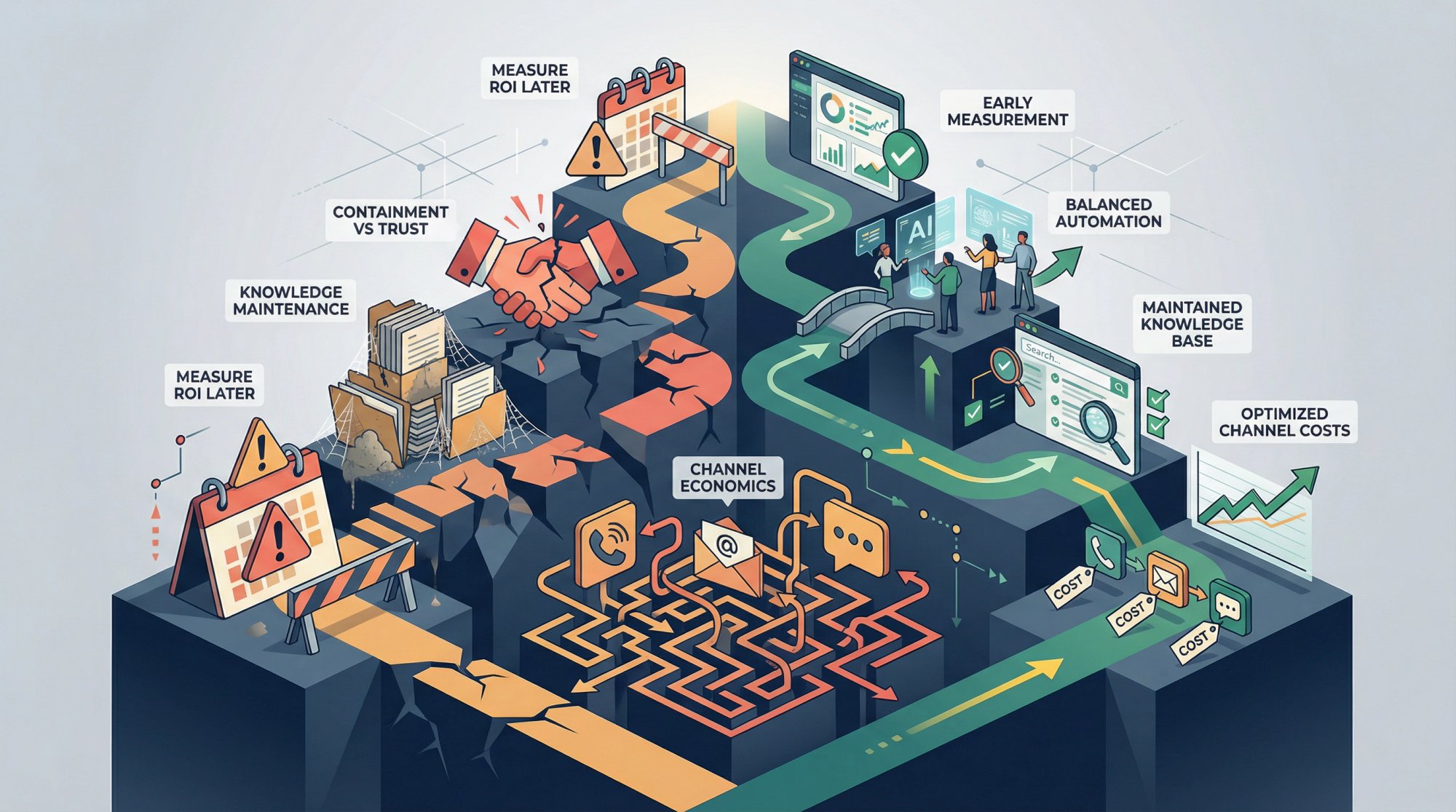
Pitfall 1: "We'll Measure ROI Later"
This is how projects get cut. If leadership can't see ROI early, they treat it as a cost center.
Fix: Define your baseline and measurement plan before launch.
Pitfall 2: Optimizing For Containment At The Expense Of Trust
If customers don't trust the bot, they won't use it. If they can't reach a human, they abandon.
Fix: Always offer a human option and tune handoff thresholds.
Pitfall 3: Underestimating Knowledge Maintenance
Gartner explicitly tied conversational AI success to the reality of knowledge backlog and weak revision processes.
Fix: Put a recurring monthly "knowledge ops" line item in your model.
Pitfall 4: Ignoring Channel Economics
Channel cost differences are real, but variable by organization. ContactBabel's cost benchmarks are useful sanity checks, but you should still compute your own loaded costs.
What Social Intents Adds To The ROI Conversation
This is the practical connection between Social Intents' architecture and ROI math:
① Faster Adoption = Faster Time-To-Value
Because chats route into Teams, Slack, Google Chat, Zoom, or Webex, you reduce tool-switching and training friction. Your "implementation curve" is often shorter.
② Unlimited Agents On Most Plans Changes The Scaling Math
Many chat tools become expensive as you add seats. Social Intents scales primarily with usage limits rather than agent seats (from Basic and above).
③ AI Actions Raise The ROI Ceiling
When a bot can fetch real data and take real actions through custom integrations, containment can be meaningfully higher and agent handle time meaningfully lower.
FAQ
How Long Does It Take To See ROI?
Support efficiency ROI can show up in weeks (volume and handle time move quickly).
Revenue ROI often lags because the sales cycle lags.
Social Intents' own lead-generation guidance notes that "true ROI" for lead gen can take longer depending on your sales cycle. Plan your measurement window accordingly.
What If Our Chatbot Doesn't Reduce Headcount?
ROI can still be real through:
• Avoided hiring
• Handling growth without added staff
• Redirecting staff to higher-impact work
But you must show that "saved time" is used productively.
Should We Include AI Model Costs?
Yes. Even if small, it makes your ROI model complete and protects you from surprises.
Use the provider's current pricing pages (OpenAI, Anthropic, Google) and update quarterly.
What's The Difference Between Containment Rate And Deflection Rate?
Containment rate measures how many chatbot conversations were resolved without human intervention (bot conversations only).
Deflection rate measures how many total contacts (across all channels) were avoided because of the bot.
Both matter for ROI, but they measure slightly different things.
How Do We Handle Attribution For Revenue ROI?
Use your existing CRM and analytics infrastructure. Track:
• Chat engagement events in GA4
• Lead source tags in your CRM
• Conversion paths that include chat touchpoints
• A/B tests with chat on/off for specific segments
Social Intents provides GA4 tracking guidance and CRM integrations to support attribution.
What If We're A B2B Company With Low Volume But High-Value Deals?
B2B chatbot ROI often comes from quality over quantity. Even if you only handle 100 chats, if 10 turn into $50,000 deals, that's huge ROI.
Focus on:
• Lead qualification accuracy
• Time-to-first-response for high-intent prospects
• Context preservation during handoff to sales
• Reduction in sales team's administrative workload
How Often Should We Recalculate ROI?
Recalculate quarterly or after major changes to:
• Track improvement trends
• Catch cost creep (like increased API usage)
• Justify continued investment
• Identify optimization opportunities
What's A "Good" Chatbot ROI Percentage?
There's no universal benchmark, but here's what we see:
| ROI Range | Interpretation |
|---|---|
| 0-50% | Marginally positive; look for optimization opportunities |
| 50-150% | Solid return; typical for well-implemented support bots |
| 150-300% | Strong return; usually high-volume support or effective sales assist |
| 300%+ | Exceptional; often high-volume B2C support with good containment |
Your specific ROI depends on your baseline costs, volume, and implementation quality.
How Do We Account For 24/7 Coverage In ROI Calculations?
If your bot provides after-hours coverage that you previously didn't have:
• Calculate the opportunity cost of missed leads or contacts during off-hours
• Or estimate what it would cost to staff those hours (overtime, third shift, outsourcing)
• Add the difference as a benefit
Many companies find 24/7 coverage is one of the highest-value chatbot benefits, especially for global businesses or lead generation.
What If Our Bot's Performance Isn't Meeting Projections?
This is actually a good thing to discover early. It means you can optimize before the ROI story becomes negative.
Common fixes:
• Expand training data for low-confidence topics
• Adjust handoff thresholds (too aggressive or too conservative)
• Add AI Actions for high-volume transactional requests
• Improve the user experience (widget placement, greeting message)
• Review transcripts for failure patterns
Track these improvements and measure the impact on your key metrics.
How Do We Present Chatbot ROI To Executives Who Are Skeptical About AI?
Use this three-part approach:
① Start With Costs They Already Understand
"We spend $X per contact on support today. Here's what that looks like across 10,000 contacts per month."
② Show The Math Conservatively
"If the bot handles just 15% of contacts (conservative estimate based on similar deployments), here's the savings."
③ Acknowledge Risks And Mitigation
"Here's our pilot plan to validate these assumptions before full rollout."
Executives appreciate honesty about limitations and clear measurement plans.
Can We Calculate ROI For Internal Chatbots (IT Help Desk, HR)?
Absolutely. The formula is similar, but you count time saved for both the requester and the support staff.
For example, if an IT bot resets passwords automatically:
• Employee saves 15 minutes (no waiting for IT)
• IT technician saves 10 minutes (no manual reset)
• Total productivity gain: 25 minutes per incident
Multiply by hourly rates and incident volume for your ROI calculation.
Internal bots often show strong ROI because they save time for highly-paid knowledge workers.
What About The Cost Of Bad Chatbot Experiences?
This is a hidden cost that can erode ROI. If your bot frequently fails or provides wrong answers:
• Customers may abandon (lost sales)
• They may contact support anyway (double handling cost)
• Trust in your brand decreases (hard to quantify but real)
Mitigation strategies:
• Use verified knowledge sources
• Set confidence thresholds for AI responses
• Make human escalation easy and obvious
• Monitor satisfaction scores specifically for bot interactions
• Regularly review and fix failure modes
The good news: platforms like Social Intents with human handoff into Teams or Slack make escalation seamless, reducing the risk of bad bot experiences.
Get Started With Chatbot ROI Measurement
Calculating chatbot ROI is more than an accounting exercise. It's about understanding how conversational AI fits into your business strategy and where it creates value.
By thoroughly identifying costs and rigorously measuring benefits, you can build a compelling case that your chatbot is saving money, earning money, or (ideally) both.
Companies that deploy chatbots smartly have an edge. They serve customers faster, scale operations efficiently, and free their humans for higher-value work. But to get buy-in for expanding chatbot projects (or to troubleshoot one that's underperforming), you need the data. ROI provides that common language between the tech side, the customer experience side, and the finance side.
A chatbot with solid ROI can transform perceptions from "nice-to-have experiment" to "must-have digital teammate." It can go from a cost center to a profit center. This is quite achievable. Businesses across industries have seen triple-digit ROI percentages from chatbots, some slashing support costs by half or more, others driving new revenue through lead capture and 24/7 sales.
One final insight: ROI isn't uniform. It depends on execution. The organizations reaping big returns are usually those that integrate their chatbots well (with systems and teams) and keep them up-to-date and accurate.
For example, companies using Social Intents often integrate the chatbot into their existing team workflows (Microsoft Teams, Slack, Google Chat, Zoom, Webex). This integration boosts agent productivity alongside the bot's work. That kind of seamless integration can amplify ROI by ensuring nothing falls through the cracks. The bot and humans work in tandem efficiently.
As Social Intents demonstrates, chatbot ROI often comes from expanded coverage (nights and weekends), reduced repetitive load on agents, faster handle times via AI assistance, and capturing more leads. Not simply from cutting headcount.
The best ROI comes when chatbots empower your team and extend your service, not just try to replace people.
Use the steps in this guide to quantify your chatbot's impact. And once you have that ROI figure, don't just file it away. Use it. Share it with your boss. Use it to justify scaling up chatbot initiatives. Or identify where to tweak for even better returns.
A $10,000 investment that yields $50,000 in benefits is a story worth telling. With a clear ROI analysis, you'll ensure your chatbot project gets the recognition, support, and continuous improvement it deserves, driving value for your business well into the future.