Your AI chatbot answers thousands of questions every day, instantly. But what happens when a customer needs more than a quick answer? What about when they're frustrated, confused, or dealing with something your bot wasn't trained to handle?
That's where AI chatbot with human handoff becomes essential.
It's the bridge between automated efficiency and genuine personal care. Your chatbot handles routine questions at lightning speed, then seamlessly passes complex issues to your team when needed.
The stakes?
Research shows that 63% of customers will leave a company after just one poor experience.
If that one bad interaction is with a bot that can't help (and there's no human backup), you've lost them. On the flip side, when handoff works smoothly, customers report higher satisfaction than either AI-only or human-only support. They get instant help for simple needs and human expertise for complex ones.
This guide shows you how to implement chatbot-to-human handoff the right way. You'll learn when to trigger escalations, how to make transitions seamless, and exactly how to set it up using Social Intents (with step-by-step instructions you can follow today).
Why AI Chatbot Handoff Matters for Customer Retention
A chatbot without proper handoff is like a customer service desk with no way to reach a manager.
Customers get stuck, frustrated, and eventually leave.
The data is clear: 80% of people will only use chatbots if they know a human option exists. They don't trust bots to handle everything (and they shouldn't). But they'll happily engage with AI if they know backup is available.
In fact, 82% of consumers would rather get an instant chatbot response than wait for a human agent for basic issues. The moment things get complicated, though, they expect a smooth path to a person.
A well-designed hybrid AI and human support system delivers four massive benefits.
How Poor Chatbot Handoff Causes Customer Churn
Nothing kills trust faster than a bot that loops endlessly without offering human help.
When customers can't escape an unhelpful bot, they abandon your company entirely. Studies show that 30% of consumers would switch to a competitor after a single bad chatbot experience. The escape hatch isn't just nice to have. It's what keeps customers from rage-quitting your service.
Every failed bot interaction is a customer considering your competitors.
Why Hybrid AI and Human Support Increases Customer Satisfaction
Customers want the best of both worlds.
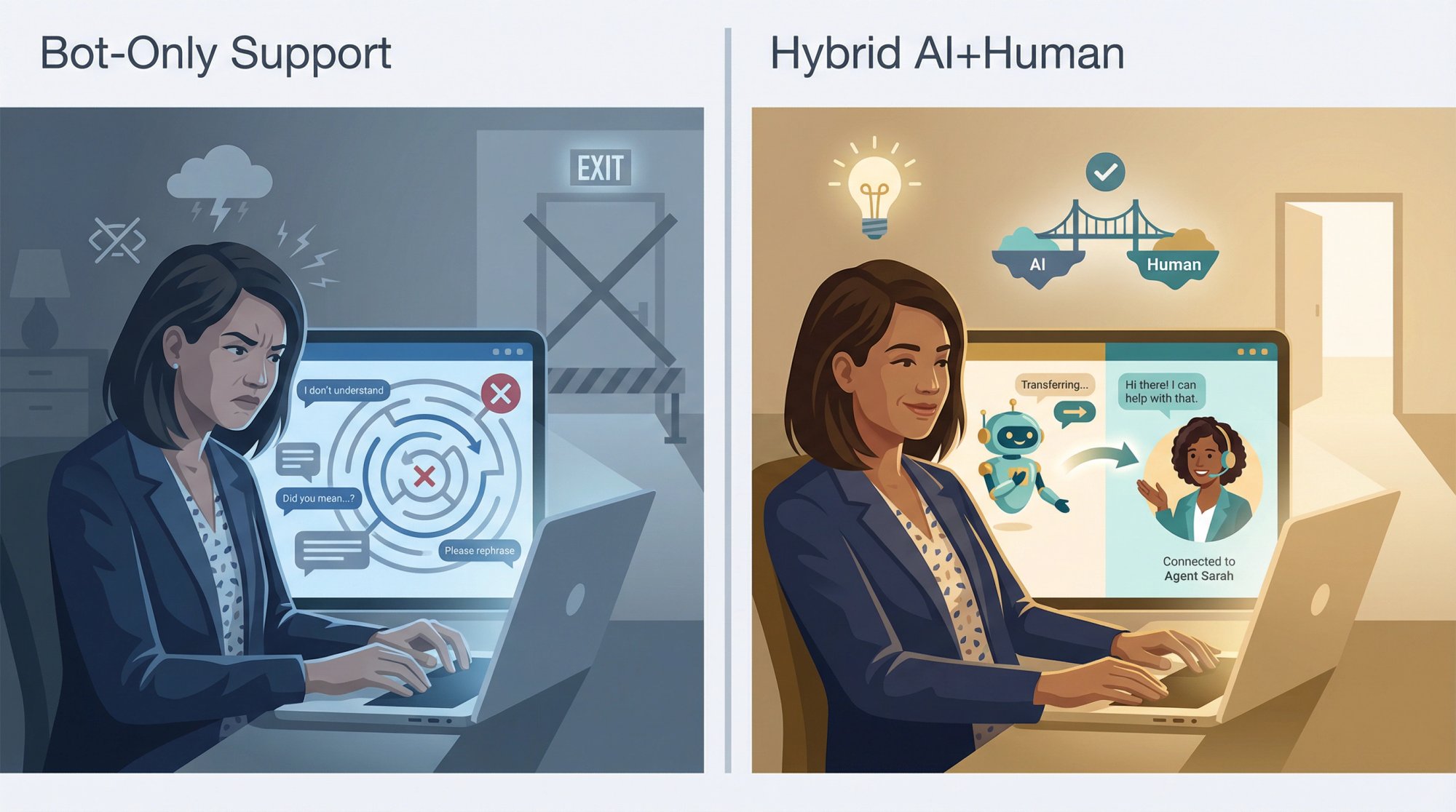
82% of consumers prefer an immediate chatbot response for simple questions, but also want human agents available for complex issues. When you give people both options, customer loyalty increases. They know nothing will fall through the cracks. They trust your support because it adapts to their needs in real time.
That's exactly what Social Intents' live chat platform enables: seamless integration between AI automation and human expertise.
The hybrid advantage: Customers get speed and expertise, not speed or expertise.
How AI Chatbot Handoff Speeds Up Issue Resolution
Some issues require human judgment, empathy, or authority.
A billing dispute. A sensitive account problem. An urgent cancellation. These often need a person who can actually solve it. Proper handoff improves first-contact resolution because conversations don't hit dead ends.
The bot handles the basics. Humans tackle the rest immediately.
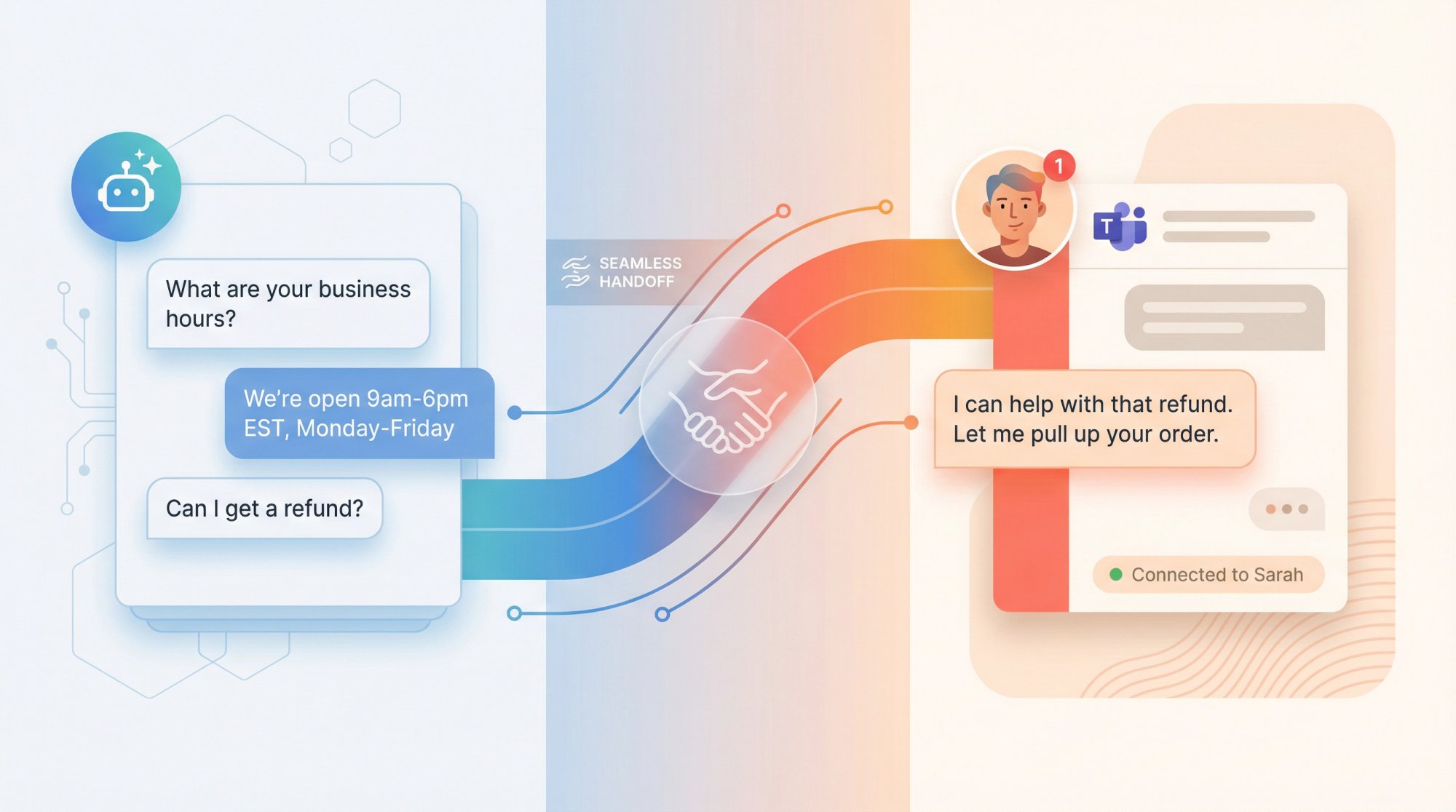
No more "I'll escalate this and get back to you" followed by days of silence. Instead, the escalation is instant and the issue gets resolved in the same session. With Social Intents' Microsoft Teams integration, your support team can respond to escalated chats directly from Teams without switching tools.
How AI Chatbots with Handoff Improve Support Team Efficiency
Well-trained AI can handle 70-80% of routine inquiries autonomously.
That means your team isn't drowning in "What are your hours?" and "How do I reset my password?" questions. Instead, agents focus on high-value interactions where their expertise matters. Your customer support operation scales without sacrificing quality.
Studies show that when AI chatbots take over repetitive questions, 64% of agents are able to spend their time solving complex problems (versus only 50% of agents without chatbot assistance). In short, chatbots do the easy work, freeing your humans for the hard stuff.
Bottom line:
Chatbot-to-human handoff isn't optional. It's how you make AI support actually work for real customers.
When Should an AI Chatbot Escalate to a Human Agent?
Even the smartest AI chatbot needs to know its limits.
The key is defining clear triggers for when your bot should step aside and bring in a human agent. Here are seven critical scenarios:
When Customers Explicitly Request Human Help
This one is non-negotiable.
If someone types "I want to talk to a person" or clicks a "Talk to an Agent" button, your chatbot must immediately connect them to a live agent. Ignoring a direct request for human help is a major UX mistake.
Make the escape hatch obvious. Never make customers plead twice.
Leading chatbot guides recommend always giving users the option to reach a human at any point in the conversation.
When the AI Chatbot Doesn't Know the Answer
When a query is too complex or outside the bot's knowledge base, it's time for human help.
Don't let conversations loop endlessly. A good rule of thumb is if the bot gives an unhelpful response twice in a row, escalate on the third attempt. Modern AI chatbot platforms can track confidence scores.
For example, if the bot's answer confidence drops below, say, 50% twice consecutively, route to a human.
In practice, limiting failed responses to 2-3 attempts before escalating ensures the user doesn't get too frustrated.
When Sentiment Analysis Detects Frustration or Anger
AI can analyze message tone and sentiment.
If it detects anger, frustration, or confusion, the bot should proactively offer to connect the user with a human. For instance, messages like "This isn't helping" or "I'm getting annoyed" should trigger an apology and a handoff:
"I'm sorry. Let me connect you with a human agent who can assist further."
Emotionally charged situations need empathy that humans provide better. Rescue the interaction before the customer rage-quits. Using sentiment analysis to identify frustrated customers and trigger an agent handoff is a recommended best practice.
When High-Value or VIP Customers Need Priority Service
If you can identify priority users (platinum clients, big spenders, key accounts), consider escalating them to a human after initial chatbot triage.
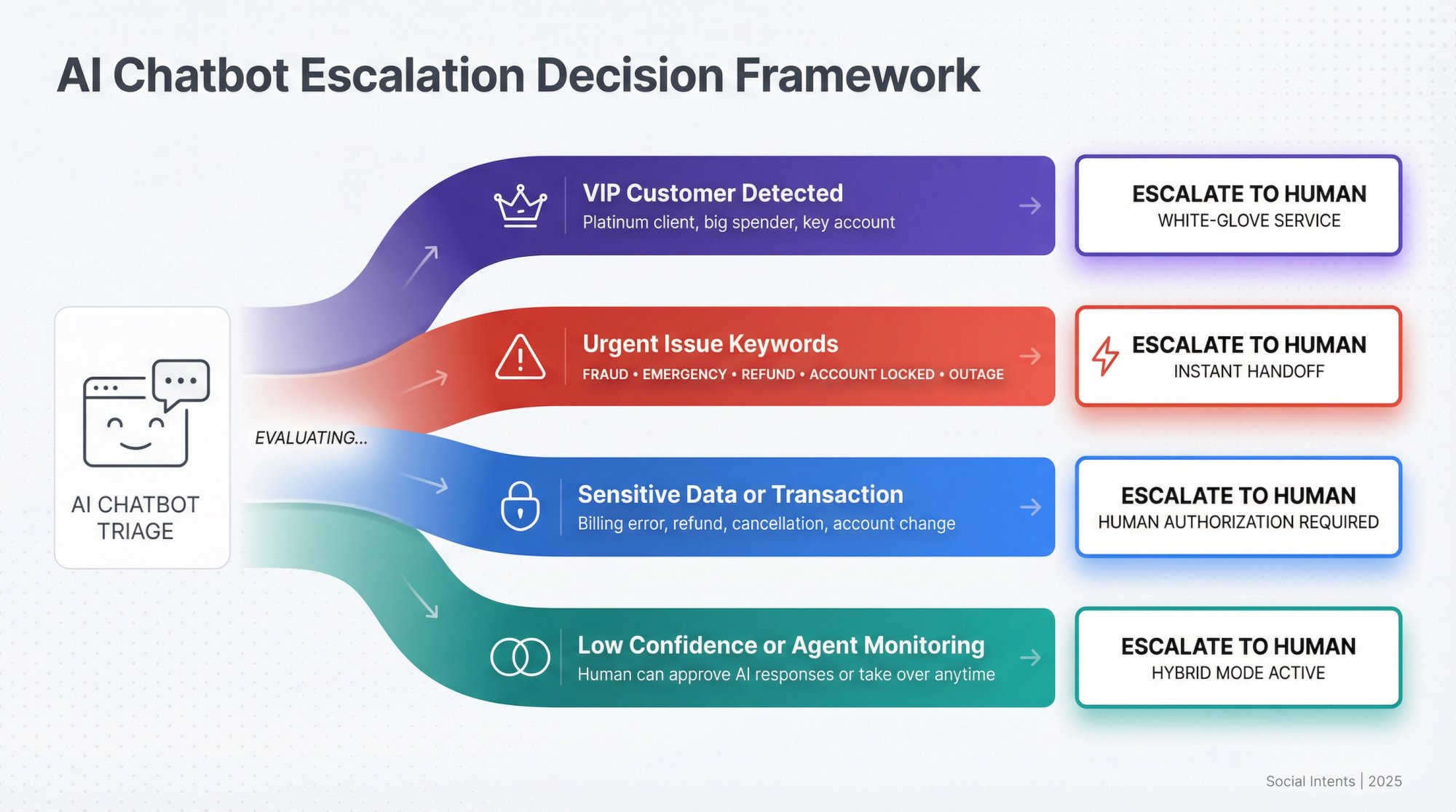
Important clients expect white-glove service.
The bot can greet and gather basic info, then quickly pass the conversation to a live agent or dedicated account manager. This gives VIPs the fast, personal touch they expect.
Industry guides suggest giving VIP customers priority escalations during business hours to keep your best customers extra happy.
When Urgent or High-Risk Issues Arise
Certain keywords should trigger an instant handoff.
Examples include: "fraud," "emergency," "refund," "account locked," "outage."
Don't leave critical or sensitive situations in AI's hands. For instance, a travel bot seeing "my flight is tomorrow and I need to change it" should escalate immediately (any delay could be costly to the customer and your relationship with them).
Monitor for keywords related to urgent or high-risk issues and always have those route straight to a person.
When Customers Need Help with Personal Data or Complex Transactions
Topics involving money, personal data, or complex multi-step processes often require human judgment or authorization.
Think billing errors, refunds, cancellations, account changes. These usually are best handled by a person for both security and customer comfort. Customers feel more at ease when a human confirms a refund or fixes a billing issue.
Trust matters most when money or personal data is involved, so your bot should hand these off promptly (unless it's specifically authorized and capable to handle them with high confidence).
When Using Advanced Human-in-the-Loop Workflows
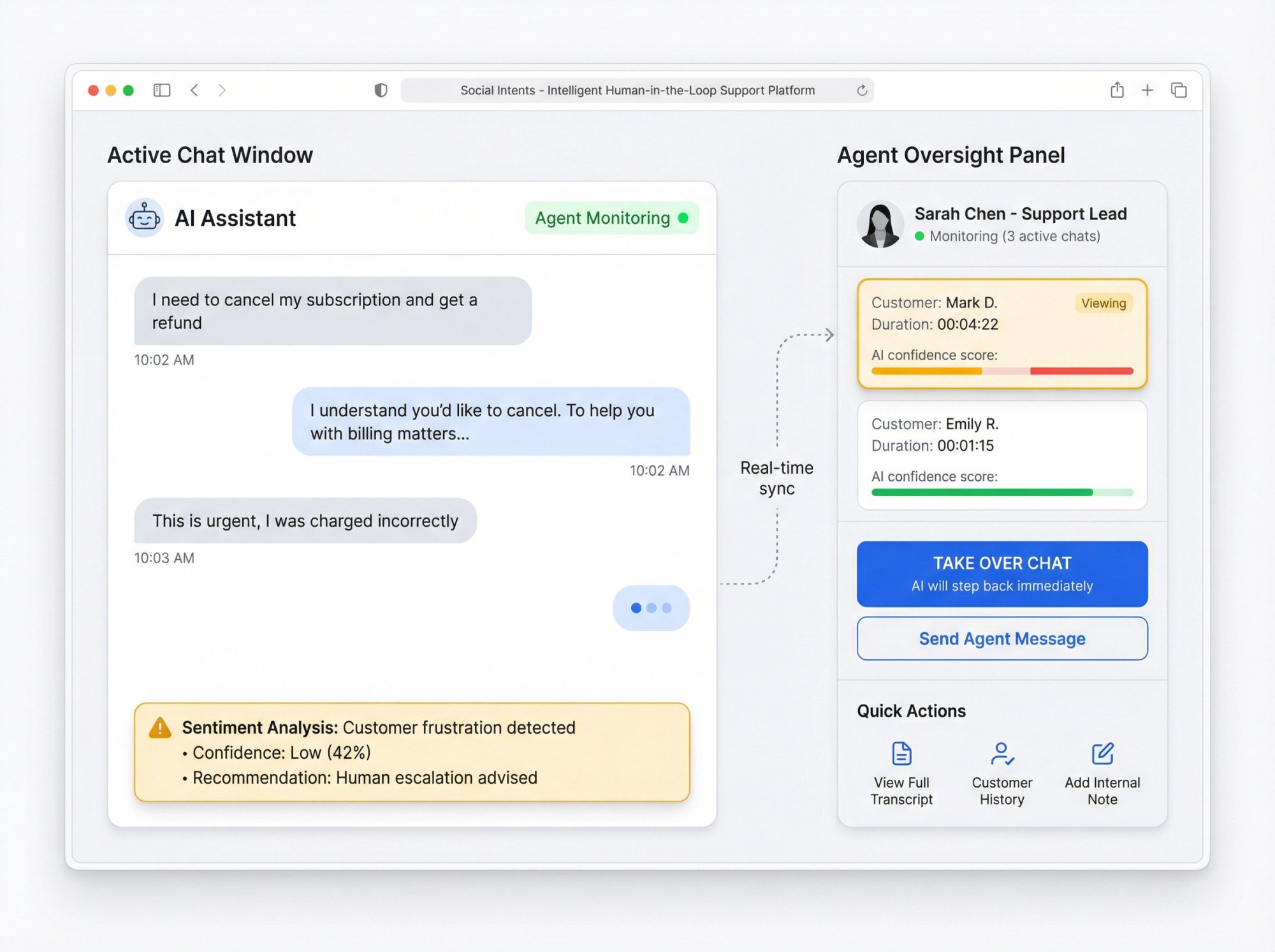
Some advanced platforms allow a human-in-the-loop mode.
For example, the bot might draft an answer but ask a human to approve it before sending if it's not confident. Or an agent might be silently monitoring live AI chats and can jump in at any time.
With Social Intents, for instance, an agent can see live chatbot conversations and take over simply by typing a reply (the chatbot will immediately step back once the human intervenes). This kind of intelligent handoff system ensures that even during a bot interaction, a human is on standby to guide or correct the AI as needed.
The key principle: Every business should map out triggers for what their bot doesn't handle well. Your chatbot's job is to assist, not gatekeep. Human support should always be one step away.
How to Make Chatbot Handoff Seamless: 5 Best Practices
A poorly executed handoff can be almost as bad as no handoff at all.
Done right, the customer barely notices the transition (aside from the relief of getting the help they need). Follow these best practices to ensure a smooth experience:
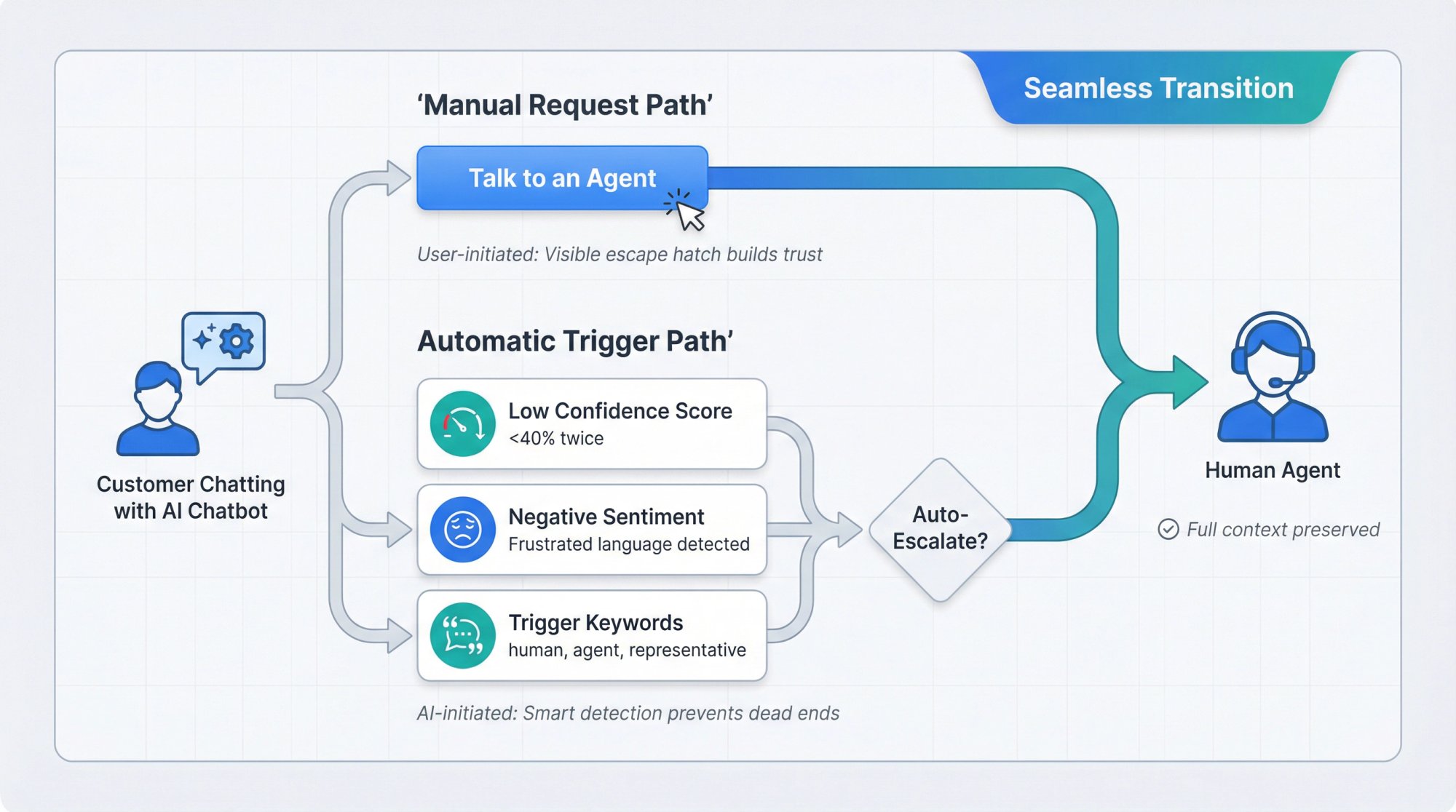
Make Human Help Easy to Access from the Start
Never trap users in a chatbot with no escape.
From the beginning of a chat, provide a visible "Talk to an Agent" option or at least instruct users that typing "agent" will summon a person. This might sound counterintuitive, but prominently offering a human option actually increases engagement with the chatbot.
People trust your bot more when they know they won't get stuck in a dead-end loop.
The psychology: knowing an escape hatch exists makes people less anxious and less likely to need to use it.
Set Up Automatic Triggers Too
In addition to manual options, set up automatic triggers. Configure rules for the keywords, sentiments, and failed-answer counts we discussed above. For example, if a user says "representative" or "human," or if the AI's confidence score falls below 40% twice in a row, the system should instantly transfer to live chat.
These safety nets ensure the bot doesn't flail for too long. It knows when to raise its hand and say "I need help."
Preserve Chat Context During Handoff
The handoff should feel like a natural continuation of the conversation, not a hard reset.
That means the human agent must see the full chat history (everything the user and bot discussed so far). Under no circumstances should the agent ask the customer to repeat information the bot already collected.

Research shows that not having to re-explain an issue during a support interaction is a top-3 factor in customer satisfaction. Context continuity is arguably the number one success factor for handoffs.
Make sure your system passes along key details like the customer's name, account info, and what they were trying to do.
With Social Intents, for example, the entire conversation transcript (bot and user messages) is automatically posted to your agent in Microsoft Teams or Slack as soon as an escalation happens. That way, the agent can read up before they even say hello.
Communicate What's Happening
Also, communicate to the user what's happening. Don't just silently switch over. The bot should say something like:
"Sure, I'm connecting you with a human agent who can assist further."
If there's any wait time, set expectations: e.g. "An agent will join shortly" or "You're #2 in line, an agent will be with you in about 1-2 minutes."
This reassurance goes a long way. Silence during a transfer makes users wonder if they've been forgotten or disconnected.
Route Escalated Chats to the Right Team or Person
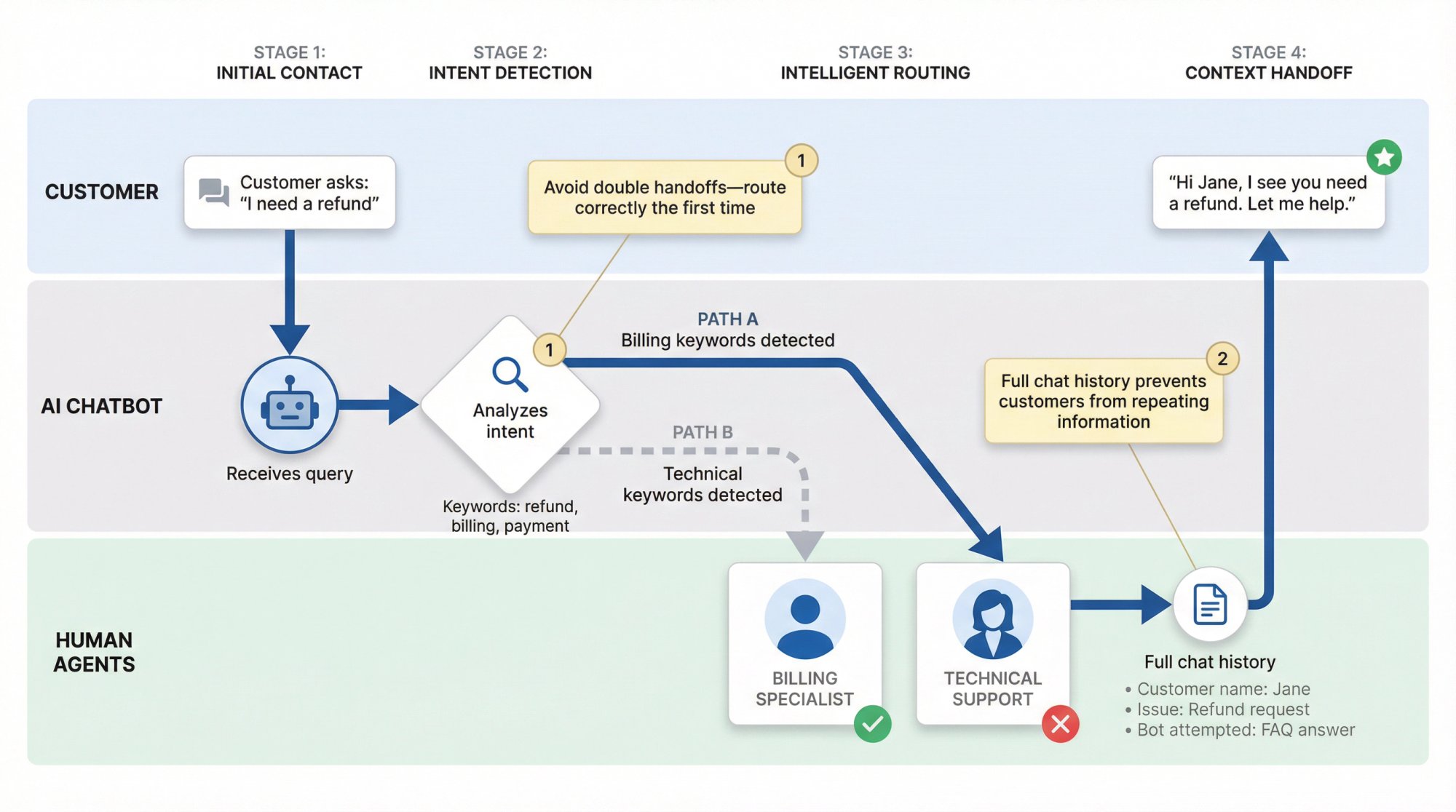
A seamless handoff means getting the customer to the best human for the job, as fast as possible.
If your support operation has multiple departments or tiers, use the conversation context to route intelligently. For instance, a trigger phrase containing "refund" should route to your Billing team, while "integration help" might route to Technical Support.
The last thing you want is to escalate to a human only for them to say, "Sorry, I need to transfer you to a different department."
Avoid that second handoff by routing correctly the first time.
This requires integrating your chatbot with some skill-based routing rules or your helpdesk's assignment system. Many chatbot platforms allow you to set different escalation endpoints based on keywords or intent detection. Take advantage of that. It ensures the human who takes over actually has the skills and permissions to solve the problem, delivering a one-and-done resolution whenever possible.
Train Your Human Agents for Smooth Chatbot Takeovers
Agents need the right mindset and tools to pick up where a bot leaves off.
Training your team on the handoff process is crucial. The agent's first message should acknowledge what's already been discussed:
e.g. "Hi Jane, I see you were chatting with our bot about resetting your password. Let me help you with that."
This shows the customer that the agent is up to speed and values their time.
It's far more reassuring than a generic "Hi, how can I help you?" (which would make the customer start over from scratch).
Internal Agent Knowledge
Internally, ensure agents know what the bot is capable of and what it likely already did. If the bot gathered the user's name, email, or order number, agents should not ask for them again. If the bot already tried two troubleshooting steps that failed, the agent shouldn't repeat those same steps.
The bot and human are a cohesive team, not siloed support channels.
A quick review of the chat transcript and any attached data should inform the agent's approach. By continuing the flow rather than restarting, agents validate the customer's entire experience.
Analyze and Improve Your Handoff Process Over Time
Every chatbot escalation is a learning opportunity.
Treat it as valuable feedback for both your AI and your support processes. Post-chat, send a brief survey to the customer about their experience. Monitor transcripts of handoff conversations regularly to spot patterns.
Maybe a lot of users are requesting a human at a specific point in the bot's dialog flow (indicating that part is confusing or unsatisfactory). Or perhaps the bot frequently fails on questions about a certain product feature (indicating a knowledge gap you can train it on).
Use these insights to continuously train your chatbot to handle more scenarios, and refine your escalation rules.
The goal isn't to eliminate handoffs (some will always be necessary and that's good), but to reduce unnecessary escalations while ensuring the necessary ones happen promptly. It's an ongoing cycle:
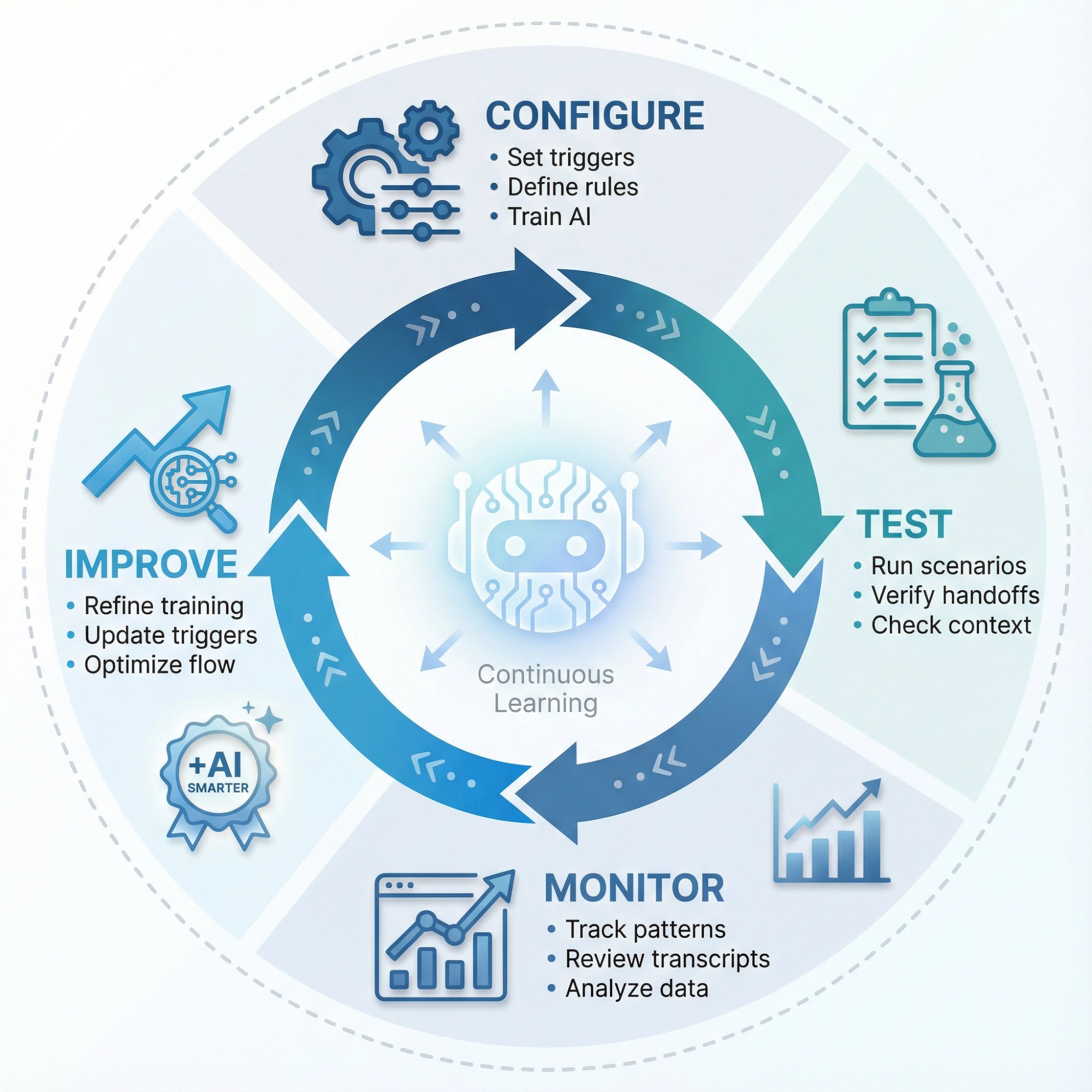
① Configure your bot and triggers
② Test the handoff workflow
③ Monitor real interactions
④ Improve based on patterns
As your AI gets smarter and your business needs evolve, keep tuning. Over time, you'll find the sweet spot where the bot-human combo delivers optimal results.
How to Set Up AI Chatbot with Human Handoff Using Social Intents
Implementation might sound complex, but modern tools make it straightforward.
Here's how to set up a chatbot with human handoff using Social Intents as an example (the steps will be similar in other platforms, with slight variations):
Prerequisites:
• You've set up your AI chatbot (connected it to an AI model like OpenAI's ChatGPT, Anthropic Claude, or Google Gemini, and trained it on your content)
• You have a Social Intents account with your agent team connected (whether via Microsoft Teams, Slack, Google Chat, or using the Social Intents web dashboard)
Step 1: Choose Your Chatbot's Handoff Mode
In the Social Intents dashboard, navigate to your Chat Widget settings → AI Chatbot tab → find Chatbot Action (handoff mode) settings.
You have three options for how the bot and humans cooperate:
| Mode | When to Use | How It Works |
|---|---|---|
| Chatbot Only | Want maximum automation first | AI handles conversations until explicit handoff trigger. Human agents join only when bot escalates. Great when you want the bot to answer as much as possible first, with humans stepping in for tricky stuff. |
| Chatbot + Agents (Hybrid) | Want human oversight on every chat | Both bot and agents involved from the start. Bot tries to answer, but agents see everything in real-time and can jump in anytime. As soon as a human agent sends a reply, AI steps back. Useful if you're training the bot or want a personal touch on all conversations. |
| Chatbot When Offline or Missed | Need 24/7 coverage without 24/7 staff | Bot acts as fallback when no human available. During business hours, live agents handle chats if online; outside hours (or if chat isn't answered within X minutes), AI chatbot steps in. Ensures round-the-clock coverage. |
Select the mode that fits your use case and Save the settings.
Step 2: Configure Escalation Triggers and Keywords
On the AI Chatbot settings tab, look for Human Escalation Trigger Phrases (or similar). Here's where you define the keywords or conditions that will cause an immediate handoff to a person.
Make a list of phrases that should summon a human. Common examples:
• "talk to an agent"
• "need a human"
• "representative"
• "live person"
• "get me a human"
Basically, include variations a user might use when they want to bail out of the bot. Social Intents supports wildcards and partial matches (for example, adding *agent would catch "speak to an agent" as well as "agent please"). Be generous with synonyms here so you don't miss an obvious plea for a human.
It's also smart to add a Quick Reply button for this. Many teams configure a visible "Talk to an Agent" button in the chat interface from the get-go. In Social Intents, you can add such a button that appears in the chat window, making it super easy for the user to opt out of the bot anytime.
Pro tip: You can even instruct the ChatGPT-based bot to present this button in its replies. For instance, by including a snippet of HTML like <button data-reply="invite_agent">Talk to an Agent</button> in the bot's answer prompts, Social Intents will render a clickable option for the user.
Once you've entered your trigger keywords and enabled any buttons, save your changes. Now your chatbot knows exactly when to automatically raise the flag and bring in a human.
Step 3: Connect Your Human Support Team
For handoff to actually bring in a real person, you need to have your agents connected to the system.
Social Intents is designed to integrate your chatbot with the collaboration tools your team already uses:
| Platform | How It Works |
|---|---|
| Microsoft Teams | Add the Social Intents app to your Teams environment. New chats post into a specific channel. Each conversation becomes a threaded post that your agents can click into and reply from. |
| Slack | Install the Social Intents Slack app and choose a channel for live chat notifications. |
| Google Chat, Zoom, Webex | Social Intents supports these as well. Chats route into a space or channel where your team is present. |
| Web Dashboard | If your team prefers not to use a messaging app, they can use the Social Intents web console to receive and answer chats. Just log in and they'll see incoming chats in the dashboard. |
Complete the integration for whichever platform your support team lives in. Train your team on how alerts come in: for example, in Teams or Slack, they'll get a notification (message post) when a new chat is escalated to them. In the web app, they'll see a new chat in the queue with a sound or pop-up notification.
As soon as an agent responds to the user, the conversation is connected (the user will see the agent's reply in the website chat widget, and from that point the bot will step out of the conversation).
Also, configure your business hours and offline settings in Social Intents. This ensures that if a handoff triggers but no agents are online (e.g. it's midnight), the system knows what to do (whether that's keeping the bot engaged, asking the user to leave a message, or something else).
Step 4: Test Your Chatbot Handoff Workflow
Before unleashing it on real customers, do a thorough test run of the whole handoff process.
Go to your website (or wherever the chat widget is embedded) and start a chat as if you're a customer. Try triggering the handoff in multiple ways:
• Explicit trigger: Type something like "I want a human" or your chosen keywords, and confirm that the chatbot immediately offers to connect to an agent or automatically flags for human takeover.
• Stump the bot: Ask a complex question that you know the bot doesn't have an answer for. See if it correctly escalates after a couple of failed attempts.
• Use the button: Click the "Talk to an Agent" quick-reply button (if you added one) to ensure that works.
Watch what happens on the agent side. If you integrated with Teams or Slack, did a message appear in the channel? Does it include the prior conversation context for the agent?
(In Social Intents for Teams, the entire chat history up to the point of handoff gets posted into the channel thread automatically, so agents have full context.)
If using the web dashboard, check that the transcript is visible there.
Now have one of your team members (acting as the agent) respond to the test chat. Verify that you (as the test customer) see the human's reply come through, and that the bot indeed stays quiet once the human has taken over. Ensure that the agent's name or profile is shown correctly to the user, so they know a human is now helping them.
Walk through a full end-to-end scenario:
① Bot greets
② User asks something complex
③ Bot escalates
④ Agent joins and resolves issue
⑤ Chat ends
This simulation will often surface any misconfigurations (maybe a trigger phrase that didn't register, or an agent notification that wasn't enabled). Tweak your settings until the handoff feels seamless.
Step 5: Monitor and Refine Performance Post-Launch
Once you go live, keep an eye on how often handoffs are happening and why.
Social Intents provides chat transcripts and basic analytics that can help here. For example, if you find that 50% of chats are escalating immediately, that could indicate the bot isn't confident enough on common questions (you might need to train it better on those topics to improve its success rate).
On the other hand, if you notice certain phrases or issues where the bot should have handed off but didn't, consider adding new trigger keywords or adjusting the sentiment thresholds.
Gather feedback from your support agents too. They can tell you if the context they receive is sufficient or if they often need to ask the customer for information that the bot could have collected. Maybe customers seem annoyed by a particular bot phrasing before escalation (that could be something to fix in the bot's script).
Use this feedback loop to fine-tune the experience continually.
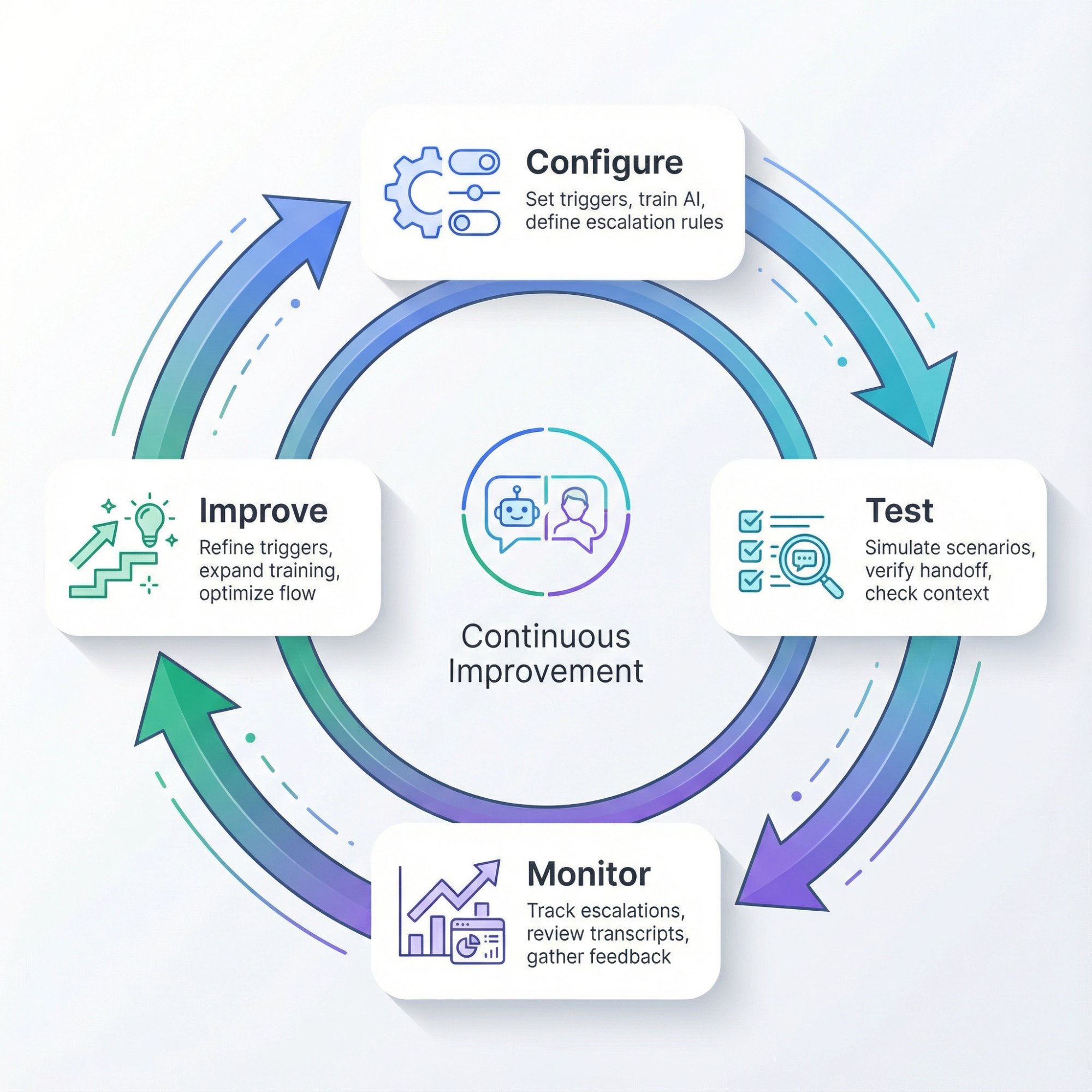
Setting up an AI chatbot with human handoff is an iterative process:
① Configure
② Test
③ Monitor
④ Improve
With the steps above, you have the fundamentals in place: your AI answers what it can, and seamlessly loops in your team when needed.
Best AI Chatbot with Human Handoff: Why Social Intents Works
Social Intents is built specifically for this hybrid support model.
The platform combines powerful AI chatbots with seamless human handoff, all integrated into the tools your team already uses. Here's what makes it stand out as a solution for AI + human support:
Works Where Your Team Works
Your agents don't need to learn another dashboard or software.
Social Intents pipes chats directly into Microsoft Teams, Slack, Google Chat, Zoom, or Webex (whichever your team already lives in). Agents can reply from the platforms they're already in all day. This means faster adoption, happier support teams, and no time lost switching between tools.
(There's also a web console for agents who prefer a browser inbox.)
Smart AI with Natural Handoff
Social Intents supports the latest AI models (OpenAI ChatGPT, Anthropic Claude, Google Gemini, etc.). You can train your bot on your website content, documents, and knowledge base in minutes (giving it a rich understanding of your business).
When the bot needs help, the handoff to humans is effortless: agents can monitor live AI chats and jump in instantly by just typing a reply. The AI gracefully steps out with no clunky process.
It feels like a tag-team, not a baton drop.
Custom AI Actions
Want your chatbot to not just answer questions, but also perform tasks?
Social Intents offers Custom AI Actions that integrate with third-party tools and APIs. This means your bot can:
→ Fetch order statuses
→ Create a support ticket
→ Check shipping info
→ Update an account
And more (all during the conversation).
These automations can enrich the chat with real data while still keeping a human in the loop for oversight.
Customers love getting instant answers (like "Your order is currently in transit, expected delivery tomorrow"), and agents love not having to do those lookups manually. This capability is getting massive interest from businesses looking to automate more without losing control. You can connect to popular systems like Salesforce, HubSpot, Dynamics 365, or any custom API.
WhatsApp and Messenger Support
Not all customer chats start on your website.
Social Intents extends the same AI + human handoff to channels like WhatsApp and Facebook Messenger. So if a customer messages your WhatsApp business line at 10pm, your AI can respond instantly and even escalate to an on-call agent or queue it for the morning team.
Expanding chatbot coverage to messaging apps lets you meet customers where they already are, without separate siloed tools.
E-Commerce Ready
Social Intents has native integrations for Shopify, BigCommerce, Wix, WordPress, and more.
You can install it from the app store or plug-in marketplace in minutes (no coding needed). This is ideal for e-commerce support where common questions ("Where's my order? What's your return policy?") can be answered by AI, and complex issues (damaged goods, custom requests) can be seamlessly handed to your team.
If you run an online store, having the chatbot/handoff live on your site and integrated with your order system can boost support efficiency significantly.

Predictable Pricing (Unlimited Agents)
Unlike many live chat or chatbot providers, Social Intents doesn't charge per agent (from the Basic plan upward, agents are unlimited).
This is huge for scaling (you can loop in as many team members as needed without blowing the budget). Plans are tiered mainly by features and usage (chat volume and number of chatbots). Unlimited agents means even your entire company could engage in customer chat if needed, creating a truly customer-centric culture.
And every plan comes with a free 14-day trial to test it out.
Here's a snapshot of Social Intents pricing (as of 2025):
| Plan | Annual Price | Key Features & Limits |
|---|---|---|
| Starter | $39/month (annual) | 1 widget, 1 domain, 3 agents max, 200 chats/mo, ChatGPT integration, 10 trained URLs/docs |
| Basic | $69/month (annual) | 2 widgets, 2 domains, Unlimited agents, 1,000 chats/mo, custom shortcuts, ChatGPT integration, 25 trained URLs |
| Pro | $99/month (annual) | 5 widgets, 5 domains, Unlimited agents, 5,000 chats/mo, remove co-branding, cross-team chat transfers, 200 trained URLs |
| Business | $199/month (annual) | 10 widgets, 10 domains, Unlimited agents, 10,000 chats/mo, remove co-branding, cross-team transfers, real-time translation, 1,000 trained URLs |
| Agency/Reseller | $299/month (annual) | 20 chatbots (any domains), 10,000 chats/mo, 10,000 training docs, white-label branding, create sub-accounts (client workspaces). Extra chatbots can be added for additional cost. |
Monthly billing is available too at a slightly higher rate; above are discounted annual rates. Always check Social Intents pricing for the latest rates.
Social Intents pricing is transparent and designed to scale as you grow, without surprise per-agent fees.
The Agency plan is also noteworthy if you're an agency or MSP looking to offer chatbots to your clients (it allows a white-label portal and managing multiple client accounts under one umbrella).
Real-World Use Cases for AI Chatbot and Human Handoff
How do companies actually use AI chatbots with human handoff in the wild? Here are a few common scenarios where this hybrid approach shines:
E-Commerce Customer Support:
An online retail store fields thousands of "Where's my order?" or "What's your return policy?" questions (those get answered instantly by the AI, saving countless agent hours). But when someone has a complex issue like a damaged product or a custom sizing question, the chatbot flags a human rep to jump in. This keeps shoppers happy and issues resolved fast. Social Intents has ready integrations for Shopify, BigCommerce, WooCommerce, etc., to make this seamless.
SaaS Product Support / Customer Success:
A software company's chatbot can handle common how-to questions, onboarding queries, and simple troubleshooting 24/7. If a user asks something more technical ("I need help with your API") or seems unhappy ("Your latest update broke my workflow!"), the bot escalates to the Customer Success team on Slack. The transition is smooth (the team picks up mid-conversation in Slack without the user ever leaving the chat widget). This ensures power users and B2B clients always get a human touch for important issues.
After-Hours Coverage:
A business that offers live chat during the day can extend some level of support into the night by using AI. For example, set the chatbot to "Offline Mode" after 6pm. Customers who chat at 9pm still get answers to many questions via the bot. If the bot can't resolve something, it politely informs the customer that a human will follow up in the morning (or it pages an on-call agent if truly urgent). In Social Intents, the Chatbot When Offline mode is perfect for this. The result is 24/7 responsiveness without a graveyard shift.
Lead Qualification & Sales Handoff:
It's not just for support (websites use chatbots to engage visitors and capture leads). An AI chatbot can greet visitors, answer product questions, and ask a few qualifying questions. When it identifies a hot lead (say, a visitor from a target company asking about pricing for 100 users), it can instantly notify a human sales rep. The rep gets the chat in Microsoft Teams and can jump in to close the deal. This way, your sales team doesn't waste time on unqualified chatter, but they're looped in for high-value opportunities in real time.
How to Get Started with Social Intents AI Chatbot Handoff
Getting up and running is easier than you might think.
Here's the typical onboarding flow:
1. Sign up for Social Intents
Create your account on the Social Intents website (free 14-day trial available, no credit card required).
2. Connect your AI model
In the Social Intents dashboard, set up your AI Chatbot and connect it to an AI provider. You can use the default OpenAI API (ChatGPT model) or bring your own key. Anthropic's Claude and Google's Gemini are also supported if you have access to those.
3. Train the chatbot on your content
Feed it your key knowledge sources: you can paste important URLs (FAQs, Help Center docs, etc.), upload PDF manuals, or even paste raw text. With one click the platform will scrape and index that info so the AI can answer questions based on your material. The Basic plan supports 25 URLs/docs, Pro 200, Business 1,000, etc., so use as needed.
4. Install the chat widget (or integration)
If you're adding live chat to a website, copy-paste the Social Intents embed code onto your site (or use the WordPress plugin / Shopify app / Wix app for a no-code install). If you want to offer AI chat on other channels like Slack or Teams (for internal support use cases), you would install the Social Intents app there. Essentially, get the chatbot in place where your users will interact with it.
5. Configure your handoff triggers
As detailed earlier, go into the AI Chatbot settings and set the trigger phrases and handoff mode (bot only, hybrid, offline mode) based on your preference. This ensures the chatbot knows when to pull in a human.
6. Go live and monitor
Turn on the chat widget and let it start handling real conversations. Monitor its performance, gather feedback, and tweak as needed.
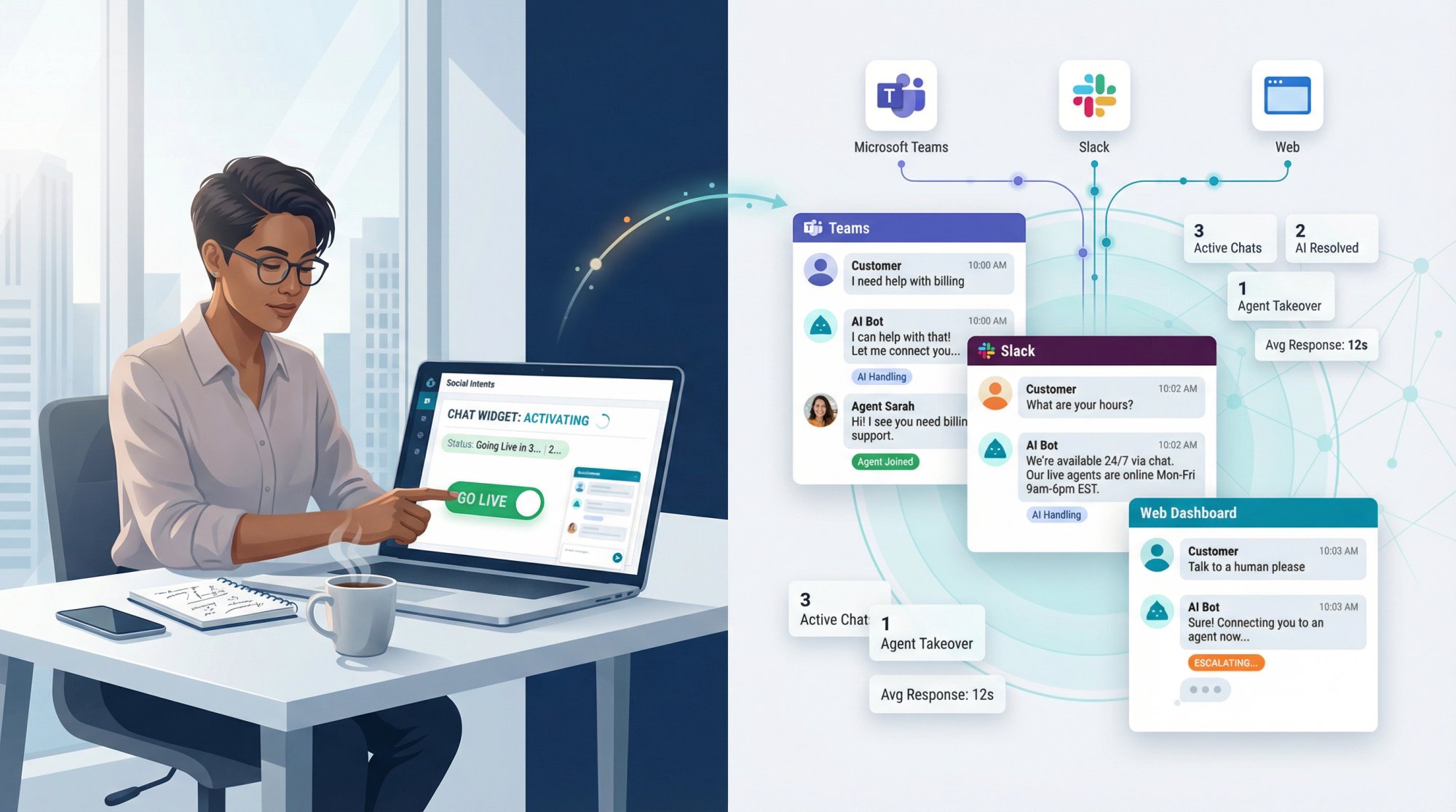
Most teams can go from zero to a fully functioning AI chatbot with human handoff in just a couple of hours of setup and training.
Social Intents onboarding guides walk through this process, and their support team is available to help with any questions during your trial.
Frequently Asked Questions About AI Chatbot Handoff
What's the Difference Between AI-Only Chatbots and AI Chatbots with Human Handoff?
An AI-only chatbot handles conversations independently with no option to involve a human. If it can't answer something, the user hits a dead end (or maybe gets a "Please email us" message).
In contrast, an AI chatbot with human handoff combines automated responses for common questions with the ability to seamlessly transfer complex issues to live agents. It's the best of both worlds.
Research shows that about 80% of customers say they're willing to use chatbots as long as a human option is available if needed. Without that safety net, many users won't trust a chatbot at all.
How Do I Know When to Escalate a Chatbot Conversation to a Human Agent?
You should escalate in the scenarios we covered earlier:
• When customers explicitly request it ("operator, please!")
• When the bot doesn't know the answer (especially after a couple failed attempts)
• When sentiment analysis detects frustration or confusion
• When a high-value customer needs extra care
• When urgent/sensitive issues arise (fraud, account problems, emergencies)
Many modern AI chatbot platforms can detect these conditions automatically (using confidence scores, sentiment analysis, keyword spotting, etc.) and trigger the handoff for you. The key is to configure those rules and thresholds upfront.
Also, always give customers a manual out (e.g. a "contact human" button) at any time.
Do Customers Have to Repeat Their Information When Transferred from Chatbot to Human?
Not if your handoff system is set up properly.
The live agent should see the full conversation history and any data the bot collected (like order numbers or email addresses). With Social Intents, for example, the entire chat transcript and context is passed to your team when an escalation happens.
Agents can read exactly what the customer asked and what the bot responded before things got handed off. The agent should then acknowledge that context in their greeting ("Hi Sam, I see you were discussing a refund for order #1234…").
This way, the customer isn't asked to repeat themselves. If your current chatbot solution doesn't preserve context on handoff, that's a big flaw (it's worth investing in one that does, because customers hate having to start over from scratch).
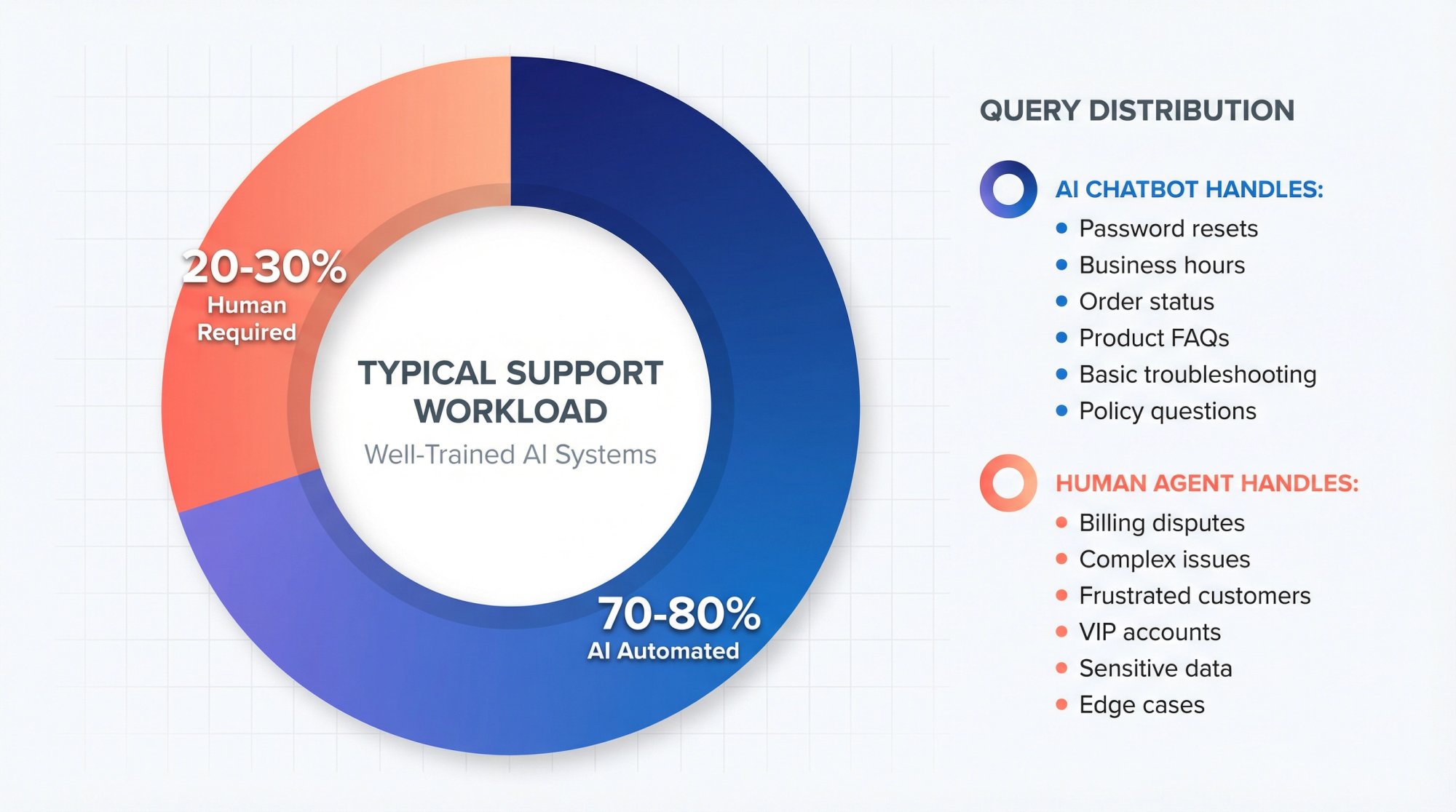
What Percentage of Chats Can AI Chatbots Handle Before Needing Human Help?
It depends on how well the bot is trained and how complex your typical queries are.
But generally, well-designed chatbots can handle about 70-80% of routine questions autonomously. The remaining 20-30% of conversations will require human intervention because they involve either edge cases, complex issues, or emotional nuances that bots aren't great at.
The goal isn't to get to 100% (that's unrealistic for most businesses). The goal is to have the bot effectively cover the common and simple stuff, so your human agents can focus on the thornier problems.
Over time, as you expand the bot's knowledge and capabilities, you might push the automation coverage a bit higher, but there will always be a role for humans in the loop.
Note: The actual percentage will vary by industry. For a simple e-commerce store, the bot might handle 85% of chats (mostly FAQs and order lookups). For a medical or legal service, the bot might only handle 50% and escalate the rest due to complexity or compliance. Use these numbers as a rough benchmark, not a promise.

Does Social Intents Integrate with My Existing Support Tools and Platforms?
Yes (integration is one of Social Intents strong suits).
It natively connects with major team collaboration platforms:
• Slack
• Zoom
• Webex
And also provides a web chat console for agents.
For website integration, it has plugins/apps for popular CMS and e-commerce platforms like Shopify, WordPress, BigCommerce, Wix, Webflow, etc.
On the backend, Social Intents offers integrations with Zapier and webhooks, so you can pipe chat data into CRM systems or helpdesks as needed. It also supports the Custom AI Actions mentioned earlier to integrate directly with databases or third-party APIs.
In short, you can likely hook it into whatever workflow you already have rather than starting from scratch.
What Happens If No Agents Are Online When a Chatbot Tries to Hand Off?
You should configure a fallback for this scenario.
In Social Intents, you can set "offline" behavior in the chat settings.
Common approaches include:
• Having the bot continue to assist the customer as much as possible (perhaps gathering their contact info and issue details) and then promising a follow-up
• Converting the chat into a help ticket or email that a human will respond to later
• Offering the user an option like "Would you like us to call you first thing tomorrow?"
• Or at least displaying a message like "Our live agents are currently offline. I'll make sure your message gets to the team and they'll respond by email soon."
The key is not to leave the user hanging. Even after hours, the bot should handle it gracefully (either fully resolve the issue if it can, or assure the customer of next steps if it can't). Always set clear expectations on when a human will get back to them.
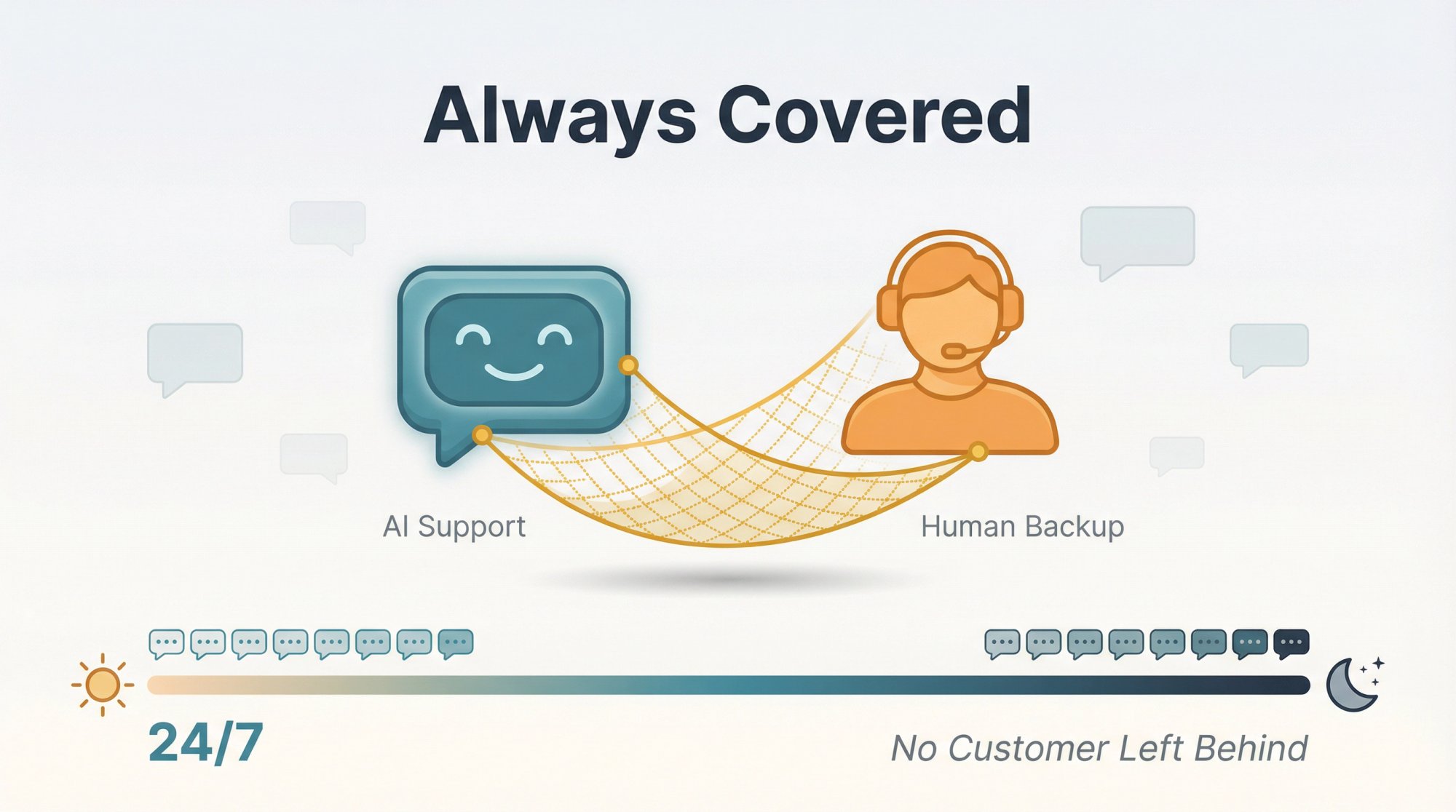
Tip: If 24/7 live support is not feasible, consider using the Chatbot When Offline mode so the bot does what it can off-hours. Just be sure the bot collects an email or contact so your team can follow up on anything it couldn't solve.
How Can I Prevent Customers from Getting Frustrated with Chatbots?
Several ways:
1. Make human help accessible
Include an easy way out (button or keyword) from the start. Users feel in control. Reduces frustration even if not used.
2. Set smart escalation triggers
Bot doesn't keep frustrated user in loop purgatory. Quickly hand off when not helping.
3. Thoroughly train chatbot
Top 50 questions answered accurately covers huge portion of needs.
4. Be transparent
"I'm an AI assistant, here to help and can bring in human agent anytime." Sets right expectation.
Interesting finding: Customers engage MORE with chatbots when they know a human option exists as backup. Implementing good handoff system encourages more people to try bot.
Does Implementing AI Chatbots Reduce Support Team Workload?
Yes, a lot (if implemented well).
Chatbot handles repetitive inquiries eating up hours. Questions like "Can I change plan?", "What's dress code?", basic troubleshooting done by AI 24/7. Human staff not spending time on those.
Effectively increases team capacity without additional hires.
Agents find jobs more engaging too. Instead of answering same question 100 times, tackle interesting problems.
Research found that high-performing service teams were over twice as likely to be using chatbots, and that agents with AI chatbots were able to focus more on complex issues (64% of them) than those without bots (50%). So not only does workload shift, but the nature of the work shifts to higher-value tasks.
Importantly, Social Intents pricing (with unlimited agent seats on most plans) means you're not penalized for using a hybrid approach. You can have as many team members as needed jump in when the bot escalates, without worrying about per-agent licensing costs.
Of course, you should monitor metrics like deflection rate, handle time, and CSAT to ensure the bot is actually helping. But if tuned properly, most companies see a clear reduction in repetitive workload and faster response times.
How to Balance AI Automation with Human Support

AI automation delivers speed and efficiency. Human support provides empathy and complex problem-solving.
The best customer experiences come from both working together in harmony.
A thoughtful chatbot-to-human handoff system essentially tells your customers: "We're here for you however you need us. Our bot provides instant help, and our humans have your back when you need them." This instills confidence and trust. Users who know they won't hit dead-ends are far more likely to engage with your chatbot in the first place, and they're more likely to come away satisfied.
As you deploy your AI + human strategy, keep the customer's perspective front and center. Continue to solicit feedback and iterate.
AI capabilities are advancing rapidly (today's chatbots can handle far more than those even a year ago). It's conceivable that the "bar" for what bots can do will keep rising. But for most organizations in 2025, a hybrid model is the gold standard: let the bot do what it does best, and always have a human ready for the rest.
By following the practices in this guide and leveraging tools like Social Intents (built for seamless escalation), you can deliver fast, AI-driven service without losing the human touch.
The result?
→ Support that feels truly 24/7 and always-on
→ Yet never leaves customers hanging when they need a real person
→ Happier customers
→ Less churn
→ More efficient support team
A win-win for everyone.
Ready to implement it for your organization?
Social Intents has everything you need to create world-class hybrid support. You can start your free trial today and see how AI + human handoff can transform your customer experience.
Here's to faster answers and personal service, together at last.