Your customer just landed on your website at 2 AM. They have a question about pricing. And nobody's there to answer.
This scenario plays out thousands of times every day. Visitors bounce. Opportunities disappear. Revenue walks away.
But what if someone was there to help? Not a sleep-deprived support agent, but an AI-powered chatbot that never takes a break, never gets frustrated, and can handle hundreds of conversations at once.
That's what chatbot development services for websites deliver. And in 2025, they're not just a nice-to-have feature. They're becoming essential for businesses that want to compete.
Here's what makes this moment different: over 987 million people worldwide are now using AI chatbots regularly. The chatbot market reached approximately $15 billion in 2024 and analysts project it will hit $46+ billion by 2029. Customers expect instant answers. The companies that can deliver them win.
This guide will show you exactly how to get a chatbot on your website, what features matter most, how to implement one correctly, and what mistakes to avoid. Whether you're a small business owner or managing enterprise support, you'll know how to deploy a website chatbot that actually delivers results by the end.
Why Your Website Needs a Chatbot in 2025
The benefits go way beyond "it looks cool." A well-implemented chatbot changes your customer experience and your bottom line. Here's how:
24/7 Customer Support Without Hiring Night Shifts
Your chatbot doesn't sleep, take lunch breaks, or call in sick. It greets every visitor instantly, answers common questions at any hour, and ensures no one leaves because they couldn't get help.
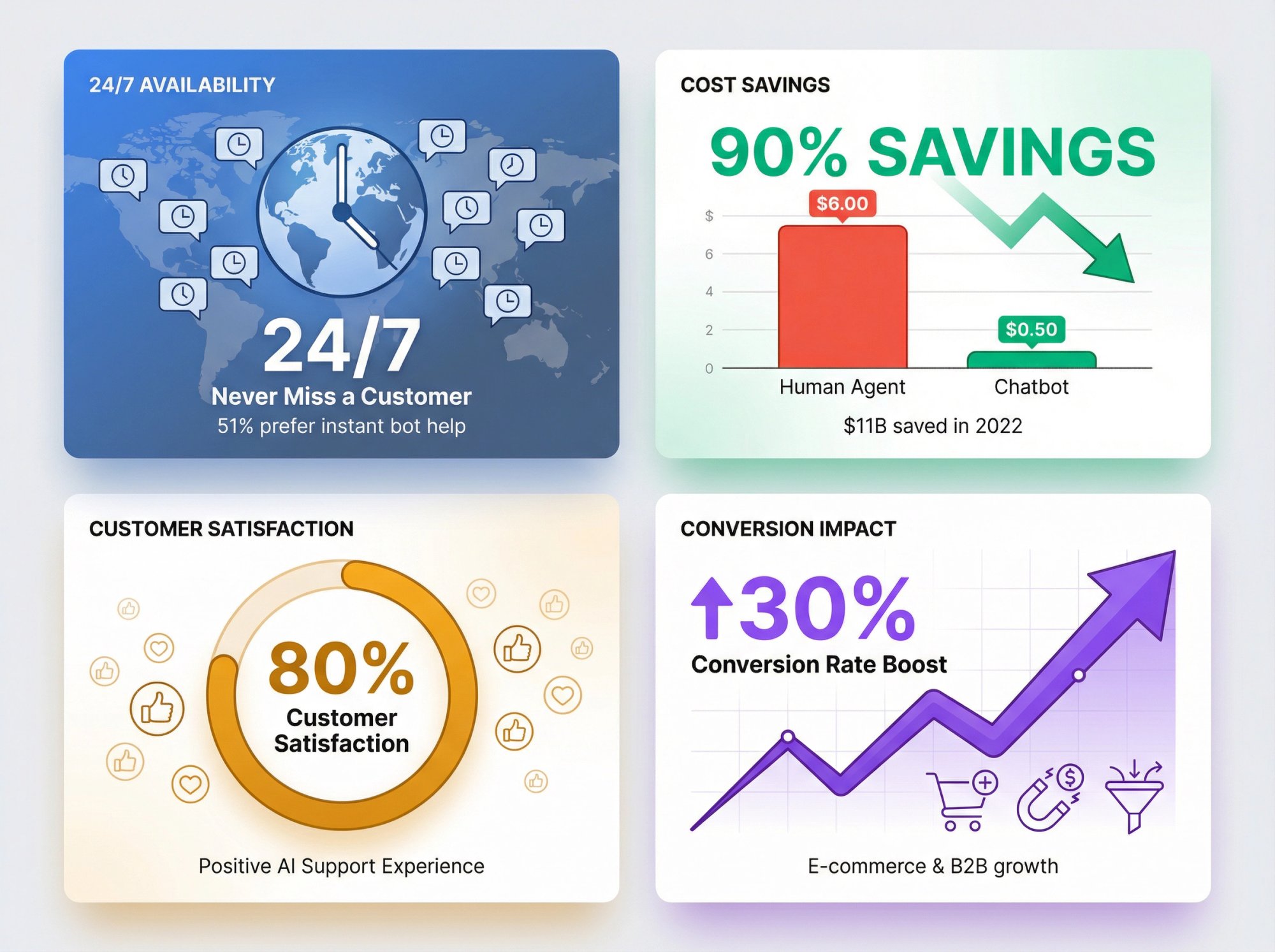
Recent research found that 51% of consumers prefer getting instant help from a bot rather than waiting for a human agent when they have simple questions. They don't want to wait. They want answers now.
That round-the-clock availability directly improves customer satisfaction, especially for global businesses serving different time zones.
How Chatbots Cut Support Costs by 90%
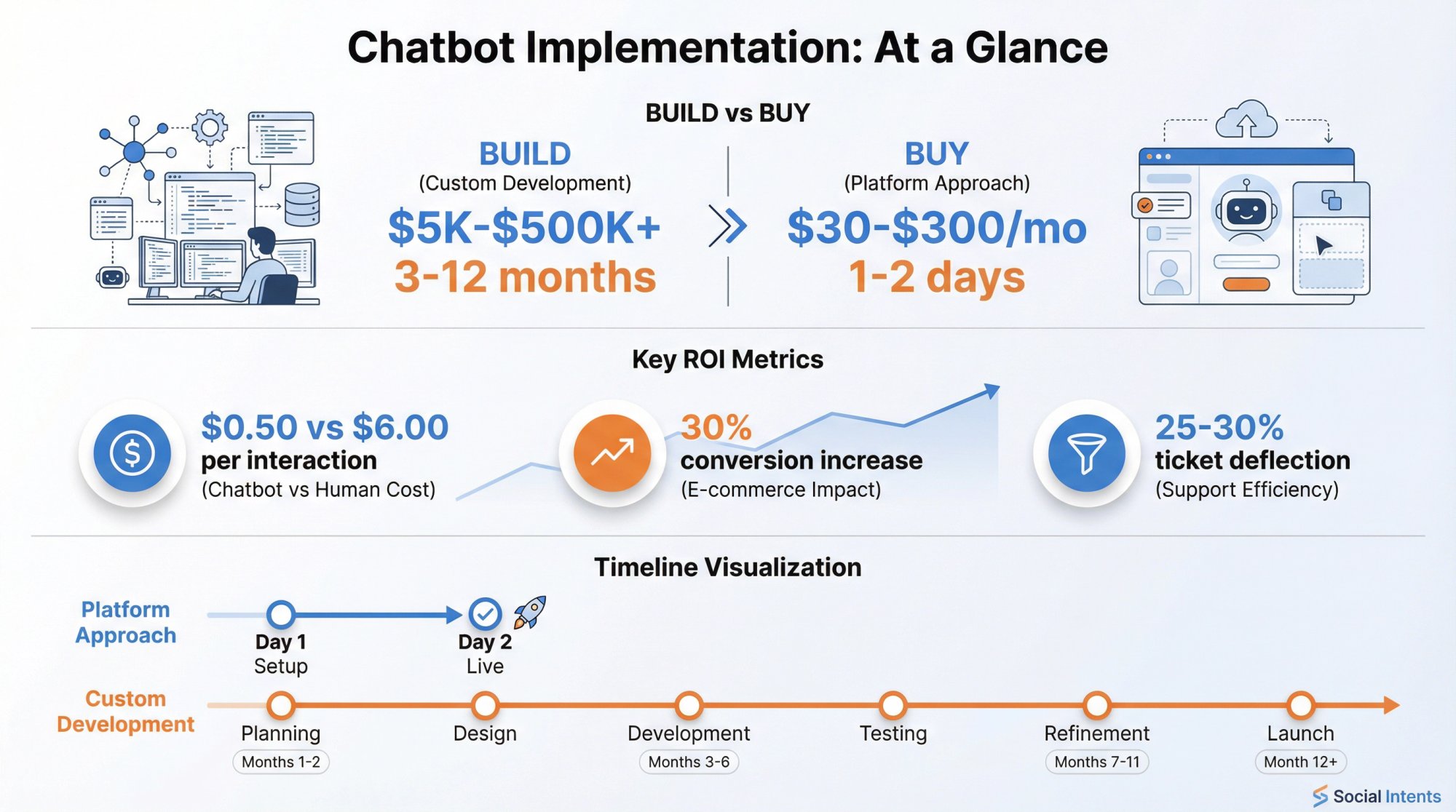
Here's the economics: the average chatbot interaction costs about $0.50 compared to $6.00 for a human-handled support ticket. One chatbot can simultaneously manage thousands of conversations. Your human team can't.
Collectively, chatbots saved businesses over $11 billion in support costs in 2022 alone. Even accounting for setup and maintenance, the math works out dramatically in favor of automation for routine queries.
A good bot typically deflects 25-30% of routine support tickets by answering FAQs, providing account info, and handling standard requests without human intervention. That frees your team to focus on complex issues that genuinely need human judgment and empathy.
Why 80% of Customers Actually Like AI Support
Surprisingly, 80% of customers who've interacted with AI support reported it was a positive experience. Why? Because the simple stuff got resolved immediately.
Nobody enjoys waiting 20 minutes to ask "What are your business hours?" A chatbot answers that in 3 seconds. The customer is happy. Your agents can focus on the tricky stuff where they add real value.
How Website Chatbots Increase Conversion Rates
Chatbots don't just support existing customers. They drive sales.
A bot can proactively engage a visitor lingering on your pricing page: "Hi there! Have questions about which plan is right for you?" That simple nudge captures attention at the exact moment someone needs help making a decision.
E-commerce companies have seen chatbots improve conversion rates by up to 30% by guiding shoppers, answering product questions, and even recovering abandoned carts.
The key insight: Chatbots capture opportunities that would otherwise slip away while your team is in meetings or offline. For B2B sites, bots qualify leads by asking a few smart questions, then passing hot prospects to your sales team in real time.
Why Chatbots Deliver More Consistent Service Than Humans
Bots never have bad days. They deliver the same friendly, helpful tone on chat #1 and chat #5,000. They don't get frustrated by repetitive questions. They don't accidentally give outdated information because they forgot about the policy change last week.
This consistency strengthens your brand. Plus, multilingual chatbots can instantly switch languages based on the user, ensuring everyone gets help in their native tongue without hiring support staff for every language.
What Chatbot Conversation Data Reveals About Your Business
Every chatbot conversation is automatically logged. Review those transcripts and you'll discover:
-
What questions customers ask most often
-
What terminology they actually use (not what you think they use)
-
Where your website is confusing or missing information
-
What features or products people care about most
It's like having thousands of customer interviews, except you get them passively while providing service. These insights inform product development, website improvements, and content strategy.
Over 80% of organizations are actively looking to implement chatbots in their customer service or sales process. We're past the early adopter phase. Having a solid chatbot now gives you a competitive edge in responsiveness and availability.
How to Get a Chatbot on Your Website: Build vs Buy
You've decided you want one. Now what? You have two main paths: build it yourself (custom development) or use an existing chatbot service. Here's what each option really involves.
Custom Development vs Chatbot Service: What to Choose
| Approach | Custom Development | Chatbot Services |
|---|---|---|
| Cost | $5,000 to $500,000+ upfront | $30 to $300/month subscription |
| Time to Deploy | Months (3-12+) | Days (1-2 for basic) |
| Technical Requirements | Developers, data scientists, UI designers | Non-technical setup possible |
| Maintenance | Your responsibility (ongoing) | Provider handles updates |
| Flexibility | Complete control | Platform-limited but extensible |
| Best For | Large enterprises with unique needs | Most businesses |
When Custom Chatbot Development Makes Sense
Building a chatbot from scratch means hiring developers to code it using frameworks like Google's Dialogflow, Microsoft's Bot Framework, or open-source libraries. You get complete control over every feature, every integration, total data ownership.
But the costs are brutal. Custom AI chatbot development typically ranges from $5,000 to over $500,000 depending on complexity. And that's just to launch. Then you need ongoing maintenance, bug fixes, AI training, and updates.
It can take months to deploy. You'll need developers, data scientists, UI designers, and project managers. Plus you're responsible for infrastructure, security, scaling, and every technical detail.
This route makes sense for large enterprises with very specific requirements, strict data regulations, or unique workflows that no platform can handle. For most businesses? It's overkill. The off-the-shelf options have gotten too good and too affordable.
Why Most Businesses Choose Chatbot Services
Chatbot platforms deliver the entire system as a cloud service. They provide the AI engine, conversation builder, integrations, and the website widget. You configure it to your needs without writing code.
The advantages are obvious: speed and simplicity. You can often launch a basic bot in a day or two. No need to build natural language processing from scratch when the service handles that for you.
Cost-wise, most chatbot services charge monthly subscriptions ranging from $30 to a few hundred dollars depending on features and usage. You avoid massive upfront development costs and get regular improvements as the service updates.
The trade-off? Less absolute freedom. You're constrained by the platform's features. But modern services are quite flexible, often allowing custom code steps, webhooks, and API integrations to extend functionality.
Given the market growth (heading toward $46+ billion by 2029), dozens of quality platforms compete for your business. That competition works in your favor with better features and pricing.
If you have standard needs (handling customer FAQs, capturing leads, supporting e-commerce transactions), a chatbot service will meet them at a fraction of the cost and time. Custom development only makes sense for very specialized requirements or extreme compliance needs (like on-premise deployment for regulated industries).
Best Chatbot Features for Website Customer Service
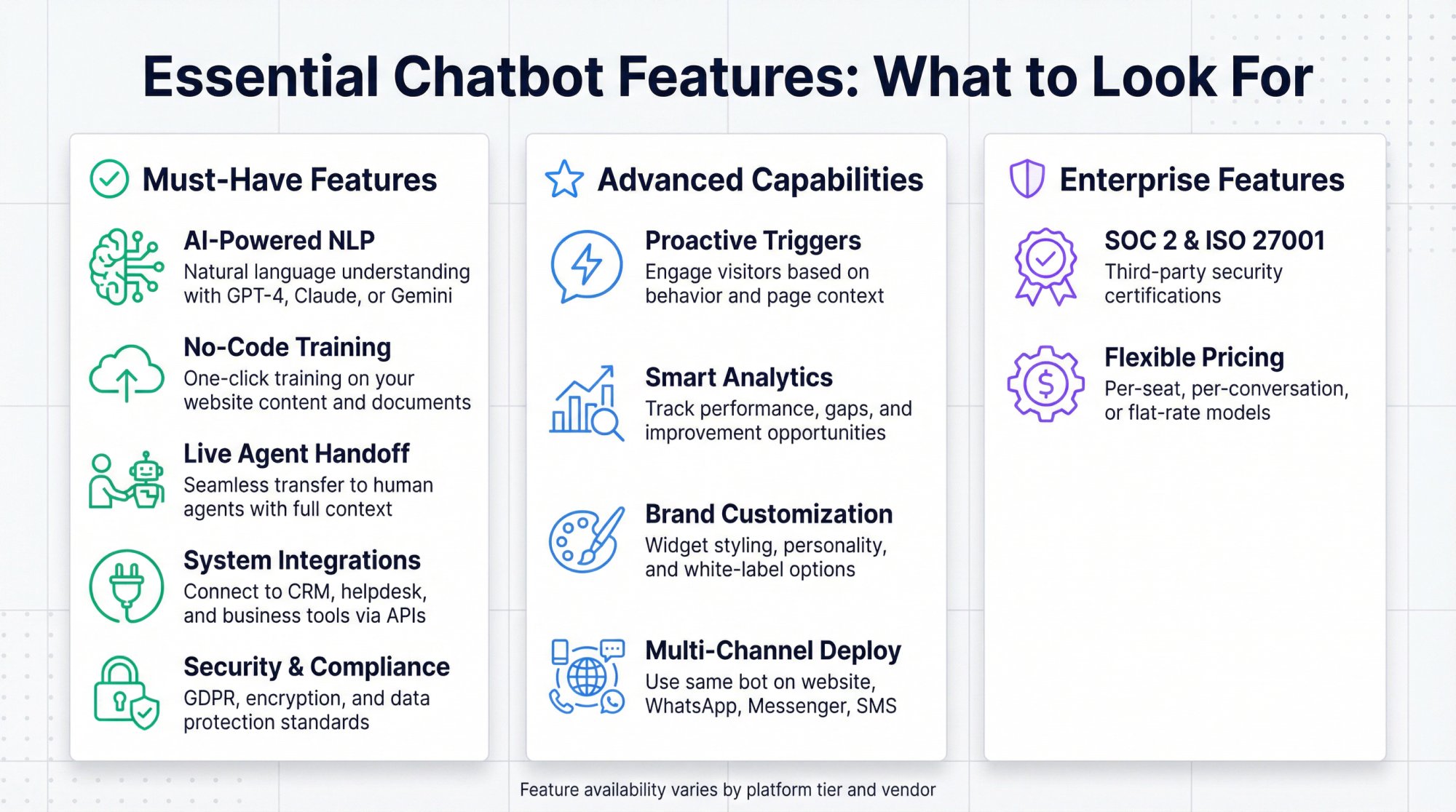
Not all chatbot platforms are created equal. The market ranges from basic FAQ bots to sophisticated AI assistants. Here are the features that separate great solutions from mediocre ones:
No-Code Setup: Why You Don't Need Developers
You shouldn't need developers to configure your chatbot. Top platforms offer visual interfaces, drag-and-drop builders, or guided setup flows that non-technical users can manage.
Many provide one-click training. You point the bot at your website or upload documents, and it automatically learns your content. This is critical. It means your marketing or support team can manage the bot directly without waiting for engineering resources.
If a platform requires extensive coding just to get a basic bot running, that's a red flag (unless you specifically want a developer-heavy solution for customization).
AI-Powered Natural Language Understanding Explained
Modern AI chatbots are light-years beyond the clunky keyword-matching bots from five years ago. You want a service using advanced natural language processing (NLP) and machine learning. Ideally mentioning specific AI models like GPT-4, Claude, or Google's Gemini.
These allow the bot to interpret questions phrased in unusual ways, maintain conversation context across multiple turns, and respond naturally. The difference is massive.
A rule-based bot might only respond to "What is your return policy?" if it matches exact keywords. An AI bot understands "Can I send back something I bought last week?" even though that sentence was never pre-programmed.
Think of it this way: The leap from scripted bots to AI bots is like comparing a flip phone to a smartphone in terms of capability. The best services offer hybrid approaches, combining AI flexibility with some rule-based guidance for critical flows to ensure accuracy.
How to Train a Chatbot on Your Business Data
Out-of-the-box, ChatGPT knows general information. It doesn't know your business specifics, your products, your policies, or your processes.
The chatbot service you choose must let you feed your own content into the bot's knowledge base. This might involve:
-
Uploading FAQs and documents
-
Connecting to your knowledge base or help center
-
Pointing the bot at your website URLs to ingest content
-
Adding Q&A pairs manually
This is sometimes called custom knowledge training or retrieval augmented generation (RAG). The bot pulls accurate answers from your data instead of making educated guesses.
For example, if you have a help article about password resets, you want the bot using that exact text when users ask password questions. Many top platforms offer one-click training where you provide URLs or PDFs and the AI indexes that information automatically.
Make sure the platform also lets you easily update this data. When you change a policy or launch a new product, the bot needs to learn about it quickly.
The bottom line: This feature makes the difference between a chatbot that gives useful, accurate answers and one that responds "I don't know" to anything beyond generic knowledge.
How to Hand Off Chatbot Conversations to Live Agents
Even the smartest AI will encounter questions it can't answer or situations requiring human judgment. When that happens, you need a smooth transfer to a live agent.
The bot should say something like "Let me connect you to a team member" and seamlessly transfer the conversation, including context of what the user already asked. Your agent picks up the thread without making the customer repeat everything.
Look for services with built-in live chat or integrations with your existing help desk tools. Some platforms route chats directly into collaboration tools your team already uses.
For example, Social Intents enables you to answer website chats directly from Microsoft Teams or Slack, where your team already works. When the AI chatbot can't handle a question, it pings a human agent right in Teams or Slack to take over. No separate dashboard to monitor. No new tool to learn.
The best setups do hybrid AI + human support really well, making the transition feel natural. Handoff can be triggered by user request ("I want to talk to someone") or automatically based on the bot's confidence level or detected frustration.
Without this feature, users hit dead ends and their frustration grows.
What Chatbot Integrations You Actually Need
Think about what backend systems your chatbot might need to access. Can it:
-
Pull customer order statuses from your order management system?
-
Create tickets in your CRM when issues arise?
-
Schedule appointments via your calendar app?
-
Check inventory or pricing from your database?
Advanced chatbot services allow API calls and integrations so the bot can do these things. This could be through native connectors (pre-built integrations to Shopify, Salesforce, etc.) or through webhooks and custom API calls.
Integration capability really separates basic from powerful platforms. Simple chatbot builders might only answer text questions. Higher-end ones let you embed the bot into business workflows.
Also consider multi-channel deployment. Many services let you use the same bot on your website and messaging apps like Facebook Messenger, WhatsApp, or SMS. You manage one bot that works across channels.
Your website chatbot shouldn't be an island. It should fit into your broader tech ecosystem to be truly effective.
How Proactive Chat Triggers Increase Conversions
A good chatbot doesn't have to wait for users to say "hello." Many platforms let you set proactive triggers based on user behavior:
Common trigger scenarios:
-
If a visitor spends 60 seconds on your pricing page, the bot pops up: "Hi! Questions about our pricing or need help choosing a plan?"
-
If someone has items in their cart but hesitates, the bot offers: "Need any help with checkout?"
-
If someone visits the same help article three times, the bot asks: "Can I help you find what you need?"
Used wisely, these contextual prompts increase engagement and conversion by reaching out at the right moment. You want a service that supports triggers based on:
① Time on page
② Scroll depth
③ Specific page URLs
④ Exit intent (mouse moving toward close/back)
⑤ Returning vs. new visitors
Some advanced bots even personalize messages, greeting returning users by name or tailoring offers based on browsing behavior.
Just don't be too pushy. Nobody wants aggressive popups the second they land on a page. But smart, contextual prompts? Those drive real results.
Chatbot Analytics: What Metrics Actually Matter
Deployment is just the beginning. Real value comes from continuously improving your chatbot based on data.
At minimum, you need to see:
-
How many conversations happened
-
Peak usage times
-
Most common questions
-
Resolution rate (bot solved it vs. escalated to human)
-
Unanswered questions (where the bot had no good reply)
Good analytics platforms highlight those failed queries. They're golden opportunities to train the bot better. Some integrate user feedback (thumbs up/down on answers, post-chat surveys). Others use AI to suggest new answers for gaps.
The best services don't just give you raw data. They offer actionable recommendations like "Users keep asking about X which I couldn't answer. Want to add content for that?"
You want a closed-loop learning system: monitor performance, identify gaps, improve the bot, repeat. Choose a service that gives you the visibility and tools to do this effectively.
How to Customize Your Chatbot Widget and Voice
Your chatbot represents your brand. The look, feel, and personality should be customizable.
Virtually all platforms let you change basic widget colors and edit the welcome message. But better ones offer:
-
Custom avatars (profile photo/icon for the bot)
-
The chatbot's name
-
White-label options (remove the provider's logo)
-
Tone and personality settings (formal vs. casual, helpful vs. playful)
-
Custom greeting text, help prompts, and fallback messages
-
Multiple language support for the widget interface
Some platforms restrict full customization to higher-tier plans, so check what's included at your price point.
The goal is that the chatbot feels like a natural part of your website and brand experience, not a jarring third-party widget slapped on.
What Security Standards Your Chatbot Must Meet
Your chatbot collects data: names, emails, possibly order numbers or personal information. You need to ensure the service provider has solid security measures.
Key security features to verify:
→ Encryption of data in transit and at rest
→ GDPR compliance (for EU user data)
→ HIPAA compliance options (for healthcare scenarios)
→ SOC 2 or ISO certifications (for enterprise requirements)
Some providers will sign a Data Processing Addendum (DPA) and even a Business Associate Agreement (BAA) if needed for legal compliance.
Check where data is hosted (US, EU, etc.) and whether that aligns with your policies. Also consider how the bot handles sensitive info. Can it be configured to avoid storing things like credit card numbers if a user types them?
If your organization has security reviews, you'll want a platform that can answer these questions with documentation. Choose a partner that takes security seriously and provides the controls you need.
What Chatbot Pricing Model Makes Sense for You
Will the service remain cost-effective as your usage grows? Can it technically handle high traffic?
Most cloud platforms scale automatically, but if you expect very high concurrency (thousands of simultaneous chats), confirm the service can handle it.
Common pricing models:
| Pricing Model | How It Works | Best For |
|---|---|---|
| Per agent/seat | Monthly fee per team member | Small teams with high chat volume |
| Per conversation | Charge per chat interaction | Predictable low-to-medium volume |
| Per user engaged | Fee per unique visitor contacted | High traffic, variable engagement |
| Flat rate with limits | Fixed price with conversation cap | Growing businesses needing budget certainty |
Think about your usage patterns. If you have a large team but low chat volume, you want unlimited agents with a conversation cap. If you have heavy traffic but few agents, per-agent pricing works fine but watch conversation limits.
For example, Social Intents offers unlimited agent seats on all plans beyond the starter tier, pricing instead by monthly chat volume. This is excellent for growing teams. You don't pay more as you add people.
Many traditional live chat systems charge per agent (like $50/agent/month), which gets expensive fast for larger teams.
Also check if AI features cost extra. Some platforms include AI chatbot interactions in the base price; others charge separately if you exceed certain limits.
Estimate your monthly chat volume and number of agents, then simulate costs across a few platforms. Most offer free trials. Take advantage to understand both the product and true pricing.
How to Install a Chatbot on Your Website (Step by Step)
Getting a chatbot onto your website is more approachable than it sounds. Here's how to do it right:
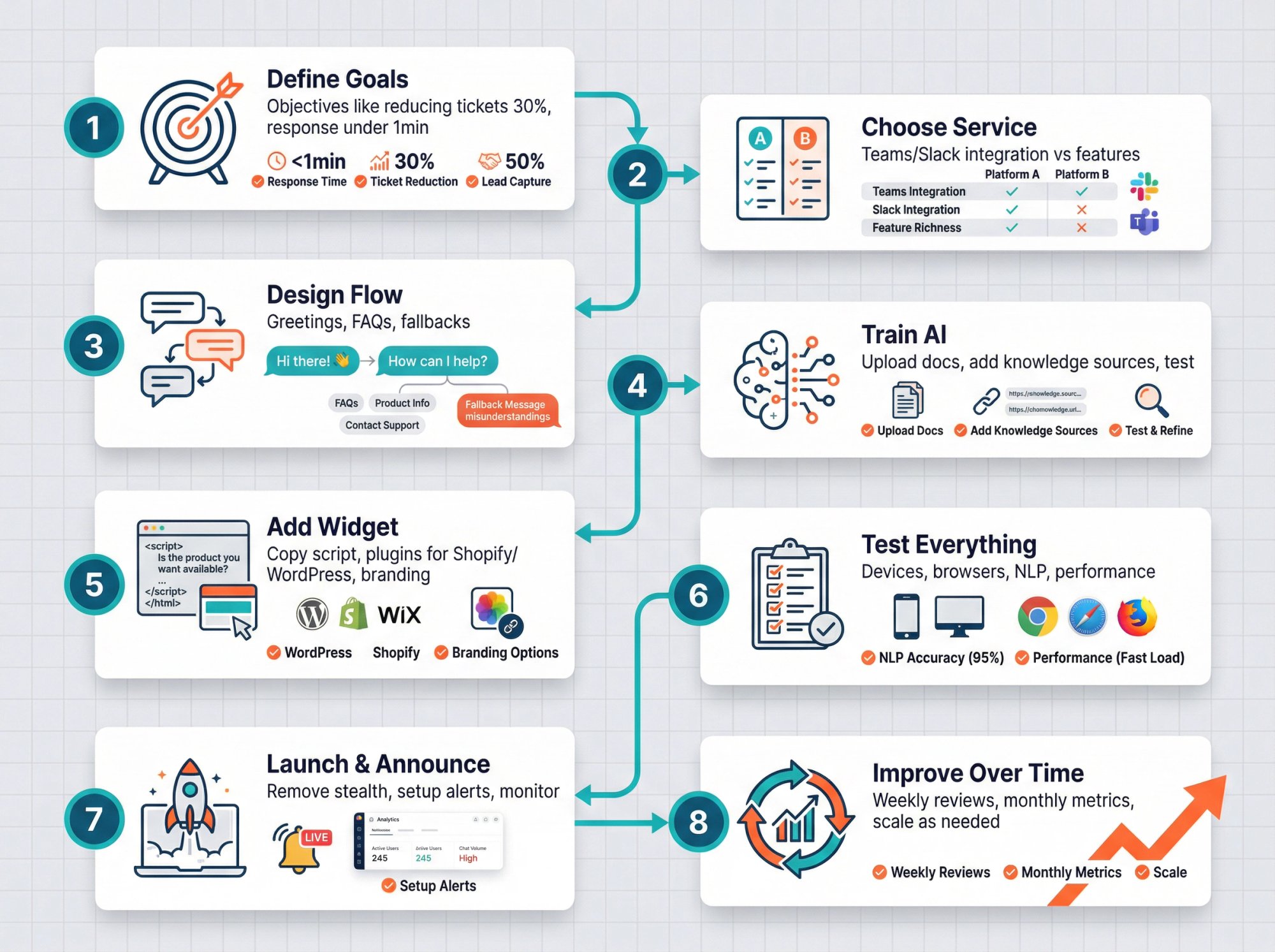
Step 1: Define What You Want Your Chatbot to Do
Start by articulating exactly what you want the chatbot to do.
Common objectives:
-
Answer customer support FAQs
-
Capture leads for sales
-
Assist with e-commerce (product recommendations, order tracking)
-
Book appointments or demos
-
Reduce support ticket volume
Also define success metrics. It might be:
-
Reducing live support tickets by 30%
-
Increasing leads captured by 50%
-
Improving customer satisfaction scores
-
Decreasing response time to under 1 minute
Having clear objectives upfront guides all your decisions and gives you something measurable to evaluate later.
Step 2: How to Choose the Right Chatbot Service
With your goals clear, research platforms that fit your needs. Apply the features checklist from the previous section.
If your priority is zero-code simplicity, lean toward user-friendly platforms. If you need deep integration with Teams or Slack for your agents, a tool like Social Intents (which routes chats directly into those collaboration tools) could be ideal.
If budget is tight, explore free plans from services or basic tiers of other platforms. If you run a Shopify store, using a chatbot app from the Shopify App Store simplifies integration.
Shortlist 2-3 options and take their free trials. During evaluation, imagine setting up a conversation flow in each. See which feels right for your team's skill level.
Look for templates they provide. These accelerate setup significantly. The "right" choice balances required features, ease of use, and budget.
Step 3: How to Design Your Chatbot Conversation Flow
Even AI-powered bots need content planning. Map out:
Greetings: What's the first message users see? Examples:
-
"Hi there! How can I help you today?"
-
"Welcome! I'm here to answer questions about our products and services."
Set a friendly tone matching your brand voice.
FAQs and Knowledge Base: Gather frequently asked questions. For each, decide how the bot should respond. If your platform uses AI trained on documents, compile those documents. If it's flow-based, create decision trees.
Fallback Messages: What happens when the bot doesn't understand? Common approaches:
-
"I'm not sure about that. Can you rephrase, or would you like to talk to a human agent?"
-
"That's outside my knowledge area. Let me connect you with our team."
Write these in advance to maintain a helpful tone even in failure scenarios.
Personality and Tone: Decide if your bot is professional and formal or casual and friendly. This influences word choice, punctuation (exclamation points vs. periods), and whether you use emojis.
Quick Reply Buttons: Consider providing clickable options for common actions:
-
🔍 Track an Order
-
💬 Contact Support
-
📄 View Pricing
These guide users and simplify interaction.
Essentially, you're mapping the user journey in conversation form. Sketch a few example dialogues: User asks X, bot responds Y, user says Z, bot does…
Many platforms have visual flow editors where you build these paths directly. Take advantage of templates for your industry. They provide solid starting points you can customize.
Step 4: How to Train Your AI Chatbot Correctly
If your service uses AI, this is the critical step for accuracy. It typically involves:
Adding Knowledge Sources:
-
Upload PDFs, text files, or documents
-
Add links to important web pages (FAQs, product pages, policies)
-
Input Q&A pairs manually in the platform interface
Some platforms let you connect to existing knowledge bases via API. Others have you create FAQ lists in their interface.
Configuring AI Settings:
Many AI bots allow a "system prompt" that sets the bot's role and constraints. Examples:
-
Bot name: HelpBot. Personality: polite and concise. Only answer questions about our company.
-
You are a friendly customer service assistant for Acme Corp. Never discuss competitors.
Adjust these settings to align with your brand and use case.
API Keys (if needed):
Some services require you to bring your own OpenAI API key or similar. Others include AI usage in their plan. Make sure you understand how this works to avoid billing surprises.
Testing:
Once training is set up, test the bot in the platform's sandbox. Ask questions you know are covered in your content. Try curveballs the bot shouldn't know. See how it handles edge cases.
Tweak training data based on these tests. Add missing FAQs. Refine answers that sound off. Training is iterative. You'll discover gaps and fill them over time.
Step 5: How to Add the Chat Widget to Your Site
With the bot's brain ready, put it on your site:
Copy-Paste Script:
Most platforms provide a JavaScript snippet. You (or your developer) add this to your website's HTML, typically before the closing </body> tag or via Google Tag Manager.
Use a Plugin or App:
For WordPress, Shopify, Wix, and similar platforms, many chatbot services offer official plugins/apps. Install the plugin, activate it, and enter your account credentials. No coding required.
For example, Social Intents provides dedicated integrations for Shopify, BigCommerce, Wix, WordPress, Webflow, and more to streamline setup.
Visibility Settings:
Configure which pages the bot appears on. Maybe you want it on support pages and the homepage but not blog posts. Set those rules in the platform.
If you planned proactive chats (from Step 3), configure those triggers now (e.g., show message after 60 seconds on pricing page).
Branding:
Customize the widget's appearance to match your site. Set primary colors, upload a chat icon or avatar, and add the chatbot's name. Make it feel integrated, not like a generic third-party addon.
Test on Live Site:
After adding the script or plugin, visit your website and refresh. You should see the chat widget. Initiate a test conversation to ensure everything works outside the sandbox environment.
Test on mobile too. The widget should be responsive and easy to use on phones.
Step 6: What to Test Before Going Live With Your Bot
Don't announce your chatbot the moment it appears. Quietly test with colleagues or friends first. Have them try various scenarios:
-
Easy questions the bot should handle
-
Complex ones it likely can't (to test escalation logic)
-
Misphrased or slang questions (to test NLP)
-
Nonsense or rude inputs (to see if the bot responds gracefully)
Verify that data capture works. If the bot collects emails, did you receive them? If it creates Slack messages or tickets on handoff, did that flow happen?
Check that analytics record these test chats in the dashboard.
Test on multiple devices and browsers (Safari, Chrome, Firefox). On iPhone vs. Android. Make sure the widget opens properly everywhere.
If your bot supports multiple languages, test language switching.
Finally, test performance. Does the chat window load quickly? Does the AI respond promptly? If responses take 5+ seconds, users will get frustrated. Most modern AI chatbots respond in 1-3 seconds, which feels instant.
Step 7: How to Launch and Announce Your Chatbot
Once you're satisfied with performance, officially launch:
Remove Stealth Mode:
Some platforms have a "hide from public" option for testing. Disable it so all visitors see the bot.
Announce It:
-
Put a banner on your site: "Need help? Our AI assistant is here 24/7!"
-
Mention it in your newsletter or on social media
-
Brief your internal team about the bot's capabilities and limitations
Set Up Alerts:
Ensure that when the bot transfers a chat to humans, your team knows immediately. This could be via email, Slack, Teams, or the live chat dashboard. Fast follow-up is critical. Users have already interacted with the bot, you don't want them waiting again.
Monitor Closely:
For the first days/weeks, read through early conversation transcripts. See how real visitors use it. You'll discover new FAQs you hadn't covered or unexpected terminology people use.
Rapid iteration during this initial period refines the bot while usage is relatively low.
Step 8: How to Improve Your Chatbot Over Time
Launching isn't the finish line. The best chatbots continuously improve.
Weekly (at first):
-
Review analytics and chat samples
-
Note failures or odd answers
-
Update knowledge base or tweak AI prompts to fix issues
-
Expand the bot's scope incrementally (e.g., add order tracking integration later)
Monthly:
-
Look at containment rate (% of chats resolved without humans)
-
Check customer feedback scores
-
Update for business changes (new products, pricing, holiday hours)
Keep Training:
Many platforms let you label AI responses as "good" or "bad" so the bot learns over time. Use those features. Export conversation logs and use them to refine training.
Stay Updated:
Chatbot platforms evolve rapidly. New features roll out regularly: better sentiment detection, voice integration, improved analytics. Watch for updates and take advantage of enhancements.
Scale as Needed:
If traffic grows, be ready to upgrade your plan. Don't let the bot get shut off or degraded because you hit a usage quota. It's a good problem to have. It means people are engaging.
Following these steps dramatically increases your odds of success. The key takeaways: plan carefully, train the bot well, and keep humans in the loop.
What Types of Chatbot Platforms Are Available
There are hundreds of chatbot providers, and new ones launch frequently. To make sense of the landscape, it helps to understand the categories:
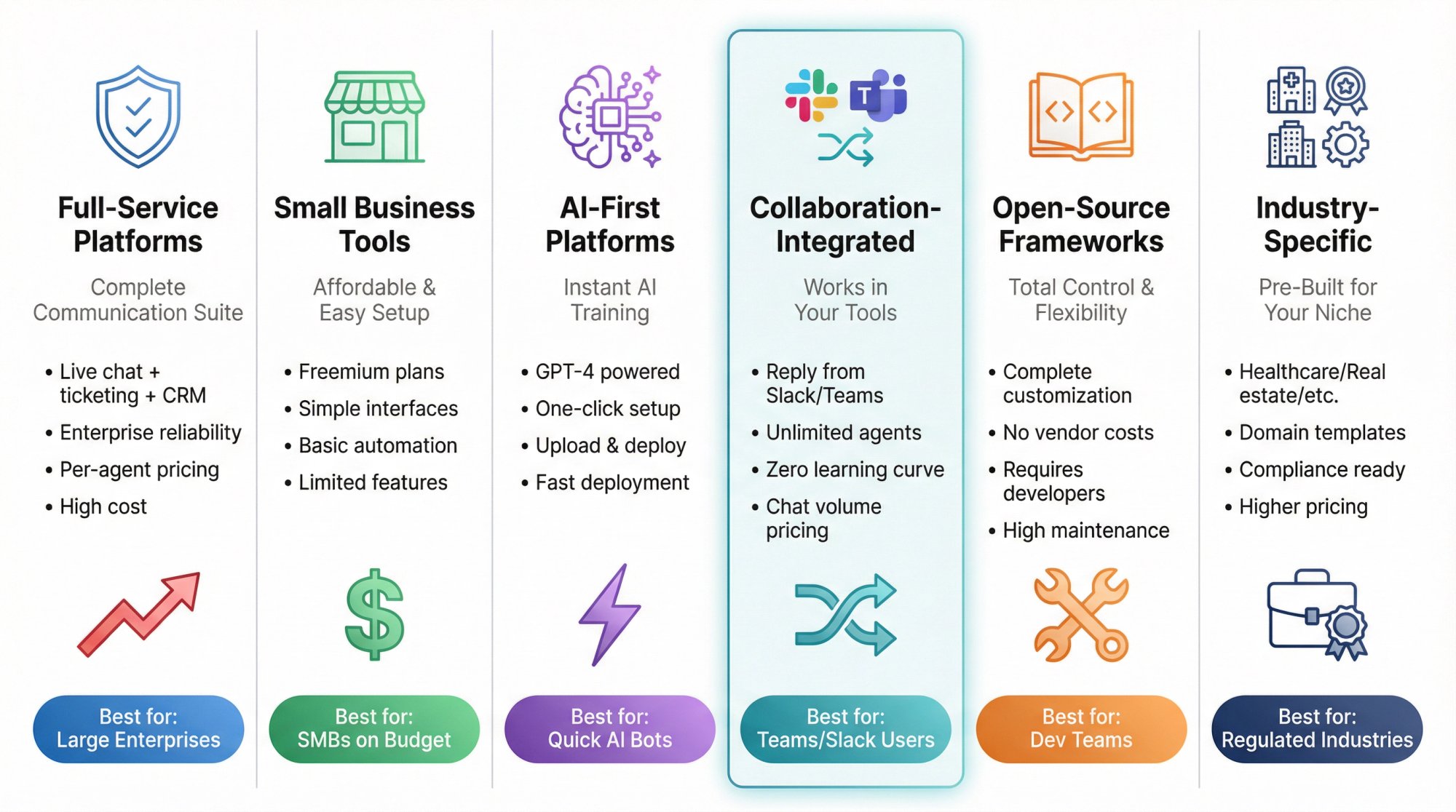
Full-Service Customer Support Platforms
Companies offer complete customer communication platforms: live chat, ticketing, knowledge bases, and integrated chatbot capabilities.
Advantages: Everything ties into one system. The chatbot can create tickets, access CRM data, and route to agents seamlessly. Enterprise-grade features and reliability.
Downsides: Expensive. Many charge per agent or seat. These platforms can be overkill if you just need a simple website chatbot.
Great if you already use that platform for support or need robust multi-channel support. But if you're starting from scratch or have budget constraints, probably too much.
Small Business Chatbot Tools
Platforms target small to mid-sized businesses.
Advantages: Affordable (or even freemium). Easy to use. Combine live chat and some chatbot/automation features. Many offer a free plan with limited bot triggers and paid plans at a fraction of enterprise costs.
Downsides: May lack advanced AI features or deep integrations compared to bigger platforms. But for common needs, they're often sufficient.
If you're just getting started or have a tight budget, these are worth checking out. Many let you build simple rule-based bots and are now adding AI integration for natural language understanding.
AI-First Chatbot Platforms
Newer platforms focus on quick setup of AI bots trained on your content.
Advantages: Fast deployment. Emphasis on advanced AI (GPT-4, etc.). Often no coding required. Upload a PDF or point to a URL and get a working chatbot instantly.
Downsides: Newer platforms might lack polish in areas like live agent consoles or advanced routing. Check their privacy terms. Some may use your content to train their AI models.
If your primary goal is an AI Q&A bot on your site, these are very attractive. They excel at letting you stand up a knowledgeable bot quickly.
Chatbots Built Into Teams and Slack
Platforms like Social Intents route website chats into collaboration tools (Slack, Microsoft Teams, Google Chat) instead of separate dashboards.
Advantages: Your team replies from tools they already use daily. No new interface to learn. Often includes unlimited agent seats since you're not paying per-agent. Your collaboration tool is your interface.
For example, Social Intents routes website chats directly to Teams or Slack, where your team already works. When the AI chatbot can't handle something, it pings a human in Teams or Slack to take over. The pricing focuses on chat volume, not agent count, making it cost-effective for larger teams.
Downsides: If your team doesn't use these collaboration tools, the value is less. But for Teams or Slack-heavy organizations, it's arguably the most seamless way to add chat to your site.
Open-Source Chatbot Frameworks
Options like Rasa, Botpress (community edition), or Microsoft Bot Framework let you build completely custom bots with full control.
Advantages: No recurring vendor costs. Everything stays on your servers. Total flexibility.
Downsides: Steep learning curve. Requires developers and data scientists. You're responsible for infrastructure, hosting, security, and maintenance. Essentially treating the chatbot like a software development project.
Few SMBs need this. Some large enterprises or organizations with strict data governance requirements use these frameworks. If you have a strong dev team and unique needs, this path can work. Otherwise, a managed service is almost always faster to value.
Industry-Specific Chatbot Solutions
Some companies build chatbots tailored for certain industries:
-
Enterprise customer service platforms
-
SaaS support help desks
-
Healthcare bots with HIPAA compliance and symptom checking
-
Real estate bots providing home listings
-
Hospitality bots for hotel FAQs and booking
If you're in a niche, search for domain-specific options. They might have pre-built templates and industry language understanding.
Downsides: Can be pricey. Limited use outside that one area. But the upside is faster setup since they already "speak your industry's language."
Which Type of Chatbot Is Right for You
Focus on your use case and constraints:
-
Small business needing simple FAQ bot? SMB-focused platforms work great.
-
Large enterprise with thousands of tickets daily? Full-service suites or custom solutions make sense.
-
Team already living in Slack/Teams? Collaboration-integrated bots deliver seamless adoption.
-
Want cutting-edge AI with minimal setup? AI-first builders are compelling.
Don't be afraid to reach out for demos or trials. The chatbot space is competitive. Vendors will walk you through tailored demos. This accelerates your understanding of how the tool works for your scenario.
Best Practices: How to Make Your Chatbot Actually Work
Getting a chatbot live is an achievement. Using it effectively is an ongoing effort. Here are best practices to maximize value and avoid common mistakes:
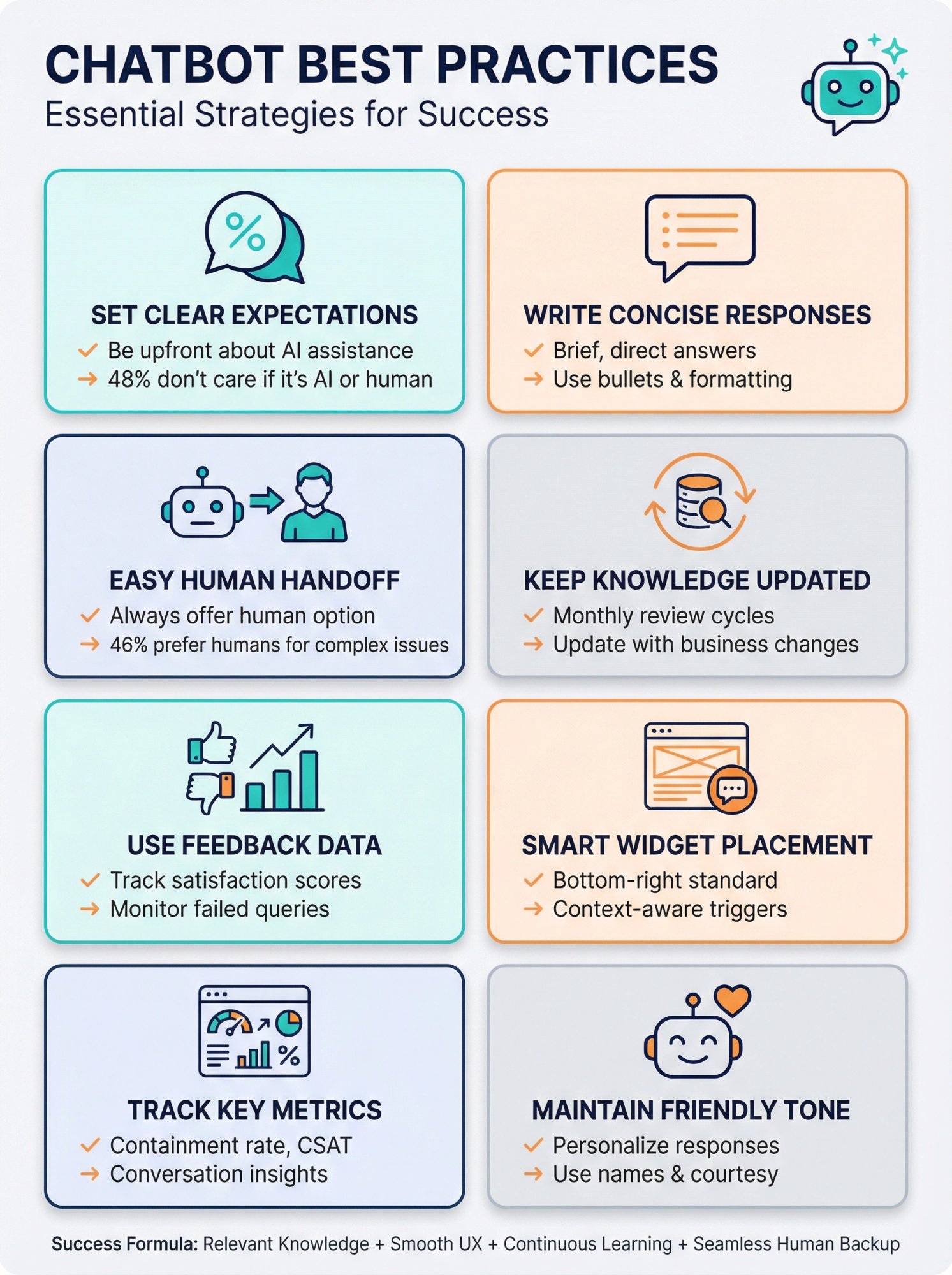
How to Set Clear Chatbot Expectations
Be transparent that users are interacting with a bot. Have it introduce itself:
"Hi, I'm an automated assistant here to help!"
This manages expectations. Users won't get as frustrated by limitations if they knew from the beginning it wasn't human.
Research shows 48% of customers don't care if it's a bot or human as long as their issue gets resolved quickly. Honesty helps achieve that.
If the bot is limited to certain topics, mention it upfront or via a menu of options. Clarity prevents users from asking things the bot can't handle and not realizing they need a human.
How to Write Concise Chatbot Responses
Nobody wants to read paragraphs in a chat window. Train your bot to give brief, direct answers.
If someone asks "What are your business hours?" the bot should respond: "We're open Monday-Friday 9am-6pm and Saturday 10am-4pm." Not a five-sentence company history followed by the hours.
Use formatting (bullet points, numbers) when listing information. Break up complex answers into multiple messages or ask follow-up questions to narrow down what the user needs.
Whenever possible, personalize the response using what you know: "It looks like you're on our Premium plan. The features available to you are…"
This level of relevance makes users feel the bot is actually helpful, not just spewing generic text.
How to Let Users Reach a Human Agent Easily
Some users will want or need a human no matter how good your bot is.
Make it simple to get one:
-
Have a persistent "Talk to a human agent" option in the chat UI
-
Program the bot to detect keywords like "representative," "human," "agent," "operator" and immediately respond with "Sure, I'm connecting you with a team member now."
If you only have support during certain hours, handle it gracefully: "Our team is offline at the moment, but I can create a ticket and they'll email you tomorrow."
Remember, 46% of people prefer dealing with a live person for complex issues, and over half get frustrated if a bot can't solve their issue. Don't compound frustration by hiding the human option.
By making handoff easy, you actually increase trust in the bot. Users know it won't trap them in an endless loop.
You can have the bot gather basic info before transferring: "Okay, I'll get a human. Can you briefly describe your issue so I connect you to the right person?" This helps the agent. Just don't make the user repeat themselves entirely after transfer. Pass along the conversation transcript.
How to Keep Your Chatbot Knowledge Updated
Think of your chatbot as a dynamic part of your content strategy. Any time you update your website, products, or policies, update the bot too.
Examples:
-
Change pricing? Update bot's answers about plans and costs
-
Launch new feature? Add Q&A about it
-
Holiday shipping deadlines? Train bot on seasonal FAQs before the rush
Many companies set a monthly review where they look at new content or common tickets and update the chatbot accordingly. This prevents the bot from growing stale or giving outdated information (which can be worse than no information).
A well-maintained chatbot remains accurate and useful. A neglected one slowly becomes less helpful as your business evolves.
How to Use Chatbot Feedback for Improvement
Some platforms let users rate answers (thumbs up/down) or indicate if their question was resolved. Pay attention to that data.
If 80% of people click thumbs-down on the bot's answer about "refund status," that's a glaring sign the answer isn't helpful. Maybe it's missing details or the bot isn't understanding the question correctly.
Use implicit signals too:
-
Does the user rephrase the question multiple times? (Bot might be missing the point)
-
Do they always ask for human help after a certain answer? (That answer needs work)
Some companies periodically survey users about the chatbot experience: "How was your interaction with our virtual assistant?" This yields qualitative insights like "It didn't understand when I asked about warranty". That reveals a gap to fill.
Treat your chatbot as a continually learning system. The more data and careful tuning you put in, the better it gets.
Where to Place Your Chat Widget on Your Website
Placement: Typically bottom-right corner is standard and intuitive. But if your site has another element there, choose bottom-left. Ensure the widget doesn't cover important call-to-action buttons or form fields.
Triggering: Decide if the chat should auto-open. Some sites do an immediate popup on landing, which can be off-putting. A more subtle approach is to have the widget blink or show a notification icon after a delay.
Or use exit intent on key pages. If a user is about to leave the pricing page (mouse moves toward close), trigger: "Got questions about pricing? I can help."
Best practice: trigger proactively only when relevant. Too many unsolicited popups annoy users.
Test different approaches if you can. Maybe 50% of visitors get an auto-prompt and 50% don't. See which group engages more or has better outcomes.
Consider user segmentation:
-
Returning user: "Welcome back! Let me know if you need anything."
-
First-time visitor: "Hi there! Have any questions? I'm here to help."
Many platforms allow such targeting rules.
What Chatbot Metrics to Track and Why
Revisit the goals you set initially and track progress.
Common chatbot metrics:
| Metric | What It Measures | Why It Matters |
|---|---|---|
| Containment rate | % of chats resolved without human intervention | Shows bot effectiveness |
| Number of conversations | How many users engage | Indicates adoption |
| Conversion/completion rate | For specific flows, how often does bot achieve goal? | Measures business impact |
| CSAT or feedback | Post-chat satisfaction scores | Quality indicator |
| Average handle time | How long conversations last | Efficiency measure |
Also track content insights: What questions are asked most? This might inform your FAQ page or website alerts.
Chatbot insights can benefit other areas of the business beyond just support.
How to Keep Your Chatbot Friendly and Human
Your chatbot should enhance customer experience, not be a cold barrier.
Design it to feel friendly and helpful:
-
Use the person's name (if you ask for it or have it from login)
-
Say "please" and "thank you" where appropriate
-
Program responses to a few common off-topic questions ("Are you a robot?" "What's your name?") with playful but brief answers
When a human does take over, they should acknowledge the transition: "Hi, this is John from Acme. I see our chatbot was helping you with an order issue. I'll take it from here."
This maintains continuity and shows the agent is up to speed.
Little things humanize the bot and can strengthen brand affinity. A dry, robotic bot might get the job done. A slightly personable bot creates delightful moments.
Keep personality appropriate for your audience. A banking bot should probably be more formal than a gaming website bot.
The formula for success: Relevant knowledge + smooth UX + continuous learning + seamless human backup. Do that, and your chatbot becomes a virtual team member users appreciate.
Why Social Intents Is Different for Website Chat
Throughout this guide, we've mentioned Social Intents a few times. There's a reason: it takes a unique approach that solves real problems many businesses face with traditional chatbot and live chat platforms.
What's Wrong With Most Live Chat Platforms
Traditional chatbot and live chat platforms require your team to learn a new dashboard, monitor another inbox, and context-switch between tools all day. Your support team already juggles email, Slack, Teams, your CRM, and other systems. Adding yet another interface creates friction.
Plus, many platforms charge per agent seat. That pricing model gets expensive fast when you want to scale your team or include agents who only help occasionally.
How Social Intents Works Differently
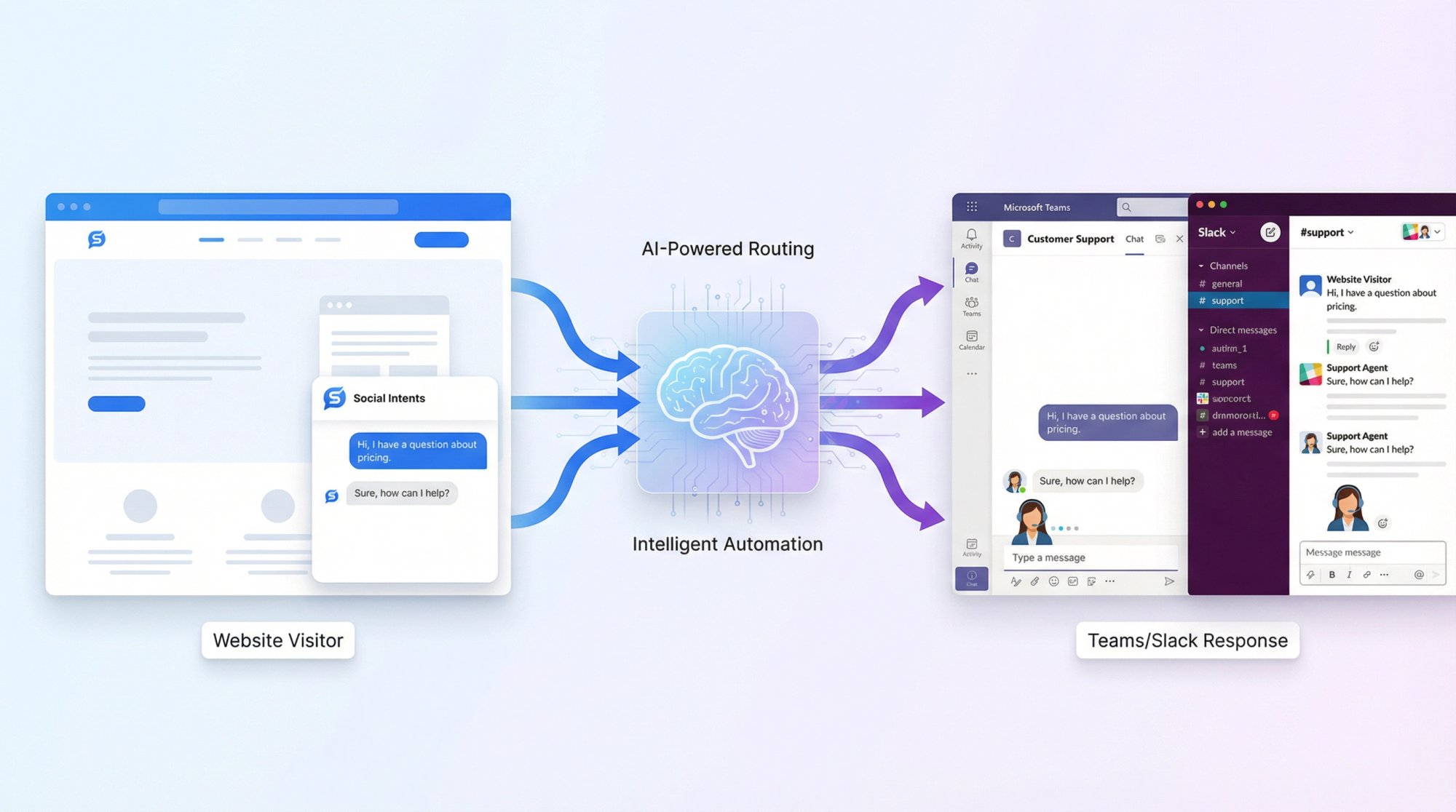
Social Intents routes your website chats directly into Microsoft Teams, Slack, Google Chat, Zoom, or Webex, tools your team already uses every day.
Here's how it works:
Visitors chat on your website. They see a normal chat widget, ask questions, get instant help.
Your team replies from Teams or Slack. When a chat comes in, it appears as a message in your designated Teams channel or Slack channel. Your agents respond right there. No separate dashboard to monitor.
AI handles the routine stuff. Social Intents includes AI chatbot capabilities powered by ChatGPT, Claude, or Google Gemini. The bot can answer common questions automatically, trained on your website content and documents.
Seamless handoff when needed. When the AI can't handle something or the user requests a human, it pings your team in Teams or Slack to take over. Your agent sees the conversation history and picks up smoothly.
Why This Approach Matters
Zero learning curve. Your team doesn't learn a new tool. They just reply to messages in Teams or Slack like they always do.
Higher adoption. When support is this easy, agents actually use it. No forgotten dashboards or ignored inboxes.
Unlimited agents without the cost. Social Intents pricing includes unlimited agent seats on all plans beyond the starter tier. You're not charged per person. The pricing is based on monthly chat volume instead.
This is huge for growing teams. Add 5 people? 50 people? Doesn't matter. No additional per-seat fees.
Perfect for Teams/Slack-heavy organizations. If your company already uses these collaboration platforms daily, Social Intents fits naturally into your workflow.
What Features Social Intents Includes
Beyond the unique Teams/Slack integration, Social Intents includes features you'd expect from modern chatbot services:
-
AI chatbots with custom training on your content, documents, and knowledge base
-
Human handoff with full conversation context
-
Custom AI actions to integrate with third-party tools (check order status, create tickets, etc.). Customers are particularly interested in this capability
-
WhatsApp and Messenger chatbots with escalation to your agents
-
Native apps for Shopify, BigCommerce, Wix, WordPress, and Webflow for easy installation
-
Real-time translation for multilingual support
-
Proactive chat triggers based on user behavior
-
Analytics and reporting to track performance and improve
-
14-day free trial to test everything before committing
What Social Intents Pricing Looks Like
| Plan | Annual Price | Key Features |
|---|---|---|
| Starter | $39/month | 1 widget, 3 agents, 200 conversations/month, ChatGPT integration |
| Basic | $69/month | 2 widgets, unlimited agents, 1,000 conversations/month, 25 trained URLs |
| Pro | $99/month | 5 widgets, unlimited agents, 5,000 conversations/month, 200 trained URLs, remove co-branding |
| Business | $199/month | 10 widgets, unlimited agents, 10,000 conversations/month, 1,000 trained URLs, real-time translation |
| Agency/Reseller | $299/month | 20 chatbots, 10,000 conversations/month, white-label, sub-accounts, brandable portal |
The Agency/Reseller plan is particularly interesting for agencies and web design providers looking to enhance their offerings with AI chatbots for clients.
When Social Intents Makes the Most Sense
Social Intents makes the most sense if:
-
Your team uses Microsoft Teams or Slack as their primary communication hub
-
You want to avoid learning yet another tool
-
You need to scale your support team without per-agent pricing killing your budget
-
You want AI automation plus easy human backup in one integrated solution
-
You're running an e-commerce store (Shopify, BigCommerce, Wix) and want quick setup
It's particularly strong for small to mid-sized businesses that want enterprise-level chat capabilities without enterprise complexity or cost.
TechRadar's review specifically highlighted Social Intents' integration with collaboration tools and unlimited agent pricing as key differentiators in the crowded live chat market.
If you're tired of juggling multiple tools and want chat support that fits naturally into your team's existing workflow, Social Intents is worth a close look.
You can start a free 14-day trial to see exactly how it works with your website and your team's collaboration tools before making any commitment.
Common Questions About Website Chatbots
What's the difference between a chatbot and live chat?
Live chat means human agents answering customer questions in real-time via a chat widget on your website. It's entirely human-powered.
Chatbots use AI and automation to answer questions without human involvement. They can work 24/7 and handle unlimited simultaneous conversations.
The best approach is usually hybrid: a chatbot handles routine questions automatically, then transfers to a human agent when needed. This gives you efficiency and scalability with the human touch available for complex issues.
How much does chatbot development cost?
It depends on your approach:
Custom development: Building from scratch can cost $5,000 to $500,000+ depending on complexity. You'll also have ongoing maintenance costs.
Chatbot services/platforms: Most charge monthly subscriptions ranging from $30 to a few hundred dollars for typical plans. You avoid large upfront development costs.
For most businesses, using a chatbot service is dramatically more cost-effective than custom development. You get started faster and pay predictable monthly fees instead of massive one-time costs.
Can chatbots integrate with my existing tools?
Yes. Most modern chatbot platforms offer integrations with popular tools:
-
CRM systems (Salesforce, HubSpot, etc.)
-
Help desks (Zendesk, etc.)
-
E-commerce platforms (Shopify, BigCommerce, WooCommerce)
-
Communication tools (Slack, Microsoft Teams, Google Chat)
-
Automation platforms (Zapier)
Many also offer APIs or webhooks so you can build custom integrations if needed.
Check the specific integrations offered by each platform during your evaluation. The best services play well with your existing tech stack.
How do I train a chatbot for my website?
Modern AI chatbots make training relatively simple:
① Provide your content:
-
Upload documents (PDFs, FAQs, policy docs)
-
Point the bot at your website URLs to ingest content
-
Add Q&A pairs manually for specific questions
② Configure AI settings:
-
Set the bot's personality and tone
-
Define what topics it should and shouldn't discuss
-
Establish when to escalate to humans
③ Test and refine:
-
Ask questions you expect customers to ask
-
Review responses and adjust training data where answers are weak
-
Continuously add new content as your business evolves
Many platforms offer one-click training. You provide URLs or files and the AI automatically indexes that information. The key is keeping the content updated so the bot stays accurate.
What happens when a chatbot can't answer a question?
Good chatbots have clear fallback strategies:
① Ask for clarification: "I'm not sure I understand. Could you rephrase that?"
② Offer alternatives: "I don't have information about that, but I can help with [related topics]. Would any of these work?"
③ Escalate to human: "This is outside my knowledge area. Let me connect you with a team member who can help."
The best practice is to make human handoff easy and graceful. The bot should transfer the conversation (including context) to a live agent seamlessly.
Never leave users stuck in a loop where the bot keeps failing without offering a way out. That's the fastest way to frustrate customers.
Are chatbots actually good for customer experience?
When implemented well, absolutely. Research shows:
-
80% of customers who've interacted with AI support reported positive experiences
-
51% of consumers prefer instant help from a bot rather than waiting for a human agent for simple questions
-
Chatbots can resolve issues in seconds that would take humans minutes or hours
The key is hybrid AI + human support. Let the bot handle routine queries where speed matters. Have humans available for complex issues where empathy and judgment are needed.
Bad chatbot experiences happen when:
-
The bot can't answer anything useful (poor training)
-
There's no easy way to reach a human
-
The bot gives outdated or wrong information
-
It's too pushy with auto-popups
Done right, chatbots enhance customer experience by providing instant help while freeing your team to focus on high-value interactions.
Can chatbots work on mobile devices?
Yes. Modern chatbot widgets are responsive and work on mobile devices automatically.
The chat interface adapts to smaller screens, often appearing as an icon that expands to a full-screen chat on phones. Users can interact with the bot just as easily on mobile as on desktop.
If you have a mobile app, many chatbot platforms also offer SDKs that let you embed the chat experience inside your app.
Always test your chatbot on actual mobile devices (iPhone and Android) before launch to ensure the experience is smooth.
How quickly can I get a chatbot live on my website?
With modern chatbot services, you can have a basic bot running in 1-2 days if you move quickly.
Here's a realistic timeline:
-
Day 1: Sign up for a service, configure basic settings, upload your initial content for training
-
Day 2: Test the bot, refine responses, add the widget to your website, do final checks
More complex implementations with custom integrations, extensive training data, and multi-step workflows might take 1-2 weeks.
The biggest time investment is usually gathering and organizing your content (FAQs, policies, product info). Once you have that, the technical setup is quite fast.
Compare this to custom development, which often takes months from start to launch.
What's the ROI of implementing a website chatbot?
Businesses typically see ROI through:
Cost savings:
-
Chatbot interactions cost about $0.50 vs. $6.00 for human-handled support tickets
-
Deflecting 25-30% of routine tickets reduces support team workload significantly
-
Some companies report chatbots saving thousands of support hours annually
Revenue growth:
-
E-commerce sites see conversion rate improvements up to 30% from chatbot-assisted shopping
-
Lead capture 24/7 means you don't miss opportunities outside business hours
-
Faster response times improve customer satisfaction and retention
Efficiency gains:
-
Your team spends less time on repetitive questions and more on high-value interactions
-
Customers get instant answers instead of waiting hours or days
-
Analytics reveal customer pain points you can address
Some studies show customer service AI investments delivering 3.5x ROI or higher. Your specific ROI depends on your implementation quality, training, and use case.
The key is setting clear goals upfront so you can measure actual impact against those objectives.
Your Next Steps
You now have everything you need to implement a chatbot on your website successfully. Let's recap the essentials:
Chatbots have moved from novelty to necessity. With nearly a billion people using AI chatbots worldwide and customers expecting instant, 24/7 answers, having a capable chatbot is becoming table stakes for competitive businesses.
Choose a chatbot service over custom development unless you have very specialized requirements. Modern platforms deliver powerful AI capabilities, easy setup, and affordable pricing that custom development can't match.
Focus on the features that matter for your use case: no-code setup, AI-powered understanding, training on your data, seamless human handoff, integrations with your tech stack, and fair pricing that scales.
Follow the implementation steps carefully: define goals, choose your platform, design conversation content, train the bot, integrate it properly, test thoroughly, and maintain continuously.
Remember the best practices: set clear expectations, keep responses concise, provide easy access to humans, update knowledge regularly, leverage feedback, and maintain the human touch.
Consider Social Intents if you want simplicity. If your team uses Microsoft Teams or Slack and you want to avoid juggling another tool, Social Intents offers a unique approach that routes chats directly into your collaboration tools with unlimited agents and AI automation built in. Try the 14-day free trial to see how it works in your environment.
The technology is mature. The tools are accessible. The benefits are proven.
The question isn't whether you should add a chatbot to your website anymore. It's when you'll get started and which solution you'll choose.
Every day without a chatbot means missed conversations, lost opportunities, and customers getting frustrated by slow or unavailable support.
Pick a platform. Start your free trial. Get a basic bot running. Then refine it based on real usage. You'll be amazed how quickly it becomes an essential part of your customer experience.
Your customers are ready for chatbots. The technology is ready for you. Now it's time to make it happen.