Picture a potential buyer scrolling through your property listings at 11 PM, questions burning in their mind, ready to schedule a viewing. Your office is closed. By morning, they've moved on to another agent's listing.
This scenario happens constantly in real estate. According to research from the National Association of Realtors, 71% of buyers and 81% of sellers choose the first agent they connect with. Speed matters. Availability matters. Live chat makes both possible.
Live chat on your website lets you engage prospects instantly, even outside business hours. It bridges the gap between the always-on online world and the personal touch buyers expect from an agent. In this guide, we'll show why live chat has become essential for realtors, how to implement it effectively, and how to use AI assistance to supercharge your lead generation.
Why Realtors Need Live Chat Now More Than Ever
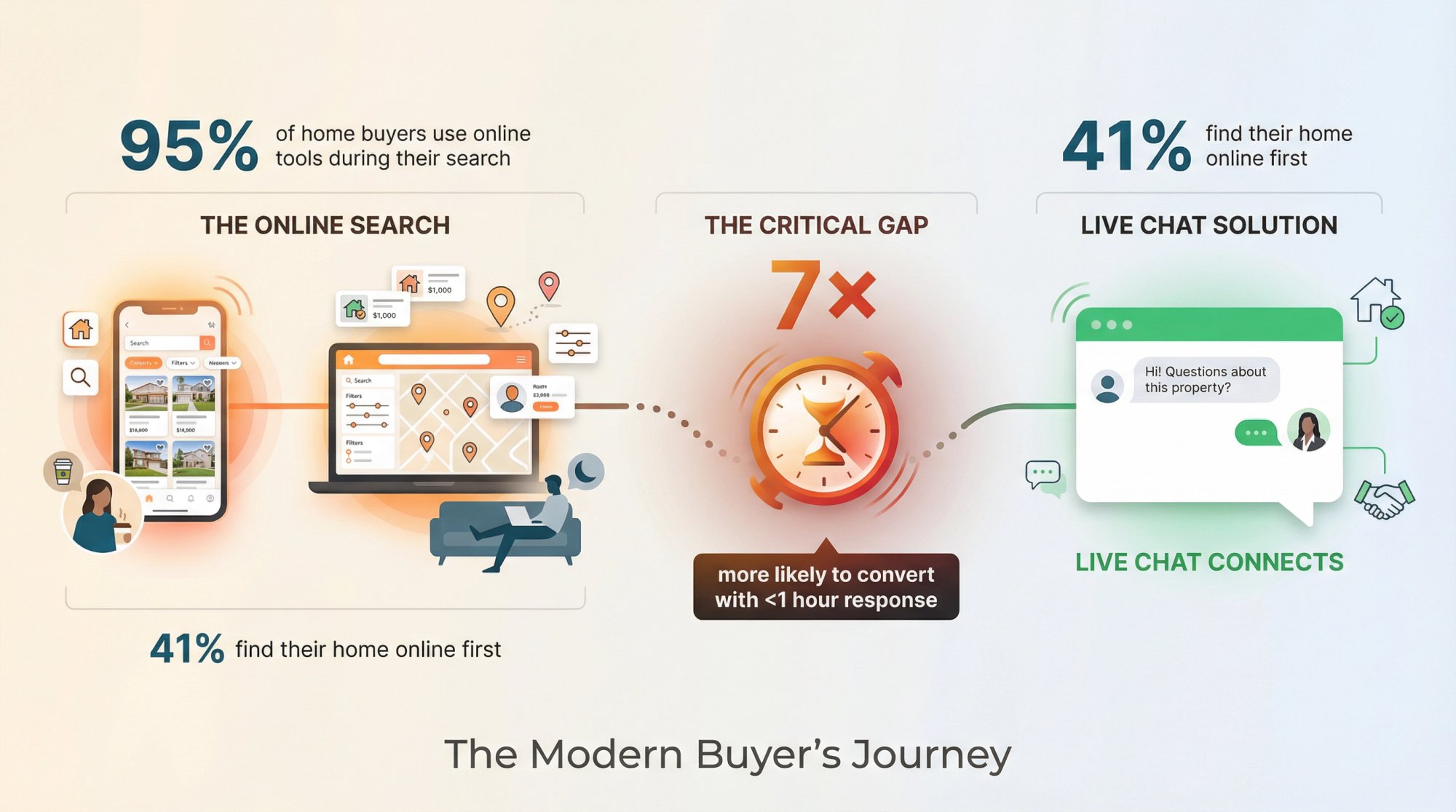
The home-buying journey has shifted almost entirely online. Research shows over 95% of home buyers use online tools during their search, and 100% use the internet at some stage. Rather than starting by walking into a brokerage, today's buyers scroll through listings on their phone at lunch, or late at night from the couch.
According to NAR's 2023 profile of home buyers, 41% of buyers find their home online first, while only 20% contact an agent as a first step. But this doesn't mean agents are being cut out. Far from it. Those same studies show buyers consider real estate agents their most trusted and useful source of information when making a decision.
In other words: buyers go online to find properties, but they still need agents for expertise and guidance.
Live chat is the missing link. It connects these savvy online shoppers with you, the agent, at the exact moment they're exploring properties on your site.
How Fast Response Time Affects Real Estate Lead Conversion
Consider the expectations of modern consumers. We're in the age of Amazon-like immediacy where people expect answers right now. If a buyer has a question about the lot size or wants to schedule a tour, waiting hours for an email reply won't cut it.
Research indicates that a property inquiry responded to within the first hour is seven times more likely to turn into a qualified lead. A quick response multiplies your chances of capturing a hot prospect.
Without live chat, what happens?
A visitor with a simple question ("Has the kitchen been remodeled?") might leave your site if they can't get an answer immediately. They might fill out a "Contact us" form, but many won't bother. And even those who do are likely contacting other agents at the same time. By the time you respond a day later, they've moved on.
Live chat fixes this by putting you in touch while the lead is red hot. It's the difference between being the first agent who engages that buyer (and winning the client), versus chasing them after they've already found help elsewhere.
This changes everything for busy agents.
Real estate is an industry built on relationships and timing. Live chat lets you strike while the iron is hot, combining the convenience of online search with the human trust of an agent's voice.
What Are the Benefits of Live Chat for Real Estate Agents
Live chat isn't just a flashy add-on for your website. It directly addresses many challenges realtors face in converting online visitors into clients. Here are the biggest benefits and how they translate into more leads and sales:
How to Capture More Real Estate Leads with Instant Engagement
Timing is everything in real estate. If you can engage a buyer at the peak of their interest, you dramatically increase the odds of conversion.
When your site has live chat, a visitor browsing a listing can get an answer or schedule a viewing immediately, rather than wandering off. Quick responses prevent drop-offs.
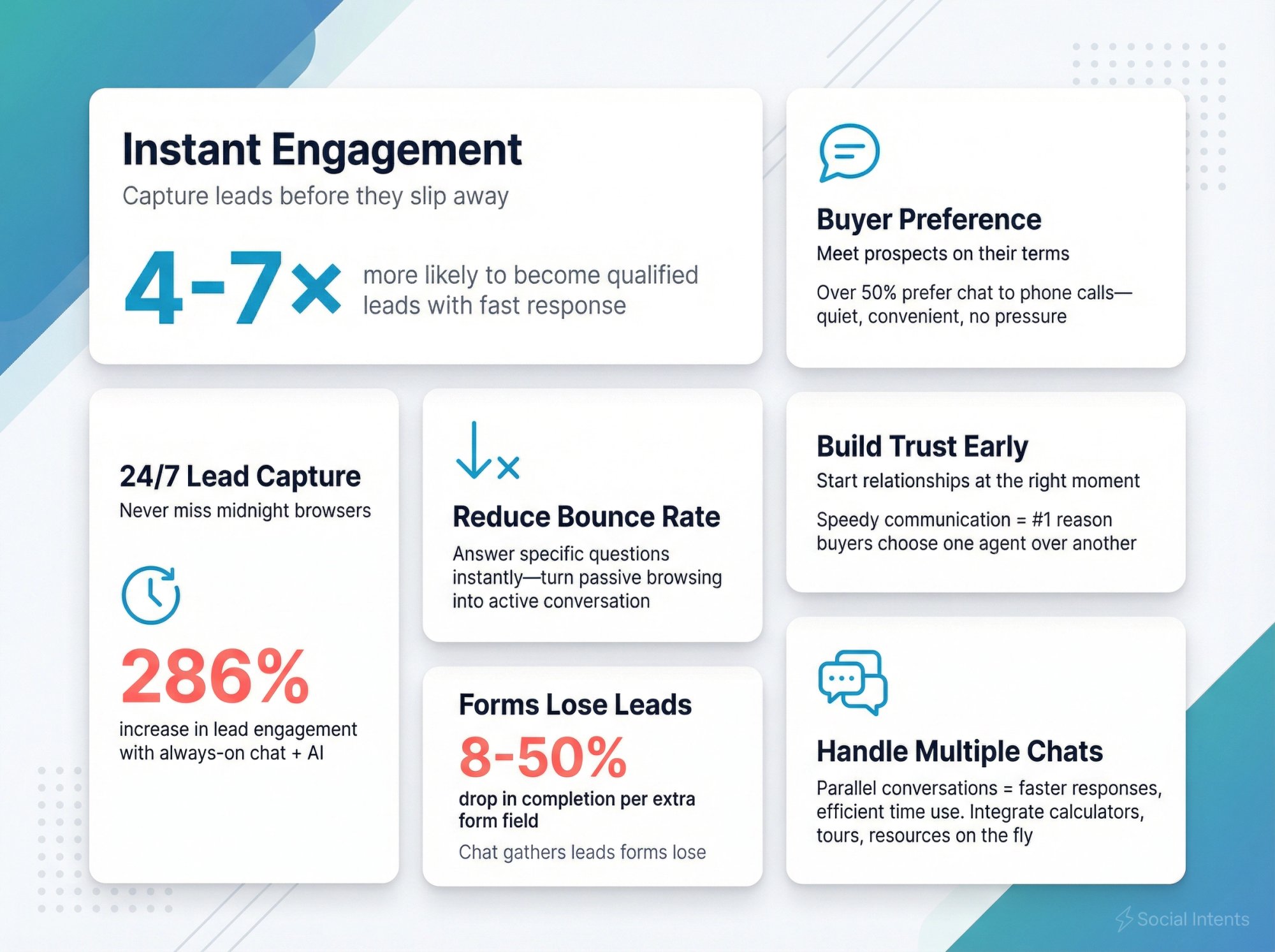
Industry data backs this up: responding to inquiries within minutes (rather than hours) can make prospects 4× to 7× more likely to become qualified leads. Live chat essentially grabs the customer before they slip away.
Why Home Buyers Prefer Live Chat Over Phone Calls
Not everyone can talk on the phone or visit your office when questions arise. Many house hunters are browsing during work hours or late at night.
Live chat gives them a quiet, no-pressure way to ask questions in real time. Unlike a phone call, a chat can be done from anywhere without drawing attention. This is important if they're at work or just not ready for a sales call.
This convenience means more people will reach out. Plus, modern buyers (especially millennials and Gen Z) often prefer typing a quick message over making a phone call. Over half of consumers now say they'd rather text or chat than call an agent on the phone. By offering chat, you're meeting prospects on their terms.
How Live Chat Reduces Website Bounce Rates for Realtors
Real estate websites without live chat often see visitors leave without ever making contact. Why?
Common scenario: a potential buyer has a very specific question not answered on the listing (e.g. "How old is the roof?" or "Is there parking included?"). Without an immediate way to ask, many will simply leave the site to look elsewhere.
Live chat invites them to engage instead of bouncing. Even a simple proactive message like "Hi there, have a question about this property? I'm here to help!" can hook a hesitant visitor.
By converting passive browsing into active conversation, chat significantly increases the time visitors spend on your site and the likelihood they'll take the next step.
How to Get Real Estate Leads 24/7 Without Hiring Night Staff
Real estate is not a 9-to-5 business. Clients browse at all hours, and international or out-of-state buyers might be online in the middle of your night.
Live chat (especially when combined with AI chatbots or an on-call rotation) gives you round-the-clock coverage. You don't need to physically stay awake. An AI chatbot can greet after-hours visitors, answer basic questions, and collect their info for you to follow up.
This ensures late-night or overseas inquiries never go unanswered. According to recent analyses of early adopters, teams using 24/7 live chat and AI chatbots have seen a 286% increase in lead engagement simply by being always available, and up to 40% higher conversion rates by instantly qualifying and responding to prospects in real time.
Bottom line: Live chat means you're open for business whenever a buyer is ready to act.
How to Build Trust with Real Estate Clients Before Meeting
Real estate is highly personal. Clients want to work with someone they trust.
Live chat allows you to start building that rapport earlier in the relationship, even before an official showing or meeting. By chatting in a casual, helpful way, you position yourself as a friendly expert who's available to help. This can set you apart from competitors who feel distant or unresponsive.
Speedy, helpful communication is often cited by buyers as a key reason they chose one agent over another. If you're the agent who is right there to answer questions during the initial online search, you've essentially begun the client relationship at the ideal time. That personal touch encourages the lead to stick with you when it's time for a viewing or listing appointment.
Why Contact Forms Lose Real Estate Leads
Think about the typical "Contact Us" form on a website: name, email, phone, and a big blank box. Many visitors are reluctant to fill these out, fearing they'll get spammed or hassled by a pushy sales call. In fact, every extra field in a form can drop completion rates by anywhere from 8% to 50%. And who hasn't used a fake email or phone number at some point just to get info?
Live chat replaces that static form with a two-way conversation. It's more inviting. Prospects can ask a quick question without committing all their contact details upfront.
You can still capture their info, but in a more organic way. For example, after answering a question you might say, "Can I get your email to send you the full listing brochure?". By then, trust is built and the lead is warmer.
Bottom line: Chat gathers leads that forms lose, and usually with more accurate info and richer context (since you learn what they care about).
How Real Estate Agents Can Handle Multiple Leads Simultaneously
A live chat system allows agents to handle multiple conversations at once, unlike phone calls. If you have a team, you can distribute chats or have one agent assist several site visitors concurrently. This means clients get faster responses.
For instance, if someone asks, "Is the school district good?" an agent can quickly shoot over a response or a link to your blog on local schools while also chatting with another buyer about a different property.
From the client's perspective, it feels like instant, attentive service. From the agent's perspective, it's an efficient use of time (handling inquiries in parallel during slower moments, rather than playing phone tag later).
You can integrate helpful resources into chat (like mortgage calculators, virtual tour links, etc.) to instantly provide what the buyer is looking for.
In short, live chat turns your website from a static brochure into an interactive experience. It engages visitors, answers their needs on the spot, and converts them into tangible leads.
How to Add Live Chat to Your Real Estate Website

Adding live chat to your site might sound technically daunting, but modern solutions have made it quite straightforward. You don't need to be a developer to get started. Here's a step-by-step game plan for setting up live chat:
How to Choose the Best Live Chat Software for Real Estate
Start by selecting the right live chat software. Look for a tool that fits how you and your team work.
For example, if you and your colleagues live in Slack or Microsoft Teams all day, consider a chat solution that integrates directly into those platforms (so your new leads pop up where you're already communicating). This way, you won't miss chats or have to force everyone to learn a brand-new interface.
Social Intents is built specifically for this use case. It lets you handle website chats, SMS texts, and WhatsApp messages all from one place (from your Slack or Teams app, or from our web console).
| Feature | What to Look For |
|---|---|
| Integration | Works with Slack, Teams, Google Chat, or web console |
| Mobile Access | Reply on-the-go via phone app |
| Team Features | Transfer chats, invite team members into conversations |
| Pricing Model | Unlimited agents (avoid per-agent charges) |
| Channels | Handle website, SMS, WhatsApp from one inbox |
Be mindful of pricing. Some providers charge per agent or per conversation. If you have a growing team or high volume, those costs add up. Opt for a solution that offers unlimited agents or generous limits so you're not penalized for success.
We offer unlimited agents on all our plans (except Starter), so you can scale your team without worrying about escalating chat costs.
How to Install Live Chat Widget on Real Estate Websites
Most live chat platforms make installation easy. Typically, after signing up you'll get a small snippet of JavaScript code to insert into your website's HTML (often just before the </body> tag).
If your site is on a common platform like WordPress, Shopify, or Wix, there are usually plug-and-play integrations or plugins available. Social Intents offers dedicated plugins and apps for those platforms to simplify setup.
Installing the widget code will make a chat bubble appear on your site (often in the bottom-right corner by default, and you can usually adjust the position).
This process is usually as simple as copy-pasting one code snippet or clicking "Add App" if using an integration. Once installed, test it out: visit your site, and you should see the chat icon or welcome message ready to go.
How to Customize Live Chat for Your Real Estate Brand
A generic chat box is a good start, but customizing it will make it far more effective and on-brand.
Use your platform's settings to add your logo or agent photos, choose the widget color to match your branding, and write a friendly welcome message. For instance, the welcome text could be "Hi there! Have questions about a property? Chat with us live."
A personal touch, like showing an agent's name or headshot, can also increase engagement (visitors feel like there's a real person ready to help).
Next, set up any pre-chat form fields you want. Many realtors opt for a light pre-chat form that asks for the visitor's name and what they're looking for (e.g. "Buying or renting?" or "Which property are you interested in?"). This helps route the inquiry and gives you context. But keep it short; asking too many things upfront can deter people. You can always gather more info during the conversation.
Also configure your office hours in the tool. When you're available vs. offline. This way you can display an "Offline – leave us a message" mode or switch to a chatbot after 7pm, for example.
What Are Proactive Chat Triggers and How to Use Them
One powerful feature of live chat is the ability to reach out to visitors proactively. Instead of waiting for them to click the chat bubble, you can have the system automatically invite them to chat based on certain triggers.
Examples of effective triggers:
• If someone has been viewing a property page for more than 30 seconds, a message could pop up: "Need more details on this listing? I'm happy to answer any questions."
• If they add a home to their favorites (if your site has such functionality), trigger a chat saying, "That's a great property – let me know if you'd like to schedule a tour!"
• If you notice via your dashboard that someone is browsing high-end listings, an agent could manually send a message: "Hi, I specialize in luxury properties in this area – feel free to ask me anything about these listings."
Most platforms let you configure these triggers by time on page, scroll depth, specific page URLs, or repeat visits. Use them judiciously (you don't want to annoy every visitor), but when well-timed, proactive chats can significantly boost engagement.
It's like a salesperson gently approaching a customer who seems interested, rather than waiting behind the counter.
How to Connect Live Chat to Your Real Estate CRM
To maximize the value of live chat, connect it to your lead management process.
Many chat solutions provide integrations or at least Zapier hooks to pipe chat data into your CRM or email marketing system. At minimum, set it up so that chat transcripts and contact info are emailed to you or logged somewhere for follow-up.
For example, you could integrate with a CRM like Follow Up Boss so that whenever a chat ends, a new lead entry is created with the transcript attached. This ensures you (or your assistants) can follow up methodically and no conversation falls through the cracks.
Social Intents offers Zapier integrations to push transcripts, leads, or events into CRMs and tools. Some platforms also allow automated follow-ups (e.g. automatically sending the visitor a thank-you email or a list of links discussed in the chat). These little touches can reinforce the connection made during chat.
How AI Chatbots Can Handle Real Estate Inquiries 24/7
One of the most exciting developments in live chat is the integration of AI chatbots. These range from simple rule-based bots (which offer a menu of options or answer FAQs) to advanced AI like ChatGPT that can hold more human-like conversations.
In real estate, a hybrid approach works best: use a chatbot to handle common questions and after-hours inquiries, with an easy option to hand off to a human agent when needed.
For example, you might configure a chatbot to greet visitors outside of 9am to 6pm with, "Hi, I'm the virtual assistant. I can answer questions about our listings or take a message for the team."
The bot could answer things like "What's the price of 123 Maple St.?" or "Do you have 3-bedroom rentals in Denver?" by pulling data from your site. If the question is complex or the user types something the bot isn't sure about, it can seamlessly say "Let me get a realtor to help you with that" and forward the chat to you (with an alert on your phone).
How We Handle AI at Social Intents
Our platform allows one-click training on your content. You can train the AI chatbot on your listings and FAQ pages, so it understands your properties and services and can answer in a pinch.
We support ChatGPT, Claude, and Google Gemini, and you can set up custom AI actions to integrate with third-party tools (like pulling order status, ticket creation, or shipping info). The benefit? You essentially have a virtual assistant 24/7, without paying overtime.
Just be sure to program it with conversational answers and include fallback options (like collecting the person's email for follow-up) so that the experience stays positive. Many clients will appreciate that basic questions get answered instantly at 10pm, even if it's a bot, as long as they know a human is a click away for the rest.
This can also filter out tire-kickers: the bot can ask a few qualifying questions (budget, timeframe) and pass you only the serious leads, saving you time.
How to Train Your Real Estate Team on Live Chat
Once live chat is up and running, dedicate time for you and any team members to practice with it.
Do some test chats to get comfortable with the interface, and explore features like:
→ Sending attachments (perhaps you can send a PDF brochure during a chat)
→ Using canned responses (prepare quick answers for FAQs like "Yes, this property is still available", "HOA fees are $250/month", etc.)
→ Tagging or noting chats (some systems let you mark conversation outcomes, like "Cold lead" vs "Hot lead – scheduled viewing" for reporting)
Set expectations among your team for chat response times. Ideally, someone should reply within seconds to a new chat. If you have multiple agents, decide how you'll rotate chats or assign them.
Many systems let the chat alert go to a group channel (in Slack, for example) so the first available person can grab it. Figure out what works best so that chats are answered even if someone is busy. You might even create a schedule (e.g. Agent A handles chats in the morning, Agent B in the afternoon).
Also, train on tone and etiquette. Chat is conversational, so encourage a friendly, concise style. Use the visitor's name, use emojis if appropriate 😊 (it can make you seem more approachable, especially to younger clients), and avoid very formal language. The more it feels like texting a helpful friend, the better the experience.
Lastly, review transcripts periodically. They're a goldmine for insight. You'll see common questions (maybe prompting you to add certain info to listings or create a content piece addressing a frequent concern) and you can coach yourself or team members on better answers if needed.
Best Practices for Real Estate Live Chat Success
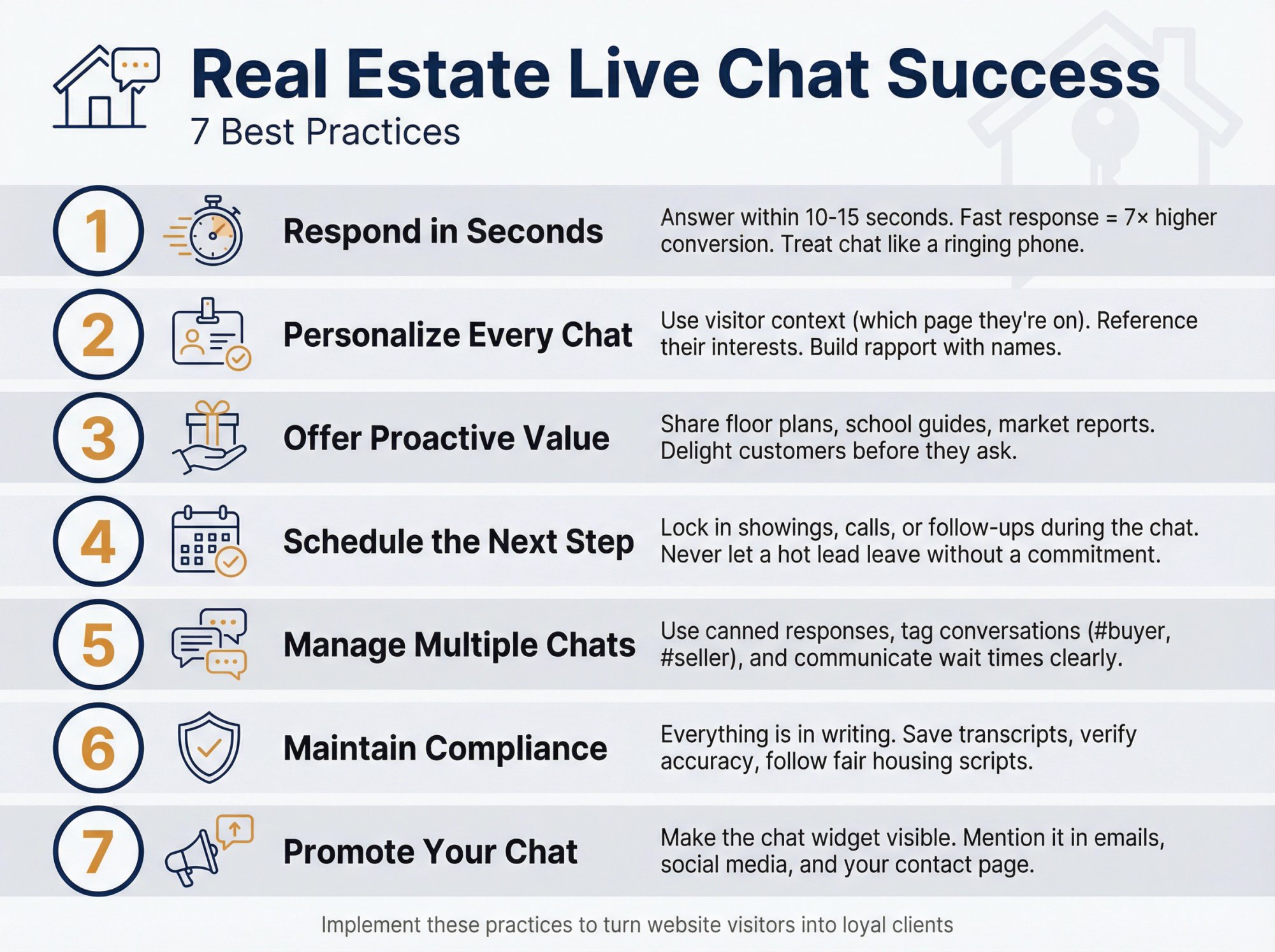
Getting live chat on your site is a great start. To truly turn it into a lead-generating machine and a delightful experience for your prospects, keep these best practices in mind:
Why Real Estate Agents Must Respond to Chats in Seconds
When that chat notification pings, aim to answer immediately (within 10-15 seconds if possible).
The whole point of live chat is instant gratification. If a visitor waits and waits, they'll lose interest or hop to another site. Many teams treat chat like a ringing phone. You wouldn't let a call ring out, so don't let a chat sit idle.
If you're solo and juggling, at least send a quick greeting: "Hi, I'll be right with you!" to acknowledge the visitor.
Fast response isn't just good service. It directly impacts conversion. Studies have shown customers who get quick answers are far more likely to stick around and take next steps.
If you consistently can't respond fast (say you're often out at showings), consider setting your status to offline and letting a bot or an offline form handle it, so users aren't left hanging. But whenever possible, strive for real-time responsiveness. It wows people because so few businesses truly manage it.
How to Personalize Real Estate Chats for Better Conversion
As you chat, use the information at hand to make it personal.
Most live chat tools show you some context about the visitor's activity (like which page they're on or what they've clicked). Leverage that.
If they're on 123 Maple Street's listing page, you might start with, "I see you're looking at 123 Maple – beautiful home! What would you like to know about it?".
If they mention they're relocating or first-time buying, acknowledge it: "Exciting that you're moving from out of state! I can help with remote tour options if you need.".
Also introduce yourself by name, and learn theirs: "By the way, I'm Alex, a local realtor. Who do I have the pleasure of chatting with?".
People appreciate knowing there's a human on the other end. You can even keep notes for repeat visitors. If John Doe chatted last week about condos, and he's back again, imagine greeting him with "Hi John, welcome back! Did you have more questions about condos or are you looking at other property types today?".
That level of memory and personal touch can blow clients away. It shows you care and pay attention.
How to Offer Value in Real Estate Chats Before Being Asked
While answering questions is the baseline, delighting the customer comes from being proactive.
As you identify the visitor's needs, think of what extra value you can provide unprompted.
For example:
• If someone asks about school districts, after answering you might say, "Would you like me to send you our guide on local schools? It has ratings and reviews of each – might be helpful."
• If they're looking at a particular house, you could offer, "I have a detailed PDF with the floor plan and recent upgrades. I can send it here if you'd like."
• If a person seems early stage, offer something to keep them engaged: "We have a weekly email of new listings in [Neighborhood] – would you be interested? I can have it sent to you."
Most chat platforms allow file sending or at least links. Use that to share brochures, virtual tour videos, neighborhood market reports, etc.
By offering useful resources proactively, you position yourself as a helpful expert, not just a gatekeeper of info. That builds trust and often encourages the lead to deepen the interaction (e.g. "Sure, send me the report, and maybe we can schedule a call later.").
How to Schedule Property Showings During Live Chat
One of the most powerful ways to convert a chat into a client is to lock in the next step during the conversation.
If someone seems interested in a property, don't let them leave without proposing a tangible follow-up.
For instance: "This home is available – would you like to schedule an in-person tour or a video walkthrough? I can set one up right now for you."
Then use your calendar to suggest a couple of slots: "We could do tomorrow at 6pm, or Saturday at 10am – which works?"
If they agree, you just moved them dramatically down the funnel!
Many chat systems can integrate with scheduling apps or you can simply pencil it in and send a calendar invite after the chat. Even if they're not ready for a viewing, schedule something: a phone consultation, a Zoom meeting, etc.
Or at minimum, get permission to follow up: "Okay, how about I email you a list of similar properties and we can chat later this week once you've had a look?"
The key is to leave the chat with an action item and the prospect's contact info. You've warmed them up in chat – now carry that momentum forward by booking an appointment or commitment while enthusiasm is high.
How Real Estate Agents Can Manage Multiple Live Chats
As your chat volume grows, you might face multiple simultaneous inquiries. This is a good problem (it means more leads), but you need strategies to handle it.
Make liberal use of canned responses (shortcuts) for common questions to save time typing. For example, a pre-written response for "What's the property tax on this?" or "How do I apply for a rental?" can be inserted with a couple keystrokes and then you customize it as needed.
This helps you answer one person while another waits a few seconds.
Let visitors know if you're juggling: "I'm helping another client very quickly, but I'll have that info for you in just a moment…". People are generally patient if they know they haven't been forgotten.
Also, don't be afraid to politely close a chat once the issue is resolved, so you can focus. For instance, "Glad I could help, Mark. If any other questions come up, I'm here. Have a great day!" – this signals it's okay to end.
Many platforms let you apply tags or notes after a chat (like #buyer, #seller, #hot-lead). Use these for your follow-up process or analytics later. It takes a few extra seconds per chat but pays off in understanding the types of inquiries you get and prioritizing follow-ups.
What Real Estate Agents Need to Know About Chat Compliance
In the excitement of instant chat, remember that everything you say is essentially in writing and represents you and your brokerage.
Maintain professionalism: use correct (or at least clear) spelling and grammar, and be cautious with jargon. If you mention any figures (price, interest rates, etc.), ensure they're accurate or labeled as estimates.
It's easy to be casual on chat, which is mostly good, but you also want to avoid miscommunication. If a question veers into something you can't answer offhand (like a legal query or something you need to research), don't wing it.
Instead: "That's a great question. I want to give you a precise answer. Can I research that and email you this afternoon?"
People respect that honesty.
Also, many real estate markets have regulations about record-keeping and disclosures. Treat chat like email (a written record). Save transcripts (your platform should do this) and assume managers or even clients might refer to them. If you have compliance scripts (fair housing, etc.), stick to them in chat as you would in person.
And of course, always be courteous and patient, even if a user is being a tire-kicker or difficult. Your professionalism in chat is often their first direct impression of you.
How to Let Clients Know You Offer Live Chat
Now that you have chat, make sure people know about it!
Don't hide that chat bubble. Design it to stand out (contrasting color, a friendly icon). You can even mention "Chat with us live on our site!" in your other marketing (emails, social media, Google Business listing).
If you have a business Facebook or Instagram, consider connecting those messaging channels to your live chat as well, so DMs funnel into the same inbox. (Social Intents supports multi-channel setups where you can handle website, WhatsApp, and Messenger from one place.)
The more entry points, the better.
Within your site, you might also create a Contact page that highlights live chat as the preferred/fastest option: e.g. "Questions? Chat with us live (look for the chat button at bottom-right). Our team typically responds in less than 30 seconds during business hours."
This sets the expectation that you're responsive. When people know they can get instant answers, they're more likely to reach out at all, rather than lurking anonymously.
How Realtors Can Use Live Chat Without Switching Apps
It's natural to worry that adding live chat means one more thing to monitor on top of calls, texts, emails, and everything else.
In fact, the number one hesitation many realtors have about live chat is the fear of having to constantly switch to a new app or dashboard to handle these conversations. Real estate is hectic enough. The last thing you need is one more blinking inbox.


How Live Chat Integrates with Slack and Microsoft Teams
The good news is that modern live chat solutions have largely solved this problem by integrating with the communication tools you already use.
For example, Social Intents (our platform) was built to let you chat with website visitors directly from Slack, Microsoft Teams, Google Chat, and other popular apps. If your team already lives in Slack or Teams for internal chats, you can receive and respond to client chats from your website right in those apps, alongside your other conversations.
That means no additional software to juggle and no separate browser tab to constantly check.
When a visitor on your site starts a chat, you get an instant notification in, say, your "#website-leads" channel in Slack. You answer it like any other message. Need input from a colleague? You can loop them in or DM them within Slack for the answer, without the client ever knowing.
The client sees a seamless reply in the chat widget, while you never left your preferred workspace.
Essentially, live chat becomes an extension of your existing workflow, not an extra silo.
Many agencies find this integration critical. It removes the "but I might forget to check it" worry. Your standard team comms app becomes your customer chat tool.
Plus, there's no extra login for each agent, no training on a complex new interface. If you know how to send a Slack message, you know how to answer a live chat.
This was exactly the approach we took at Social Intents: keep agents in one place. Why force your team to learn a whole new dashboard when they could just use Slack or Teams? The result is higher adoption and faster response times, because agents respond to web visitors like they would to any IM ping.
Pro Tip: If you don't use Slack/Teams, most live chat tools also have a mobile app or email forwarding. At minimum, set up the system to send an email or mobile push whenever a new chat comes in, so you get an alert. You can even route chats to an SMS text.
The goal is to ensure you see the message quickly. The best system is the one you're most likely to notice and open right away. For many, that's Slack on their phone, for others it might be an email notification that they have set to push alerts.
By leveraging an integrated live chat solution, you avoid context-switching, which was once a major drawback of live chat. Now there's really no barrier to entry. You can deliver real-time responses without adding strain to your day.
In fact, it often saves time: no more playing phone tag or writing long emails to answer simple questions. Chat is short and sweet, and then it's done.
What to Look For When Choosing Live Chat Software
We'd be remiss not to discuss how to evaluate live chat software options, since there are many on the market. Here are some criteria to keep in mind specifically for the real estate use-case:
| Criteria | What to Look For |
|---|---|
| Multi-Channel Integration | Tool integrates with Slack, Teams, Google Chat, etc. Can unify chats from website and other sources like Facebook Messenger or WhatsApp. |
| Ease of Use | Clean interface, straightforward settings, good onboarding docs. You and your team can hit the ground running without a 2-hour training session. |
| Customization and Branding | Chat widget can be branded with your colors, logo, custom greeting. Control where it appears, what triggers proactive messages, what questions a bot might ask. |
| Lead Capture Features | Pre-chat forms (optional), email capture on exit, integration hooks to send data to your CRM or email marketing. Tag conversations or set follow-up reminders. |
| AI and Automation Capabilities | Built-in chatbots or easy integration to third-party bots. AI training on your content. Smooth bot-to-human handoff. |
| Mobile Support | Mobile app or responsive web app so you can reply from your phone easily. |
| Scalability and Pricing | Can add agents without major cost spikes. Supports multiple websites or departmental routing under one account if needed. |
| Support and Reliability | Reliable service (good uptime), prompt support channels. |
Why We Built Social Intents This Way
For a real estate professional, we believe an integrated approach (chat inside Slack/Teams) with strong lead capture and AI features gives the best results. That's exactly what we focus on.
Key features that matter for real estate:
• Unlimited agents (from Basic plan upward) so you can scale your team without escalating costs
• Multi-channel support to handle website, WhatsApp, SMS, and Messenger from one inbox
• AI chatbots with human handoff using ChatGPT, Claude, or Gemini trained on your content, with seamless escalation to human agents
• Custom AI actions to integrate with third-party tools and pull order status, create tickets, or access shipping info
• Works in Slack, Teams, Google Chat, Zoom, Webex or use our web console
• 14-day free trial so you can test it out risk-free
Whatever you choose, ensure it aligns with the way you work and the experience you want your website visitors to have.
Real Estate Agency Live Chat Success Story
Let's walk through a concrete example of how this works in practice.
The Scenario:
Sarah runs a boutique real estate agency with 5 agents. They use Microsoft Teams all day for internal communication. Before live chat, they relied on contact forms and phone calls, which meant lots of missed opportunities (especially after hours).
The Implementation:
Sarah signed up for Social Intents, installed the Teams integration, and added the chat widget to their website. Total setup time: about 15 minutes.
She configured:
→ A friendly welcome message: "Hi! Looking for your dream home? Chat with us – we're here to help!"
→ Pre-chat form asking for name and property interest (buying/selling/renting)
→ Office hours: 9am-6pm with AI chatbot coverage after hours
→ Proactive trigger: if someone spends 30+ seconds on a listing page, chat pops up
The Results:
Within the first month:
• Lead volume increased 40% because people who would have bounced now engaged in chat
• Response time dropped to under 30 seconds as agents saw chat notifications in Teams and replied immediately
• After-hours leads captured when the AI chatbot handled 60+ overnight inquiries, collecting contact info and answering basic questions
• Zero context-switching since agents stayed in Teams, no new app to learn
Sarah's favorite part? "We don't miss leads anymore. Even when we're at showings, someone on the team sees the Teams notification and can reply. It's seamless."
The AI Handoff:
The chatbot answers questions like:
• "What properties do you have in downtown?"
• "What's the price of 456 Oak Street?"
• "Do you handle rentals?"
When someone asks something complex ("Can you help me get pre-approved for a mortgage?"), the bot says, "Great question! Let me connect you with one of our agents," and forwards the chat to the team channel. An agent picks it up within seconds.
This hybrid approach means basic inquiries get instant answers 24/7, while serious prospects get personal attention from a real agent.
Real Estate Live Chat FAQ

What is live chat for real estate?
Live chat for real estate is a website widget that allows property buyers, sellers, and renters to have real-time text conversations with agents. It provides instant answers to questions about listings, scheduling tours, pricing, and neighborhood details, right when visitors are browsing your site.
How much does live chat cost for real estate agents?
Pricing varies by provider. Some charge per agent, some per conversation. Social Intents offers plans starting at $39/month (Starter with 3 agents) up to $199/month (Business with unlimited agents and 10,000 conversations). Most providers offer free trials so you can test before committing.
Can live chat help me capture more real estate leads?
Absolutely. Research shows that responding to property inquiries within the first hour makes prospects 7× more likely to become qualified leads. Live chat lets you engage visitors instantly, capture their contact info naturally through conversation, and schedule viewings on the spot, all of which dramatically increases conversion rates.
Do I need a chatbot or can I handle live chat myself?
You can start with human-only chat, but adding an AI chatbot for after-hours and common questions is highly beneficial. A hybrid approach works best: let the bot handle simple inquiries ("What's the price?" "Is this still available?") and forward complex questions to a human agent. This gives you 24/7 coverage without requiring round-the-clock staffing.
How do I integrate live chat with Slack or Microsoft Teams?
Look for a platform that offers native integration with your collaboration tool. Social Intents installs directly into Slack, Teams, Google Chat, Zoom, and Webex. After connecting your account, website chats appear as messages in your chosen channel, and you reply just like any other message. No separate login or dashboard required.
Can live chat work on mobile devices?
Yes. Modern live chat works seamlessly on mobile browsers for your website visitors. On the agent side, if you use an integration like Slack or Teams, you can respond from their mobile apps. Most standalone chat platforms also offer dedicated mobile apps so you can answer chats while on the road.
What happens to chats when I'm offline?
You have several options:
• Display an offline message and collect visitor info via a contact form
• Route to an AI chatbot that answers basic questions and captures lead info
• Forward to email or SMS so you can follow up later
• Set office hours so the widget automatically switches to offline mode
Most agents use a combination: human responses during business hours, AI chatbot after hours.
How can I train an AI chatbot on my property listings?
With Social Intents, you can do one-click training on your website content. Simply provide the URLs of your listings and FAQ pages, and our AI (powered by ChatGPT, Claude, or Gemini) learns your properties and services. The bot can then answer questions like "Do you have 3-bedroom homes in [neighborhood]?" or "What's included in the HOA fees for 123 Main St?"
Will visitors know they're talking to a bot vs. a human?
That depends on how you configure it. You can set the bot to introduce itself ("Hi, I'm the virtual assistant") or make it clear when handing off to a human. Transparency is generally best. Most visitors don't mind chatting with a bot for simple questions, as long as they can reach a human when needed.
How do I measure the ROI of live chat?
Track these metrics:
• Lead volume: how many new contacts captured through chat
• Conversion rate: percentage of chats that result in scheduled viewings or appointments
• Response time: average time to first reply
• Lead quality: how many chat leads close vs. other channels
• Cost per lead: compare to other marketing channels
Most chat platforms provide analytics dashboards showing conversation volume, agent performance, and lead capture rates.
Can live chat help with real estate SEO?
Indirectly, yes. Live chat improves user engagement metrics (time on site, bounce rate), which can positively impact SEO. It also helps you understand what questions visitors have, which can inform your content strategy. Some platforms even let you capture keywords from chat conversations to identify content gaps.
What if I get too many chat requests?
This is a great problem! Solutions:
• Add team members (look for platforms with unlimited agents)
• Use AI chatbots to handle simple questions
• Set realistic expectations with auto-messages if wait times increase
• Route chats by specialty (buyer's agent, seller's agent, rentals)
• Use canned responses for common questions
With the right system, you can scale to handle high volume without sacrificing quality.
How do I prevent spam or unqualified leads in chat?
Strategies include:
• Pre-chat form with qualifying questions (budget, timeframe, property type)
• AI chatbot that asks qualifying questions before routing to a human
• Block/ban features for repeat offenders
• Office hours to limit availability
• Require email or phone before starting conversation
The goal is to filter out tire-kickers while keeping the barrier low enough for genuine prospects.
Can live chat integrate with my real estate CRM?
Most live chat platforms offer CRM integrations either natively or through Zapier. Social Intents supports Zapier, which connects to virtually any CRM (Follow Up Boss, etc.). This automatically creates lead records with chat transcripts, ensuring no conversation falls through the cracks.
Is live chat secure for handling personal information?
Reputable live chat providers use encryption for data in transit and at rest. When evaluating platforms, check for:
• SSL/TLS encryption
• GDPR compliance (if serving international clients)
• Data retention policies
• Access controls and permissions
Avoid transmitting sensitive financial or legal documents through chat. Use it for initial contact and scheduling, then move to secure channels for document exchange.
Why Live Chat Is Essential for Real Estate in 2025
The real estate landscape in 2025 is more competitive than ever. The agents and brokers thriving are those who adapt to how today's clients behave.
Nearly all your prospective buyers and sellers are starting their journey online, and they expect immediate, helpful service as they would from any modern business.
Live chat is no longer a "nice-to-have." It's a must-have tool if you want to engage these online prospects and convert them before someone else does.
By implementing live chat, you essentially open a direct line to your customer at the very moment they're thinking about real estate. Instead of hoping they fill out a form or remember to call later, you're right there to say "Hello, how can I help you?"
Quick Recap
Speed wins leads. You put yourself in pole position by answering first. Live chat makes that possible, and data shows it dramatically boosts conversion chances.
Convenience is king. Live chat lets buyers get answers on their terms (quietly, instantly, and from anywhere). It caters to those who shy away from calls and keeps them engaged on your site.
More conversations = more clients. By lowering the barrier to ask questions, you'll capture many more leads than with passive forms. Every chat is an opportunity to build a relationship that can lead to a transaction.
Integrate and scale. Modern live chat doesn't have to burden you. Use integrations to respond from tools you already use, and leverage chatbots or teammates to handle multiple chats. With the right setup, live chat becomes a seamless extension of your workflow that saves time (by cutting down on back-and-forth emails and phone tag).
Stand out from the crowd. Surprisingly, many agents still don't use live chat. By embracing it, you differentiate yourself as responsive, tech-savvy, and service-oriented. It sends a signal to clients that you're available and attentive – qualities people value immensely in an agent.
Your Next Steps
If you're ready to elevate your real estate business with live chat, it's time to choose a solution and get started.
The moment to act is now.
We invite you to try Social Intents for your live chat and AI chatbot platform needs.
With Social Intents, you can:
→ Chat with website visitors straight from Slack, Teams, Google Chat, Zoom, or Webex (no switching tools)
→ Add unlimited agents as your team grows (from Basic plan up)
→ Use AI chatbots (ChatGPT, Claude, or Gemini) trained on your content with seamless human handoff
→ Handle website, WhatsApp, SMS, and Messenger from one inbox
→ Set up in under 15 minutes with our native apps for Shopify, WordPress, Wix, and BigCommerce
→ Try it free for 14 days (no credit card required)
Incorporating live chat could very well be the move that sets you apart in your market, converting curious web visitors into satisfied home buyers and sellers who rave about how responsive and helpful you are.
Don't let another midnight browser slip away to your competitor. Give your online visitors the real-time service they crave, and watch the difference it makes to your lead flow and, ultimately, your closings.
Ready to chat? 🚀 Start your free trial with Social Intents today, and make sure you're the agent who's there when it counts.