Live chat isn't just another support channel you can wing. It's a high-speed, high-stakes customer experience where every second counts and every word matters. When someone clicks that chat button on your website, they're not looking for a casual conversation. They want answers. Fast.
But here's what's actually happening: most teams launch live chat without proper training and then wonder why response times are slow, customer satisfaction tanks, and agents feel overwhelmed. The problem isn't the technology. It's the training (or lack of it).
41% of consumers now prefer live chat over phone or email support, according to recent industry research. That's not surprising when you consider the speed and convenience it offers. But with high expectations comes high pressure. More than 60% of customers will consider leaving after just one bad support experience, research shows.
This guide gives you a complete training system you can implement today. We're not talking about vague tips like "be friendly" or "respond quickly." We're talking about a structured program with specific skills, realistic simulations, quality benchmarks, and an ongoing coaching framework that keeps improving over time.
And if you're using Social Intents, you already have a major advantage: your agents can answer chats directly from Microsoft Teams, Slack, Google Chat, Zoom, or Webex. That means they're working in tools they already know, which cuts training time dramatically.
Why Live Chat Training Is Different From Phone or Email Support
Before you start training, your team needs to understand why live chat is fundamentally different from phone or email support.
Speed is non-negotiable. In live chat benchmarks, the average first response time is 46.2 seconds, with an average wait time of just 22.5 seconds. That's the reality your team is stepping into. Customers expect instant acknowledgment, and most will judge the entire experience based on that first minute.
It's all written, which changes everything. Unlike phone support where tone of voice carries meaning, live chat relies entirely on written words. That means clarity, brevity, and thoughtful phrasing matter more than ever. Agents need to communicate empathy through text, explain complex solutions in short bursts, and maintain professionalism without sounding robotic.
Multitasking is the norm. The best live chat teams can handle 2-3 concurrent conversations without quality collapse. Research shows that teams responding in under 10 seconds see customer satisfaction soar above 84%. But that kind of speed requires solid training on managing multiple threads, using shortcuts effectively, and knowing when to focus on one urgent issue.
The AI reality: According to industry benchmarks, 73.8% of chats are now handled by AI, with 77.9% initiated from mobile devices. Your training program needs to prepare agents for AI-assisted workflows, human handoffs, and seamless transitions between automated and human support.
What Makes a Live Chat Training Program Work: The 3 Essential Components
Most live chat training fails because it only focuses on one dimension: teaching agents how to use the software. That's important, but it's not enough.
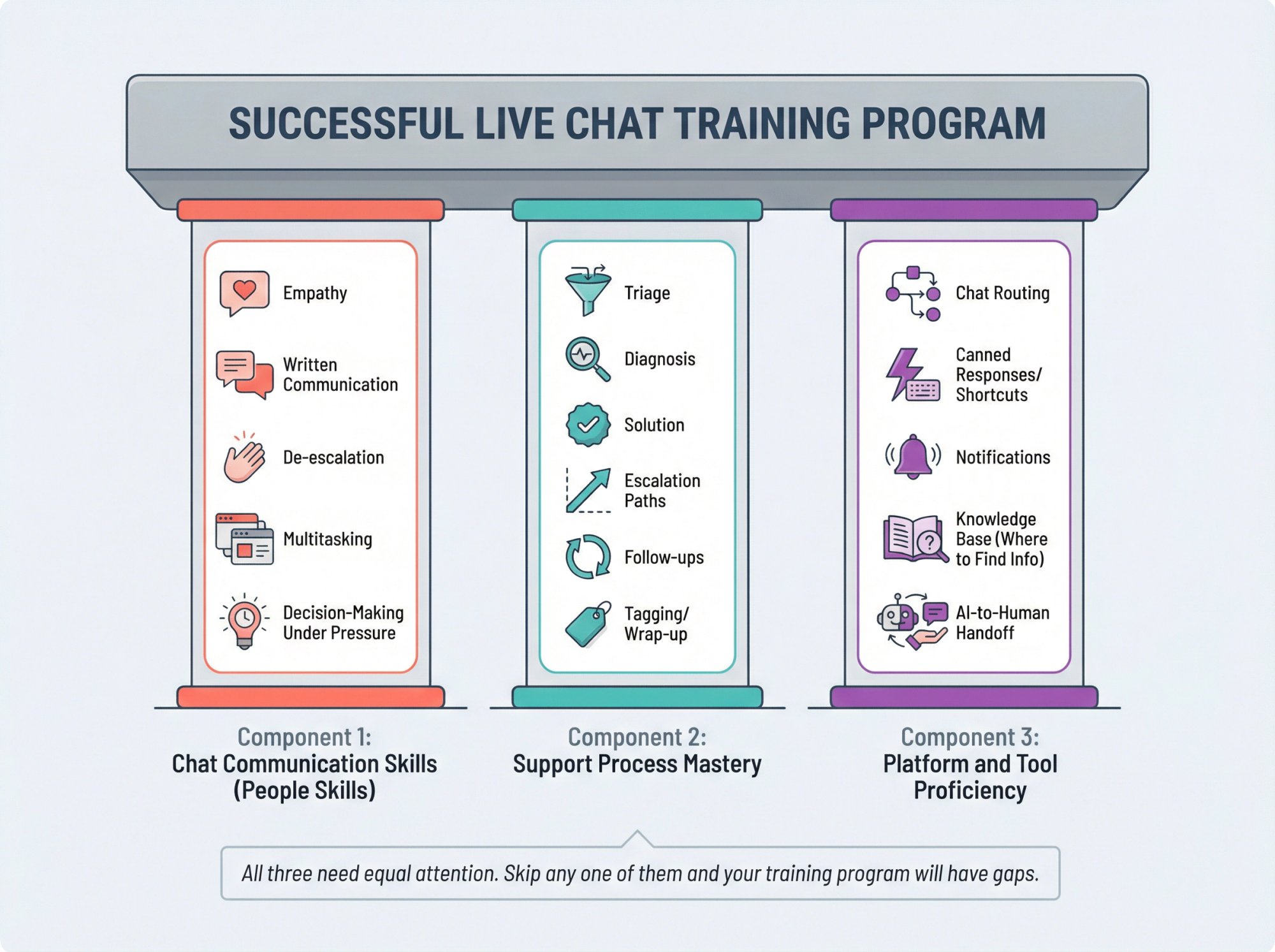
The training framework that actually works has three components:
Component 1: Chat Communication Skills (People Skills)
This covers written communication, empathy, de-escalation, multitasking, and decision-making under pressure. These are the soft skills that separate great chat agents from mediocre ones.
Component 2: Support Process Mastery
Your team needs to understand the full workflow: triage, diagnosis, solution, escalation paths, follow-ups, tagging, and wrap-up procedures. Consistency comes from having a repeatable process everyone follows.
Component 3: Platform and Tool Proficiency
This is where they learn your specific tools: how chats get routed, how to use canned responses, how notifications work, where to find information, and how AI hands off to humans.
All three need equal attention. Skip any one of them and your training program will have gaps.
Before Training: Live Chat Setup Checklist for Managers
Before you train a single agent, make these decisions:
Define what chat is for. Is it support only? Sales? Both? Will you handle technical troubleshooting or just basic questions? What about after-hours coverage? Be specific about what's in scope and what should be escalated or redirected to other channels.
Set clear service levels. Pick 3-5 metrics you'll train to and measure consistently:
• First response time (FRT)
• Average handle time
• Resolution quality score (from QA reviews)
• Escalation rate
• Customer satisfaction (CSAT)
Build your escalation map. Define who handles what:
| Level | Who Handles | What They Handle |
|---|---|---|
| Level 1 | Frontline agents | Standard inquiries, basic troubleshooting, common questions |
| Level 2 | Technical specialists or billing experts | Complex technical issues, billing disputes, specialized problems |
| Sales team | Sales representatives | Qualified leads, purchase inquiries, product demonstrations |
| Management | Team leads and managers | High-stakes complaints, escalations, policy exceptions |
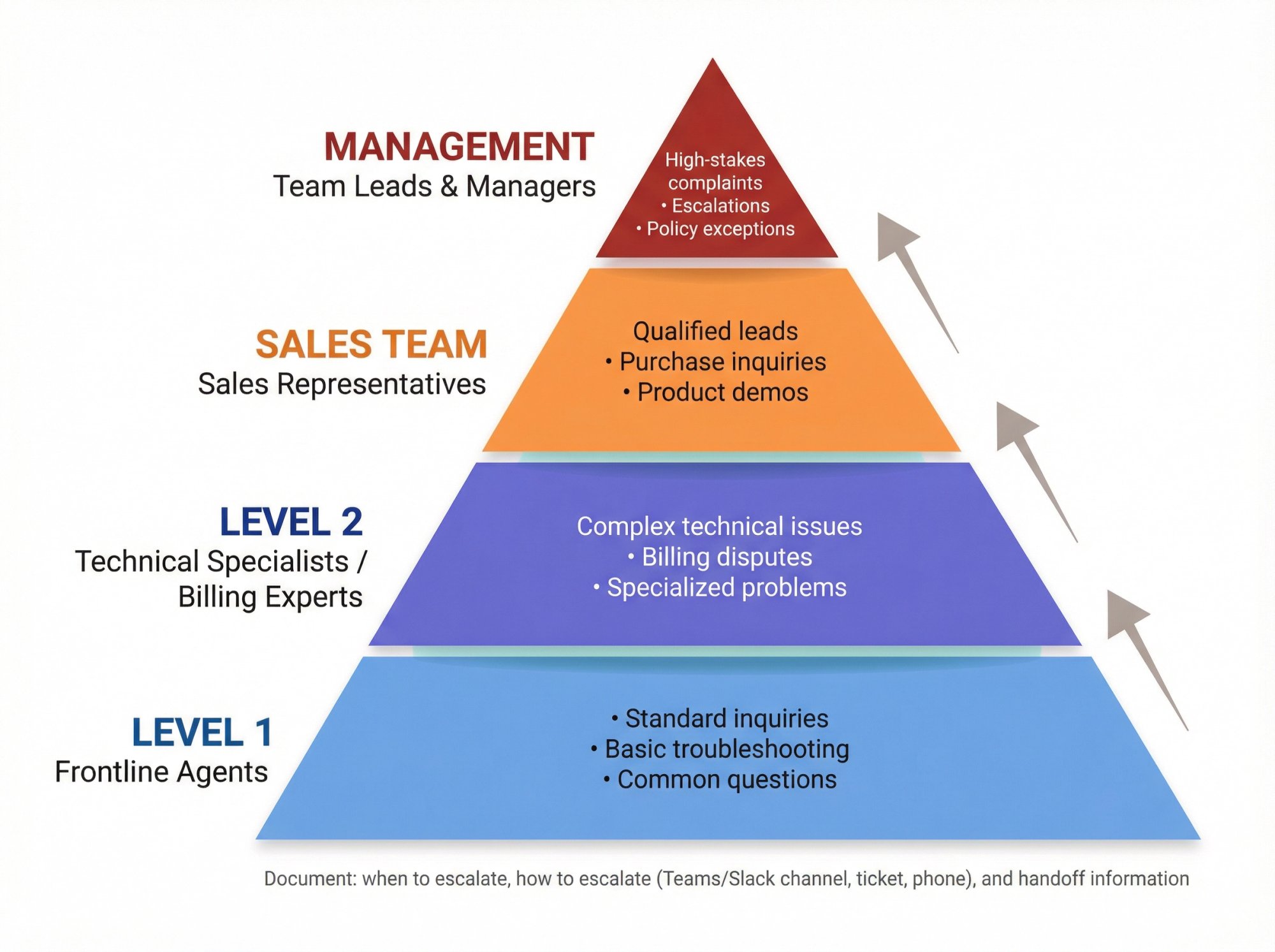
Document the exact process: when to escalate, how to escalate (Teams channel, ticket system, phone call), and what information to provide during handoff.
Create a training environment. Research emphasizes that a realistic practice environment is essential. Agents need to make mistakes in simulation, not with real customers.
If you're using Social Intents with Microsoft Teams or Slack, you can set up test chats easily. The setup guides walk through previewing and sending test messages, allowing new agents to practice the full workflow without pressure.
How to Teach Live Chat Fundamentals (Foundation Training Days 1-2)
Module 1: Core Live Chat Behaviors Every Agent Must Master
Core behaviors every agent must master:
Acknowledge quickly. Even if you don't have the answer yet, let the customer know you're on it. A simple "Got it, give me 1 minute to check that" works wonders. This holds their attention and reduces abandonment.
One question per message. Asking three things at once confuses customers and slows diagnosis. Break it down: ask, wait for reply, ask the next thing.
Write short, scannable messages. Use bullet points for lists. Number steps clearly. Break long explanations into digestible chunks. Remember: people skim chat messages, they don't read novels.
Never make customers repeat themselves. If they already told you their order number, don't ask again. Summarize what you understand to confirm you're on the same page.
Exercise: Rewrite for Chat. Take a long email response and convert it to chat format. Use the K.I.S.S. exercise (Keep It Simple Serviceperson) to practice simplifying complex answers into clear, short, readable messages.
Module 2: How to Show Empathy in Text-Based Chat Support
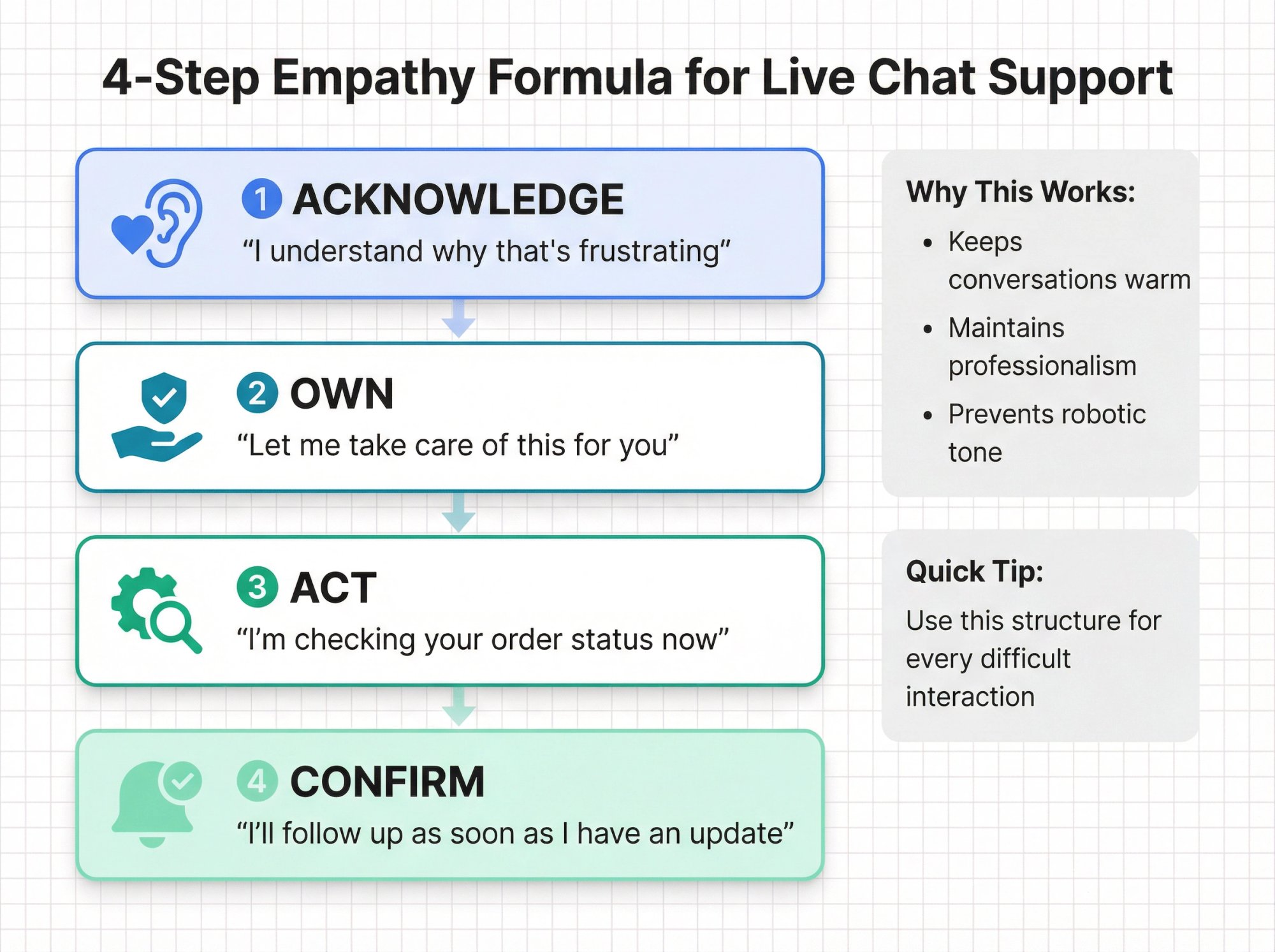
Chat feels casual, but it still represents your brand. Train agents on this simple tone formula:
① Acknowledge → "I understand why that's frustrating"
② Own → "Let me take care of this for you"
③ Act → "I'm checking your order status now"
④ Confirm → "I'll follow up as soon as I have an update"
This structure keeps conversations warm and professional without sounding robotic.
Exercise: "Write in the Warmth." This training drill teaches agents to convert dry, technical responses into warm, human messages. Here's an example:
Before: "Your account is not activated."
After: "I can help get your account activated right away. Give me just a moment to process that for you."
The difference? The second version shows empathy and action, not just facts.
Module 3: How to Diagnose Customer Problems Quickly in Chat
Most bad chat experiences happen because agents answer the wrong problem. They jump to solutions before fully understanding the issue.
Exercise: "Be a Detective." Show agents only the customer's first message and ask:
• What's the real problem?
• What information is missing?
• What's the best next question to ask?
This trains them to think before typing. These diagnostic exercises are excellent for building this skill.
Live Chat Workflow Training: What Every Chat Should Follow (Days 3-5)
Now you're teaching the specific way your team runs chat.
The Standard Chat Workflow Every Agent Should Know
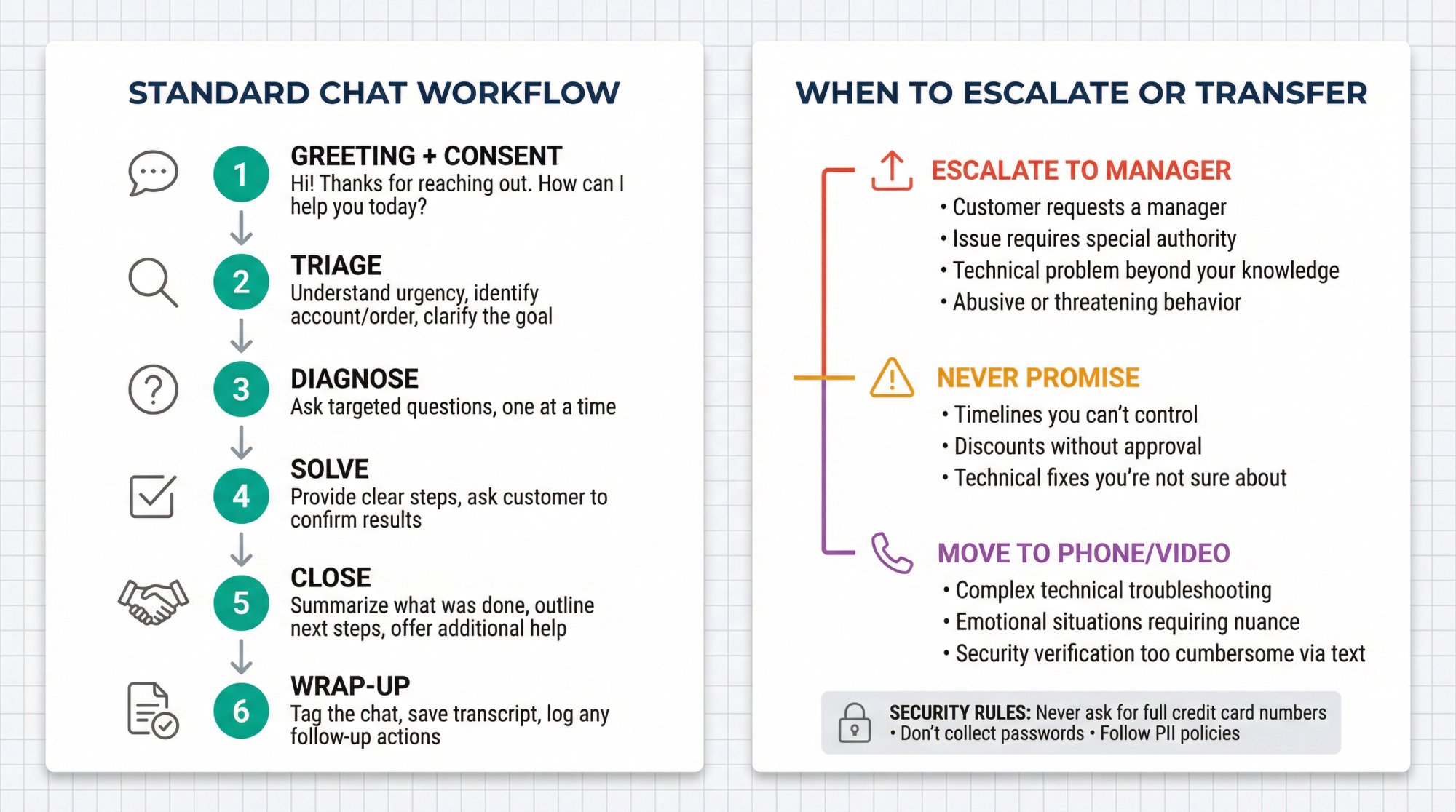
Train this like a flight checklist. Every chat should follow these steps:
① Greeting + consent
"Hi! Thanks for reaching out. How can I help you today?"
② Triage
Understand urgency, identify account/order if needed, clarify the goal
③ Diagnose
Ask targeted questions, one at a time
④ Solve
Provide clear steps, ask customer to confirm results
⑤ Close
Summarize what was done, outline next steps, offer additional help
⑥ Wrap-up
Tag the chat, save transcript, log any follow-up actions
This consistency makes QA easier and ensures nothing falls through the cracks.
When to Escalate, Transfer, or Move Off Chat
These rules protect both customers and agents:
When to escalate:
• Customer requests a manager
• Issue requires special authority (refunds, exceptions)
• Technical problem beyond your knowledge
• Abusive or threatening behavior
What not to promise:
• Timelines you can't control
• Discounts without approval
• Technical fixes you're not sure about
When to move to phone or video:
• Complex technical troubleshooting
• Emotional situations requiring nuanced conversation
• Security verification that's too cumbersome via text
Security rules:
• Never ask for full credit card numbers
• Don't collect passwords
• Follow PII handling policies strictly
If you're using Social Intents, agents have built-in commands like /tag, /transcript, and /block for managing chats efficiently. Train them to use these tools consistently.
How to Run Realistic Live Chat Simulations (Days 6-10)
This is where confidence gets built. Theory is useless without practice.
Running a "Chat Lab"
Create 20-30 scenarios that match your reality:
• "Where's my order?" (with various complications)
• "Does your product integrate with X?"
• Billing dispute or refund request
• Bug report with incomplete information
• Angry customer demanding escalation
• Language barrier or translation challenges
• VIP customer needing priority handling
Role-play frameworks are useful for structuring these scenarios. Industry research highlights the importance of including "agent + AI coworker" workflows in modern simulations.
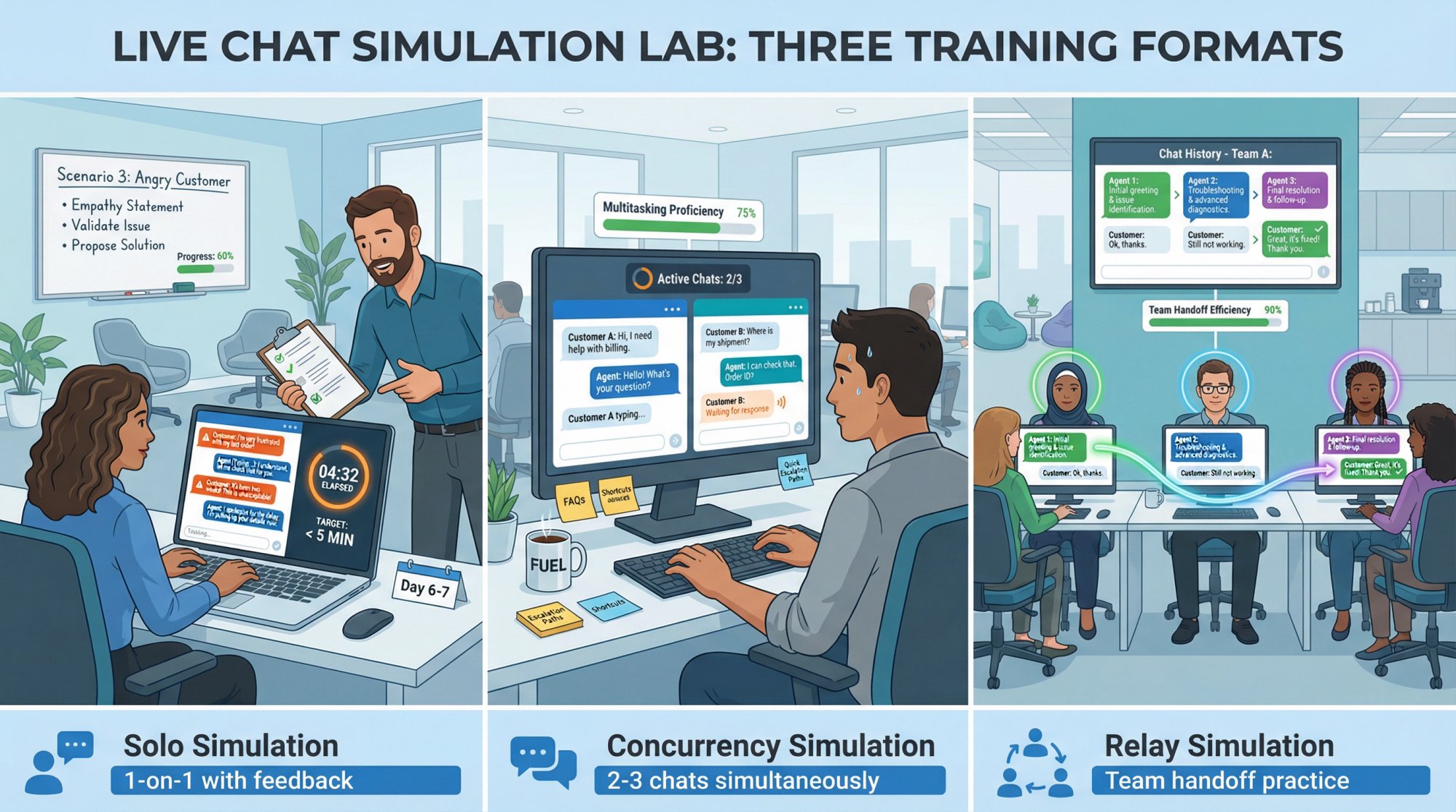
Three Simulation Formats
Solo simulation
One agent, one customer (trainer playing customer role), manager observes and provides feedback
Concurrency simulation
Agent handles 2-3 chats simultaneously; tests pacing, multitasking, and holding messages
Relay simulation
Multiple agents take turns replying in one thread; forces clarity, consistency, and smooth handoffs
Practical exercises include "Mystery Chat" (hidden twist like slang or multiple issues) and "Chat Relay" for teamwork practice.
Training the "Holding Message" Skill
Agents need permission to pause conversations without losing customers:
"I'm here. Give me 2 minutes to confirm those details."
"Checking with our billing team now. I'll have an answer for you in about 3 minutes."
This protects CSAT when resolution takes longer, and it prevents abandonment.
How to Train Teams or Slack for Live Chat Support
If your team lives in Microsoft Teams or Slack already, you've got a massive training advantage: they don't need to learn a new helpdesk UI. Social Intents is built around this principle.
Microsoft Teams Training Checklist
① Confirm routing and tabs are correct
Chats must route to the right Teams channel. Make sure the Live Chat tab is added to each Team/Channel where you want chats to appear. Note: the channel must be Public because Teams doesn't allow bot interaction in private channels.
② Turn on notifications
Teams channel notifications are often off by default. Train agents to enable "Banner and feed" notifications so they don't miss incoming chats.
③ Set up availability rules
Use a schedule (recommended) so chat follows office hours automatically. Alternatively, agents can manually toggle online/offline status, but that's less reliable.
④ Teach where settings live
Show agents where to configure:
→ Online schedule
→ Canned responses (shortcuts)
→ Chat targeting rules (which pages trigger the widget)
→ Customization options
⑤ Use canned responses from Teams
Speed + consistency = canned responses. Train agents to use shortcuts for common answers but customize them to stay personal. You don't want responses feeling robotic.
Slack Training Checklist
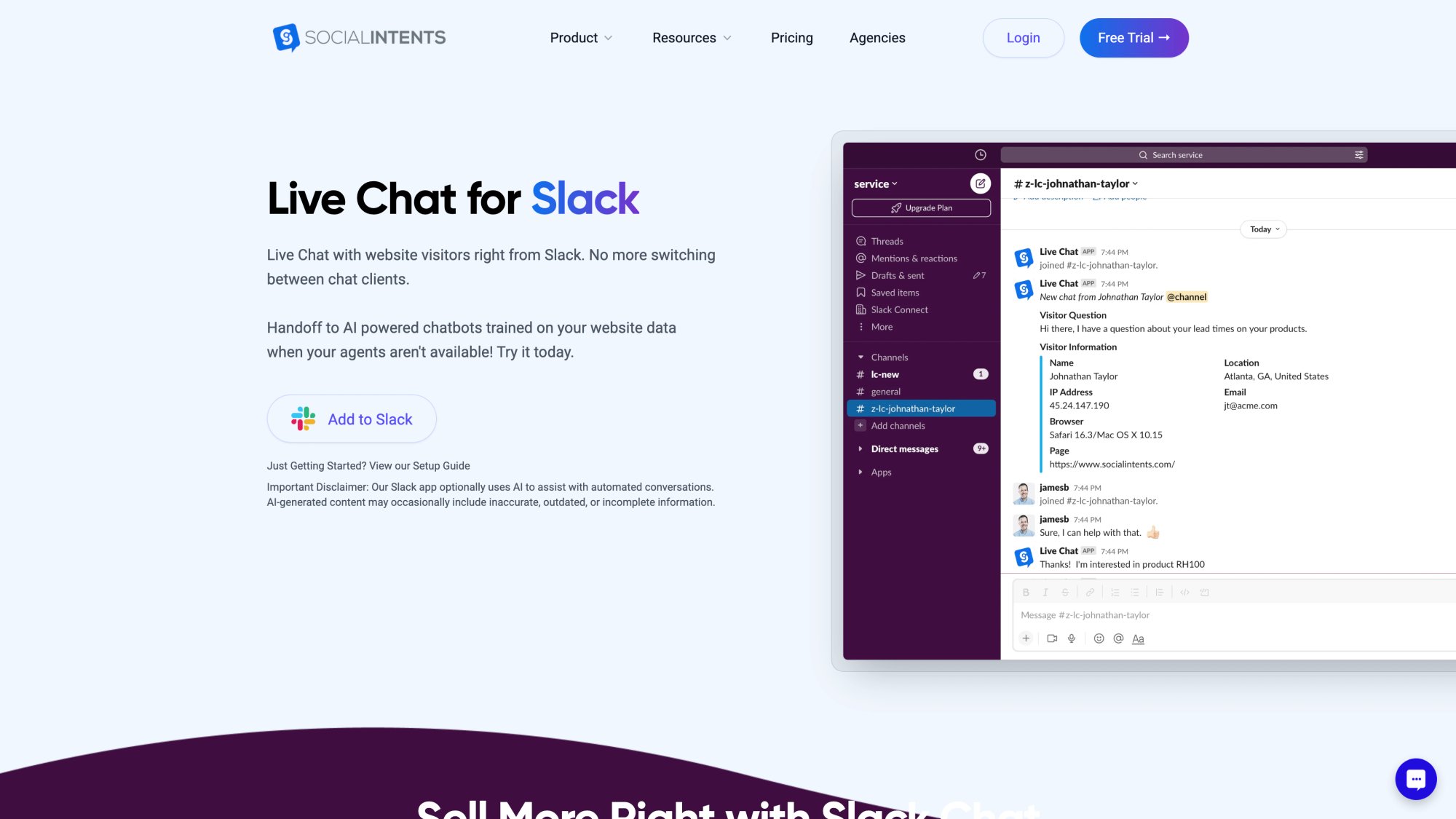
① Teach the Slack-native workflow
Agents can answer chats directly from Slack on mobile or desktop. This is huge for coverage and fast replies, especially when team members are on the go.
② Teach slash commands
Key commands to train:
→ /livechat online and /livechat offline (override office hours)
→ /livechat end (close a chat)
③ Channel hygiene rules
Keep a dedicated inbound channel. Use consistent tagging. Follow your handoff process when transferring chats.
How to Train Live Chat Agents for Multilingual Support
If you serve global customers, multilingual support is mandatory. Social Intents supports real-time translation powered by the Google Translate API.
Train agents to:
• Confirm meaning if the situation is sensitive. Machine translation isn't perfect. When stakes are high, clarify understanding.
• Use short sentences. Translation quality improves with simpler structure.
• Avoid sarcasm, idioms, and complex formatting. These rarely translate well.
• Escalate legal, medical, or regulatory conversations. Don't rely on automated translation for high-stakes wording.
How to Train AI Chatbot Handoffs to Human Agents
In 2026, live chat training is incomplete without AI policy and workflow training.
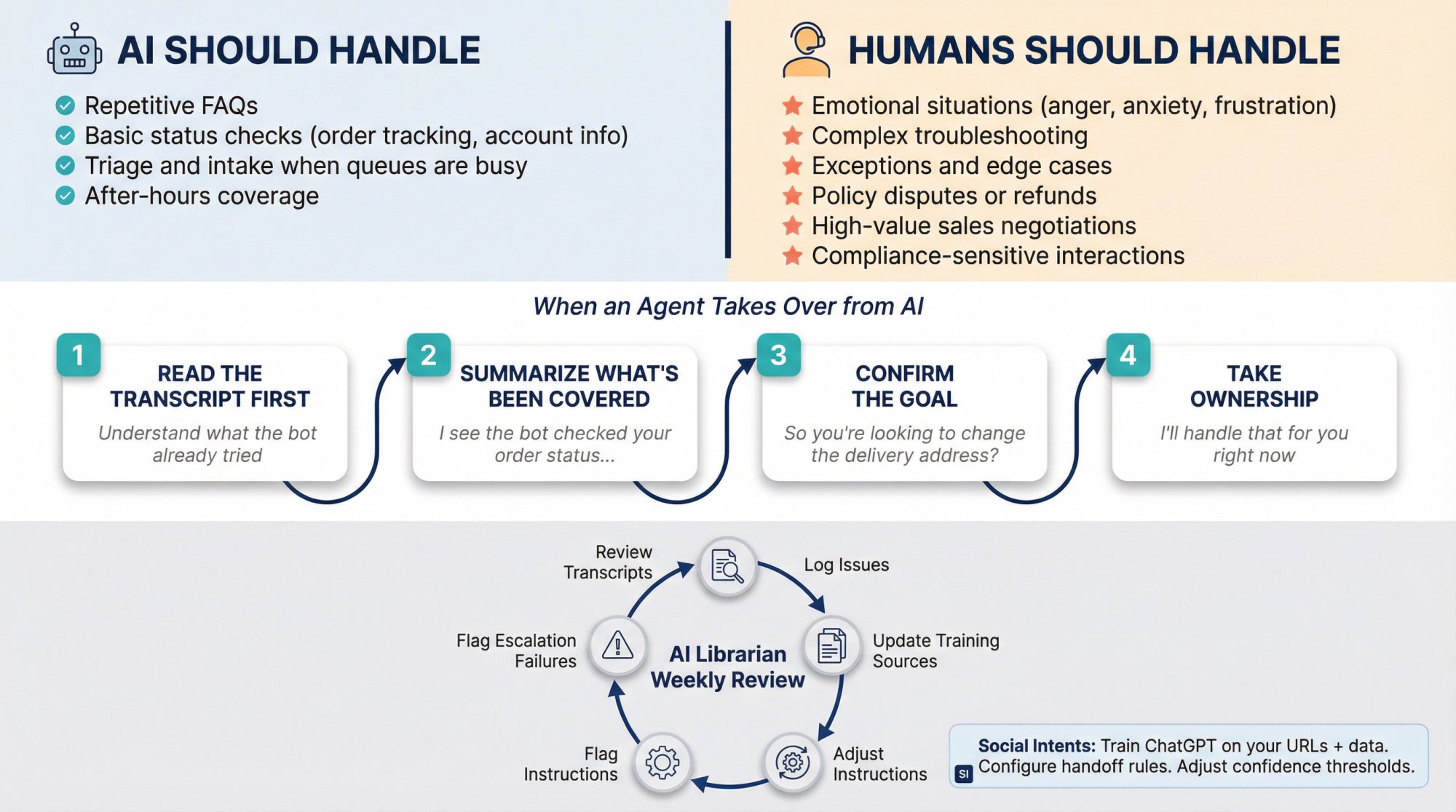
Why This Matters Now
Industry benchmarks show that 73.8% of chats are now handled by AI. Research indicates 66% of contact center leaders support AI applications, with 27% expecting major impact in the next five years.
Your agents need to work with AI, not against it.
The AI Training Decision Tree
Teach agents this simple rule:
AI should handle:
• Repetitive FAQs
• Basic status checks (order tracking, account info) when data is reliable
• Triage and intake when queues are busy
• After-hours coverage
Humans should handle:
• Emotional situations (anger, anxiety, frustration)
• Complex troubleshooting
• Exceptions and edge cases
• Policy disputes or refunds
• High-value sales negotiations
• Compliance-sensitive interactions
How Social Intents Supports Hybrid Coverage
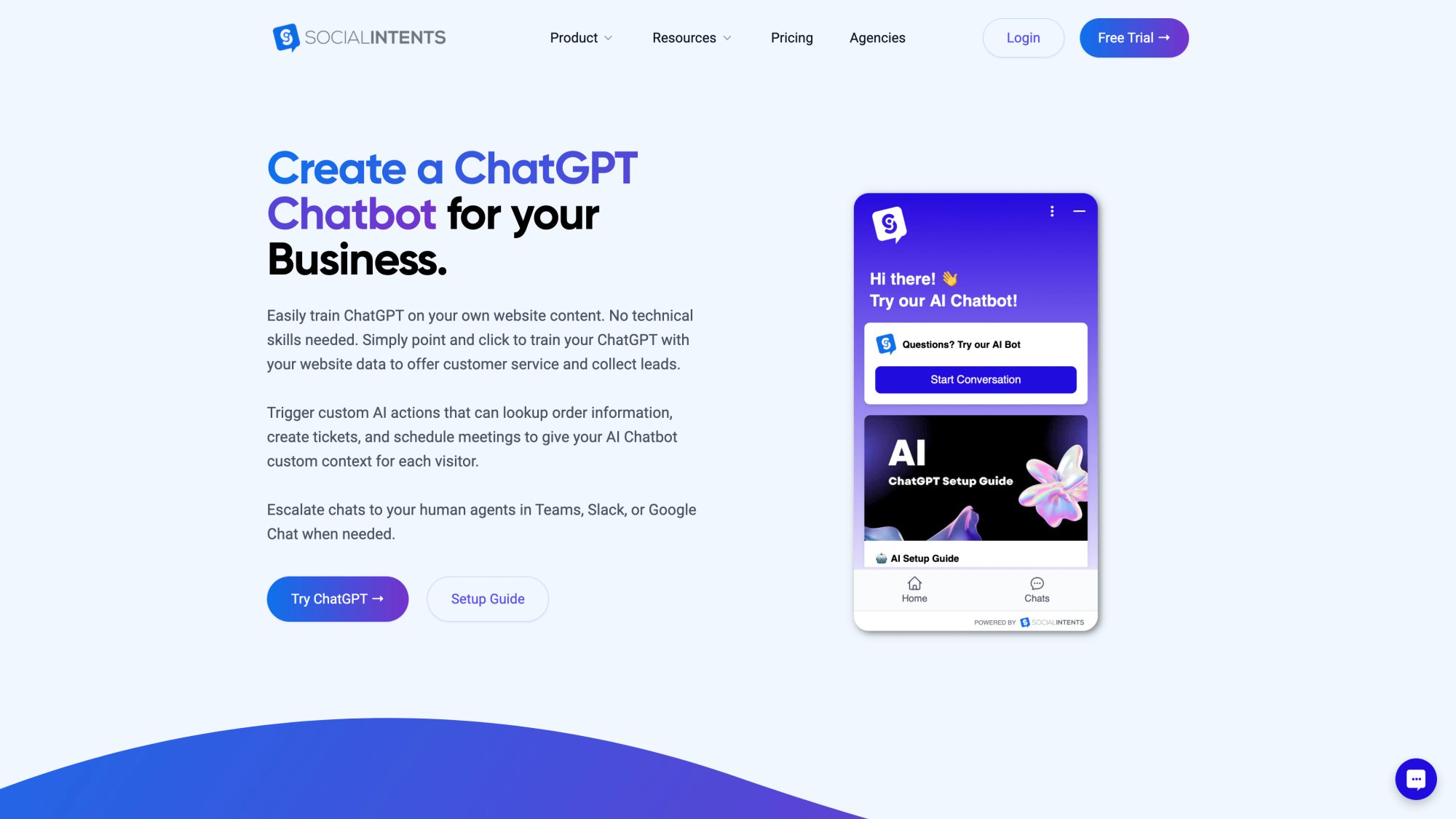
Social Intents' ChatGPT chatbot settings let you configure:
• Add chatbot when chat is offline or missed
• "Missed, drop when pickup" so AI hands back to humans when an agent joins
This ensures customers always get help, even outside business hours, but humans take over when available.
Train AI Continuity
When an agent takes over from AI, train them to:
① Read the transcript first (understand what the bot already tried)
② Summarize what's been covered ("I see the bot checked your order status…")
③ Confirm the goal ("So you're looking to change the delivery address?")
④ Take ownership ("I'll handle that for you right now")
Never blame the bot or apologize for AI. Just continue smoothly.
Improve AI Over Time
Assign an "AI librarian" weekly. Their job:
• Review chatbot transcripts
• Log missing content or wrong answers
• Add/update training sources
• Adjust instruction phrases
• Flag escalation failures
Social Intents documentation explains how to train ChatGPT on your URLs and data, and how to use instruction phrases to improve response quality. This continuous improvement loop is essential.
How to Build a Live Chat QA and Coaching System
Training isn't a one-time event. It's a continuous cycle.
Build a Lightweight Chat QA Scorecard
You don't need 40 criteria. You need 5-8 weighted categories that reflect your goals.
| Category | Points | What It Measures |
|---|---|---|
| Speed & expectation setting | 15 | Acknowledges quickly; sets timing expectations; uses hold messages |
| Diagnosis quality | 15 | Clarifies goal; asks smart questions; doesn't assume |
| Accuracy & completeness | 20 | Correct info; correct process; no risky promises |
| Tone & empathy | 15 | Warmth; respect; mirrors customer tone appropriately |
| Clarity & formatting | 10 | Short messages; bullets/steps; easy to scan |
| Ownership & next steps | 15 | Clear action taken; confirms resolution; outlines next steps |
| Compliance & security | 10 | No sensitive data collection; follows policy |
Frequency:
• Score 3-5 chats per agent per week during the first month
• Calibrate QA scoring weekly so "good" stays consistent
• Move to 2 chats per agent per week once stable
Use Drills to Coach the Scorecard
Pull from practical training exercises:
• Be a Detective → improves diagnosis
• Write in the Warmth → improves tone
• K.I.S.S. → improves clarity
• Minefield → prevents triggering language like "our policy doesn't allow…"
Complete 14-Day Live Chat Training Bootcamp
Use this plan to train new teams or retrain existing ones.
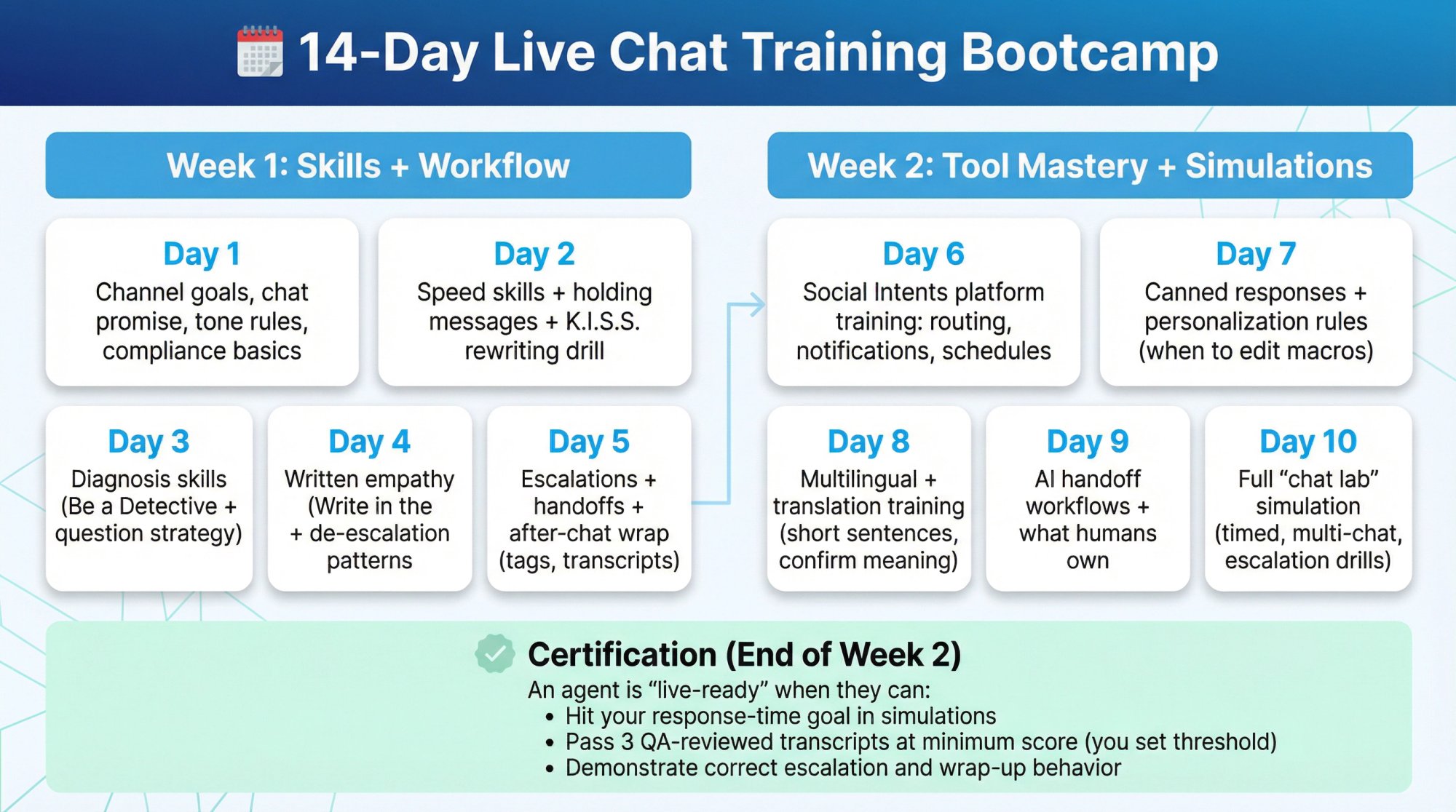
Week 1: Skills + Workflow
| Day | Focus |
|---|---|
| Day 1 | Channel goals, chat promise, tone rules, compliance basics |
| Day 2 | Speed skills + holding messages + K.I.S.S. rewriting drill |
| Day 3 | Diagnosis skills (Be a Detective + question strategy) |
| Day 4 | Written empathy (Write in the Warmth) + de-escalation patterns |
| Day 5 | Escalations + handoffs + after-chat wrap (tags, transcripts) |
Week 2: Tool Mastery + Simulations
| Day | Focus |
|---|---|
| Day 6 | Social Intents platform training: routing, notifications, schedules |
| Day 7 | Canned responses + personalization rules (when to edit macros) |
| Day 8 | Multilingual + translation training (short sentences, confirm meaning) |
| Day 9 | AI handoff workflows + what humans own |
| Day 10 | Full "chat lab" simulation (timed, multi-chat, escalation drills) |
Certification (End of Week 2)
An agent is "live-ready" when they can:
• Hit your response-time goal in simulations
• Pass 3 QA-reviewed transcripts at minimum score (you set threshold)
• Demonstrate correct escalation and wrap-up behavior
Copy/Paste Script Pack (Starter Set)
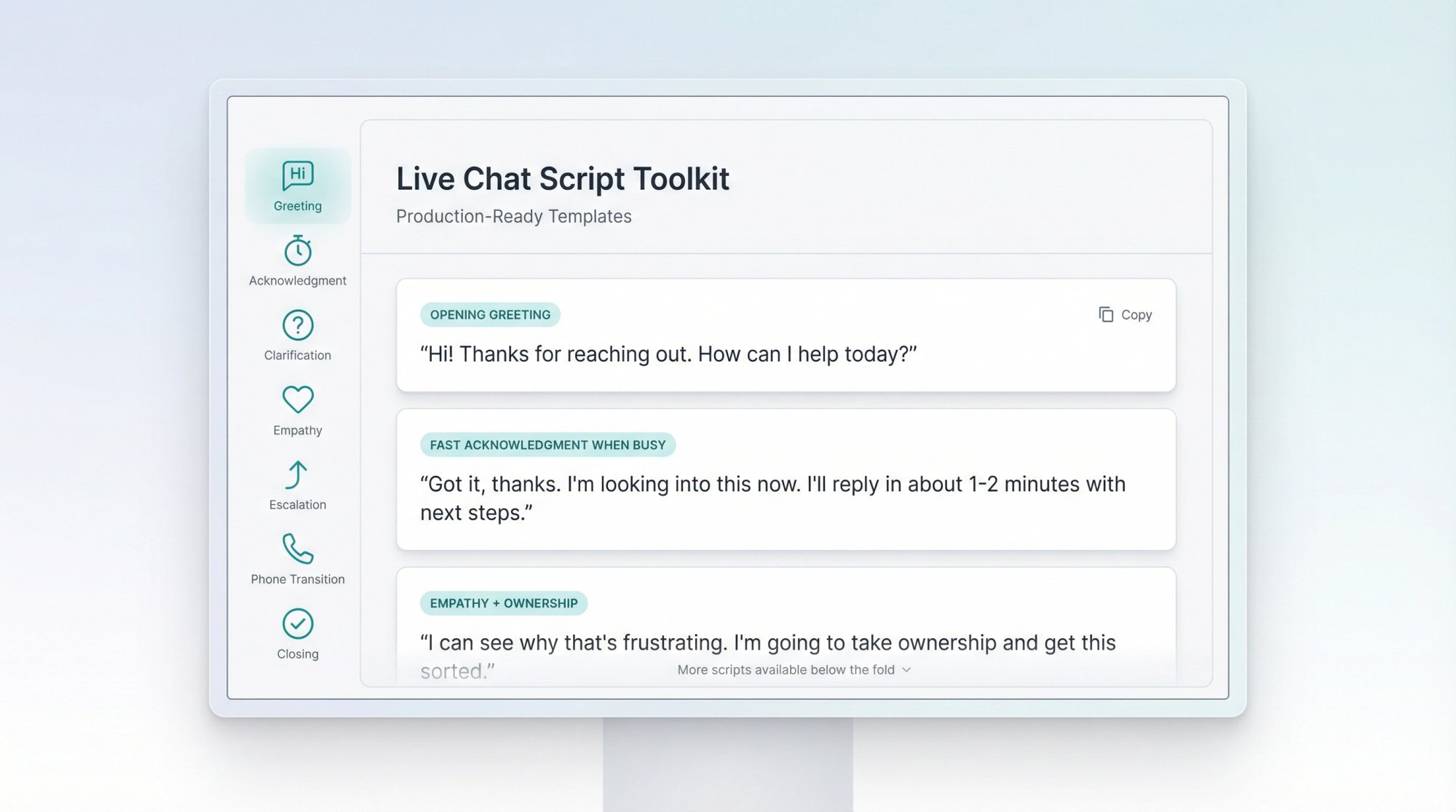
Customize these in your brand voice:
Opening greeting
"Hi! Thanks for reaching out. How can I help today?"
Fast acknowledgment when busy
"Got it, thanks. I'm looking into this now. I'll reply in about 1-2 minutes with next steps."
Clarifying question (one at a time)
"To make sure I'm solving the right thing: are you trying to ___ or ___?"
Empathy + ownership
"I can see why that's frustrating. I'm going to take ownership and get this sorted."
Escalation to specialist
"I want to get this exactly right. I'm bringing in a specialist now. Please hang tight for a moment."
Move to meeting/phone
"This may be faster if we hop on a quick call. If you're open to it, I can share a meeting link."
Closing summary
"Quick recap: we did ___, and next you'll see ___. If anything looks off, reply here and I'll help."
How to Handle Difficult Chats and De-Escalate Angry Customers
Every agent will eventually face an angry customer. How they handle it determines whether you keep or lose that customer.
Key Principles for Difficult Interactions
Stay calm and professional. The customer is venting about the situation, not attacking you personally. Take a breath before responding. Research shows that roughly half of consumers will abandon a company after a single bad service experience. Your composure matters.
Listen and empathize first. Before jumping to solutions, acknowledge feelings:
"I'm really sorry for the delay. I understand how frustrating this must be for you."
This defuses tension and makes customers more receptive to your next message.
Apologize sincerely and own the issue. If the company made a mistake, accept responsibility:
"I apologize for the inconvenience we caused you. Here's what I'm going to do: I'll overnight ship the correct item at no charge, and you'll get tracking within an hour. How does that sound?"
This response apologizes, states the remedy, and confirms it addresses their needs.
Stay positive and focus on what can be done. Instead of:
"I can't refund you because it's past 30 days"
Try:
"While I can't issue a refund after 30 days, I can offer you a free exchange or 20% off a future order. Would either of those work?"
Know when to escalate. Sometimes customers demand management, or issues exceed your authority. Train agents to escalate smoothly:
"I'm bringing in my supervisor who can help further"
Follow up when necessary. For major issues, a proactive check-in later (by email or chat) can turn an upset customer into a loyal one.
Career Path and Retention (The Missing Piece)
Industry research shows that career growth is a major retention factor. 50% of respondents said agents left to seek better opportunities, and only 41% had programs to prepare agents for leadership.
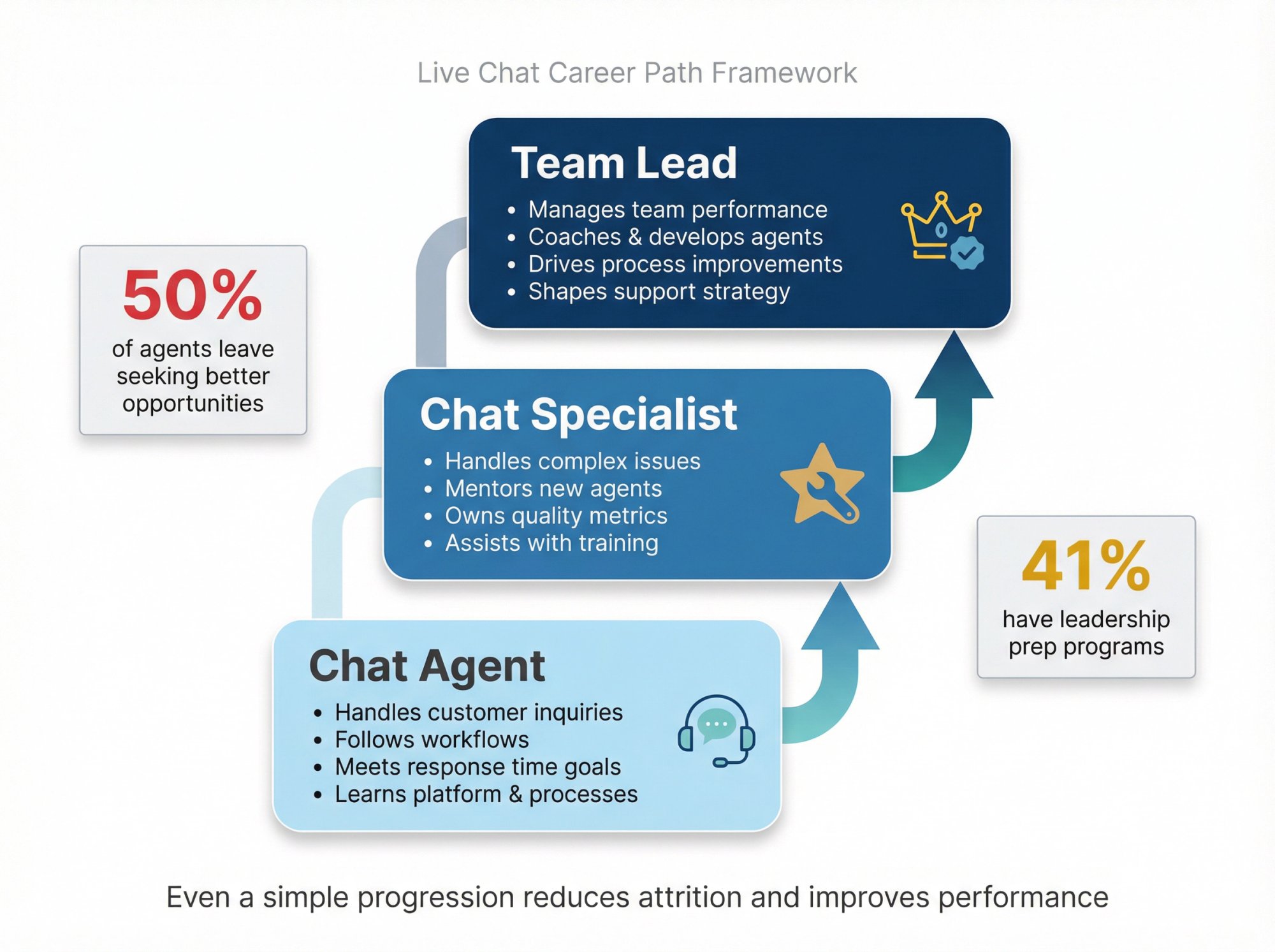
Even a simple progression helps:
Chat Agent → Chat Specialist → Team Lead
This ladder reduces attrition and improves performance because agents see a future.
Operational Habits That Keep Chat Great
Most guides stop at "be friendly and fast." The real differentiator is operations.
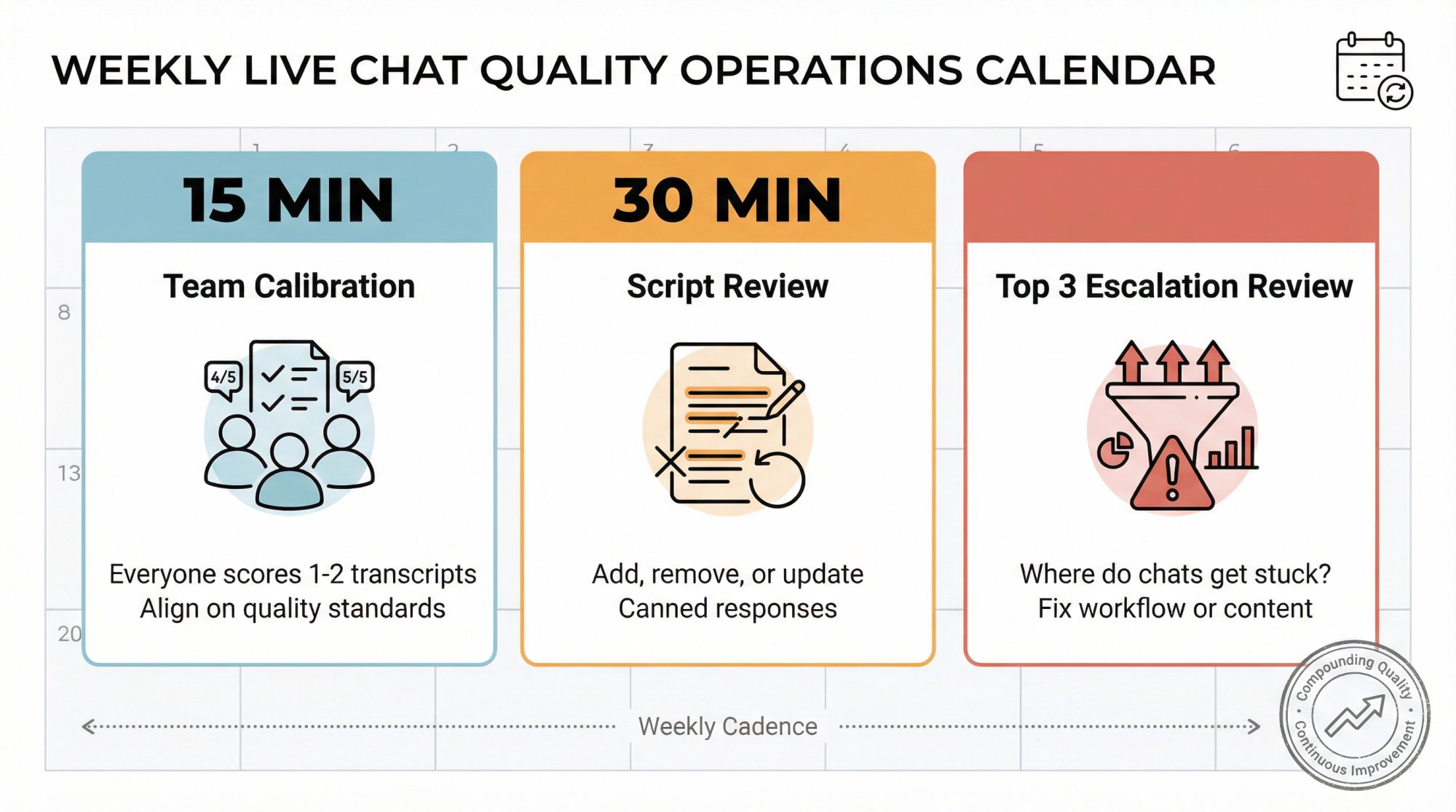
Weekly Ops Cadence
15-minute calibration: Everyone scores the same 1-2 transcripts and aligns on what "good" looks like
30-minute script review: Add, remove, or update canned responses
Top 3 escalation review: Where do chats get stuck? Fix workflow or content
These habits compound over time and keep your team sharp.
If You Want This To Be Truly Valuable
Don't just read this guide and move on. Turn it into an internal operating system:
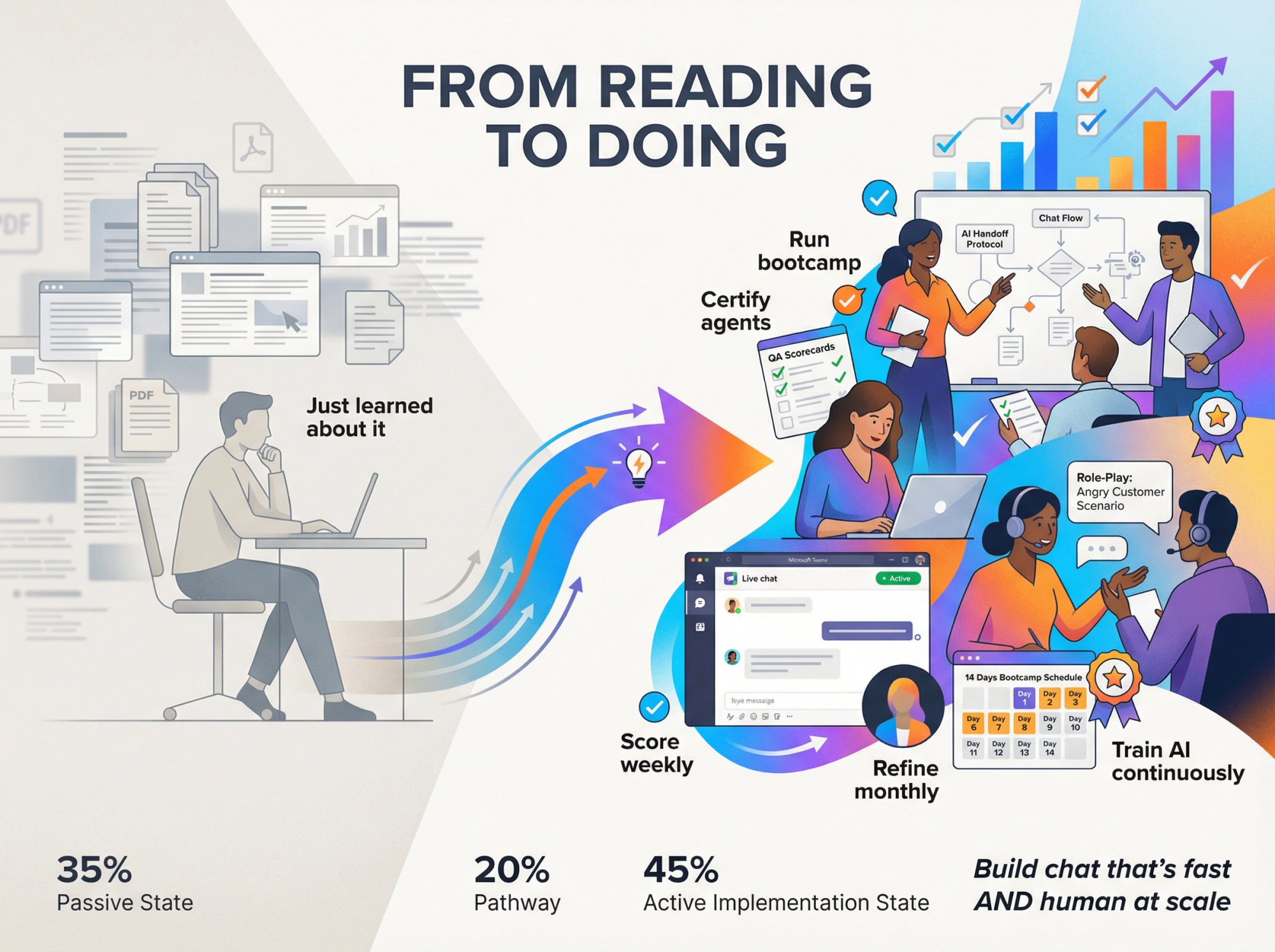
• Run the 14-day bootcamp
• Certify agents
• Score chats weekly
• Refine scripts monthly
• Treat AI training as ongoing content operations
That's how you build live chat that's fast and genuinely human at scale.
Why Social Intents Makes Training Easier
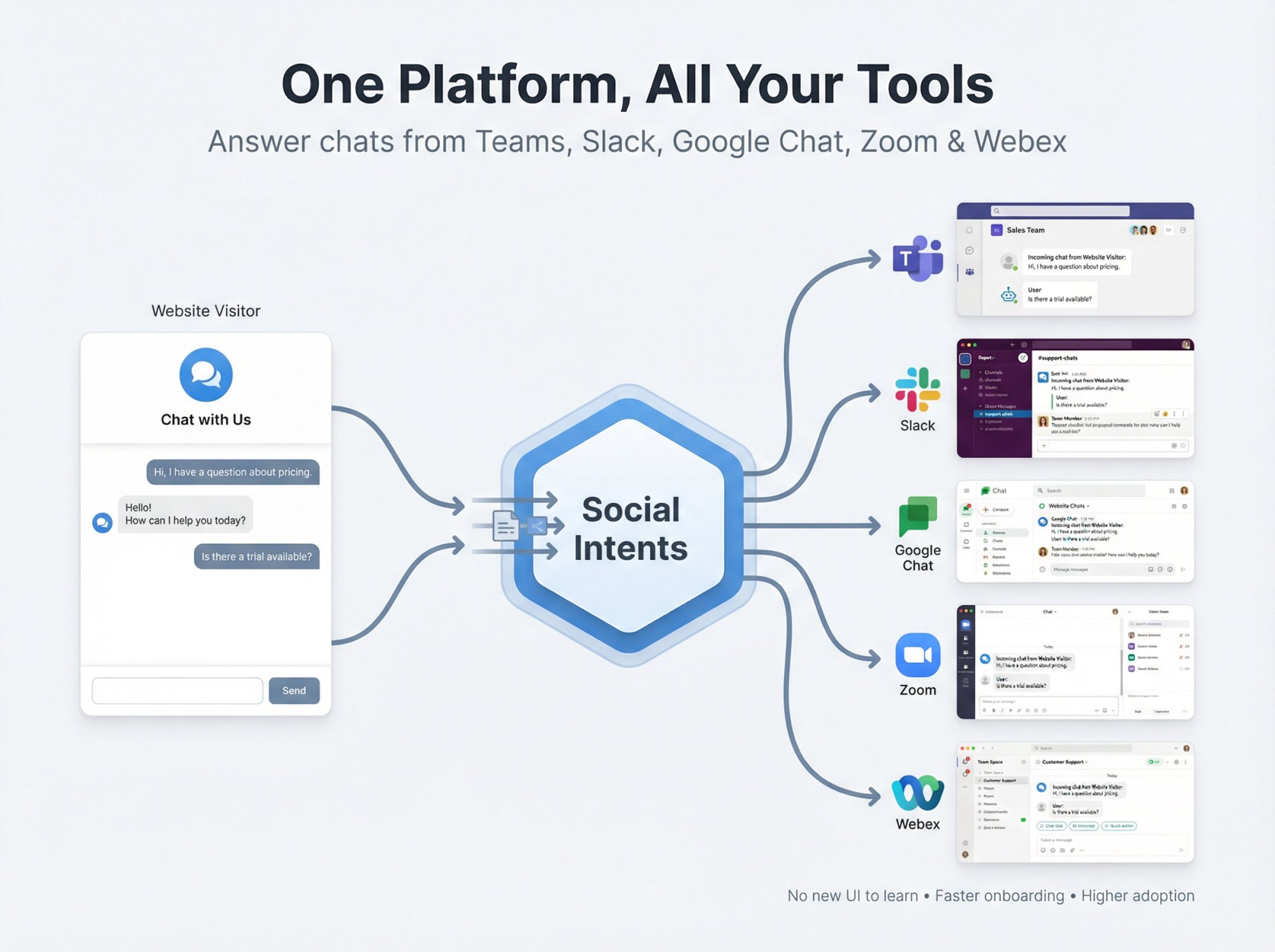
Training live chat agents is challenging. But if you're using Social Intents, you've eliminated one of the biggest hurdles: learning a new helpdesk UI.
Your team answers chats from Microsoft Teams, Slack, Google Chat, Zoom, or Webex. They're already comfortable in these tools. That means:
• Shorter onboarding time (they know the interface)
• Higher adoption rates (no resistance to "yet another tool")
• Faster responses (notifications come through their existing workflow)
Plus, Social Intents includes:
• Unlimited agents (from Basic plan up) so you can scale without per-agent fees
• AI chatbots with handoff to handle FAQs and escalate to humans when needed
• Real-time translation for multilingual support
• Canned responses and agent commands for efficiency
• Custom AI Actions to integrate with third-party tools (order status, ticket creation, shipping updates)
→ Start your free 14-day trial of Social Intents
Frequently Asked Questions
How long does it take to train a live chat agent?
For most teams, a well-structured 14-day bootcamp (like the one outlined above) gets agents live-ready. Days 1-5 cover fundamentals and workflow, Days 6-10 focus on platform mastery and simulations, and certification happens at the end. After that, ongoing coaching and QA continue indefinitely to maintain quality.
What's the most important skill for live chat agents?
Written empathy. Live chat is 100% text-based, so agents need to convey warmth, understanding, and professionalism through words alone. Technical knowledge matters, but if agents can't build rapport through writing, customers will feel disconnected.
How many chats can one agent handle at once?
It depends on chat complexity and agent experience. Most teams start with 1-2 concurrent chats for new agents, then scale to 2-3 for experienced agents. The key is maintaining quality. If CSAT drops or handle time spikes, you're over capacity.
Should we use AI chatbots or human agents?
Both. AI chatbots handle repetitive FAQs, after-hours coverage, and triage. Humans handle complex issues, emotional situations, and anything requiring judgment or empathy. The best approach is hybrid: AI deflects simple questions, escalates complicated ones, and humans take over seamlessly.
How do we measure live chat training success?
Track these metrics:
• First response time (under 60 seconds is ideal)
• Customer satisfaction (CSAT) score (aim for 85%+)
• First contact resolution rate
• QA scorecard results
• Agent confidence (via surveys or 1-on-1 check-ins)
If these improve post-training, your program is working.
What if agents can't keep up with chat volume?
Three options:
Add more agents
Implement AI chatbots to deflect simple questions
Adjust online hours to match staffing capacity
Tools like Social Intents let you configure AI to handle overflow or after-hours chats automatically.
How often should we update training materials?
Monthly reviews at minimum. Update training whenever:
• Products or features change
• Policies update (pricing, returns, etc.)
• New common questions emerge
• QA reveals knowledge gaps
Assign someone to own documentation and keep it current.
What's the best way to handle rude or abusive customers in chat?
Train agents to:
Stay calm and professional (don't take it personally)
Acknowledge their frustration without getting defensive
Focus on solving the problem
Escalate if behavior crosses the line (threats, harassment)
Use block/end chat tools if necessary
If you're using Social Intents, agents have commands like /block to manage abusive behavior.