

If you're trying to decide between an AI chatbot and a rule-based chatbot for your business, you're probably asking the wrong question.
The real question isn't "which type should I choose?"
It's "what am I actually trying to solve?"
Most blog posts won't tell you this: the "AI vs rule-based" debate is mostly theoretical. In practice, the winning approach is almost always a hybrid of both.
But to get there, you need to understand what each type can (and can't) do. We'll break down the real differences, show you when each approach makes sense, and give you a production-ready architecture you can actually use.
What Is the Difference Between AI Chatbots and Rule-Based Chatbots?
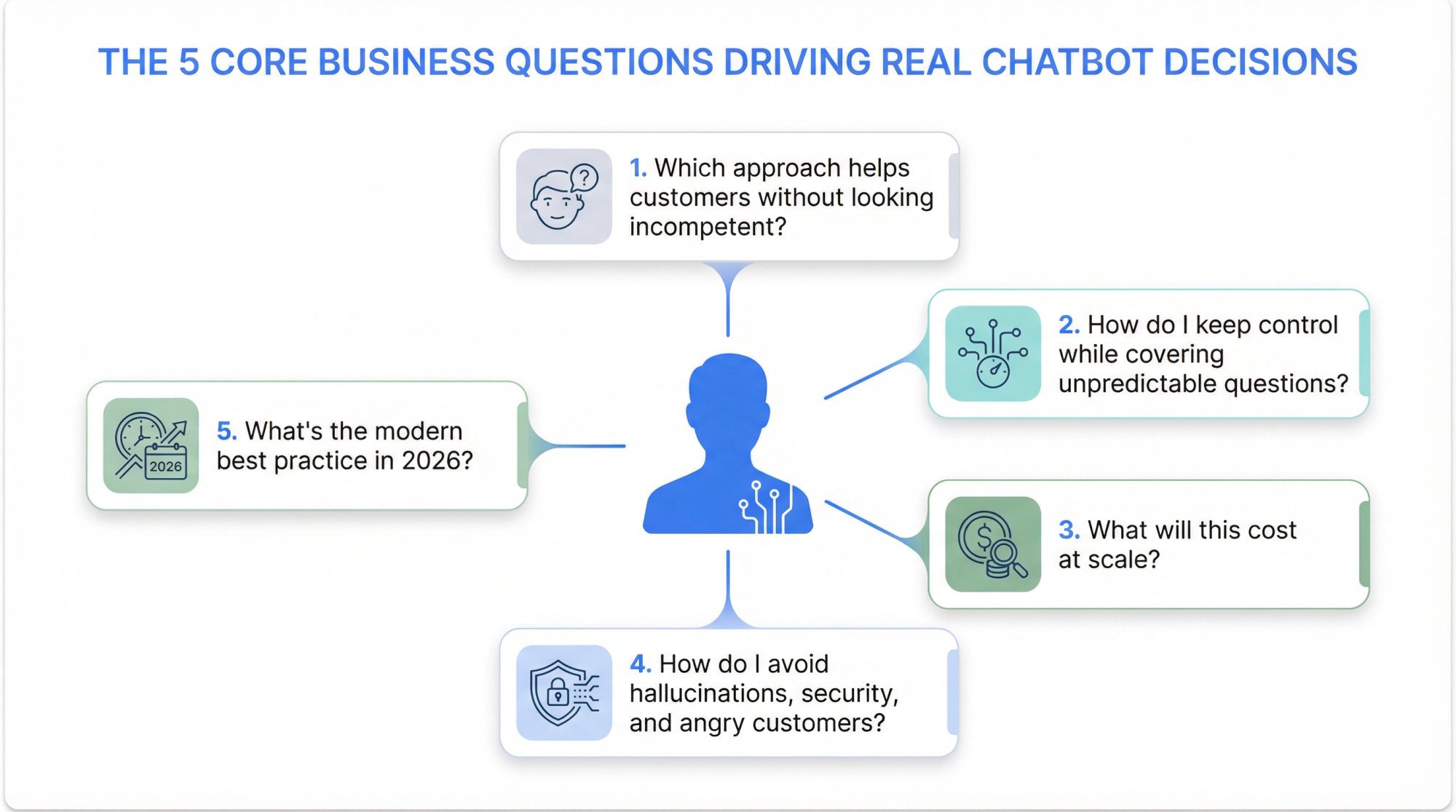
When someone Googles "AI chatbot vs rule-based chatbot," they're not looking for dictionary definitions. They're trying to answer one of these questions:
"Which approach will actually help customers without making us look incompetent?"
"How do I keep control over what the bot says while still covering unpredictable questions?"
"What's this going to cost at scale?"
"How do I avoid hallucinations, security issues, and angry customers?"
"What's the modern best practice right now in 2026?"
This guide answers all of those. By the end, you'll know exactly which approach fits your use case, and you'll have a deployment plan you can defend to leadership.
AI Chatbot vs Rule-Based Chatbot: Key Definitions
Rule-Based Chatbots: Scripted, Predictable, Controlled
A rule-based chatbot follows explicit if-then logic. Think of it as an interactive flowchart. You script every possible path, and the bot follows those paths exactly.
In practice, rule-based bots look like this:
→ "Choose one: Billing / Shipping / Returns"
→ "Type your order number" (validates format, shows next step)
→ Keyword triggers: "refund" triggers return policy script
Strength: Complete control and predictability.
Weakness: Breaks the moment a customer asks something you didn't anticipate.
Research shows that rule-based chatbots operate on if-then-else rules with specific inputs mapped to scripted outputs. This makes them incredibly reliable within designed paths, but brittle outside them.
AI Chatbots: Flexible, Generative, Probabilistic
An AI chatbot uses machine learning and natural language processing to interpret free-form text and generate appropriate responses. Modern AI chatbots (in 2026) typically mean LLM-based generative agents that can:
-
Understand what you mean, not just what you typed
-
Retrieve relevant knowledge from your content
-
Generate answers dynamically
-
Call tools or APIs to take actions
Strength: Handles variability and long-tail questions that rule-based bots can't touch.
Weakness: Probabilistic behavior introduces risk unless you build proper guardrails.
Industry research frames AI chatbots as supporting more complex interactions and having learning potential, compared to the rigid structure of rule-based bots.
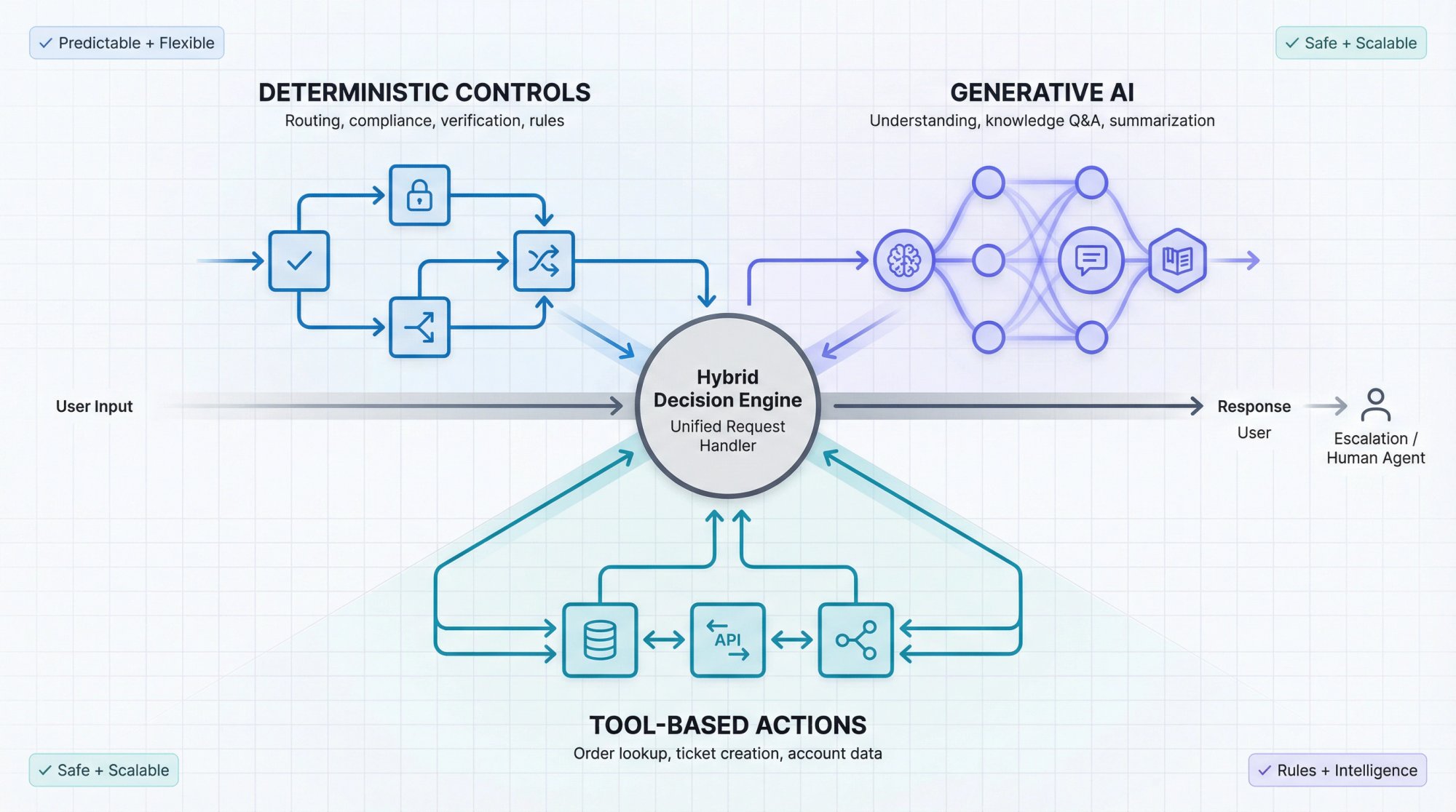
Hybrid Chatbots: The Adult Answer
A hybrid chatbot combines:
Deterministic controls (rules, flows, compliance steps, routing)
+
AI components (language understanding, retrieval, summarization)
+
Tool integration (order lookup, ticket creation, appointment booking)
Leading platform documentation describes this exactly: you can decide between fully generative, partly generative, and deterministic features when designing an agent.
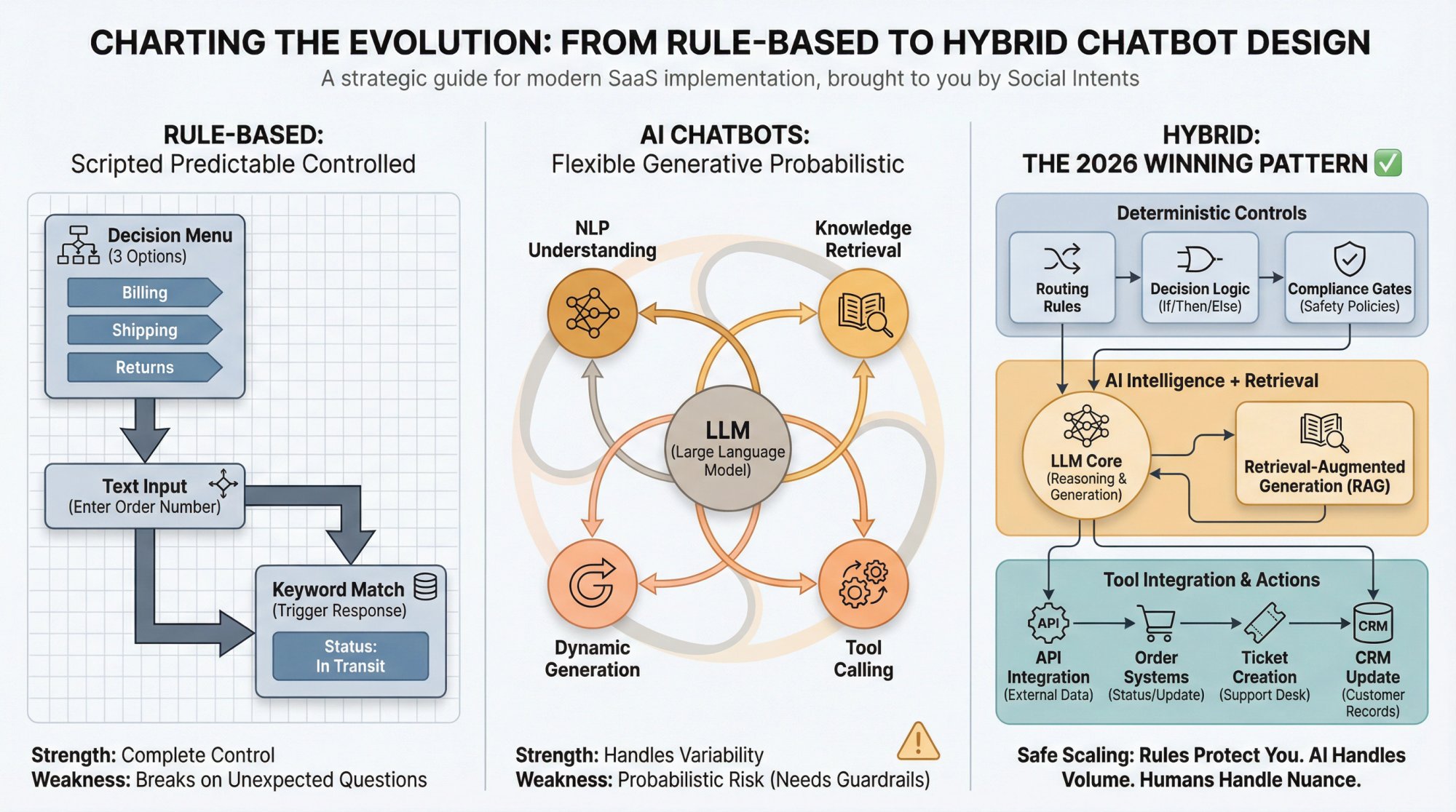
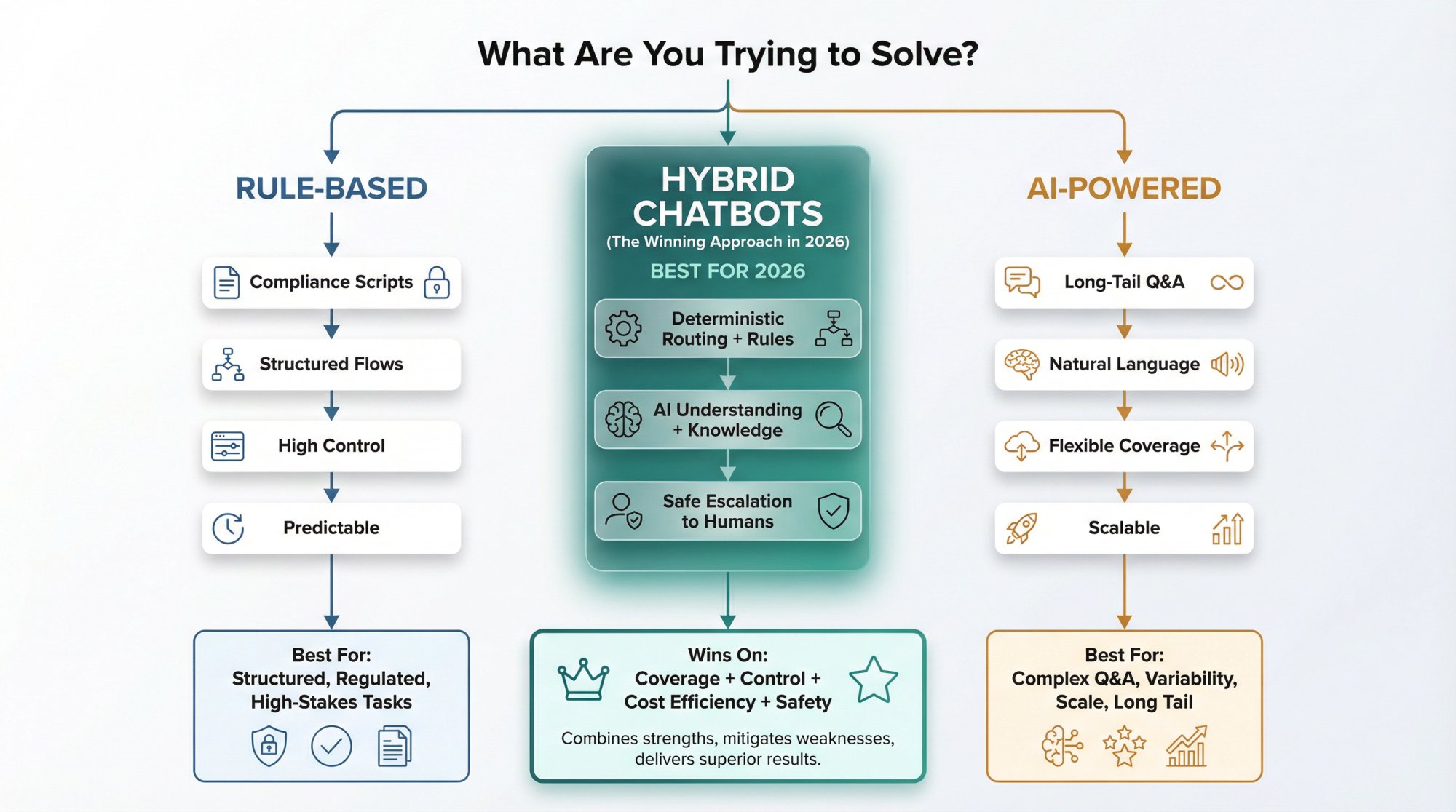
Critical insight: Rule-based vs AI is not a binary choice. The winning pattern in 2026 is almost always hybrid.
AI vs Rule-Based Chatbot: Complete Feature Comparison
You can use this practical comparison in an actual decision meeting.
Capability & Coverage
| Aspect | Rule-Based | AI |
|---|---|---|
| Predictable tasks | Excellent for structured flows | Handles these fine, but might be overkill |
| Unpredictable questions | Fails completely | Excellent when grounded in knowledge |
| Language variance | "I want a refund" ≠ "Can I return this?" | Understands both mean the same thing |
Accuracy & Reliability
Rule-based: High reliability within designed paths. You know exactly what it will say because you wrote it.
AI: Can be highly accurate if grounded and constrained, but you're fighting against the risk of hallucination. NIST's Generative AI risk profile explicitly includes "confabulation (hallucination)" as a risk category to manage.
Predictability & Compliance
Rule-based: Easy to prove what it will do. Perfect for regulated industries where you need pre-approved language.
AI: Needs explicit policy constraints, auditability, and fallback behavior. You can't realistically review every possible response before it goes live.
Maintenance Cost Over Time
Rule-based: Complexity explodes fast. Every new variation becomes a new branch in your decision tree. Maintaining a large rule-based bot feels like untangling Christmas lights.
AI: Fewer branches to maintain, but you're maintaining knowledge bases, evaluation sets, and guardrails instead of flowcharts.
Time to Launch
| Approach | Launch Speed |
|---|---|
| Rule-based | Fast for narrow flows (like "reset password" or "book appointment") |
| AI | Can launch quickly if you have good content, but hardening it for production takes work |
User Experience
Rule-based bots can feel robotic.
Users get frustrated when forced into menus that don't fit their actual question.
AI bots can feel human.
This is both a benefit (customers appreciate natural conversation) and a risk (they might trust the bot too much).
Recent sentiment data reflects this tension, showing that consumer attitudes toward AI in service are shifting, with a mix of excitement and concern.
Escalation & Handoff
Rule-based: Escalates when it hits dead ends. You script exactly when to hand off.
AI: Can escalate based on confidence scores, policy violations, sentiment analysis, or explicit user requests.
Security & Risk
Rule-based: Simpler attack surface. It can't leak data it doesn't have access to, and it won't make things up.
AI: Introduces unique risks like prompt injection and sensitive info disclosure. OWASP's Top 10 for LLM Applications covers these extensively.
Total Cost of Ownership
| Cost Category | Rule-Based TCO | AI TCO |
|---|---|---|
| Engineering | Mostly engineering time plus maintenance | Engineering + knowledge operations |
| Infrastructure | Basic hosting + observability | + per-usage inference costs + vector search + monitoring |
| Scaling | Cost grows with flow complexity | Cost grows with conversation volume |
We'll quantify this later with actual 2026 model pricing.
When to Use Rule-Based Chatbots: 5 Best Use Cases
Rule-based bots are the right answer more often than people admit, especially in regulated, high-control, or highly structured situations.
Rule-Based Is the Best Fit When You Need:
① Guaranteed compliance language
If you must say exact wording (legal disclaimers, regulated product statements, medical advice disclaimers), deterministic scripts are safer. No risk of the bot paraphrasing your carefully crafted legal language.
② High-stakes actions
Examples:
-
Changing account email or password
-
Processing refunds to payment methods
-
Cancellations with legal consequences
-
Accessing protected health or financial information
For these, you want explicit verification steps, not an AI deciding when to skip them.
③ Clear, finite user journeys
Examples:
→ "Check shipping status" (enter order number, show status)
→ "Book an appointment" (pick time, confirm)
→ "Reset password" (verify identity, send link)
→ "Generate invoice" (select date range, download)
These are perfect for decision trees. The user experience is actually better with buttons and clear steps.
④ Controlled data collection
If you need validated fields (order number format, address validation, policy confirmations), decision-tree design is ideal. You can force format requirements at each step.
⑤ Ultra-low compute cost at massive scale
Rule-based responses are essentially free at inference time (compute-wise). Your cost is engineering and hosting, not per-query API calls.
The Hidden Failure Mode of Rule-Based Bots
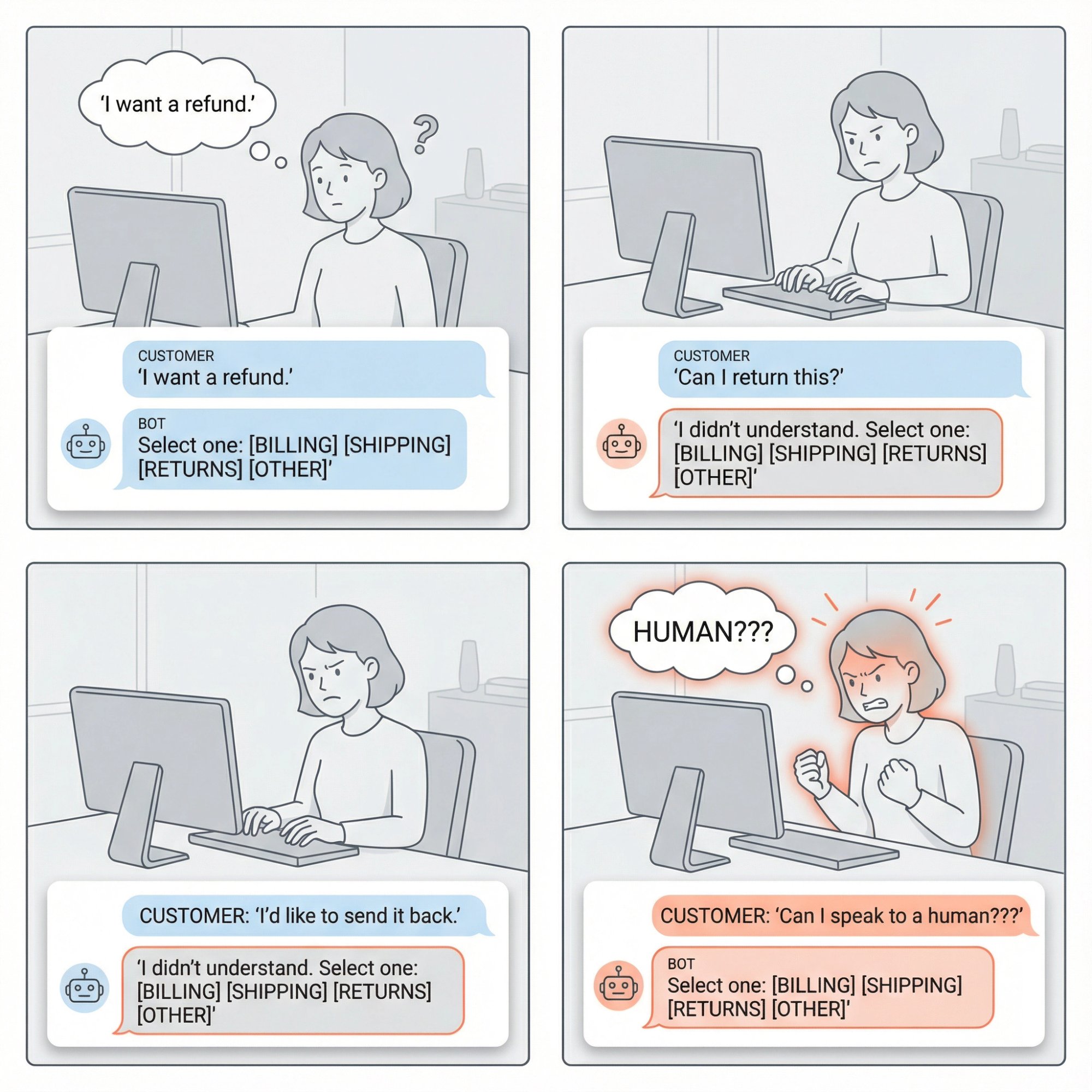
Rule-based bots fail in a specific, predictable way: they create customer rage loops.
User tries phrasing A. Bot doesn't understand.
User tries phrasing B. Bot doesn't understand.
User tries phrasing C. Bot shows same menu again.
User gives up or demands a human (angrily).
If your inbound questions have high variability, rule-based-only is a trap.
When to Use AI Chatbots: 5 Best Use Cases
AI chatbots shine when the shape of the conversation is unpredictable.
AI Is the Best Fit When You Need:
1) Long-tail Q&A across lots of content
If you have hundreds or thousands of help articles, docs, or policies, AI plus retrieval (RAG) is far more scalable than building decision trees. You'd need an army of people to script every possible question about every article.
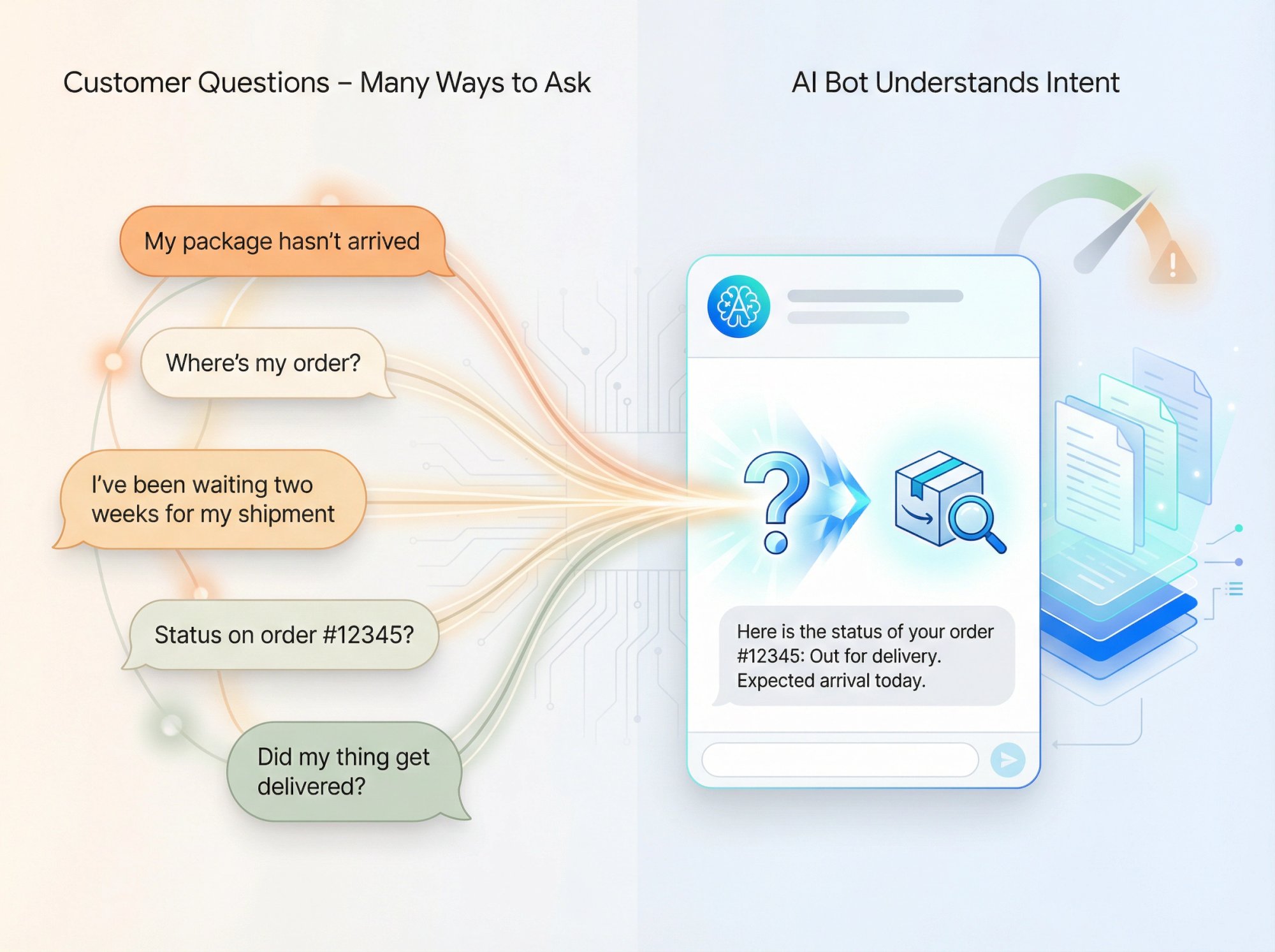
2) Natural language understanding without forcing menus
People talk like humans. "My package still hasn't arrived and I ordered it two weeks ago" is more natural than navigating: Main Menu > Orders > Track Order > Enter Number.
AI can parse that sentence, understand the intent, and respond appropriately.
3) Summarization and transformation
Great use cases:
-
Summarize a policy and explain "what this means for you"
-
Translate tone ("explain this like I'm new to your product")
-
Draft a response for a human agent to review and send
4) Multilingual and cross-lingual support
AI can detect language and respond appropriately. Building rule-based bots in 15 languages means maintaining 15 separate decision trees. AI models often handle multilingual conversations out of the box.
5) Assisted selling
AI can ask smart clarifying questions, compare products based on customer needs, and guide selections. Then hand off to a human when buying intent is high.
This is incredibly hard to script because every customer's needs are different.
The Hidden Failure Mode of AI Bots
AI fails in a different way: it can sound confident while being completely wrong.
That's why mature deployments don't ship "raw LLM chat." They ship constrained systems with:
-
Grounding (retrieval-augmented generation so answers come from your docs)
-
Policies ("don't answer if not in approved sources")
-
Tool-based truth (API calls for order status, not guessing)
-
Escalation triggers (hand off when confidence is low)
Why Hybrid Chatbots Are the Best Solution in 2026
The most reliable pattern in 2026 looks like this:
Deterministic where it must be (identity verification, compliance steps, high-stakes actions, routing logic)
+
Generative where it helps (understanding messy questions, knowledge Q&A, summarization)
+
Tool-based truth for account-specific facts (order lookup, ticket status, account balance)
Modern best practice: Hybrid chatbots combine the strengths of both approaches while protecting you from the weaknesses of each.
This aligns with how major platforms describe modern agents. Leading providers explicitly frame agent design as choosing how much is generative vs deterministic.
How to Build a Chatbot: Production-Ready Architecture
Below is an architecture that works for support and sales without betting your brand on an AI model behaving perfectly.
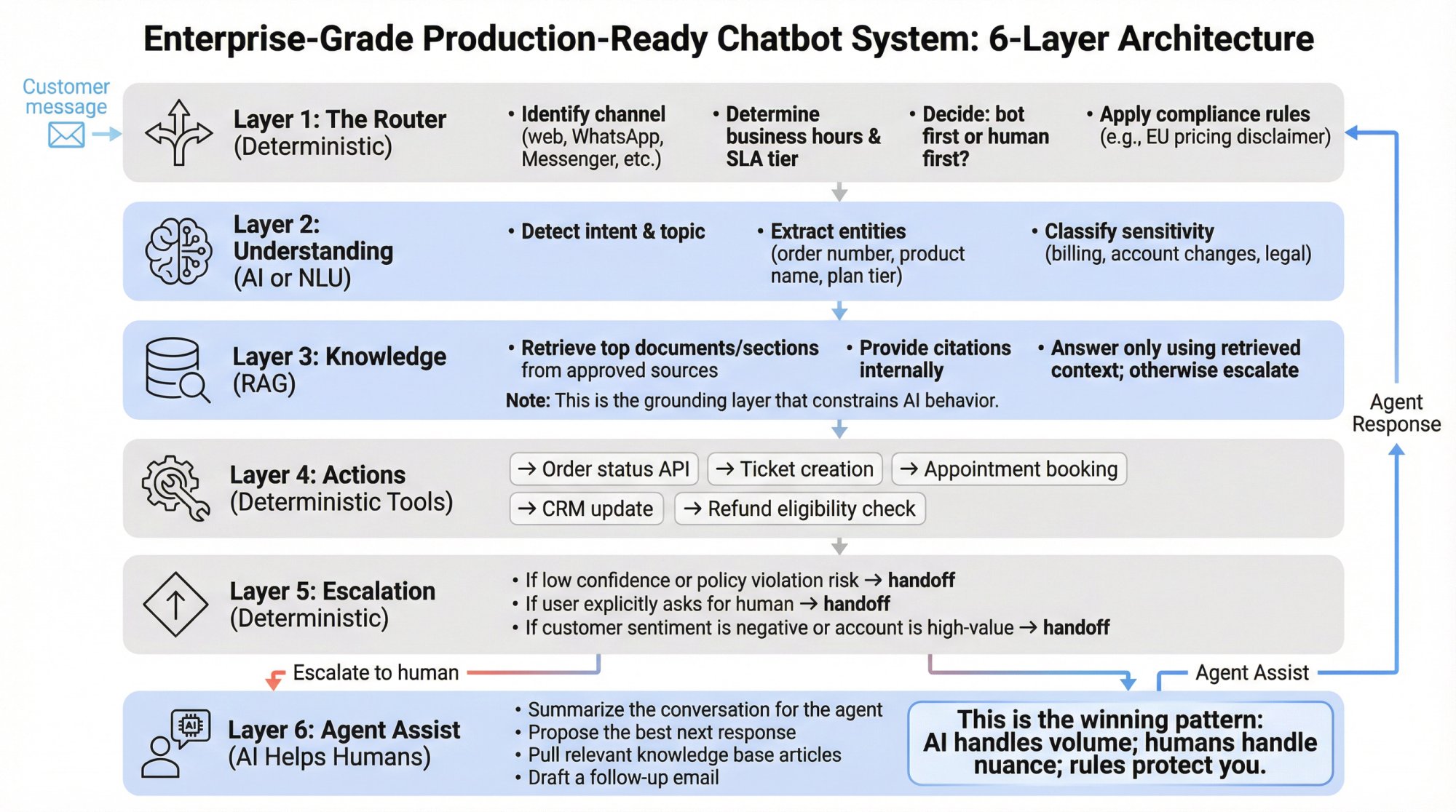
Layer 1: The Router (Deterministic)
-
Identify channel (web, WhatsApp, Messenger, etc.)
-
Determine business hours and SLA tier
-
Decide: bot first or human first?
-
Apply compliance rules (e.g., "don't discuss pricing in EU without disclaimer")
Layer 2: Understanding (AI or NLU)
-
Detect intent and topic
-
Extract entities (order number, product name, plan tier)
-
Classify sensitivity (billing questions, account changes, legal inquiries)
Layer 3: Knowledge (RAG)
-
Retrieve top documents/sections from approved sources
-
Provide citations internally (even if you don't show them to users)
-
Answer only using retrieved context; otherwise escalate
Layer 4: Actions (Deterministic Tools)
→ Order status API
→ Ticket creation
→ Appointment booking
→ CRM update
→ Refund eligibility check
Layer 5: Escalation (Deterministic)
-
If low confidence or policy violation risk → handoff
-
If user explicitly asks for human → handoff
-
If customer sentiment is negative or account is high-value → handoff
Layer 6: Agent Assist (AI Helps Humans)
Even after handoff, AI can:
-
Summarize the conversation for the agent
-
Propose the best next response
-
Pull relevant knowledge base articles
-
Draft a follow-up email
This is the winning pattern: AI handles volume; humans handle nuance; rules protect you.
AI Chatbot Pricing: What Chatbots Actually Cost in 2026
Rule-based bots are "cheap per message," but not necessarily cheap overall. AI bots are "cheap to expand coverage," but have ongoing inference costs.
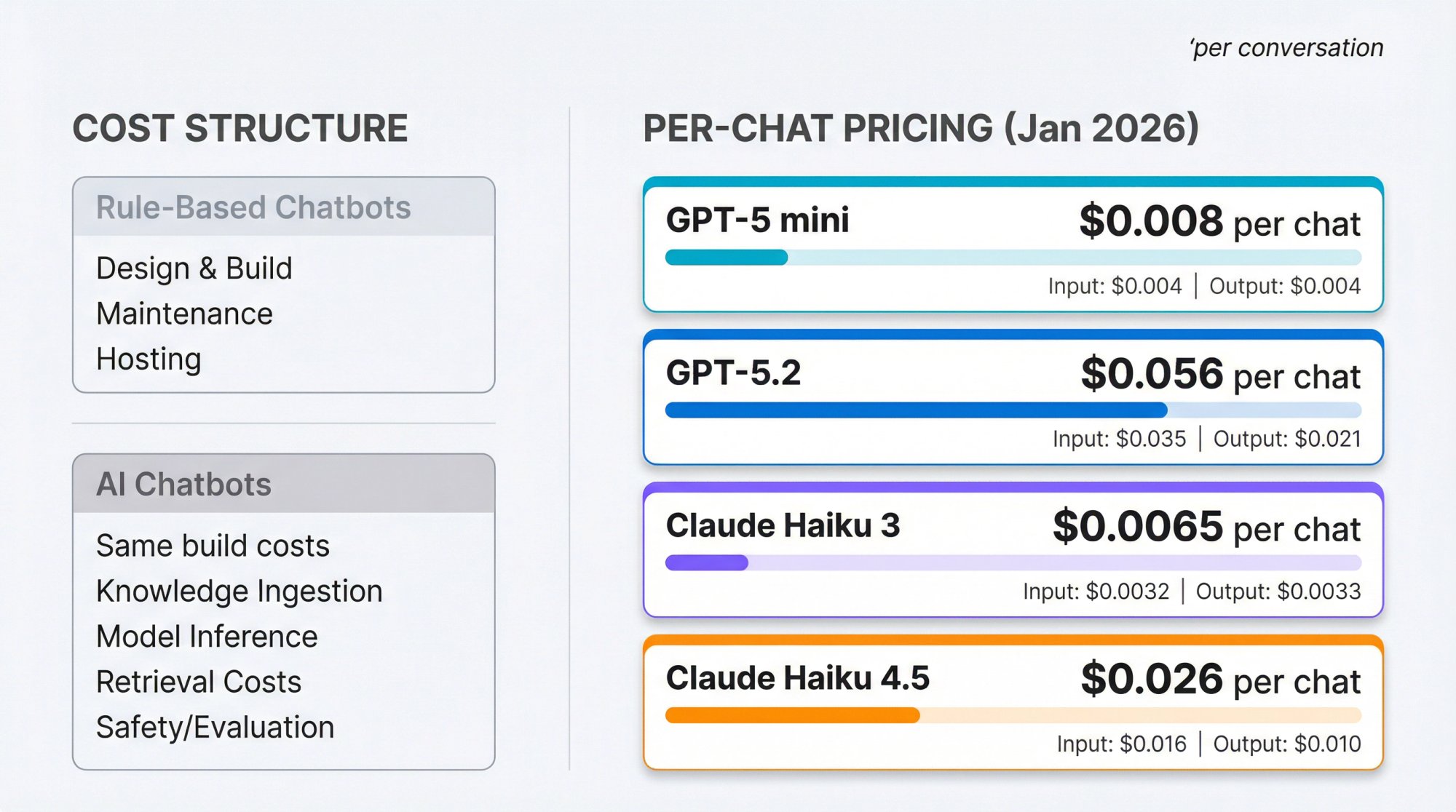
Rule-Based Chatbot Costs
-
Design and build (product, UX, engineering)
-
Maintenance (new flows, exceptions, copy updates)
-
Hosting and observability
Economic profile: Low variable cost, potentially high maintenance cost as use cases expand.
AI Chatbot Costs
-
Same build costs, plus:
-
Knowledge ingestion and maintenance
-
Model inference (tokens)
-
Retrieval costs (vector database, embeddings)
-
Safety and evaluation (monitoring, red-team tests, incident response)
Economic profile: Higher variable cost, often lower marginal cost of adding new coverage once foundations exist.
Realistic LLM Inference Costs (January 2026)
Let's make this concrete.
Assumptions:
-
10 turns per chat
-
~1,600 input tokens per turn (system prompt + history + retrieval snippets + user message)
-
~200 output tokens per turn
Total per chat: 16,000 input tokens and 2,000 output tokens
OpenAI Pricing (January 2026)
Using OpenAI's published API pricing:
| Model | Input Cost | Output Cost | Per-Chat Total |
|---|---|---|---|
| GPT-5 mini | $0.250 / 1M tokens | $2.000 / 1M tokens | ~$0.008 (less than 1 cent) |
| GPT-5.2 | $1.750 / 1M tokens | $14.000 / 1M tokens | ~$0.056 (5-6 cents) |
Calculation for GPT-5 mini:
-
Input: 16k × $0.250 / 1M ≈ $0.004
-
Output: 2k × $2.000 / 1M ≈ $0.004
-
Total ≈ $0.008 per chat
Anthropic Claude Pricing (January 2026)
Using Anthropic's Claude pricing:
| Model | Input Cost | Output Cost | Per-Chat Total |
|---|---|---|---|
| Claude Haiku 3 | $0.25 / MTok | $1.25 / MTok | ~$0.0065 |
| Claude Haiku 4.5 | $1 / MTok | $5 / MTok | ~$0.026 |
What This Means
For many customer service scenarios, LLM inference costs fractions of a cent to a few cents per conversation if you choose the right model and keep prompts lean.
But costs can rise quickly with:
-
Long chat histories
-
Huge retrieved context
-
Chain-of-thought reasoning
-
Heavy tool calls
-
High volumes
A More Honest ROI View
AI chatbot ROI is rarely "we replaced humans."
It's usually:
You increase first-response coverage (especially nights/weekends)
You reduce agent load for repetitive questions
You shorten handle time via agent-assist summaries and drafts
You capture more leads by answering fast and routing correctly
Reality check: The ROI only shows up if you measure outcomes, maintain knowledge, and set up safe handoff.
Chatbot Security and Compliance Best Practices
The 3 Biggest Reliability Failures
1) Hallucinations
NIST's Generative AI risk profile explicitly includes confabulation (hallucination) as a risk to manage.
Mitigations that work:
-
RAG grounding with strict "answer from sources" rules
-
"I don't know" behavior as a feature, not a bug
-
Tool-based truth for account-specific facts
-
Live monitoring of unanswered queries
2) Stale knowledge
Your policy changed; the bot didn't.
Mitigations:
-
Automated retraining or reindex schedules
-
Content ownership (who updates what)
-
"Effective date" metadata in knowledge base
3) Overly confident UX
If the bot sounds too human, users trust it too much.
Mitigations:
-
Clear disclosure that it's a bot
-
Show sources/citations where appropriate
-
Encourage confirmation for high-impact steps
The 3 Biggest Security Failures (Unique to AI Systems)
OWASP's Top 10 for LLM Applications highlights risks including:
Prompt injection
Insecure output handling
Sensitive information disclosure
Excessive agency
What this means for chatbots:
-
Don't let the model decide what tools it can call without constraints
-
Don't pass raw model output into systems that execute actions
-
Don't let retrieved content override system policies
-
Log and rate-limit to prevent "model DoS" cost explosions

Compliance & Transparency
The EU AI Act includes transparency obligations for AI systems that interact directly with people. Article 50(1) requires that users be informed they're interacting with an AI system (with limited exceptions).
Practical takeaway: Even if your local laws don't require it yet, always disclose when a user is chatting with AI. It's a best practice, and it's increasingly a legal requirement in some jurisdictions.
(Not legal advice. Talk to counsel for your specific situation.)
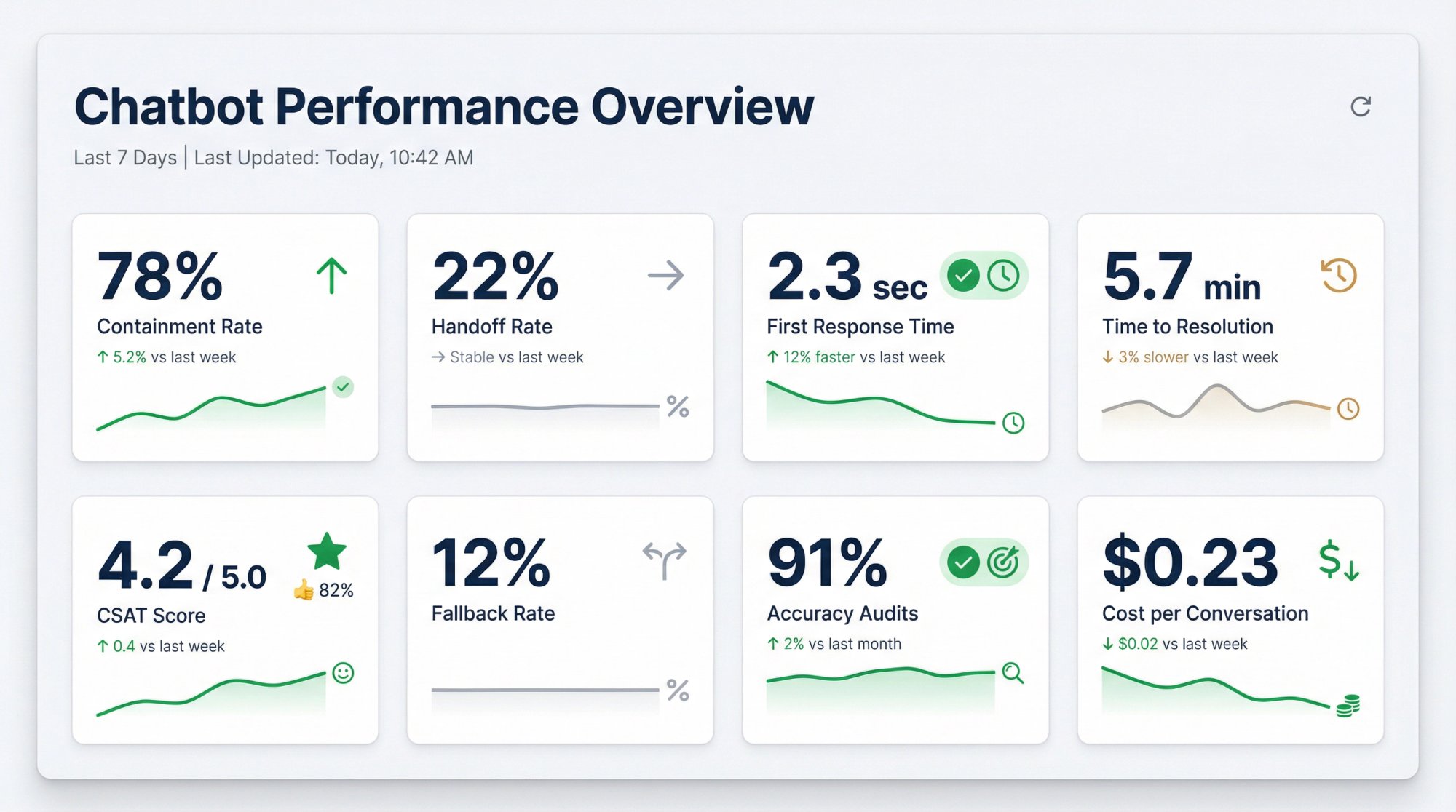
How to Measure Chatbot Performance: 8 Essential KPIs
If you don't measure, you're not deploying a chatbot. You're running a content experiment with a UI.
The 8 KPIs That Matter
| KPI | What It Measures |
|---|---|
| 1. Containment rate | Resolved without human intervention |
| 2. Handoff rate | When and why escalation happens |
| 3. First response time | Speed of initial bot response |
| 4. Time to resolution | Overall and by intent category |
| 5. CSAT / thumbs up-down | Customer satisfaction signals |
| 6. Fallback rate | "I don't know" / no-answer frequency |
| 7. Accuracy audits | Sampled transcript reviews for correctness |
| 8. Cost per resolved conversation | Tokens + infra + human time |
The Most Useful Analysis Artifact
Create a weekly "Top Unanswered Questions" report:
-
Cluster by topic
-
Map to missing content vs missing capability
-
Decide: add doc? add rule? add tool/action? escalate?
This is how high-performing chatbot programs improve continuously.
How to Implement a Chatbot: Step-by-Step Guide (30-60 Days)
Step-by-step approach that works across e-commerce, SaaS, and services.
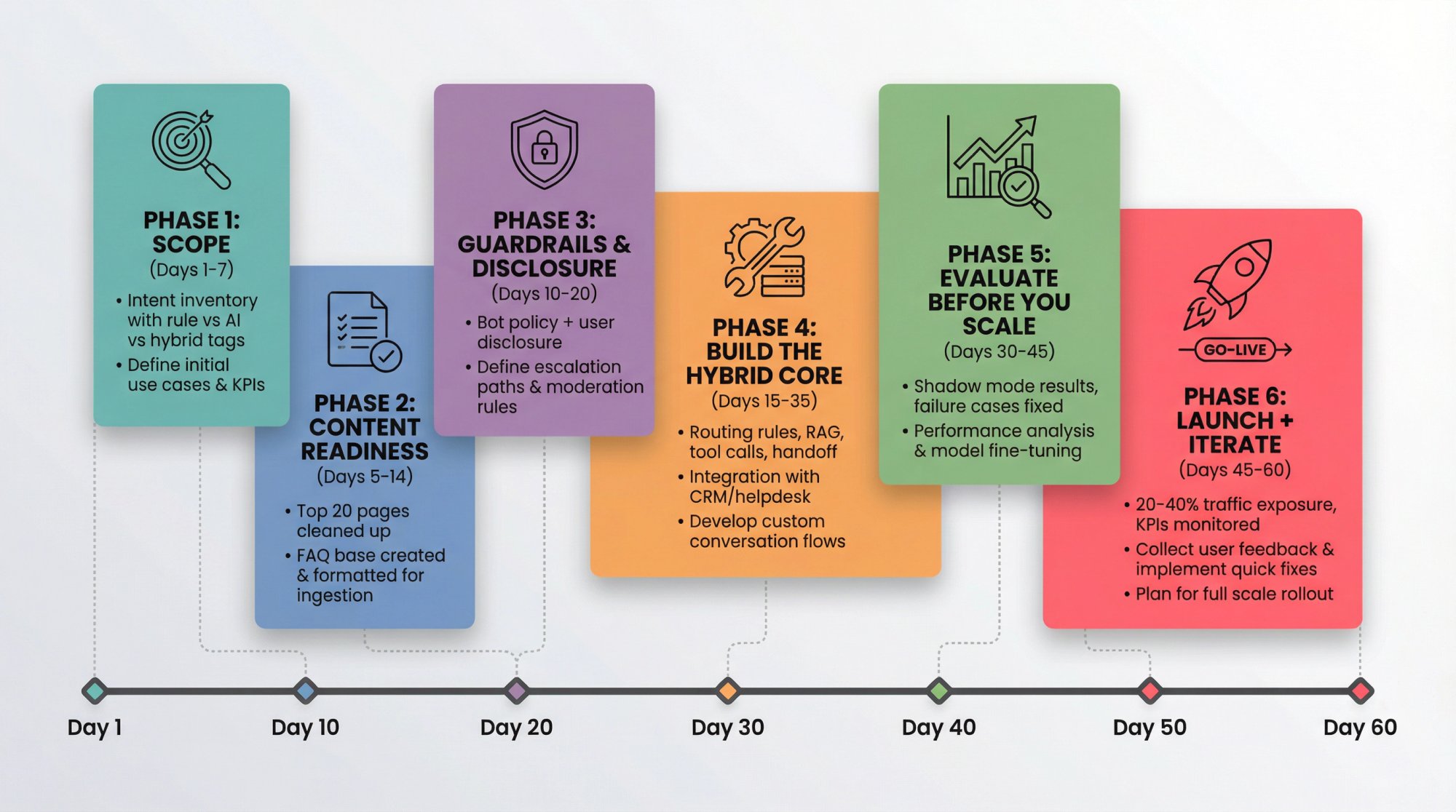
Phase 1: Scope (Days 1-7)
List your top 25-50 chat intents from transcripts.
Separate into:
→ Deterministic flows (refund eligibility, reset password)
→ Knowledge Q&A (policies, how-to)
→ Account-specific (order status, subscription status)
Deliverable: Intent inventory with "rule vs AI vs hybrid" tags.
Phase 2: Content Readiness (Days 5-14)
Identify authoritative sources:
-
Help center
-
Policy pages
-
Product docs
-
Internal SOPs (if internal bot)
Clean up the top 20 pages:
-
Remove contradictions
-
Add "last updated" dates
-
Add clear headings and FAQs
Why: AI bots are content amplifiers. If your content is messy, your bot will be confidently messy.
Phase 3: Guardrails & Disclosure (Days 10-20)
Write your bot policy:
-
What it can answer
-
What it must refuse
-
When it must escalate
-
Brand voice guidelines
Add user disclosure (especially important for EU).
Phase 4: Build the Hybrid Core (Days 15-35)
Set up:
-
Routing rules (hours, teams, high-value pages)
-
AI Q&A with retrieval grounding
-
Tool calls for factual account queries
-
Handoff to humans with transcript + summary
Phase 5: Evaluate Before You Scale (Days 30-45)
Run a shadow mode (AI suggests; humans answer).
Review failure cases:
-
Wrong answers
-
Missing content
-
Unsafe answers
-
Poor tone
Fix systematically:
① Content fixes first
② Prompt/guardrail next
③ Tools/actions last
Phase 6: Launch + Iterate (Days 45-60)
Start with 20-40% traffic exposure.
Monitor KPIs daily for first two weeks.
Expand gradually.
Live Chat Software That Supports Both AI and Rule-Based Chatbots
A big reason chatbot projects fail isn't "AI vs rules." It's workflow adoption.
If your team lives in Microsoft Teams or Slack all day, forcing them into a new inbox kills response speed and ownership.
What We Built Social Intents For
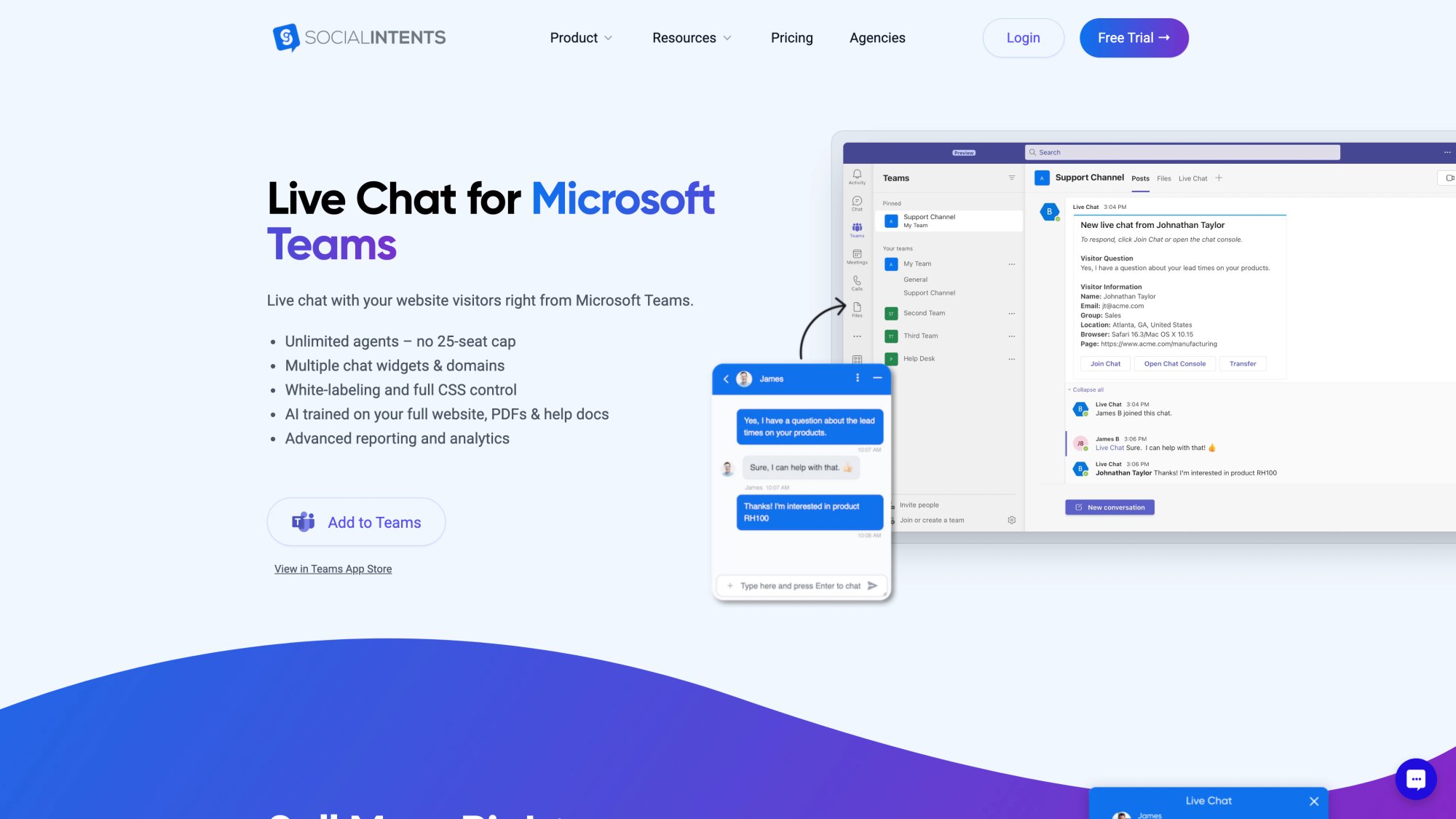
Social Intents routes website chat into the collaboration tools your team already uses: Teams, Slack, Google Chat, Zoom, Webex. We also offer a web agent console for teams that prefer a browser interface.
Supporting Both Rule-Based and AI Approaches
On the same platform, you can combine:
Rule-based engagement tools like proactive chat invites and targeting rules
+
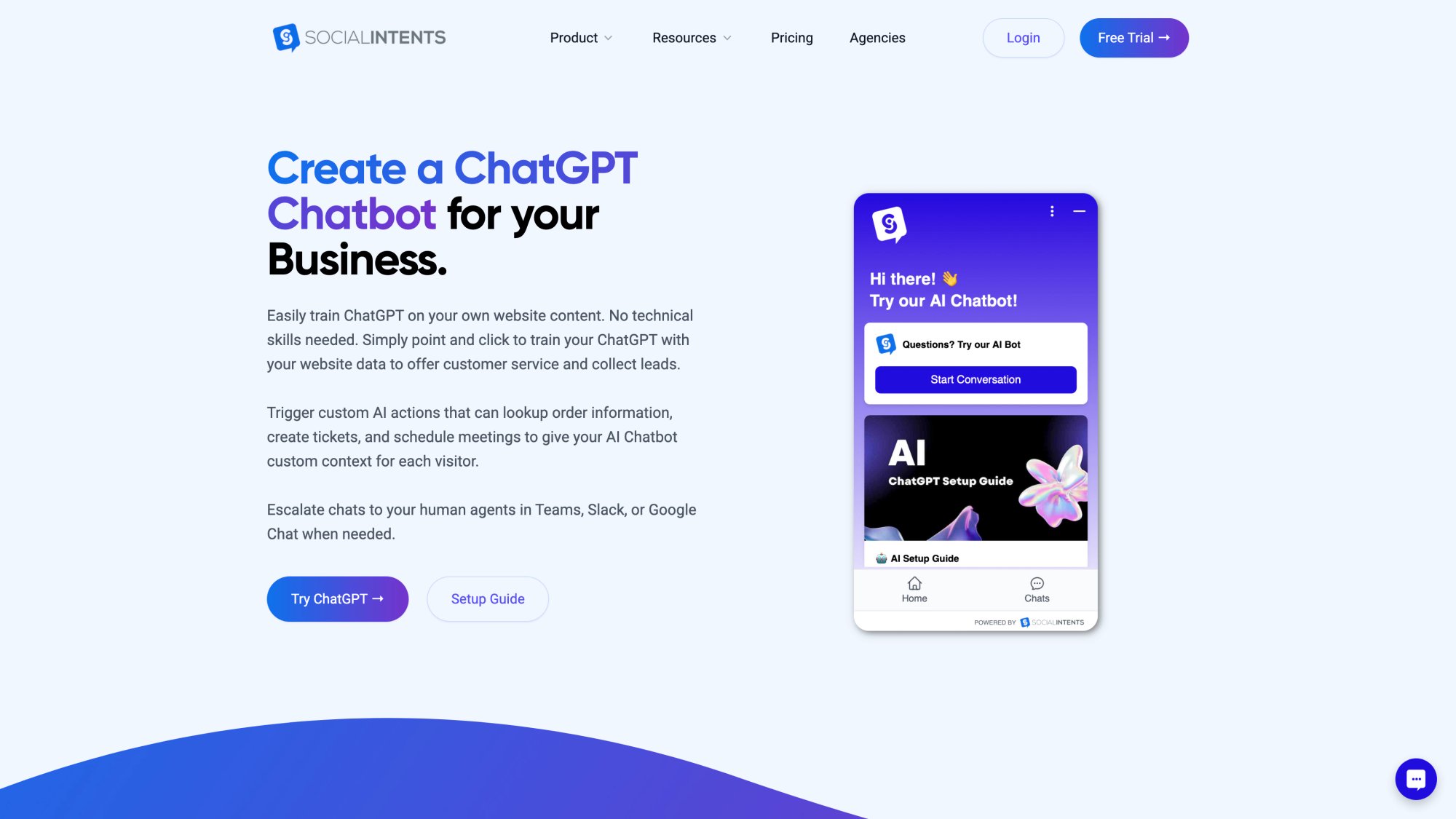
AI chatbot training with 1-click content ingestion
+
Multiple AI models (ChatGPT, Gemini, Claude)
+
Human handoff by routing to your team's channel where they already work (Teams, Slack, etc.)
Custom AI Actions That Actually Work
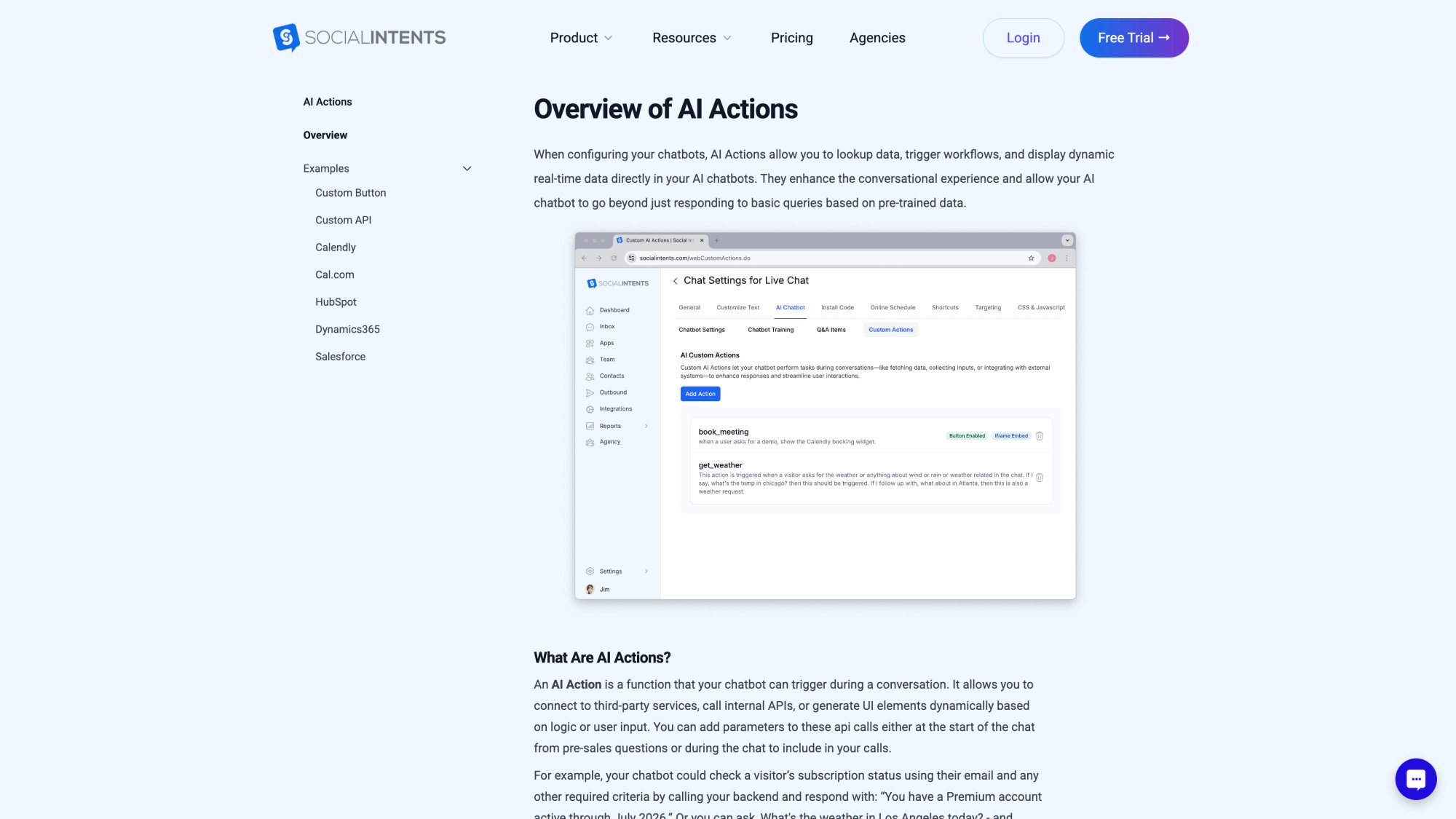
One of the most powerful capabilities in Social Intents is custom AI actions. These are integrations with third-party tools that enrich chat conversations with real data:
-
Shipping updates
-
Inventory checks
This is what turns an AI chatbot from "impressive demo" into "actually useful tool."
Customers are very interested in these capabilities because they bridge the gap between AI conversation and real business systems.
Hybrid AI + Human Workflow
Social Intents lets you configure:
AI only (bot handles everything, escalates when needed)
Hybrid AI + Human (bot assists, human approves responses)
AI after hours (bot covers nights/weekends, humans during business hours)
This flexibility means you can start conservative (hybrid) and expand AI coverage as you gain confidence.
Real Integration Where You Already Work
Instead of asking your team to learn another tool, Social Intents brings chat to:

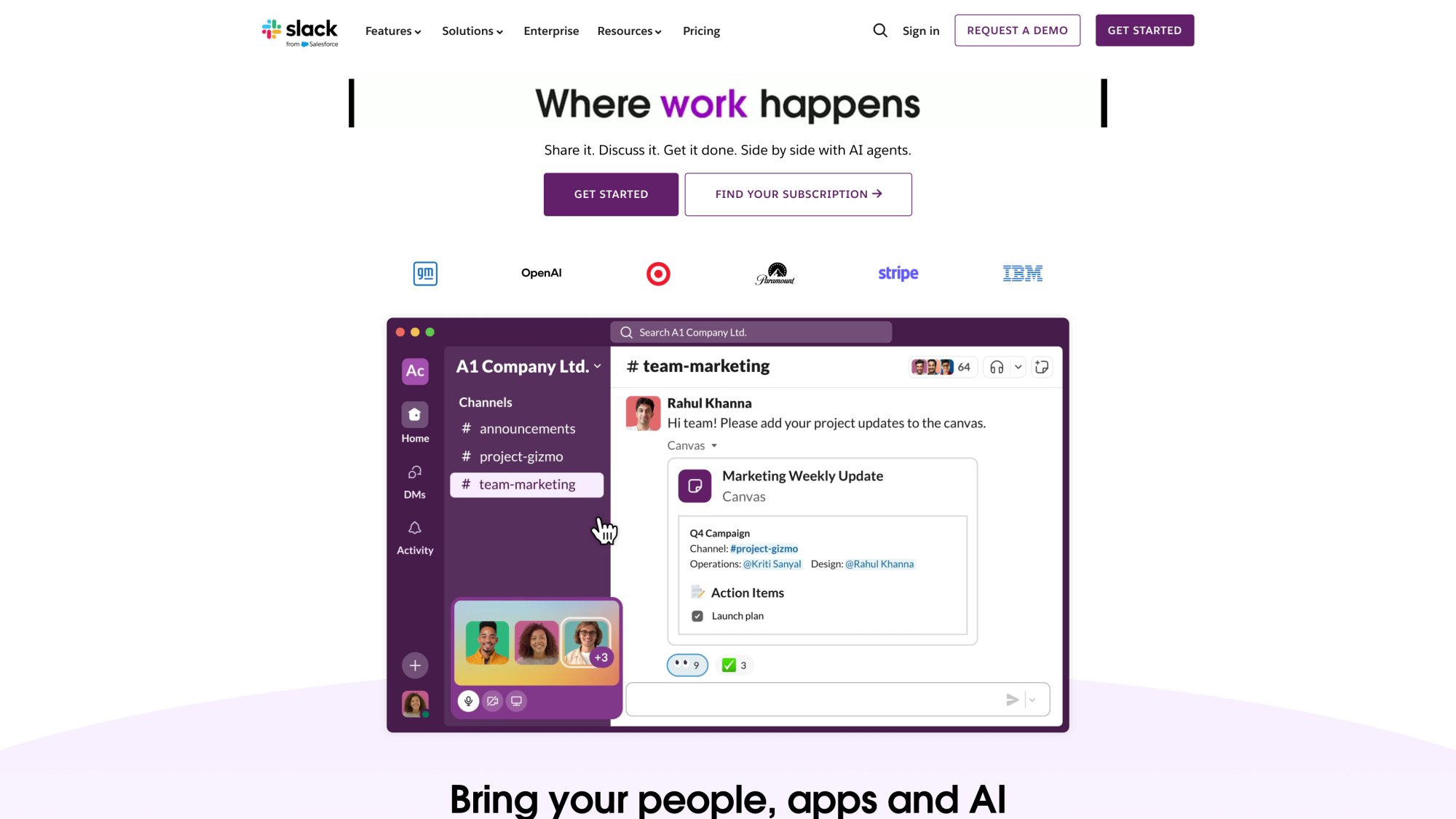
Agents see new chats as messages in their existing workspace. They reply like they're messaging a teammate. No new UI to learn.
For e-commerce teams, we have native apps for:
Installation takes minutes, not weeks.
Pricing That Makes Sense
Four plans (Starter, Basic, Pro, Business) plus an Agency/Reseller plan. Unlimited agents from Basic tier upward. Conversations and AI training limits scale by plan.
Free 14-day trial. No credit card required.
AI Chatbot vs Rule-Based Chatbot: Common Questions
Is a rule-based chatbot "obsolete" in 2026?
No. Rule-based chatbots remain the safest way to handle:
-
Compliance scripts
-
Structured data collection
-
High-risk actions
-
Predictable workflows
They're not obsolete. They're foundational guardrails.
Will an AI chatbot replace our support team?
In most real organizations, AI changes the work more than it replaces it.
AI handles repetitive questions and after-hours coverage. Humans handle exceptions, empathy, negotiation, and edge cases. The best setups increase throughput without destroying quality.
How do we prevent hallucinations?
Use a layered approach:
1. Retrieval grounding (RAG) so answers come from your docs
2. Tool-based truth for account data (API calls, not guessing)
3. Strict refusal/escalate policy when confidence is low
4. Monitoring + audits to catch problems fast
NIST explicitly treats confabulation (hallucination) as a generative AI risk to manage.
What's the biggest security risk unique to AI chatbots?
Prompt injection and unsafe tool use are top risks. OWASP's LLM Top 10 is a good starting map of what to defend against.
Do we need to tell users they're talking to AI?
If you serve the EU, transparency requirements are in the AI Act, including obligations to inform users when they interact with an AI system in certain contexts.
Even outside the EU, disclosure is a best practice for trust.
Can we start with a simple bot and add AI later?
Yes. Many businesses start with rule-based flows for common questions, then layer AI on top as needs expand.
Platforms like Social Intents let you start simple and add AI capabilities when you're ready. You don't have to choose forever on day one.
What if we don't have a knowledge base?
You can still deploy AI. Start by feeding the bot:
-
Your help center URLs
-
Product documentation
-
Common email/chat responses
-
Internal SOPs
The AI will extract knowledge from these. Over time, you can organize them into a proper knowledge base, but you don't need perfection to start.
How long does it take to see ROI?
Typical timeline:
| Timeframe | Expected Results |
|---|---|
| Weeks 1-2 | Baseline measurement, initial bot launch |
| Weeks 3-4 | First containment rate improvements visible |
| Months 2-3 | Agent time savings become measurable |
| Months 3-6 | CSAT improvements and cost-per-conversation optimization |
ROI isn't instant, but early wins (like after-hours coverage) show up fast.
What happens when the bot can't answer?
Design explicit fallback behavior:
Option 1: "I'm not sure about that. Let me connect you with a human."
Option 2: "I don't have information on that specific question. Here are related articles that might help: [links]"
Option 3: "I'm still learning about this topic. Would you like to chat with our team?"
Never leave users hanging. Always provide a path forward.
Can chatbots handle multiple languages?
Rule-based: You need separate decision trees for each language (lots of work).
AI: Modern LLMs often handle multiple languages out of the box. Social Intents also offers real-time translation, so agents can reply in English and customers see their own language.
What industries are chatbots best for?
Chatbots work across industries, but how you use them varies:
| Industry | Best Bot Applications |
|---|---|
| E-commerce | Order tracking, product questions, returns |
| SaaS | Technical support, feature questions, onboarding |
| Healthcare | Appointment scheduling, insurance questions (with careful guardrails) |
| Financial services | Account questions, transaction history (with strict compliance) |
| Education | Course info, admissions, student support |
The key is matching the bot's capabilities to your specific workflows and compliance requirements.
The Decision You Actually Need to Make
Choosing between an AI chatbot and a rule-based chatbot is really choosing between:
Flexibility vs control
Coverage vs predictability
Fast scaling vs safe scaling
The best answer for most customer-facing teams in 2026 is:
Build a hybrid: deterministic routing + safe actions + AI for understanding and knowledge + frictionless human handoff.
That's how you ship a bot that earns trust instead of burning it.
If you want to see this in action without changing how your team works, try Social Intents free for 14 days. Route website chat straight into Teams or Slack, add AI where it makes sense, and keep humans in control of what matters.

