Choosing a chatbot platform can feel overwhelming. The market is flooded with options, and the stakes are high. A well-chosen chatbot can boost customer satisfaction, save your team hours every week, and drive real revenue. A poor choice leads to wasted investment, frustrated customers, and a bot that nobody wants to use.
The numbers tell the story. Over 987 million people now use AI chatbots, and 37% of companies already deploy chatbots for customer support. But there's a catch. While 51% of consumers prefer bots for immediate answers, 64% of customers would prefer companies didn't use AI for customer service, and 53% would consider switching if they discovered a company was relying too heavily on AI.
This tension matters. Your chatbot platform choice isn't just about features and pricing. It's about trust, reliability, and whether the technology actually helps your team instead of creating new problems.
This guide walks you through everything you need to know to choose the right chatbot platform in 2026, covering the critical factors, the questions to ask, and the traps to avoid.
Social Intents exemplifies the modern chatbot platform approach: seamless integration with collaboration tools your team already uses, combined with AI capabilities that can handle routine questions and smoothly escalate to humans when needed.
What To Consider Before Choosing a Chatbot Platform
Before you compare platforms or watch demos, clarify what you actually need. This sounds obvious, but skipping this step is the fastest way to end up with a bot you'll never use or features that don't matter.
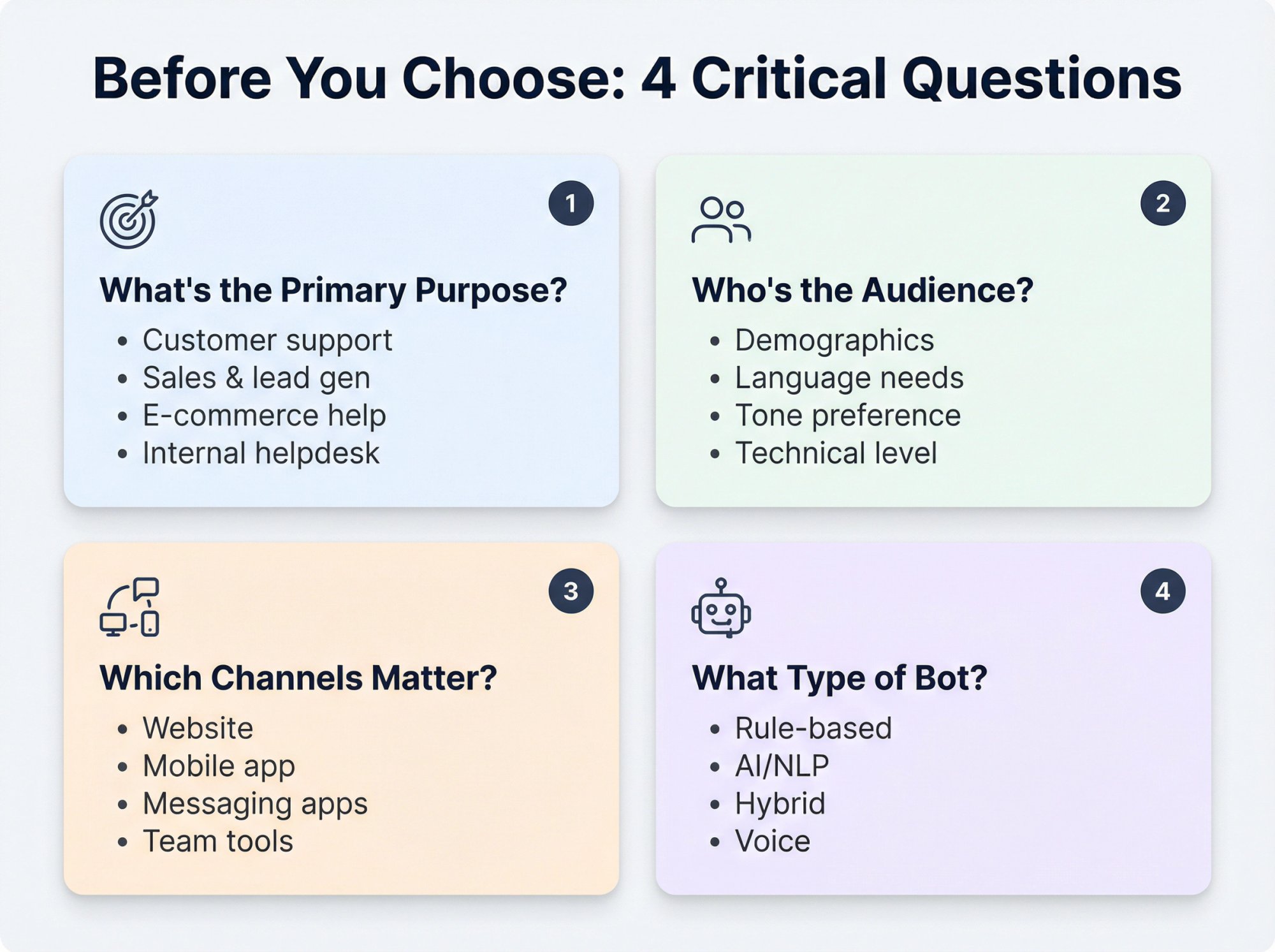
Ask yourself these questions:
What's the primary purpose?
Your use case drives everything else. Are you focused on:
• Customer support (answering FAQs, providing 24/7 help, deflecting repetitive tickets)
• Sales and lead generation (qualifying visitors, capturing contact info, booking demos)
• E-commerce assistance (product recommendations, order tracking, cart recovery)
• Internal helpdesk (HR questions, IT support, knowledge retrieval for employees)
Different goals require different capabilities. A support bot needs excellent human handoff. A sales bot needs CRM integration. An e-commerce bot needs order lookup APIs.
Who's the audience?
If it's customer-facing, think about demographics and preferences. A bank's chatbot might need formal language and rock-solid security. A retail chatbot can be more conversational and focus on guiding purchases. Internal bots need integrations with Slack or Microsoft Teams and access to company knowledge.
Also consider language. Do you serve customers globally? You'll need multilingual support with strong NLP in multiple languages.
Which channels matter?
Most businesses deploy chatbots on their website or mobile app. But you might also need the bot on messaging apps (WhatsApp, Facebook Messenger, SMS) or integrated with team collaboration tools (Microsoft Teams, Slack, email).
Make a list. This ensures you choose a platform that supports all the channels your customers actually use.
What type of bot do you need?
There are different approaches:
• Rule-based chatbots: These follow pre-defined scripts or decision trees. Great for simple FAQs or guided workflows. Very predictable, but they can't handle anything outside their script.
• AI/NLP chatbots: These use Natural Language Processing and machine learning to understand free-form user input. They can interpret questions phrased many different ways and handle complex, conversational interactions. Today's advanced AI chatbots can even learn from conversations.
• Hybrid bots: Many platforms combine approaches. The bot uses AI to understand intent, but if confidence is low, it falls back to a guided menu or structured flow. This gives you the best of both worlds.
• Voice bots: If phone or voice assistants are in scope, you'll need a platform that supports speech-to-text and text-to-speech.
Critical insight: If you don't define your chatbot's purpose first, you could end up with features you'll never use (or miss the ones that actually make a difference).
By clearly defining your objectives, target users, channels, and preferred bot type, you set the foundation for success. This prevents you from being swayed by flashy demos or picking a platform that lacks something essential.
How To Evaluate Chatbot Platforms: 9 Critical Factors
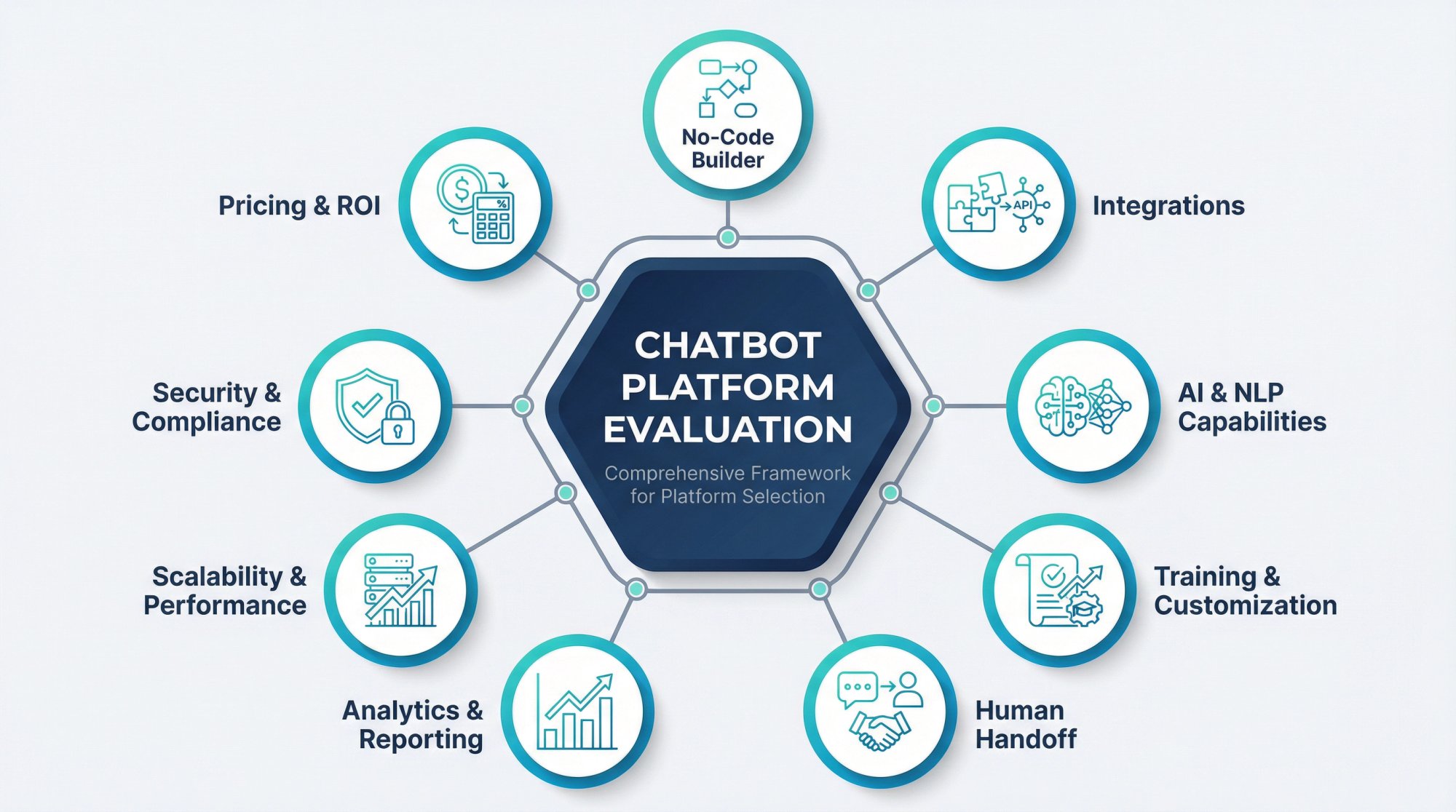
Once you know what you need, it's time to evaluate how different platforms measure up. Here are the most important criteria.
What Is No-Code Chatbot Building and Why It Matters
Unless you have developers ready to build and maintain a bot, ease of use is paramount. You want a no-code or low-code chatbot builder that lets non-technical users create and update the bot.
Many leading platforms provide a visual drag-and-drop interface to design conversation flows, define questions and answers, and set up conditions without writing code. This speeds up deployment and empowers your customer service or marketing team to tweak the bot on the fly.
Look for:
• Drag-and-drop editor or flow builder: Can you map out conversations in a flowchart style?
• Pre-built templates: Does the platform offer ready-made chatbot templates for common use cases? Templates can kickstart your project so you're not starting from scratch.
• No coding required for basics: You shouldn't need a developer to update a greeting message or add a new FAQ answer.
• Testing and training tools: Can you test responses in a sandbox and refine them? Some platforms have interactive training where you feed example questions and correct the bot's answers.
• Flexibility to customize: While no-code is great, ensure the platform allows advanced customization when needed (custom code snippets, API calls, integration scripts).
The best platforms strike a balance: easy for non-tech staff to use, but not a dead-end if you have developers who want to extend it.
Which Chatbot Platforms Integrate With Your Tools?
A chatbot shouldn't live in a silo. Its real power comes from integrating with your existing systems and workflows.
Website and live chat integration
All chatbot platforms let you embed a chat widget on your website or app. But how seamless is it? Does the chat widget match your site's look and feel? Can it pop open proactively?
If you already use live chat software or a CRM, can the chatbot integrate? Some businesses route bot chats into Microsoft Teams or Slack so their team can monitor and jump in.
At Social Intents, we built our platform specifically for this. Your website visitors chat with the bot, and your team responds directly from Teams, Slack, Google Chat, Webex, or Zoom. No separate dashboard required. Your agents stay in the tools they already know.
CRM, helpdesk, and database integration
Check if the chatbot can connect to your CRM (Salesforce, HubSpot) or helpdesk (Zendesk). This enables the bot to pull customer info (like order status or account details) and create or update records automatically.
Look for out-of-the-box integrations and also whether they have a REST API or Zapier connectors for custom needs.
E-commerce and other systems
If you run an online store, consider platforms with plugins for Shopify, WooCommerce, BigCommerce, and others. This allows the bot to check inventory, look up orders, and assist with shopping queries.
Omnichannel support
Beyond your website, can the chatbot be deployed on:
• Messaging apps: WhatsApp, Facebook Messenger, Instagram DM, Telegram
• SMS texting: For reaching users on mobile without any app
• Team collaboration tools: Pipe chats into Slack or Teams so your team can respond from familiar tools
• Voice and IVR: A few platforms integrate with phone systems to power voice bots
The goal is a unified experience. Both your customers and your internal team will be happier if the chatbot fits naturally into your current ecosystem.
Seamless integrations ensure the chatbot becomes an extension of your business rather than a disconnected novelty.
How Good Is the AI? NLP Capabilities Explained
The intelligence of your chatbot hinges on its NLP and AI capabilities. Here's what to evaluate:
Understanding user input
Does the platform's AI effectively grasp what users are asking, even if phrased in many different ways? Advanced platforms use modern NLP and machine learning to parse intent rather than relying on exact keyword matches.
If a customer types "Hey, my order hasn't arrived and I'm worried," the bot should recognize this as an "order status" query even if those exact words weren't used.
Generative AI (Large Language Models)
Many platforms now incorporate generative AI (ChatGPT-like capabilities) to make bots more conversational. This can be powerful, but these models can also confidently give wrong information if not managed properly.
The best platforms combine generative AI with safeguards like knowledge base integration or retrieval augmented generation (RAG). RAG means the bot uses your data and documents to ground its answers, reducing made-up responses.
At Social Intents, we let you train your chatbot using your own documents, FAQs, and website content. The bot pulls answers from your approved sources, not from generic training data.
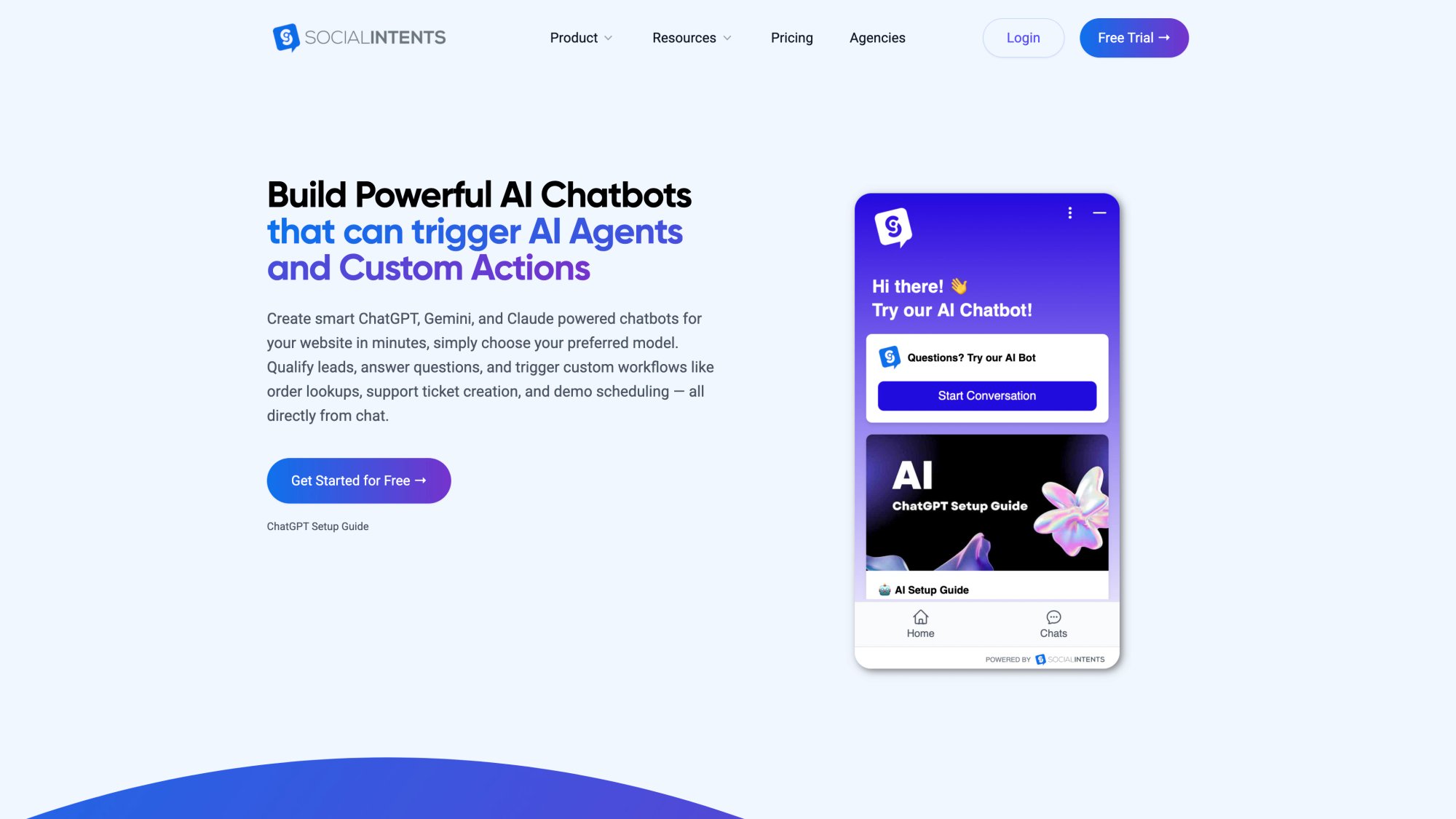
The platform supports multiple AI models (ChatGPT, Claude, Gemini) and allows you to train the bot on your specific business content, ensuring accurate responses grounded in your approved documentation rather than generic web data.
Multilingual support
If you serve customers in multiple languages, verify the bot can handle that. Some platforms require separate bots per language, while others have built-in translation or multi-language NLP.
The chatbot should detect the user's language and respond accordingly.
Context and memory
More advanced chatbots maintain context across multiple turns of a conversation. If a user asks "Do you sell laptops?" then "How much is the 13-inch?", the bot should know the second question refers to a 13-inch laptop.
Check if the platform supports context awareness. This leads to much more natural dialogues.
Customization of AI responses
Can you fine-tune the AI's behavior? Some solutions let you set the tone/personality (formal vs casual) or adjust how "creative" vs "precise" the answers should be.
If your brand voice matters, look for those controls.
| AI Feature | Why It Matters | What To Look For |
|---|---|---|
| Intent Recognition | Understands what users really want | Modern NLP, not just keyword matching |
| Knowledge Grounding | Prevents hallucinations and wrong answers | RAG, knowledge base integration, document training |
| Multilingual Support | Serves global customers | Auto-detect language, multi-language NLP |
| Context Awareness | Natural, multi-turn conversations | Conversation memory, state management |
| Customization | Matches your brand voice | Tone controls, personality settings |
How To Train a Chatbot On Your Business Content
No chatbot is truly useful out-of-the-box. It needs to be tailored to your business.
Training the bot on your content
The best platforms allow you to train the AI using your own data: company FAQs, help center articles, product documentation, policy documents.
This is huge. It means the chatbot provides accurate, specific answers rather than generic responses.
Check what the platform supports. Can you upload documents (PDF, Word, CSV)? Can you point it to your website or knowledge base and have it scrape content?
At Social Intents, you can train your chatbot with a few clicks. Upload your documents, point to your FAQ pages, and the bot learns your business. Then it can answer specific questions without needing human intervention.
Ongoing learning
Does the chatbot improve over time? Some systems learn from chat transcripts. If it failed to answer a question but a human agent later provided the answer, the bot can incorporate that next time.
Custom conversation flows
Beyond Q&A, think about whether you need custom workflows. Can you design multi-step dialog flows with conditions ("if user says X, do Y")?
Flexible platforms let you script these flows using a visual builder. You might also want features like quick reply buttons, carousels, or other rich message types.
Branding and personality
Your chatbot is a digital representative of your brand. Most platforms allow some level of custom branding: set the chat widget's colors to match your brand, give the bot a name and avatar.
Many let you customize the welcome message and tone. If look-and-feel matters, check if the vendor's widget supports white-labeling (removing their logo). Higher-tier plans often include white-label chat widgets for a fully custom appearance.
Choose a platform that lets you teach the bot about your business and shape it to fit your customer experience. A generic bot that can't incorporate your specific product info will not deliver the value you want.
When Should a Chatbot Hand Off To a Human Agent?
Even the smartest chatbot will encounter questions it cannot answer. How gracefully can the platform hand off to a human agent?
This is crucial for customer service because it directly impacts user satisfaction. Research shows 86% of people believe they should always have the option to transfer to a human agent.
Triggering human handoff
Look for features that allow the bot to detect when a human is needed. This could be when the user explicitly asks for an agent or when the bot is unsure of the answer.
The chatbot should seamlessly transfer the conversation to a live person without making the user repeat themselves. The best systems can even analyze sentiment or frustration signals and proactively escalate.
At minimum, have a "Talk to an agent" button in the chat interface.
Integration with live chat software or team platforms
Consider where your human agents will be answering when they take over. Some chatbot platforms have their own live chat console. Others integrate with existing tools.
Social Intents specializes in letting your team answer chats from Microsoft Teams or Slack directly. When a bot escalates a chat, it posts the transcript into your team's channel so a human can jump in. Your agents stay in the tools they already use all day.
Conversation continuity
Make sure the platform passes the full conversation context to the human agent. It's frustrating for a user to start over from scratch.
Good platforms transfer the chat with the chat history visible to the agent, so the customer doesn't have to repeat their issue.
Agent alerts and routing
How does the system notify agents that a bot has handed off a chat? Some will ring a group chat or assign to a specific department queue.
You should be able to configure routing rules (sales inquiry vs tech support issue, route to different teams).
Also consider off-hours. If no human is available, can the bot collect the user's info or let them know when an agent will respond?
Real-world example: A user says "Hi, I need to speak to a human." The chatbot responds empathetically and promises to connect them with the customer service team. Behind the scenes, the platform alerts a live agent (via your support dashboard or integrated tool like Teams/Slack) and conveys what the user needs help so the agent can pick up smoothly.
Human handoff is about ensuring the chatbot enhances customer service, not frustrates customers. When evaluating vendors, ask them how their bot signals a handoff and what that looks like for the agent.
What Metrics Should You Track for Chatbot Performance?
Deploying a chatbot isn't a "set it and forget it" project. You need to monitor performance and continually optimize. That's why analytics and reporting capabilities are so important.
Conversation metrics
The platform should track how many conversations the bot is handling, at what times, and how long they last. Look for dashboards that show volumes of chats and peak usage times.
This helps you see the bot's load and value (e.g., "handled 500 chats this week").
Resolution and escalation rates
Key metrics include what percentage of inquiries the bot fully resolves versus how many get escalated to humans.
If only 40% are resolved by the bot and 60% go to agents, the bot needs more training or expanded capabilities. Many platforms show bot containment rate (completed by bot vs handed to agent).
Common topics and questions
Analytics should surface the top things users ask. This might be a list of frequent user messages or intents the bot handled.
Such insight is gold for two reasons:
① It helps you optimize content. If a lot of people ask a question the bot doesn't handle well yet, you can add a better answer.
② It gives feedback to your business. If "pricing" questions dominate, maybe your pricing page isn't clear enough.
Failure points
Good analytics highlight failure points: instances where the bot couldn't answer or users expressed frustration.
Some platforms track when users hit the fallback ("Sorry, I don't understand") and what they were asking. This directs your training efforts.
User feedback integration
Consider if the bot can collect user feedback directly. After an interaction, it might ask "Did I answer your question?" or offer a thumbs-up/thumbs-down.
If the platform supports capturing these ratings, it's extremely useful. You can quantitatively measure satisfaction with bot answers.
Reporting and customization
Check what reports are available out-of-the-box. Ensure you can export data or get a summary for your team.
See if the vendor provides APIs or connectors to BI tools if that's important.
The goal of analytics is to ensure your chatbot is actually helping and to justify the ROI. Metrics like faster response times, high self-service resolution rate, or lead conversion via bot can show that.
Research shows chatbots typically respond 3 times faster than human agents. You'd want to see that reflected in your own usage data (reducing customer wait times).
Will This Chatbot Scale With Your Business Growth?
Think about not just what you need today, but what you might need a year or two from now. A chatbot platform should scale with your business and maintain reliability as usage grows.
Handling increased volume
Can the platform handle a surge of users? If your traffic doubles during holiday season, will the chatbot cope with twice as many simultaneous conversations?
Also look at any limits in the plans. Some cap the number of conversations per month. Scalability isn't only technical but also contractual.
Reliability and uptime
Check if the vendor provides any uptime guarantee or history. An outage in your chatbot service could mean lost customer engagements.
Larger providers might offer Service Level Agreements (SLAs) for uptime, especially on enterprise plans. Many host on cloud services like AWS or Azure, which is usually good for reliability.
Latency and speed
Users expect instant answers from bots. That's the whole point. If a platform's responses are sluggish, that's a red flag.
During any trial, test how quickly the bot responds. A slight delay for complex AI queries can be normal, but it should generally be snappy.
Scalability of features
As your chatbot program matures, you might want to add more bots or tackle more use cases. Is the platform flexible enough?
Maybe you start with one chatbot on your site, but later want one for Facebook Messenger or a second bot for a different department. Will your account support multiple bots under one roof?
Also check if they limit the number of agents or admins. If your team grows, can you all collaborate on managing the bot?
Future innovation
The AI field is evolving rapidly. Consider whether the platform is keeping up with new advancements.
Platforms that mention recent features (like support for ChatGPT, Claude, or Google Gemini) are likely more future-proof. Read their blog or roadmap if available.
Choosing a chatbot platform is hopefully a long-term decision. Migrating later can be painful (rebuilding all your Q&A and flows elsewhere). Think ahead: Will this solution serve us when we have 10x the users? When we expand to new markets?
Is Your Chatbot Platform GDPR and HIPAA Compliant?
Whenever a chatbot interacts with users, there are data considerations. Depending on your industry and what data might be exchanged, security and compliance could be a deciding factor.
Data protection
The platform should use encryption in transit and at rest for any stored conversation logs. Messages between the chatbot and your user should be encrypted via HTTPS. Sensitive info should be stored securely.
Compliance standards
Identify which regulations matter for you:
| Standard | When It Matters | What To Verify |
|---|---|---|
| GDPR | Users in the EU | Data Processing Agreement (DPA) offered |
| HIPAA | Healthcare with PHI | HIPAA compliance + Business Associate Agreement |
| PCI DSS | Payment/credit card data | PCI compliance (usually not recommended in chat) |
| Industry-specific | Education, finance, etc. | FERPA, FINRA, and other regulations |
Authentication and user privacy
Consider if you need the chatbot to authenticate users (logging into an account to check order status). Not all platforms can do that securely.
Some allow integration with your auth systems or tokens to identify a user. If this is a requirement, security is critical to ensure one user's data isn't shown to another.
Vendor transparency and certifications
Check if the company has any security certifications like SOC 2 Type II, ISO 27001, or if they've undergone third-party security assessments.
Smaller vendors might not, but they should at least have documentation on how they secure data.
Data residency and processing
If you have requirements that data stays in certain regions (EU data stays in EU), ask about data center locations or the ability to host in specific regions.
Privacy features
Consider if the chatbot platform allows you to mask or redact sensitive info from chat transcripts (like credit card numbers). Can you configure retention (auto-delete data after X days)?
Don't overlook security. A data breach via your chatbot could be just as damaging as any other breach, and trust is crucial if customers are engaging with it.
How Much Does a Chatbot Platform Actually Cost?
Chatbot platforms vary widely in how they charge. You need to ensure the one you choose fits your budget and usage pattern.
Pricing structure
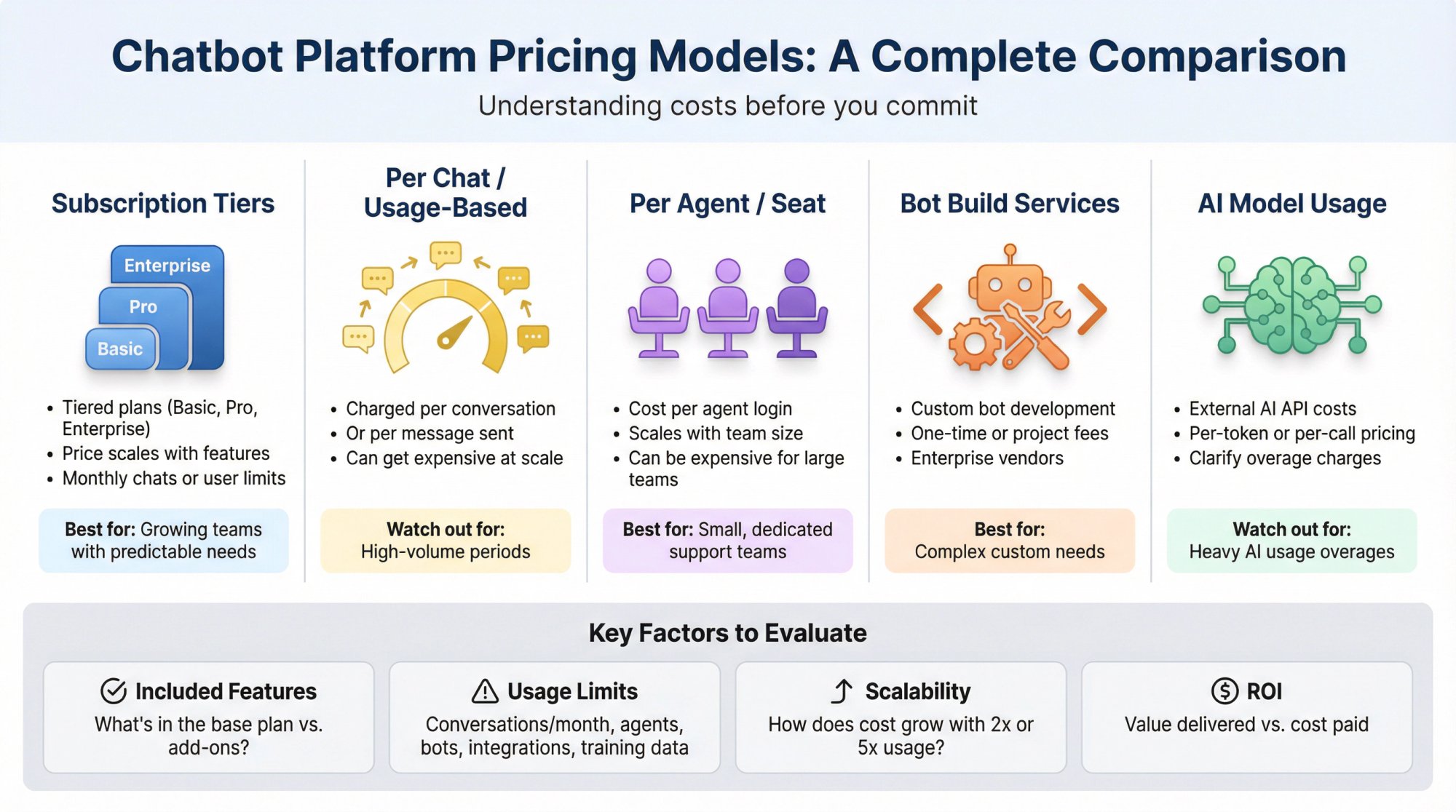
Common models include:
• Subscription tiers: Tiered plans (Basic, Pro, Enterprise) with different feature sets and limits. Price might scale with active chatbots, monthly chats, or number of users/agents.
• Per chat or usage-based: Some charge based on the number of conversations or messages. Be careful if you expect high volume.
• Per agent or seat: Some traditional live chat vendors charge per agent login. If you have a large team, that can get expensive.
• Bot build services: A few enterprise vendors charge for building/customizing the bot for you.
• AI model usage: If the platform uses external AI APIs (like OpenAI), there might be costs associated with API calls. Clarify if heavy AI usage could incur overages.
At Social Intents, we offer unlimited agents from our Basic plan upward. You don't pay more as your team grows. Our pricing is based on conversation volume, which scales with your business needs. Plus, we offer a 14-day free trial so you can test everything risk-free.
The platform's straightforward pricing model eliminates common frustrations like per-seat licensing that inflates costs as teams scale. This predictable structure helps you budget accurately and removes barriers to getting your entire support team on board.
Included features vs add-ons
Look at what each plan includes. Sometimes entry-level plans have the chatbot but lack key features like live agent handoff or integrations that are only in higher tiers.
Ensure the features you identified as critical are available in the plan you're considering.
Limits
Every plan might have limits:
• Number of conversations per month: Estimate your needs (and note if they count a "conversation" per user session or per message). What happens if you exceed it?
• Number of chatbot agents or users: Some limit how many of your team members can log in to manage the bot.
• Number of bots or installs: If you need multiple chatbots, see if the plan allows more than one.
• Integrations or API calls: Occasionally, integrations to certain apps might be only on higher plans.
• AI training data or documents: Platforms offering training on your data might cap how many URLs or documents you can upload.
Scalability of cost
Consider how the cost might grow if your usage grows. Is there a risk you'll jump from a $50/month plan to a $1,000/month enterprise plan due to a slight increase in usage?
Try to model a scenario for 2x or 5x growth. Transparent vendors outline costs clearly.
Free trial or freemium
Most providers have a free trial (14 days is common). Definitely take advantage to test in real conditions. Some have a limited free plan which can be enough to pilot the bot.
ROI considerations
Consider the value the chatbot is expected to bring (time saved, leads generated) relative to cost. A more expensive platform might pay off if it has capabilities that significantly move the needle.
On the other hand, don't overpay for features you won't use.
Why Teams and Slack Users Choose Social Intents
A lot of platforms assume your agents will live in their inbox. Social Intents is built for a different reality: many organizations live inside collaboration tools all day, and agent adoption is the bottleneck.
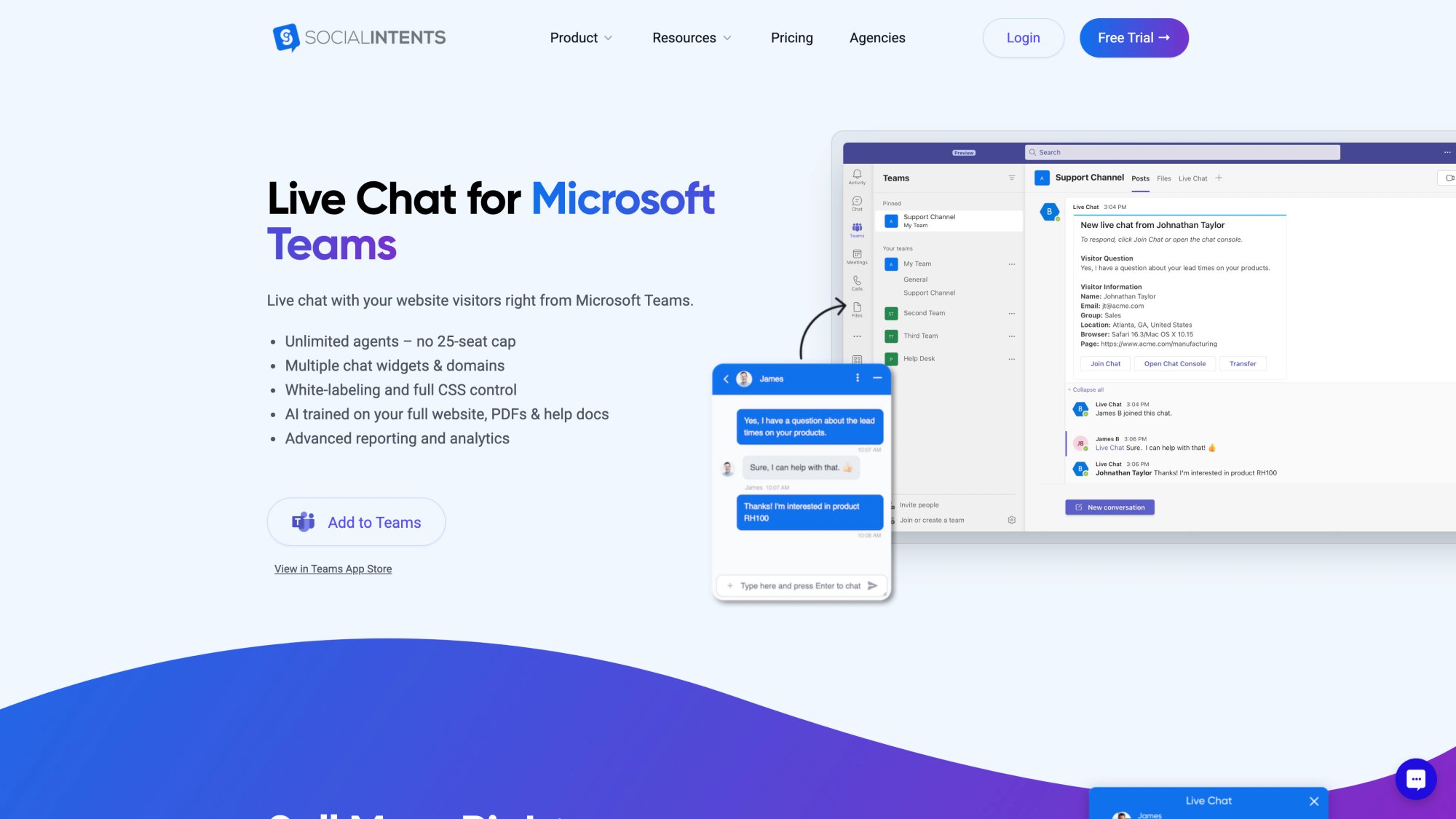
If Your Team Lives in Teams or Slack
We connect your website chat to Microsoft Teams, Slack, Google Chat, Zoom, and Webex. Website visitors chat with your bot, and your team responds directly from the tools they already use. No separate dashboard required.
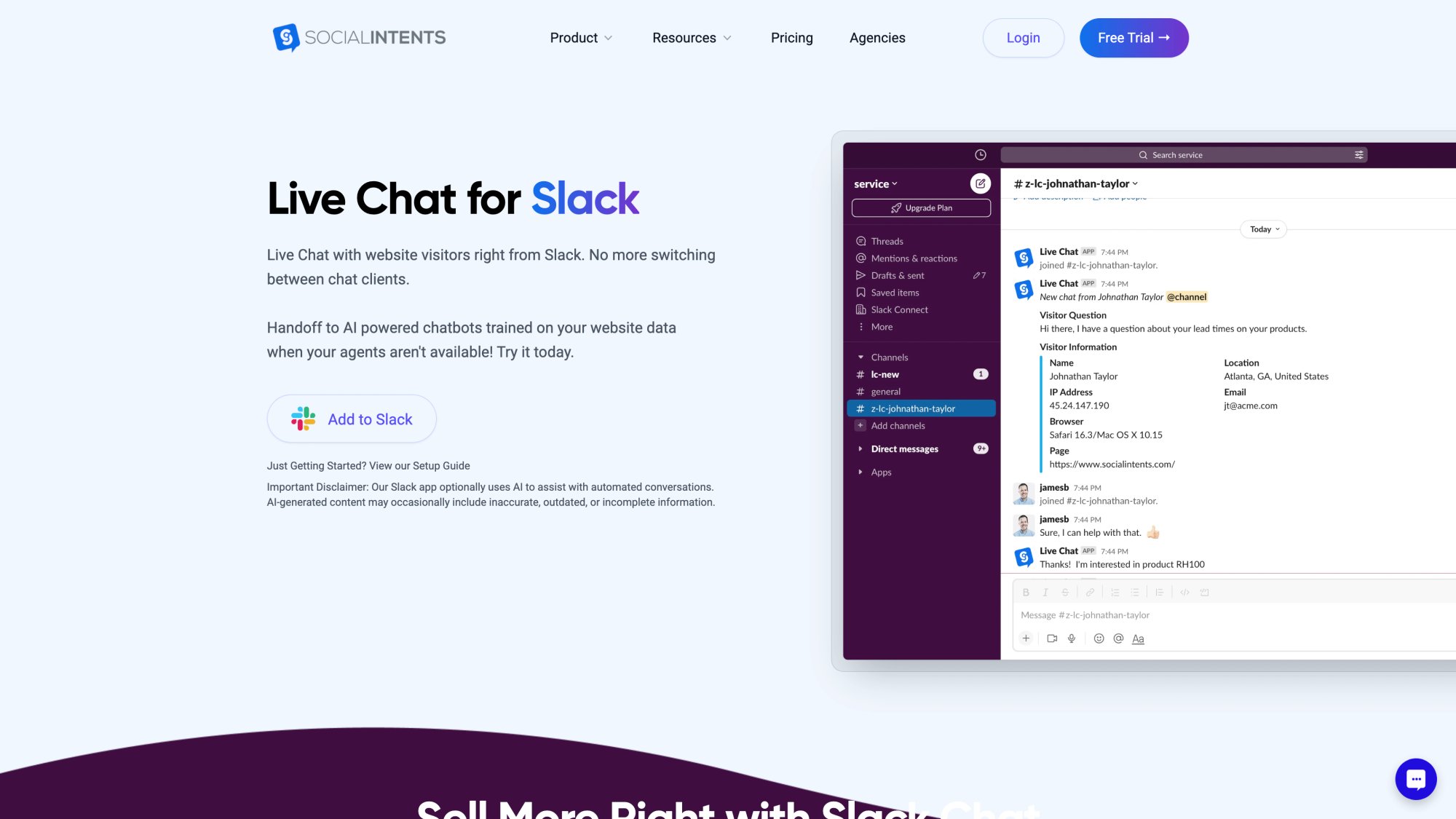
This approach transforms adoption. Your agents don't have to learn a new interface or check another inbox. The chat comes to them where they're already working, whether that's Teams or Slack.
If You Want AI Answers Plus Clean Human Takeover
Our platform combines AI chatbots with seamless escalation to humans. The bot handles routine questions using your approved content. When it can't answer or the customer asks for a human, the conversation instantly transfers to your team with full context.
You get the efficiency of automation without the frustration of trapped customers.
If You Care About Predictable Scaling
Our published pricing emphasizes unlimited agents from Basic upward. As your team grows, you don't pay more. We scale with conversation volume and features, not by how many people need access.
This is different from many competitors that charge per seat. With Social Intents, your entire support team can collaborate without inflating costs.
If You're an Agency or Provider
We offer an Agency/Reseller plan with white-label support and multi-client management. Perfect for web design firms, digital agencies, and managed service providers who need to deploy chatbots for multiple clients.
If You Want AI Actions
We support custom AI actions (highly requested by our customers). These are integrations with third-party tools to enrich chat conversations with things like order status, ticket creation, shipping updates, and more.
Your bot doesn't just answer questions. It can do things by calling your APIs securely.
Start With a Free Trial
We offer a 14-day free trial with access to all features. Train your bot on your content, test the integrations, and see how your team responds. No credit card required to start.
Get started with Social Intents today and see the difference a thoughtfully designed platform makes.
How To Test and Compare Chatbot Platforms Before Buying
After considering all the factors above, you should have a solid sense of what you're looking for. Here's how to finalize your choice:
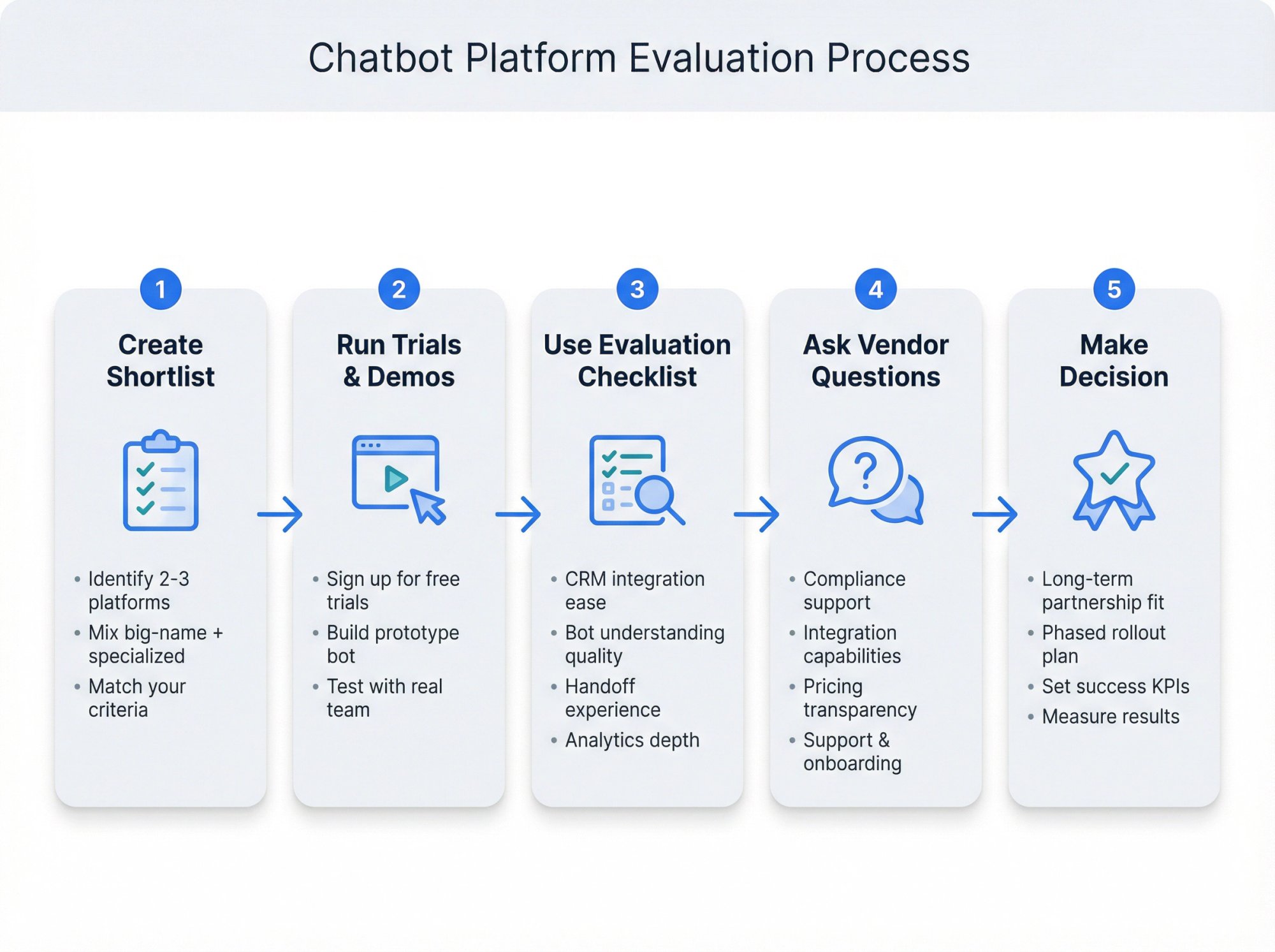
Create a shortlist
Identify 2-3 platforms that appear to meet your criteria for features, integrations, and price. Include at least one big-name platform and one newer specialized one to compare different approaches.
Take advantage of trials and demos
Sign up for free trials if available, or schedule live demos. During trials, build a small prototype bot that answers a few common questions.
Test it with real team members and maybe a friendly customer. This hands-on experience is invaluable. You'll quickly see how intuitive the builder is, how good the AI understanding is, and how it works in your environment.
Use a checklist
As you trial each platform, use the factors above as a checklist:
• Did we manage to integrate it with our CRM in the trial? How easy or hard was that?
• Does the bot understand our sample questions well?
• How was the handoff experience when we tried escalating to live chat?
• Are the analytics reporting what we expected?
• Do we feel comfortable using the interface (or did we get frustrated)?
Document your findings for each platform.
Ask vendors questions
Don't be shy about asking sales or support representatives detailed questions. For example:
• "Can your platform support HIPAA/GDPR compliance? How do you ensure data is protected?"
• "We use [Your CRM/Helpdesk]. Can the chatbot create tickets or pull info from it?"
• "If we need the bot to escalate to a human in Slack, how is that handled exactly?"
• "What happens if we exceed our plan's conversation limit?"
• "How do we train the bot on our company knowledge?"
• "What kind of support and onboarding do you provide?"
Asking these not only gets you answers but also gives a feel for the vendor's responsiveness and expertise.
Consider long-term partnership
Especially if this is a big deployment, you're not just choosing software. You're choosing a partner.
Evaluate the company behind the product. Are they established? Do they have good reviews or case studies in your industry? Are they innovating?
Sometimes a slightly less feature-rich product from a very supportive vendor might be better in the long run.
Make a phased plan
You don't have to roll out every feature on day one. Choose a platform that has room to grow.
Maybe first you deploy a bot for after-hours support on your website. Later, you add an AI sales assistant bot on Facebook Messenger. Ensure the platform can accommodate that roadmap.
Finally, once you've made your choice, measure the results. Set KPIs (like reduction in live chat volume, improved response time, customer satisfaction scores, lead conversion rates) and track them.
A good chatbot platform will show improvement in those areas over a few months of tuning.
Chatbot Platform FAQs: Your Questions Answered
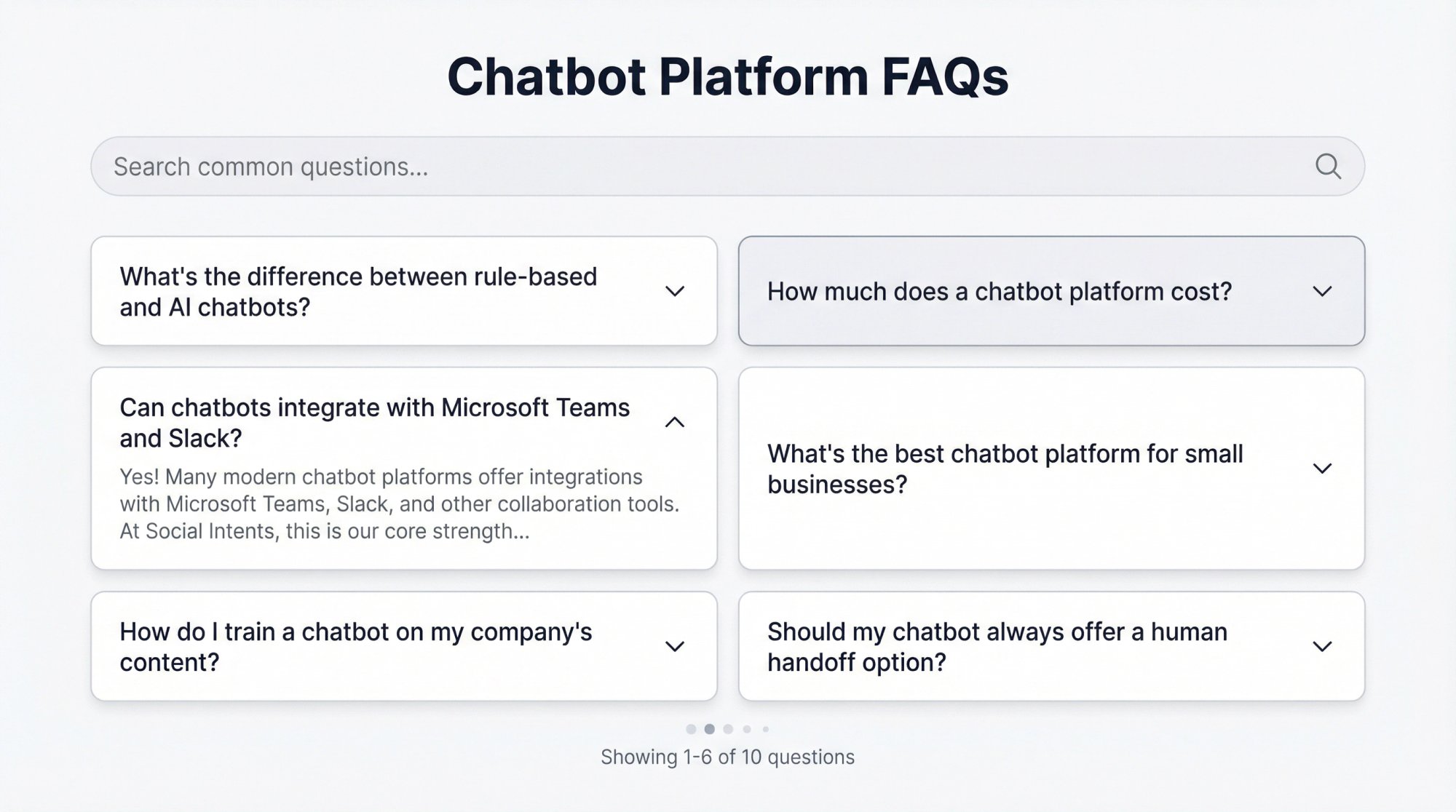
What's the difference between rule-based and AI chatbots?
Rule-based chatbots follow pre-defined scripts or decision trees. They're great for simple, predictable interactions (like FAQs) but can't handle anything outside their script.
AI chatbots use Natural Language Processing to understand free-form user input. They can interpret questions phrased many different ways and handle complex conversations. AI bots are more flexible and conversational, but they require training and testing to perform well.
Many modern platforms offer hybrid approaches that combine both.
How much does a chatbot platform cost?
Pricing varies widely. Simple platforms might start at $30-50/month for basic features. Mid-tier plans with AI capabilities, integrations, and analytics typically range from $70-200/month. Enterprise plans can cost $500-2,000+/month depending on volume and features.
At Social Intents, our plans range from $39/month (Starter) to $299/month (Agency/Reseller), with unlimited agents on all plans above Starter. We also offer a 14-day free trial.
Building a custom chatbot in-house can cost anywhere from $5,000 to $500,000 depending on complexity.
Can chatbots integrate with Microsoft Teams and Slack?
Yes! Many modern chatbot platforms offer integrations with Microsoft Teams, Slack, and other collaboration tools.
At Social Intents, this is our core strength. We built our platform specifically so your website visitors can chat with your bot, and your team responds directly from Teams, Slack, Google Chat, Zoom, or Webex. No separate dashboard required.
What's the best chatbot platform for small businesses?
The best platform depends on your specific needs, but small businesses typically benefit from:
• No-code or low-code builders (easy to set up without developers)
• Affordable pricing with clear limits and no surprise costs
• Strong human handoff (customers can always reach a real person)
• Integration with existing tools (your CRM, helpdesk, or communication platforms)
At Social Intents, we offer all of these with plans starting at $39/month, unlimited agents on higher tiers, and seamless integration with the tools your team already uses.
How do I train a chatbot on my company's content?
Most modern AI chatbot platforms allow you to train the bot using your own data. This typically includes:
• Uploading documents (PDFs, Word files, CSVs)
• Pointing the bot to your website or knowledge base to scrape content
• Manually adding FAQs and answers
• Connecting to your help center or documentation
At Social Intents, you can train your chatbot with a few clicks. Upload your documents, point to your FAQ pages, and the bot learns your business. It then pulls answers from your approved sources rather than generic training data.
The more specific content you provide, the better your bot will perform.
Should my chatbot always offer a human handoff option?
Yes. Research shows 86% of people believe they should always have the option to transfer to a human agent.
Even the smartest AI will encounter questions it can't answer or situations that require human judgment. Your chatbot should detect when a human is needed (low confidence, user frustration, explicit request) and seamlessly transfer the conversation with full context.
At Social Intents, when a bot escalates a chat, it posts the transcript into your team's Teams or Slack channel so a human can jump in immediately. The customer doesn't have to repeat themselves.
What's the difference between conversational AI and chatbots?
The terms are often used interchangeably, but there's a distinction:
Chatbots typically refer to any automated chat system, including simple rule-based bots that follow scripts.
Conversational AI specifically refers to advanced systems that use AI, NLP, and machine learning to understand context, maintain natural dialogue, and learn from interactions.
Most modern chatbot platforms now incorporate conversational AI capabilities. When evaluating platforms, look for features like intent recognition, context awareness, and knowledge grounding (not just keyword matching).
Can chatbots handle multiple languages?
Yes, many chatbot platforms support multilingual capabilities. This can work in different ways:
• Auto-detect language: The bot identifies what language the user is speaking and responds accordingly
• Multi-language NLP: The bot's AI understands queries in multiple languages natively
• Translation integration: The bot uses services like Google Translate to translate inputs and outputs
If you serve customers globally, verify the platform supports the specific languages you need. Some platforms handle this better than others.
At Social Intents, our Business plan includes real-time auto-translation to help you serve customers in their preferred language.
What metrics should I track for chatbot performance?
Key metrics to track include:
Volume metrics: Number of conversations, peak usage times, channels used
Resolution metrics: Bot containment rate (resolved by bot vs escalated to human), resolution time
Quality metrics: User satisfaction ratings, thumbs up/down feedback, sentiment analysis
Failure metrics: Instances where the bot couldn't answer, common failure points, escalation triggers
Business metrics: Tickets deflected, leads captured, conversion rate, cost savings
Good chatbot platforms provide dashboards and reports for these metrics out of the box. Use them to continuously improve your bot's performance.
How long does it take to set up a chatbot?
This varies widely based on complexity:
Simple FAQ bot: Can be set up in a few hours using templates and no-code builders
AI chatbot with custom training: Typically 1-2 weeks to train on your content, test, and refine
Enterprise deployment with integrations: Can take 4-8 weeks for full implementation, testing, and rollout
At Social Intents, many customers have a basic bot running within hours and a fully trained, production-ready bot within a week. Our no-code platform and pre-built integrations speed up the process significantly.
Start with a simple version and iterate. Don't wait for perfection before launch.
Ready To Choose Your Chatbot Platform?
Selecting a chatbot platform is a significant decision. By focusing on the factors that matter most to your business, you can cut through the noise.
Make sure any platform you consider:
✓ Aligns with your goals and use case
✓ Offers the key features you need (NLP, integrations, analytics, handoff)
✓ Fits your budget and can scale with your growth
✓ Provides confidence in security and support
The best solution will feel like it was made for your organization. It will engage your customers on their terms, provide instant helpful answers, and seamlessly loop in your team when necessary. All while being easy for you to manage and improve.
When you find that fit, a chatbot becomes a 24/7 extension of your team that boosts customer satisfaction, generates leads, and frees up your human agents for the challenges that truly require human expertise.
Remember that customers are paying attention to how you use AI. The data is clear: they want fast answers, but they also want trust, transparency, and the ability to reach a real person when needed.
Choose a platform that helps you deliver on all three.
Start your free trial with Social Intents today and experience the difference a thoughtfully designed chatbot platform makes.