You're running an agency. Clients keep asking about AI chatbots, live chat support, and 24/7 customer engagement. You could spend months building something custom, burn through $250K+, and hope it works. Or you could white-label an existing solution and start delivering value next week.
That's the opportunity here.
White label chatbot software lets you offer sophisticated AI-powered chat solutions under your own brand. No development team needed. No months of testing. Just proven technology with your logo on it, ready to sell to clients who desperately want better customer engagement.
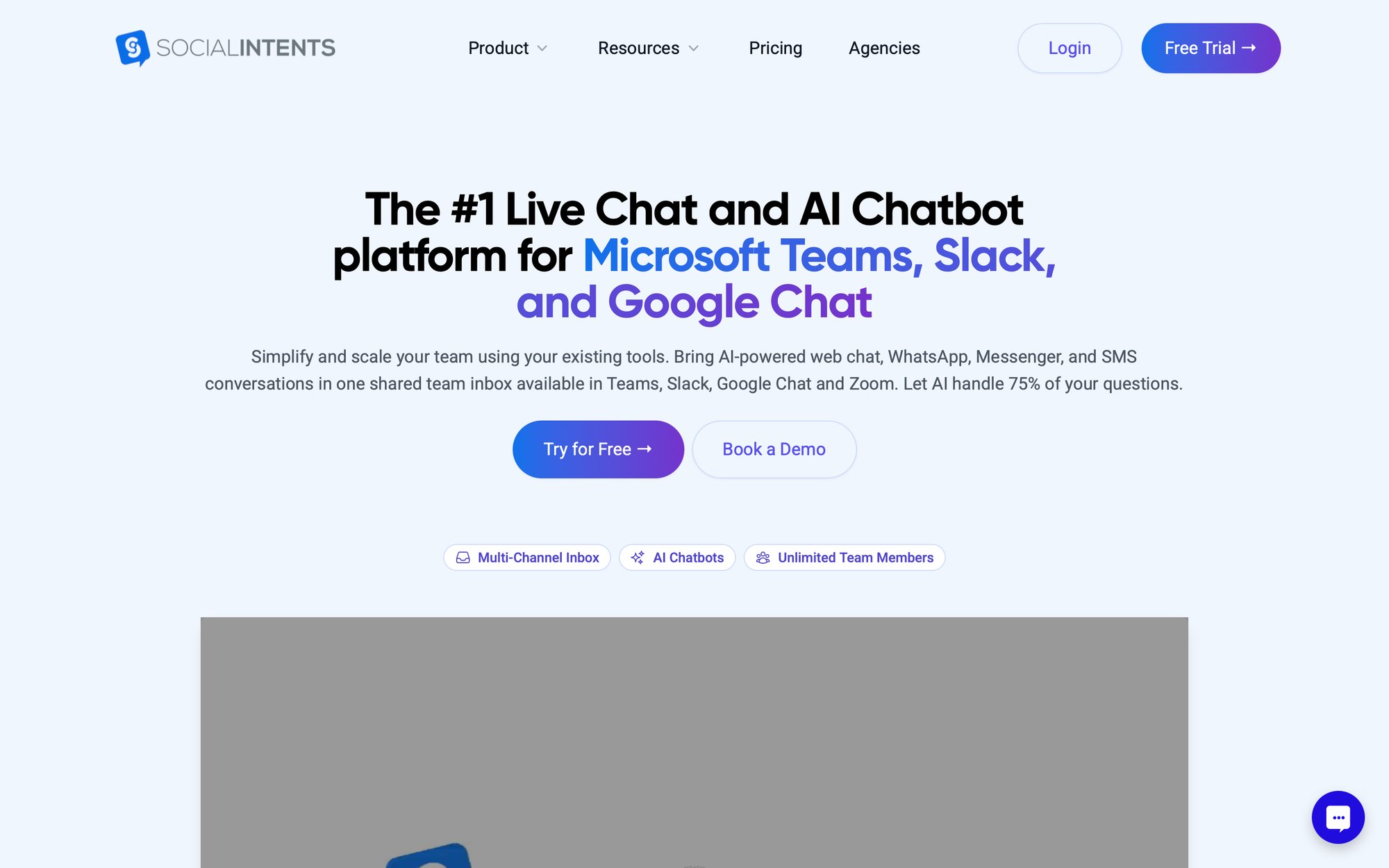
Platforms like Social Intents make this possible. Their interface shows exactly what you get: native integration with tools your clients already use (Teams, Slack, Google Chat), AI-powered responses, and complete white-label capabilities. This is the kind of mature, production-ready solution agencies can confidently resell.
In this guide, we'll show you exactly how agencies are using white label chatbots to create new revenue streams, improve client retention, and position themselves as innovators. You'll learn what to look for in a platform, how to choose the right one, and the step-by-step process of launching your own chatbot service.
What Is White Label Chatbot Software and Why Does It Matter?

White label means you take someone else's product and sell it as your own. In the chatbot world, that means a platform builds and maintains the technology while you rebrand it, package it, and deliver it to your clients.
Your clients log into chat.youragency.com. They see your logo. The chat widgets on their websites show your branding. To them, you built it. They have no idea about the vendor behind the scenes, and frankly, they don't need to.
This matters because your agency gets credit for sophisticated AI technology without the technical burden. You're not explaining to clients that they need to sign up for a third-party service. You're not splitting the relationship. You own the client interaction completely.
Social Intents, for example, offers an agency plan specifically designed for this. At $299/month, you get 20 chatbot instances with complete white-labeling: your domain, your branding, individual client sub-accounts. Your clients never see the Social Intents name unless you want them to.
The best platforms handle all the technical complexity (hosting, security, updates, AI improvements) while you focus on what agencies do best: understanding client needs, delivering results, and building relationships.
Why Agencies Are Adding Chatbots in 2025
Three massive shifts are making 2025 the perfect time to offer chatbot services:
Clients Actually Want AI Now
Two years ago, chatbots were still interesting. Today, they're expected. After ChatGPT went mainstream, business owners realized AI assistants can actually work. They're not asking if they need chat automation anymore. They're asking when you can set it up.
That creates urgency for agencies. If you're not offering chatbot solutions, your competition probably is. Or worse, clients are trying to figure it out themselves and creating a mess you'll eventually need to fix.
The Technology Finally Works
Early chatbots were frustrating. Rigid scripts, confused responses, customers getting trapped in loops. Modern platforms integrate with GPT-4, Claude, and Google Gemini. The AI actually understands context, provides helpful answers, and knows when to hand off to a human.
According to industry analysis, platforms like Social Intents now include AI training that learns from your client's website, FAQs, and documentation in minutes. The bot gets smarter over time based on actual conversations. That's a fundamentally different product than what existed even two years ago.
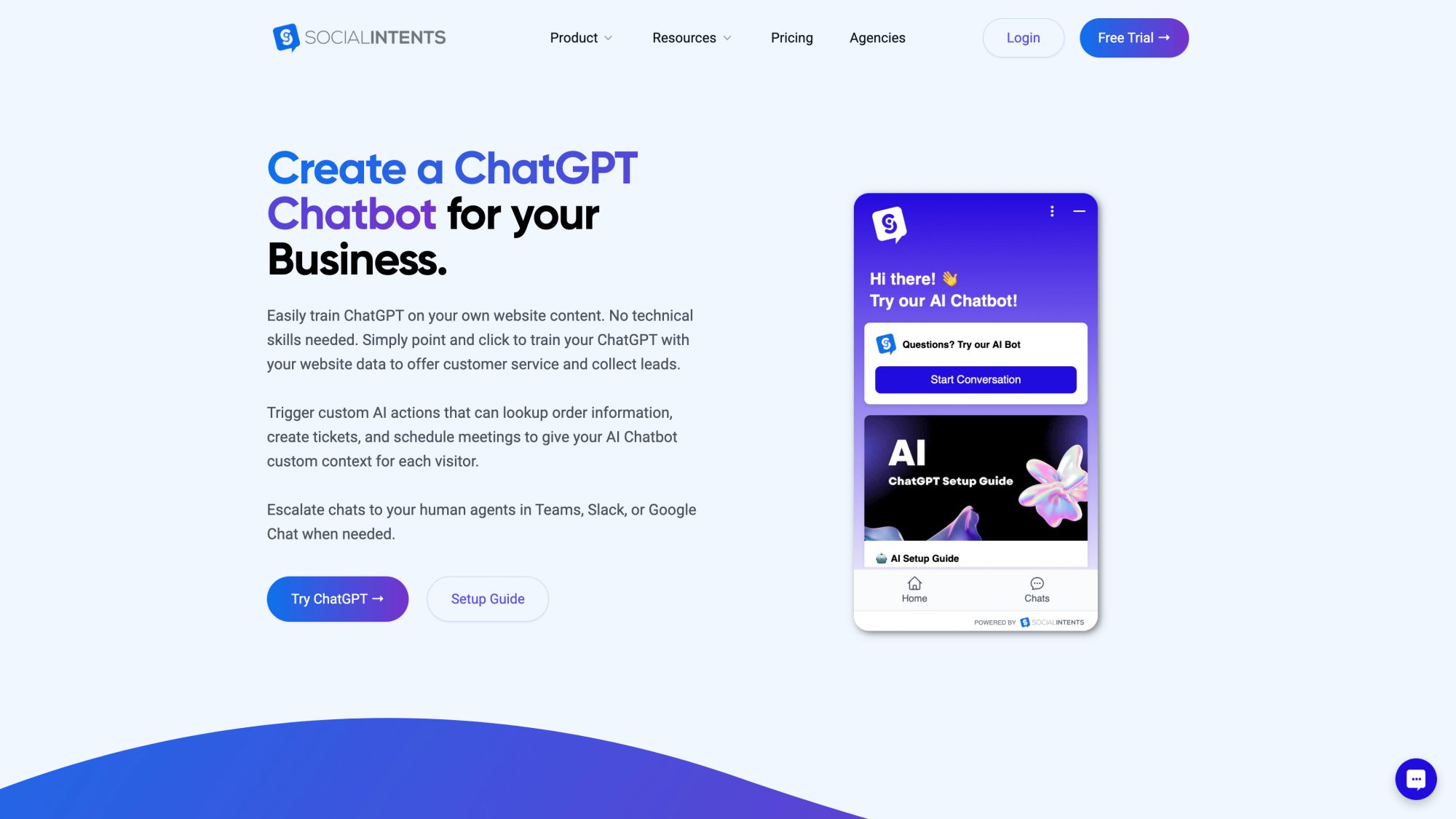
The interface above shows Social Intents' ChatGPT integration in action. You can train the AI on your client's specific content, configure confidence thresholds for human handoff, and deploy it across multiple channels. This level of AI sophistication is now standard in white label platforms, making it possible for agencies to offer genuinely intelligent chatbots without building the AI infrastructure themselves.
Building vs Buying: The Math Changed
Building a basic custom chatbot used to cost $30K-$65K and take 3-6 months. A sophisticated AI solution with live chat integration, analytics, and CRM connections? Try $250K+ and 9+ months according to development cost estimates.
White label costs $299-$1,200 per month. You can launch client services in days, not months. The ROI is obvious. So obvious that most agencies quickly realize they should have done this years ago.
The market is growing at about 30% annually and expected to exceed $11 billion in 2025 according to industry research. That growth is driven by businesses preferring to work through trusted providers (like your agency) rather than navigating complex platforms themselves.
How White Label Chatbots Work (Simple Explanation)
Think of it in three layers:
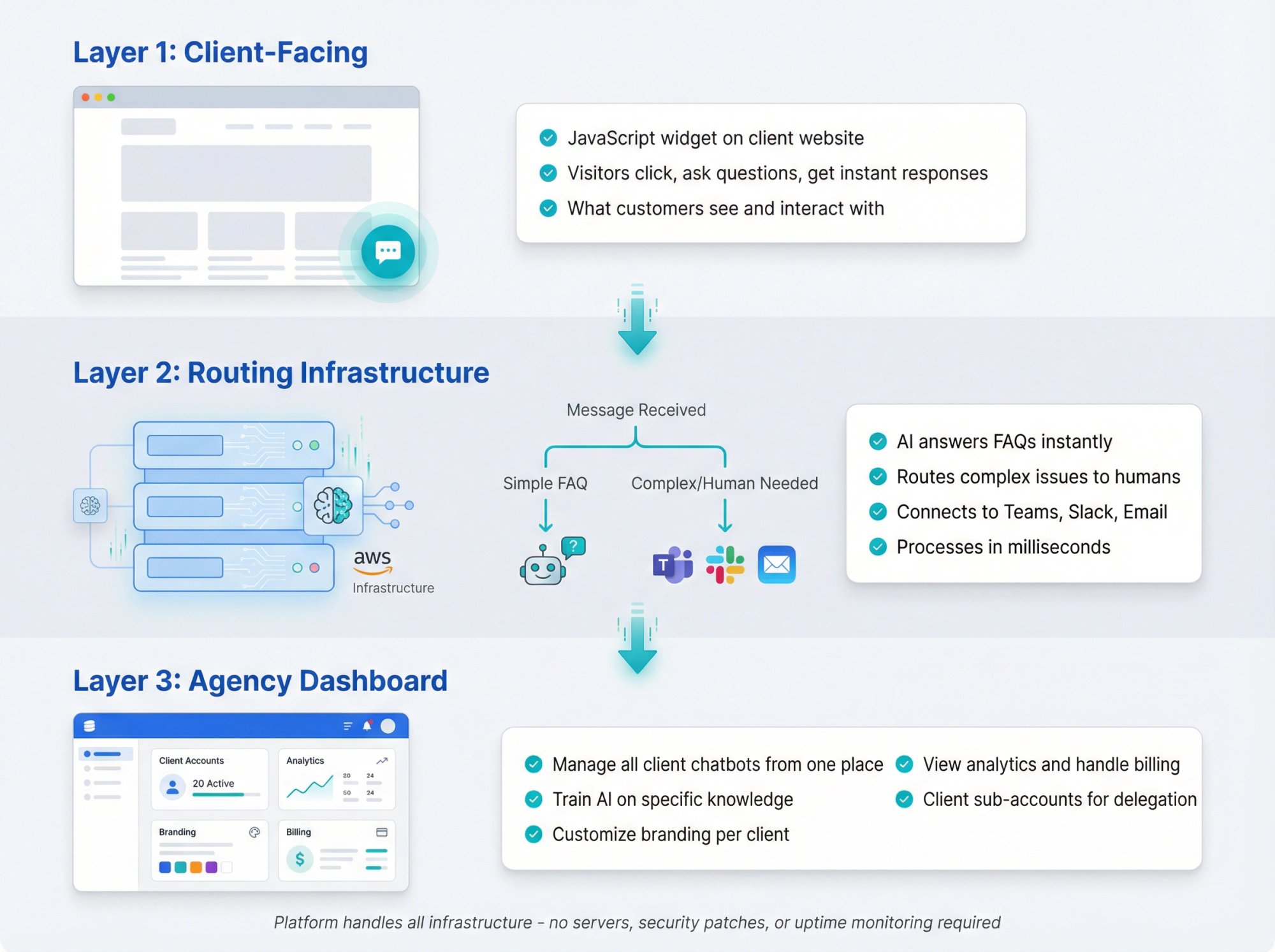
Client-facing layer lives on your client's website. A JavaScript snippet renders a chat widget. Visitors click it, ask questions, and get instant responses. This is what customers see.
Routing layer (the platform's infrastructure) receives those messages and decides what to do with them. If it's a simple FAQ, the AI answers immediately. If it's complex or requires human judgment, it routes to the right person via Microsoft Teams, Slack, email, or whatever your client uses.
Your control layer is where you manage everything. One dashboard for all clients. You can create new chatbots, train them on specific knowledge, customize branding, view analytics, and handle billing. Each client gets their own sub-account with exactly what they need to see.
Social Intents runs on AWS infrastructure with enterprise-grade security. When a customer on your client's site starts a chat, the message flows to Social Intents' servers, gets processed (AI or human routing), and the response goes back to the customer's browser. All of this happens in milliseconds, completely branded as your solution.
The beauty is you never touch the infrastructure. No servers to manage. No security patches. No uptime monitoring. That's all handled by the platform while you focus on client success.
What to Look For in White Label Chatbot Software
Not all white label chatbot providers are created equal. Some offer limited branding. Others cap agent seats or conversation volume in ways that become expensive fast. Here's what actually matters:
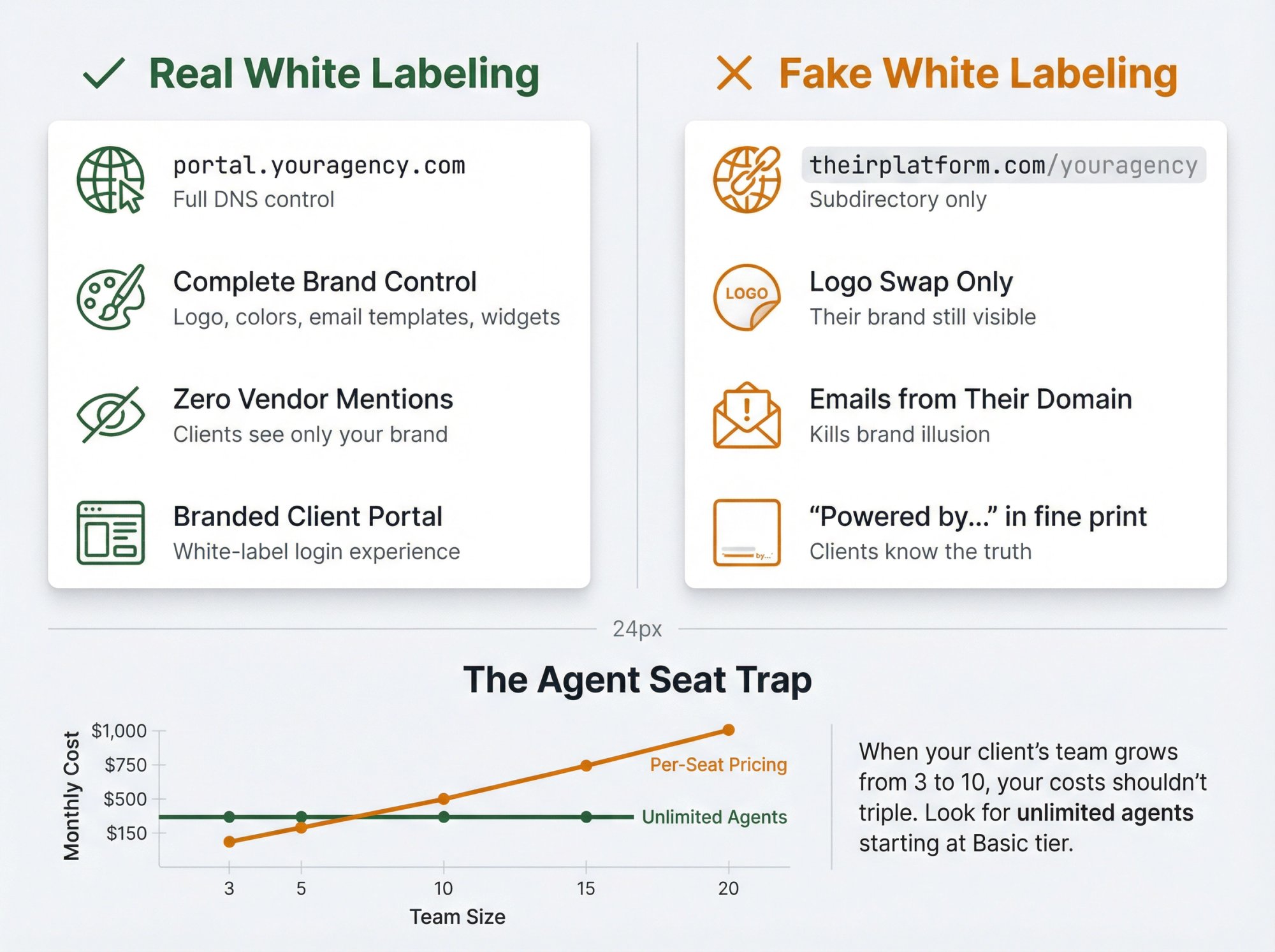
Complete White Labeling (Not Just Logo Swaps)
Real white labeling means:
• Custom domain pointing (portal.youragency.com, not theirplatform.com/youragency)
• Complete branding control (logo, colors, email templates, chat widgets)
• No vendor mentions anywhere clients can see
• Branded portal for client login and management
Some platforms claim "white label" but still show their logo in small print or send emails from their domain. That's not what you want. Clients should see your brand exclusively.
Social Intents lets you brand the entire chatbot portal with your logo and colors, set up custom domains, and even customize email templates. When the platform sends notifications, they come from your domain, not theirs.
Unlimited Agents (Critical for Scale)
Many chat platforms charge per agent seat. That seems fine until your client's support team grows from 3 people to 10. Suddenly you're explaining why their monthly fee tripled.
Look for unlimited agents from a specific plan tier upward. Social Intents offers unlimited agents starting at their $69/month Basic plan. When you resell at your agency markup, agent count becomes a non-issue.
This pricing model matters because it eliminates awkward conversations about "seat licenses" and lets you focus on value: more conversations handled, better customer satisfaction, higher conversion rates.
AI + Human Handoff (What Clients Actually Use)
Pure chatbots frustrate customers when they can't solve a problem. Pure human chat is expensive and slow. The winning combination is AI that handles routine questions and seamlessly transfers complex issues to humans.
| Capability | Why It Matters |
|---|---|
| AI auto-response | Handles FAQs instantly, 24/7 |
| Confidence scoring | Bot knows when it's unsure |
| Smart escalation | Transfers to human smoothly |
| Context preservation | Human sees full chat history |
| After-hours coverage | AI responds when team is offline |
Clients love this because it scales support without scaling headcount. Customers get instant answers for simple questions and human help for complex ones.
According to Social Intents documentation, you can configure the bot to automatically escalate based on keywords, user sentiment, or confidence levels. Plus, handoffs go directly to Microsoft Teams, Slack, or a web console, so support teams don't need to learn new software.
Multi-Channel Support
Your client's customers aren't just on their website. They're on WhatsApp. They message on Facebook. Some prefer Instagram DMs.
Smart platforms support multiple channels:
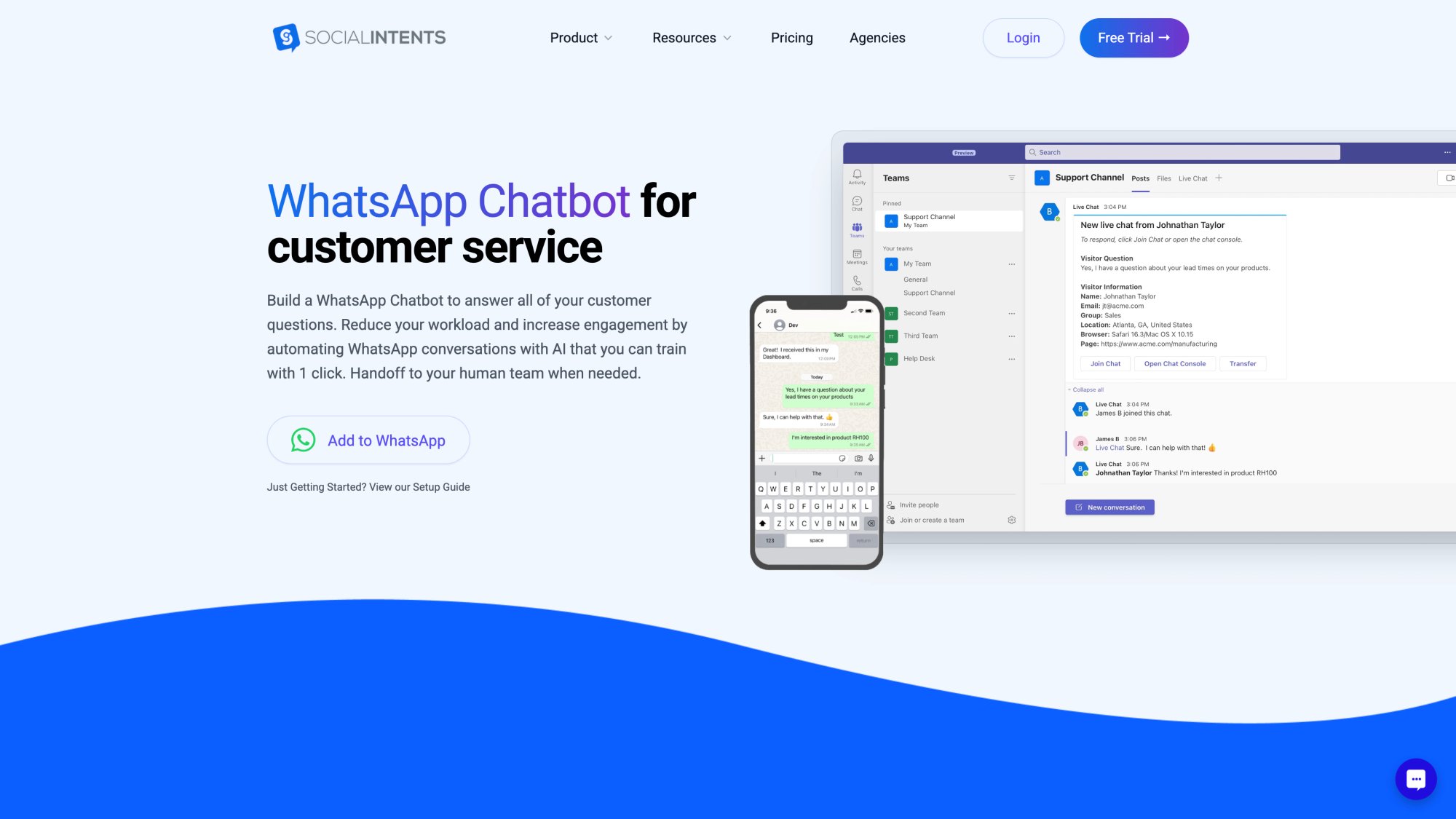
WhatsApp alone reaches over 2 billion users globally. The screenshot above shows Social Intents' WhatsApp chatbot interface, where you can deploy the same AI-powered chat experience across messaging apps your clients' customers actually use. The key advantage: one bot, trained once, deployed everywhere.
• Website chat (obviously)
• WhatsApp chatbot integration
• Facebook Messenger automation
• Instagram (growing fast)
• SMS (still works for some industries)
The key is managing all channels from one interface. Otherwise you're asking clients to juggle multiple tools, which defeats the purpose of simplification.
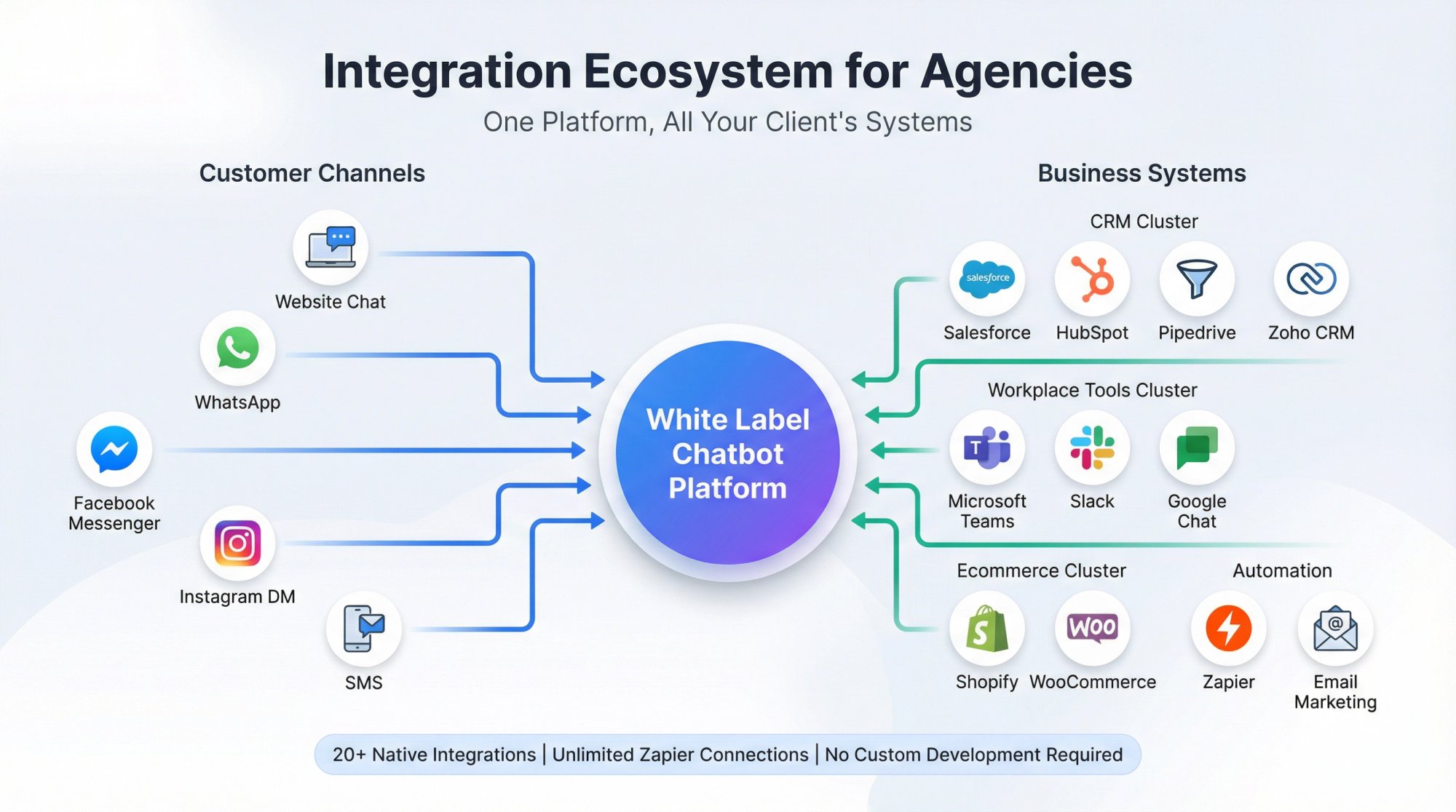
Social Intents supports WhatsApp and Messenger chatbots along with standard web chat. Everything routes through the same backend, so you create one bot and deploy it across channels.
Integration Ecosystem
Chatbots generate leads and conversations. Those need to flow into your client's existing systems: CRM, email marketing, project management, ticketing platforms.
Essential integrations include:
→ CRMs: Salesforce, HubSpot, Pipedrive, Zoho
→ Email: Mailchimp, Constant Contact, ActiveCampaign
→ Automation: Zapier (this unlocks hundreds more)
→ Workplace: Microsoft Teams, Slack, Google Chat
→ Ecommerce: Shopify, WooCommerce, BigCommerce
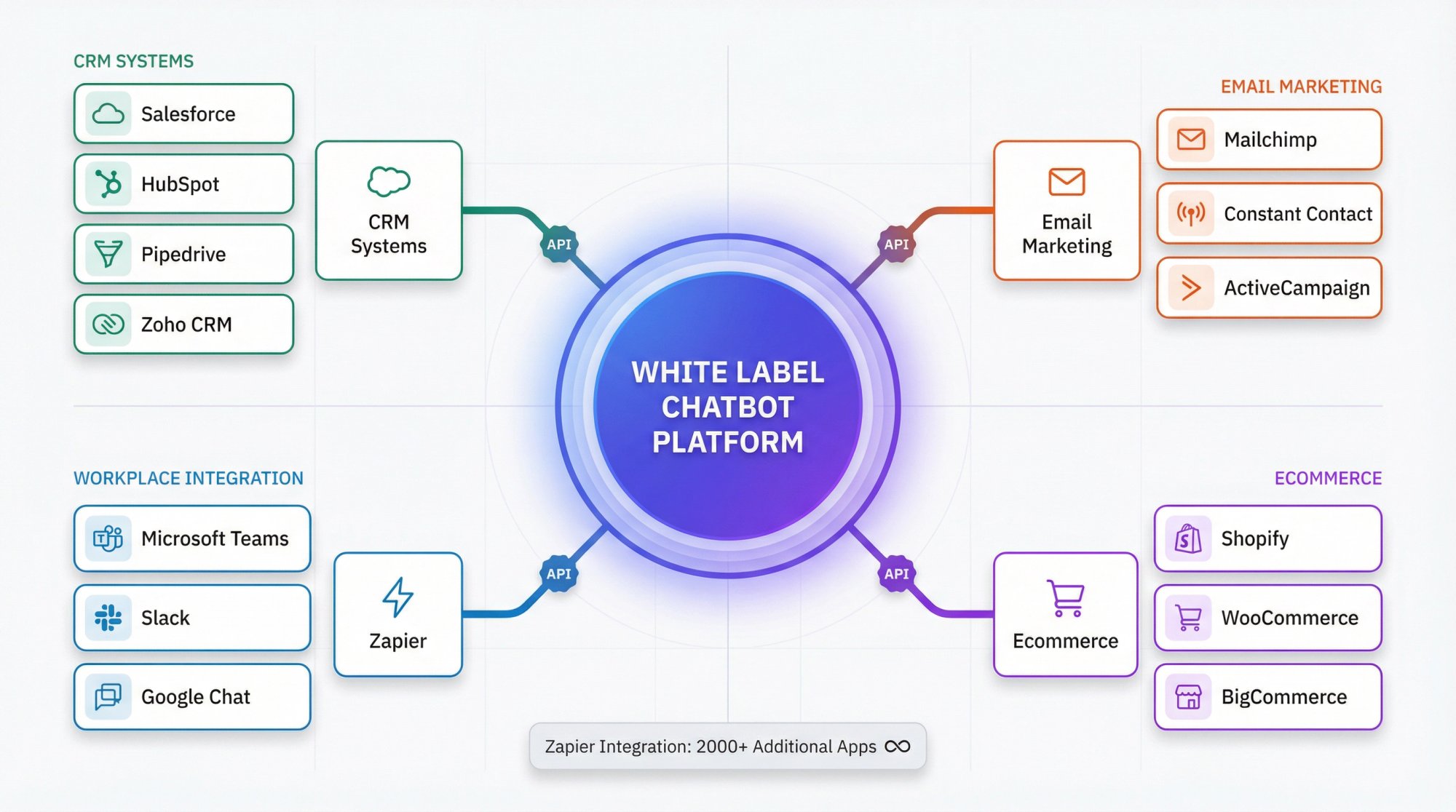
Platforms with robust APIs and Zapier connections give you flexibility. If a client uses an obscure CRM, you can still make it work through Zapier rather than saying "sorry, we don't integrate with that."
Social Intents integrates natively with Microsoft Teams, Slack, Google Chat, Zoom, and Webex. Their Zapier integration handles everything else. That means leads captured through chat can automatically populate in basically any system your clients use.
Fast Setup for Common Platforms
Your clients run on WordPress, Shopify, Wix, or custom sites. The easier it is to install on each, the faster you can deliver results.
Look for:
Native plugins/apps for major platforms (WordPress plugin, Shopify app, Wix app)
Simple JavaScript snippet for custom sites
One-click deployment where possible
Pre-built templates to speed up chatbot creation
Some agencies waste hours wrestling with installations. Choose a platform that makes this trivial. Social Intents offers official apps for Shopify, BigCommerce, Wix, WordPress, and Webflow. For custom sites, you paste a JavaScript snippet and you're live.
Custom AI Actions (What Makes Bots Powerful)
This separates basic chatbots from powerful automation. Custom AI actions let the bot perform tasks beyond just answering questions.

Custom AI Actions represent the next evolution in chatbot capability. Instead of just answering questions with text, these bots can actually perform tasks by integrating with your client's backend systems. Social Intents has seen significant customer interest in this feature because it transforms chatbots from information providers into functional assistants.
Examples:
• Check order status (connects to ecommerce backend)
• Create support ticket (logs issue in helpdesk)
• Book appointment (integrates with scheduling)
• Update account info (modifies user profile)
Clients get excited about this. Instead of the bot saying "a human will help you check your order," it actually checks the order and provides tracking information.
According to Social Intents documentation, custom AI actions are seeing heavy interest from agencies. Businesses want chatbots that do things, not just say things.

Best White Label Chatbot Platforms Compared
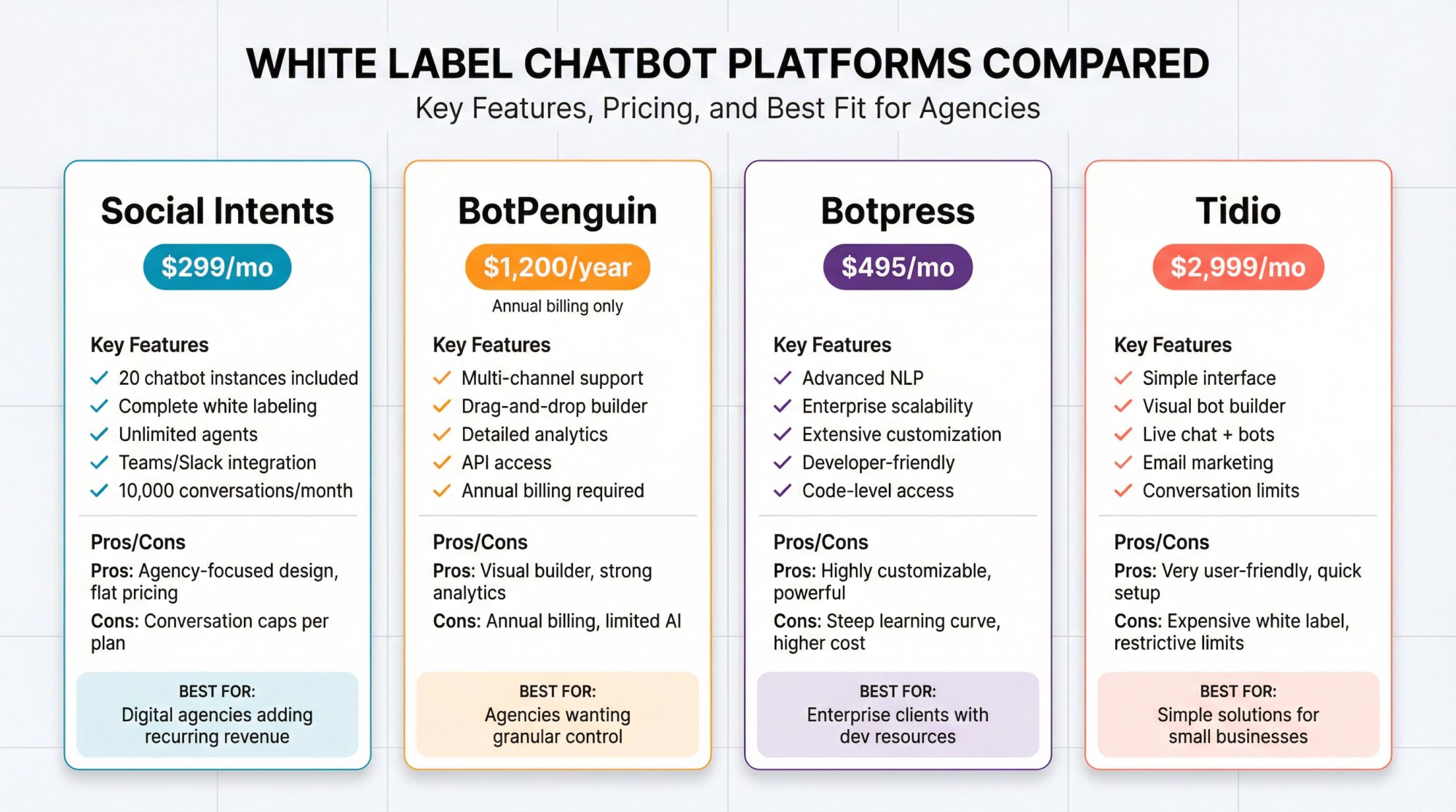
Let's compare the leading white label chatbot platforms based on what agencies actually need. We've included pricing, core features, and honest pros/cons.
Social Intents: Built for Agencies
Social Intents positions itself specifically for agencies and resellers. Their Agency plan at $299/month includes:
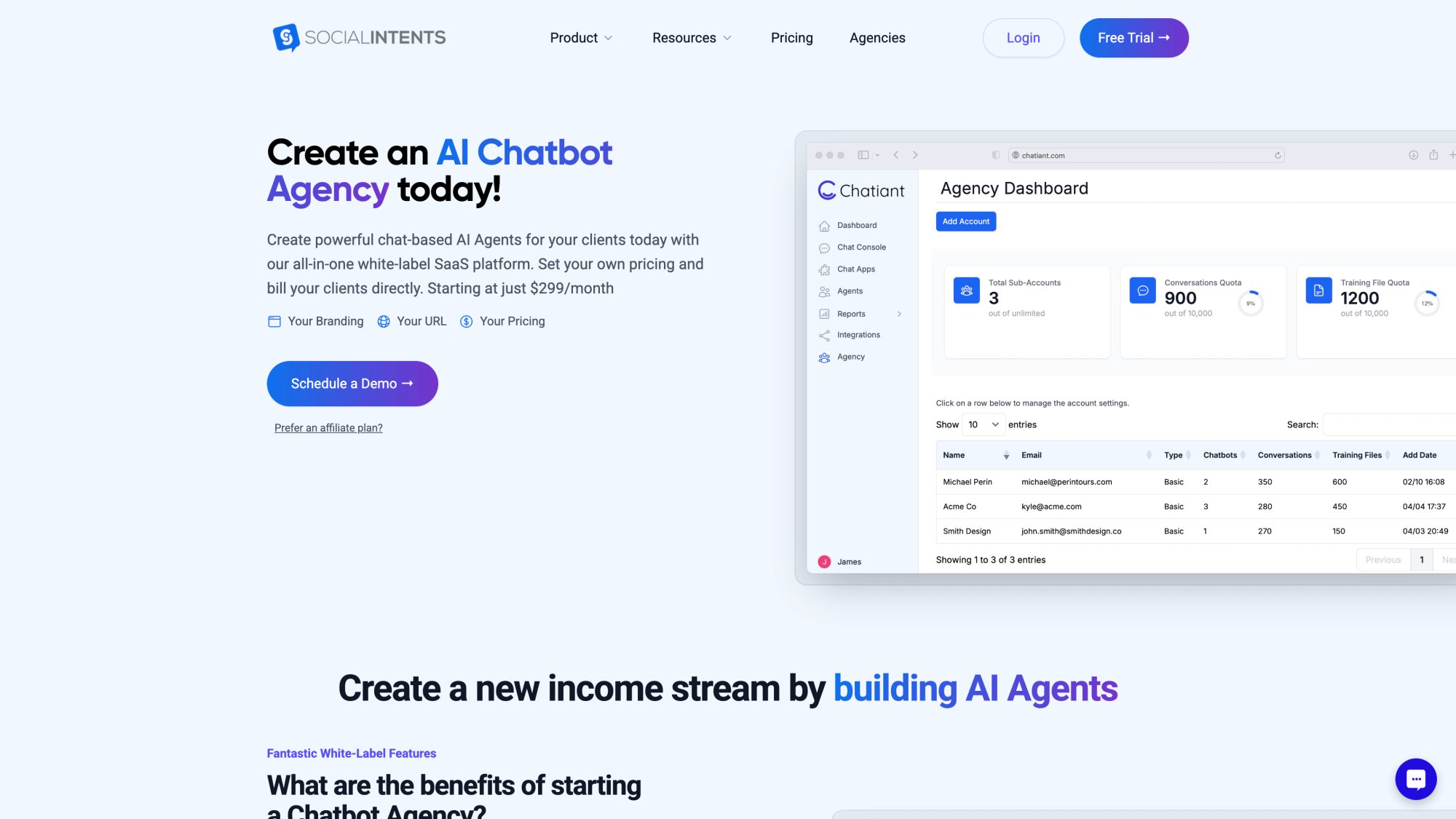
The agency plan shown above is purpose-built for resellers. You're not trying to adapt a consumer product for business use. This is designed from the ground up for agencies that want to offer chatbot services under their own brand. The pricing is transparent, the features are comprehensive, and the white-labeling is complete.
| What You Get | Details |
|---|---|
| Chatbot instances | 20 included (add more at $20 each) |
| Monthly conversations | 10,000 |
| White labeling | Complete (custom domain, branding, portal) |
| Agents | Unlimited |
| Sub-accounts | Yes, for individual clients |
| AI training | 10,000 documents |
| Integrations | Teams, Slack, Google Chat, Zoom, Webex |
What stands out: The platform is designed around the agency use case. You're not adapting a general product; it's built for reselling. The pricing is flat regardless of how you structure your client packages, which makes margin planning straightforward.
Unique advantages:
Native integration with workplace tools means your clients' teams can answer chats directly in Microsoft Teams or Slack without switching apps. Support agents don't need new software training.
Custom AI actions let you build chatbots that actually complete tasks (check order status, create tickets, book appointments) rather than just answering questions.
Real-time translation feature supports multilingual customer bases, which is increasingly important for agencies serving global clients.
Best for: Digital agencies, marketing firms, web development shops, and IT consultancies looking to add recurring revenue through white-labeled chat solutions.
BotPenguin: Developer-Friendly Option
BotPenguin starts at $1,200/year for their white label plan. Includes:
• Multi-channel support (web, WhatsApp, Telegram, Facebook)
• Drag-and-drop bot builder
• Detailed analytics
• API access for custom integrations
Pros: Very visual bot builder makes it easy to create complex conversation flows. Strong analytics help demonstrate ROI to clients.
Cons: Annual billing only. Limited AI capabilities compared to platforms using GPT-4/Claude. White labeling starts at a higher price point than monthly platforms.
Best for: Agencies comfortable with more technical bot building who want granular control over conversation flows.
Botpress: Enterprise-Scale Solution
Botpress white labeling available on Plus ($495/month) and Enterprise plans.
• Advanced natural language processing
• Scalable infrastructure
• Extensive customization options
• Developer-friendly with code access
Pros: Extremely powerful if you have development resources. Can build highly customized solutions.
Cons: Steeper learning curve. Overkill for most small-to-medium agency clients. Higher price point requires larger client deals to justify costs.
Best for: Agencies serving enterprise clients with complex requirements and budgets to match.
Tidio: Simple and Quick
Tidio's white label is available on higher-tier plans ($2,999/month range).
• Easy setup and management
• Visual chatbot builder
• Live chat + bots combined
• Email marketing integration
Pros: Very user-friendly interface. Quick time to value.
Cons: Expensive for white labeling. Conversation limits can get restrictive. Less robust AI compared to GPT-4 powered platforms.
Best for: Agencies wanting the simplest possible solution and serving clients with lighter conversation volumes.
Which Platform Should You Choose?
Critical platform decision: If you're a digital agency, marketing firm, or consultancy looking to add chatbot services without heavy technical investment, Social Intents offers the most agency-focused package at a competitive price point. The combination of pricing, true white labeling, workplace integrations, and unlimited agents makes it the practical choice for most agencies reading this.
If you need maximum customization and have development resources, look at Botpress.
If you want the absolute simplest interface and primarily serve very small businesses with low chat volume, Tidio works.
For most agencies reading this, the combination of pricing, true white labeling, workplace integrations (Teams/Slack), and unlimited agents makes Social Intents the practical choice.
How to Launch Your White Label Chatbot Service
Here's the exact process to go from "we should offer chatbots" to "we have paying clients using our branded solution."
Step 1: Choose Your Platform and Start Your Trial
Sign up for the agency/reseller plan. Most platforms offer a free trial (Social Intents includes a 14-day trial). Use that time to explore the interface, create a test chatbot, and ensure it meets your needs.
Verify before committing:
→ White labeling actually works as advertised
→ Integrations with your clients' tools function properly
→ The bot builder is something you can train team members on
→ Support is responsive (you'll need them when clients have questions)
Don't skip the trial. Fifteen minutes of testing saves weeks of frustration later.
Step 2: Set Up Your Agency Branding
This is where white label becomes real. Most platforms provide:
Custom domain configuration (usually a CNAME record like portal.youragency.com)
Logo upload for dashboard and widgets
Color scheme customization to match your brand
Email template editing so system emails come from your domain
Widget design tools for client websites
Spend time getting this right. Clients notice polish. A well-branded portal communicates that you built this for them.
With Social Intents, you can brand the entire chatbot management portal, customize widget appearance per client, and even set custom email templates for notifications.
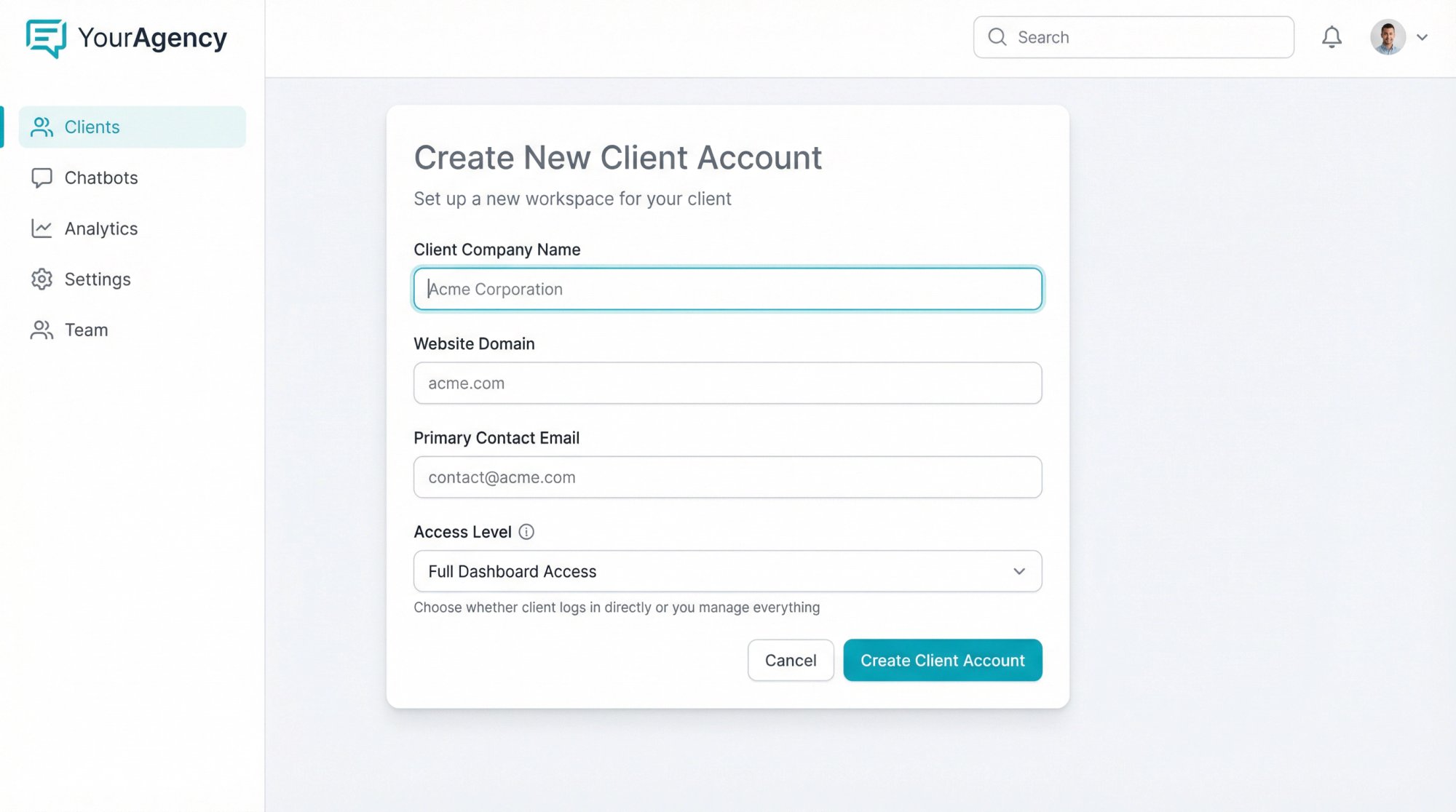
Step 3: Create Your First Client Account
Use the platform's sub-account or client management feature to create a workspace for your first client. You'll typically input:
• Client name/company
• Domain (their website)
• Contact information
• Access level (whether they log in directly or you manage everything)
Some agencies give clients limited dashboard access to view analytics. Others handle everything and just send monthly reports. Both approaches work; it depends on your service model.
Step 4: Train and Deploy the Chatbot
This involves two parts: building the bot's knowledge and installing it on the client's site.
Build the bot:
• Feed it the client's FAQ documentation
• Train it on product pages from their website
• Add common customer questions and ideal responses
• Configure escalation rules (when to hand off to humans)
• Set up the greeting message and conversation flow
Most modern platforms make training simple. You paste URLs, upload documents, or copy-paste FAQ content. The AI processes it and starts answering questions based on that knowledge.
Install on the site:
For WordPress/Shopify/Wix: Install the official plugin/app and activate it.
For custom sites: Paste the JavaScript widget code before the closing </body> tag.
That's it. The chat widget appears on the client's site, branded to match their design.
Step 5: Connect to Client Systems
Link the chatbot to tools your client actually uses:
CRM integration so leads captured in chat automatically populate their contact database
Email notifications so the team knows when someone started a chat
Slack/Teams routing so support agents can respond without leaving their workspace
Analytics connection for reporting on chat performance
With Social Intents, this might mean configuring the Microsoft Teams app so all chats route to a specific channel, setting up Zapier to push contacts to HubSpot, and enabling email notifications for offline hours.
Step 6: Test Before Launch
Before launching to real customers, test the entire flow:
Ask common questions and verify the bot answers accurately
Trigger escalation to ensure handoff to humans works
Submit test leads and confirm they reach the CRM
Check mobile experience (most chat happens on phones)
Test offline behavior (what happens when no agents are available)
Have your team pose as different customer types. Try to break it. Better to find issues now than after launch.
Step 7: Launch and Monitor Performance
Go live. Announce it to your client (they can promote the new chat feature to their customers). Then watch closely for the first week.
Monitor daily:
• Chat volume and response times
• Questions the bot couldn't answer (these reveal gaps in training)
• Escalation rate to humans
• Customer satisfaction if you're collecting feedback
Use this data to refine the bot. Add new FAQs based on common questions. Adjust escalation triggers if too many or too few chats go to humans. This tuning is normal; expect to iterate.
Step 8: Report Client Results
After 30-60 days, compile results to show your client the impact:
• Total chats handled
• Percentage answered by AI vs. humans
• Leads captured with contact information
• Average response time improvement
• Estimated support hours saved
According to Social Intents best practices, agencies should track ROI and prove value to clients through regular reporting. This data becomes case studies for selling the service to other clients.
Step 9: Refine Your Service Offering
As you onboard more clients, you'll develop templates and processes:
Standard chatbot templates for common industries (e-commerce, professional services, SaaS)
Onboarding checklists so setup is consistent and fast
Pricing tiers (basic FAQ bot vs. advanced with integrations vs. full-service with monthly optimization)
Training documentation for clients who want to manage content themselves
This refinement transforms chatbot services from a one-off project into a scalable offering. Soon you can onboard clients in hours instead of days.
Step 10: Scale Your Chatbot Business
With proven results and efficient processes, scale becomes easy. You might:
Hire or train someone to handle chatbot deployments
Create packages at different price points ($299/month basic, $699/month premium, etc.)
Develop specialized offerings (e.g., "ecommerce chatbot package" with shopping cart integration)
Build case studies showcasing client results to attract new business
One person can typically manage 20-40 chatbot clients with periodic check-ins since the AI handles most conversations. That creates significant recurring revenue without proportional increase in labor.
Why 2025 Is the Right Time to Start
Two major trends are converging to make chatbot services incredibly attractive for agencies right now:
AI Went Mainstream
ChatGPT changed everything. Suddenly business owners who thought "chatbots are dumb" saw AI actually work. They tried it themselves, were impressed, and started asking "how do I get this on my website?"
That creates immediate demand for your services. You're not educating skeptical clients about whether AI works. They already know it does. You're just helping them set it up properly.
Modern platforms leverage this by integrating with GPT-4, Claude, and Gemini. According to industry analysis, even small agencies can now offer sophisticated natural language understanding that wasn't possible five years ago. You don't need a data science team to deploy intelligent chatbots anymore.
Multi-Channel Became Essential
Customers don't just visit websites anymore. They expect to reach businesses on WhatsApp, Facebook Messenger, Instagram, SMS, and whatever platform they prefer.
Agencies that can provide a unified chatbot solution across all these channels stand out. It shows you understand modern customer experience beyond just "add live chat to your website."
According to industry research, businesses increasingly want solutions that unify multiple touchpoints. One chatbot, consistent answers, deployed everywhere customers are. That's what white label platforms now deliver.
Frequently Asked Questions About White Label Chatbots
We're addressing the questions agencies ask most often when considering white label chatbot software.
How Much Should I Charge Clients?
Typical agency markups range from 2x to 5x your platform cost. If you're paying $299/month for the agency plan and deploying 20 chatbots, that's about $15 per chatbot in your cost. You might charge clients $149-$299 per month depending on:
• Complexity of setup (simple FAQ vs. full integration)
• Conversation volume (higher limits cost you more)
• Support level (self-service vs. you manage everything)
• Add-on services (monthly optimization, content updates, reporting)
Many agencies bundle chatbot fees into existing retainers rather than selling it as a separate line item.
What If My Client's Industry Is Really Niche?
AI chatbots work across virtually any industry. The training process adapts to specific terminology, products, and customer questions. We've seen successful implementations for:
Professional services (legal, accounting, consulting), Healthcare (appointment scheduling, patient questions), Real estate (property inquiries, showing requests), Ecommerce (product questions, order status), B2B software (technical support, sales qualification), Education (admissions, course information).
The key is thorough training on industry-specific content. A legal chatbot trained on estate planning FAQs will sound very different from an ecommerce bot trained on product catalogs.
Do I Need Technical Skills to Manage This?
No coding or development experience required. Modern platforms use visual builders, training interfaces, and configuration panels that anyone comfortable with web tools can manage.
You should understand:
• How to paste JavaScript code (for custom site installs)
• Basic concept of webhooks and API connections (for integrations)
• How to train AI on content (usually copying/pasting or uploading documents)
If you can set up Google Analytics or manage a WordPress site, you can run white label chatbots.
What Happens If the Platform Goes Down?
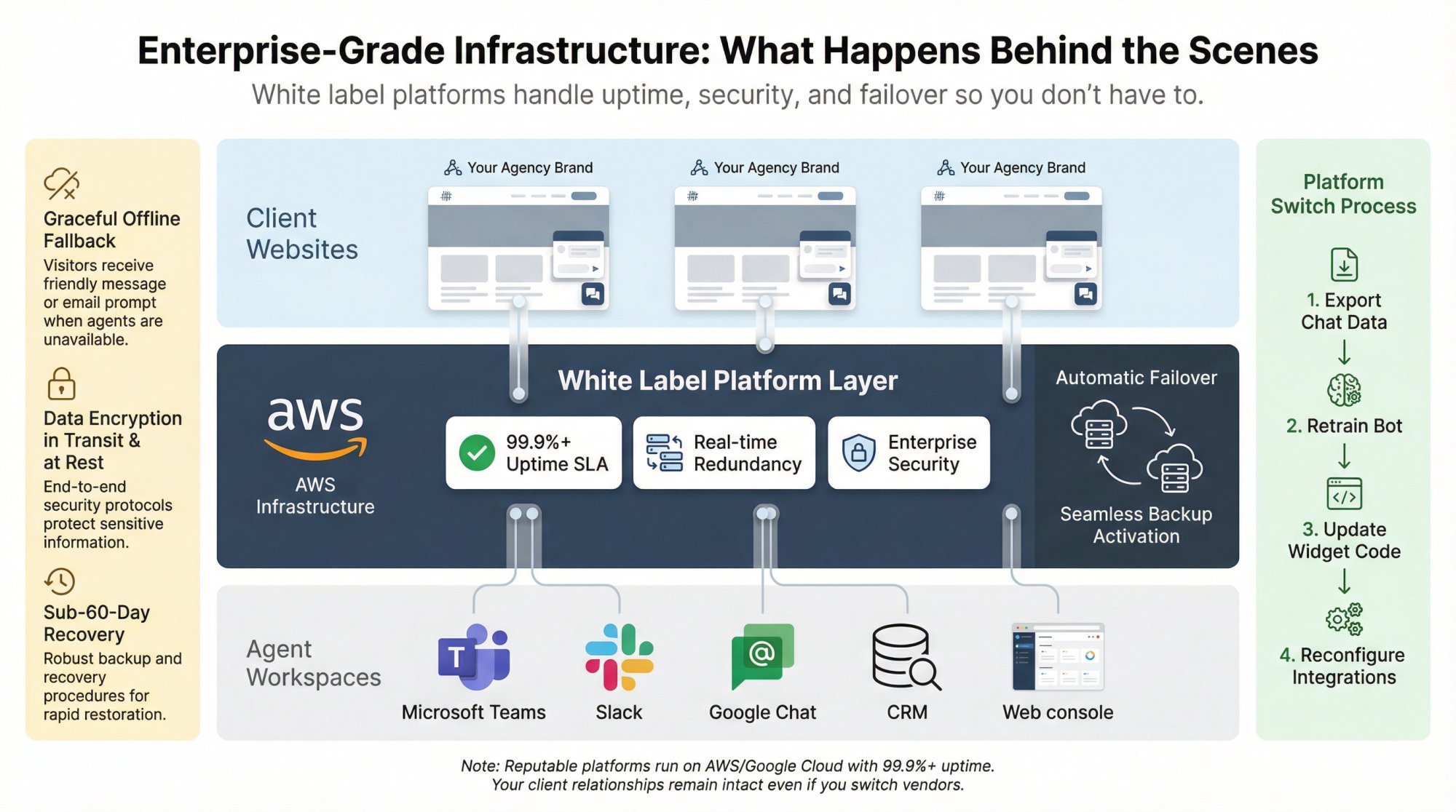
Reputable white label providers run on enterprise infrastructure (AWS, Google Cloud) with uptime SLAs typically 99.9%+. When outages happen:
The chat widget fails gracefully (shows offline message or contact form)
Existing data and configurations remain safe
Platform typically resolves issues within hours
You should have monitoring so you know about issues before clients report them. Some agencies set up UptimeRobot or similar to ping chatbot endpoints and alert if there's a problem.
Social Intents runs on AWS with standard enterprise reliability measures. According to their Microsoft Teams certification documentation, they maintain enterprise-grade hosting with proper security practices.
Can I Switch Platforms Later If Needed?
Yes, though it involves work. You'll need to:
Export chat data and analytics from the old platform
Retrain bots on the new platform using saved knowledge bases
Reinstall widgets on client sites (usually just updating the JavaScript snippet)
Reconfigure integrations
The good news: your client relationships aren't tied to the platform. You're the vendor they work with. If you switch from Platform A to Platform B, you explain it's an upgrade and handle the transition behind the scenes.
How Do I Handle GDPR and Data Privacy?
Choose platforms that are GDPR-compliant and offer Data Processing Agreements (DPAs). Key features to verify:
Data encryption (in transit and at rest)
User data deletion capabilities
Geographic data hosting options (EU data stays in EU)
Clear privacy policies you can share with clients
DPA availability for formal compliance needs
Social Intents provides GDPR compliance documentation and offers DPAs for clients who need them. They encrypt data in transit and at rest, and publish privacy policies suitable for regulated industries.
For clients in healthcare or finance, verify the platform meets industry-specific requirements (HIPAA, etc.). Not all white label providers handle sensitive data appropriately.
What If Clients Want Features the Platform Doesn't Have?
You have three options:
Request the feature from the platform provider (many actively develop based on partner feedback)
Use integrations to add functionality (Zapier can often bridge gaps)
Be honest about limitations and focus on what the platform does do well
Don't promise features that don't exist. Most chatbot needs fall within standard platform capabilities. When you encounter edge cases, work with the vendor to find solutions or recommend supplementary tools.
How Long Until I Recoup My Investment?
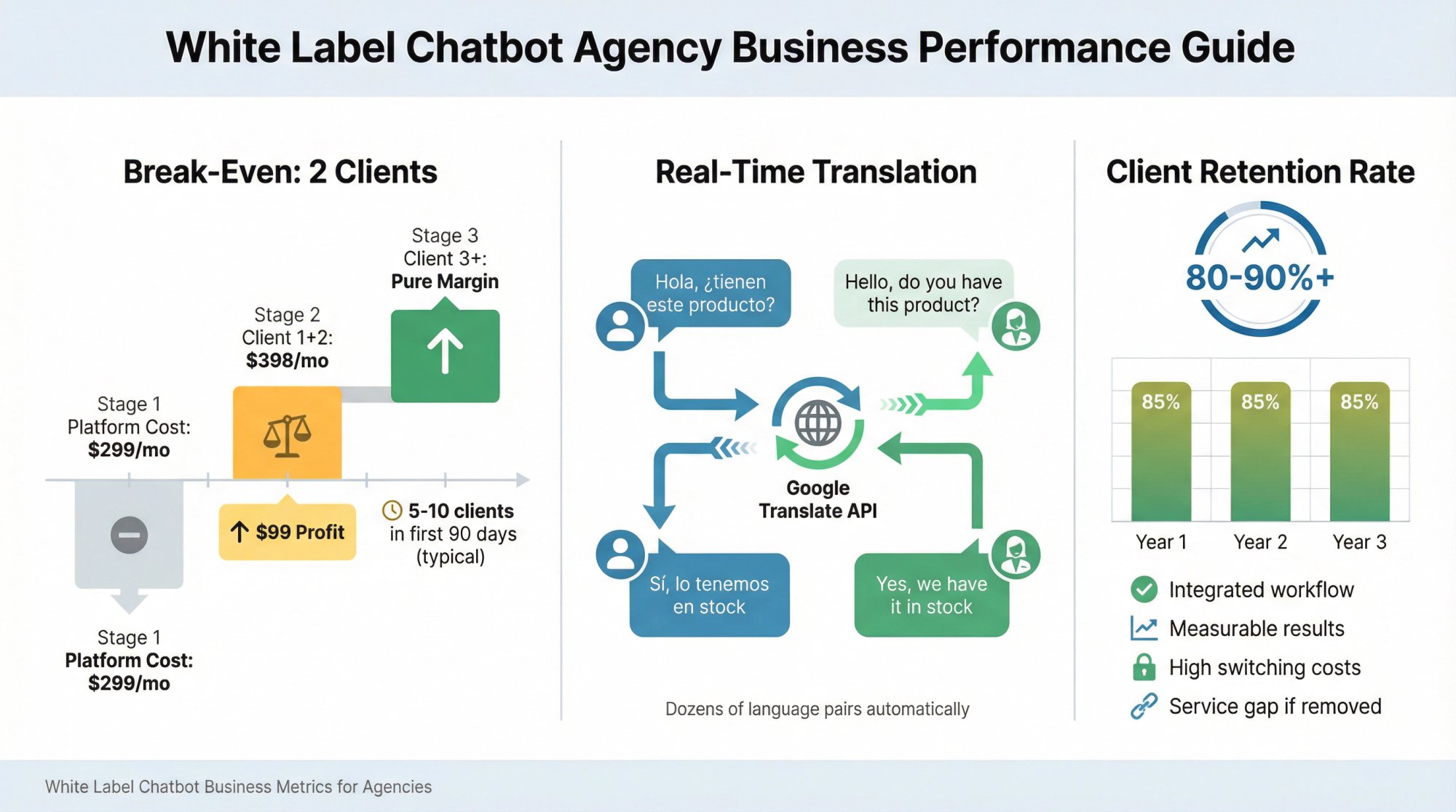
Most agencies recoup costs within 1-3 clients at typical pricing. Example:
Platform cost: $299/month
Your pricing: $199/month per client
Break-even: 2 clients ($398 revenue vs. $299 cost)

Client 3+ is pure margin
The faster you onboard clients, the faster you hit profitability. Since setup time decreases as you gain experience, many agencies sign 5-10 clients in their first 90 days.
Can One Chatbot Handle Multiple Languages?
Yes. Social Intents includes real-time translation features using Google Translate API. This means:
Customer types in Spanish, agent sees English
Agent responds in English, customer receives Spanish
Works for dozens of language pairs automatically
For businesses with multilingual customers, this is valuable. No need to hire multilingual support staff or create separate chatbots per language.
What's the Typical Client Retention Rate?
Chatbot services tend to have high retention because:
Once set up, removing it creates a service gap
Results are measurable and ongoing (leads captured, questions answered)
Switching costs are high for clients (retraining, reinstalling)
You're integrated into their support workflow
Expect 80-90%+ annual retention if you deliver solid results and basic ongoing support. Churn usually happens when the underlying client relationship fails, not because they specifically want to drop chatbots.
Should Your Agency Offer White Label Chatbots?
If you're a digital agency, marketing firm, web development shop, or IT consultancy, white label chatbots make sense when:
You already serve businesses with customer support or lead generation needs (which is most businesses)
Clients are asking about AI and automation (even vaguely)
You want predictable recurring revenue instead of just project fees
You're looking for high-margin services that don't require proportional labor increases

The alternative is watching clients set up chatbots themselves (badly), hire competitors who do offer this, or simply falling behind as customer expectations evolve.
The barrier to entry is low. Platform costs are reasonable. Setup time is minimal. And client demand is only increasing.
We built Social Intents specifically to help agencies deliver white-labeled chatbot solutions without the technical complexity of building and maintaining this technology yourselves. Our Agency plan gives you everything needed to start offering this service: complete branding control, unlimited agents, integration with the tools your clients already use, and pricing that makes sense for reselling.
Whether you choose us or another platform, the opportunity is real. AI chatbots moved from "nice to have" to "expected" faster than most people predicted. Agencies that moved early are now generating significant recurring revenue from chatbot services.
The question isn't whether to offer this. It's how quickly you can get started before everyone else does.