
Ecommerce Live Chat for Online Stores
Answer product questions, reduce cart abandonment, and boost sales, all from Microsoft Teams, Slack, or Google Chat.
Trusted by online retailers and ecommerce brands worldwide

"Your order #4521 shipped today via FedEx!"
Ecommerce live chat turns browsing shoppers into paying customers. Answer the sizing question before the cart is abandoned, and let AI handle the 2am "where is my order?" messages.
Built for Every Ecommerce Team
From pre-sales to post-purchase support, Social Intents helps your team convert and retain customers.
Pre-Sales Support
Answer product questions, help with sizing, and guide shoppers to the right products before they buy.
- Product recommendations
- Sizing & fit questions
- Stock availability
Order Support
Help customers with order status, shipping updates, and delivery questions in real-time.
- Order tracking
- Shipping inquiries
- Delivery updates
Returns & Refunds
Process returns, handle exchanges, and manage refunds quickly to keep customers happy.
- Return initiation
- Exchange processing
- Refund status
 Microsoft Teams Integration
Your Team Already Uses Teams. Now Use It for Customer Chat.
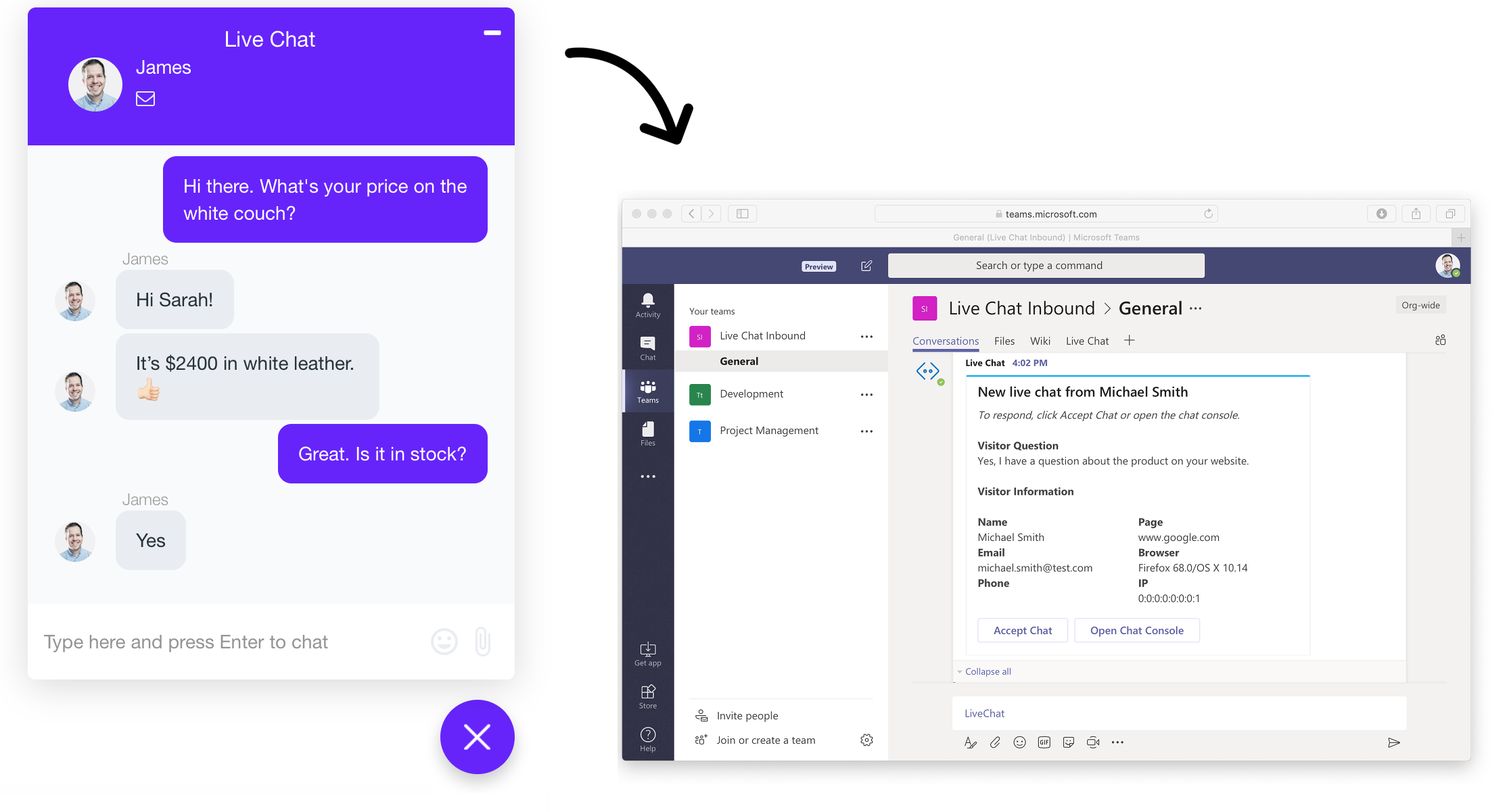
Most ecommerce teams already have Microsoft 365. Social Intents lets your support team chat with customers directly from Teams. No new software to learn.
Sign in with your company Microsoft account
No separate login. Use existing credentials.
Route chats to department Teams channels
Sales, Support, Returns: each team gets their own channel.
Unlimited agents included
Add your entire customer service team. No per-seat fees.
AI Chatbots Answer Product Questions 24/7
Train an AI chatbot on your product catalog, shipping policies, and FAQs. Customers get instant answers, even at 2am on Black Friday.

ChatGPT
GPT-5.2 powered responses trained on your product catalog and policies.

Claude
Anthropic's Claude for helpful, friendly customer conversations.

Gemini
Google's Gemini for multimodal understanding.
Train Your Chatbot on Products, Prices & Policies
Your AI chatbot learns everything about your store: product details, pricing, sizing, shipping policies, and more. No manual data entry required.
Website Crawling
We automatically crawl your website to learn your product catalog, categories, descriptions, and pricing.
Sitemap Import
Point us to your sitemap.xml and we'll index every product page, collection, and policy page automatically.
Auto-Sync Updates
Add a new product or change prices? Schedule automatic re-crawls to keep your chatbot up to date.
Do you have the blue running shoes in size 10?
Yes! The Nike Air Zoom Pegasus in Blue/White is available in size 10. It's currently $129.99 and we have 3 in stock. Would you like me to add it to your cart?
What's your return policy on shoes?
We offer free returns within 30 days of purchase. Shoes must be unworn with original tags. I can send you a prepaid return label if needed!
Look Up Orders & Shipping in Real-Time
Connect your chatbot to your order management system. Customers get instant, accurate answers about their orders without waiting for a human.
Order Status Lookup
Chatbot queries your API to get real-time order status, shipping carrier, and tracking numbers.
Shipping & Delivery Info
Pull estimated delivery dates, current location, and delivery instructions from your shipping provider.
Inventory & Pricing
Check real-time stock levels and current pricing from your inventory management system.
Trigger Actions After Every Chat
Automatically send chat data to your CRM, helpdesk, or custom APIs when conversations end. Keep your systems in sync without manual data entry.
CRM Sync
Create leads in Salesforce, HubSpot, or Dynamics after sales chats.
Helpdesk Tickets
Auto-create tickets in Zendesk, Freshdesk, or ServiceNow.
Email Marketing
Add contacts to Klaviyo, Mailchimp segments after purchase intent.
Custom APIs
Send webhooks to any endpoint for custom workflows.
Triggers when: Chat contains purchase intent
Triggers when: Issue unresolved by AI
Triggers when: Customer asks about product
Features for Ecommerce
Custom Branding
Match your store's colors and branding on the chat widget.
Department Routing
Send chats to Sales, Support, or Returns based on topic.
Cart Recovery
Trigger chat invites on cart pages to reduce abandonment.
Chat Transcripts
Email transcripts to customers and sync to your CRM.
Business Hours Mode
Show AI chatbot after hours, live chat during business hours.
Sales Analytics
Track chat-to-conversion rates and customer satisfaction.
Your store never closes. Now your support doesn't either. An AI chatbot trained on your product catalog answers instantly, and your team steps in from Teams or Slack when a sale is on the line.
Works With Your Ecommerce Platform
Add live chat to any storefront with one snippet of code. Dedicated guides for every major platform.
Frequently Asked Questions
Ready to Boost Your Online Sales?
Join thousands of ecommerce stores using Social Intents to convert and support customers.
14-day free trial · No credit card required