If you're looking at AI chatbots for HR right now, you're probably tired of answering the same benefits questions fifty times a day. Or you want to give employees 24/7 access to HR help and employee support without hiring more people. Or maybe you're just trying to reduce ticket volume without making the employee experience feel robotic and impersonal.
You're in the right place.
We're going to walk through how AI chatbots work in real HR environments, where they actually help (and where they don't), what metrics matter beyond "number of messages sent," and how to deploy one without blowing your budget or creating compliance nightmares.
This isn't theoretical. We run Social Intents, a platform that connects AI chatbots and live chat directly to Microsoft Teams, Slack, Google Chat, and other tools your team already uses. We've seen what works and what creates disasters when HR teams automate employee support.
Quick Navigation
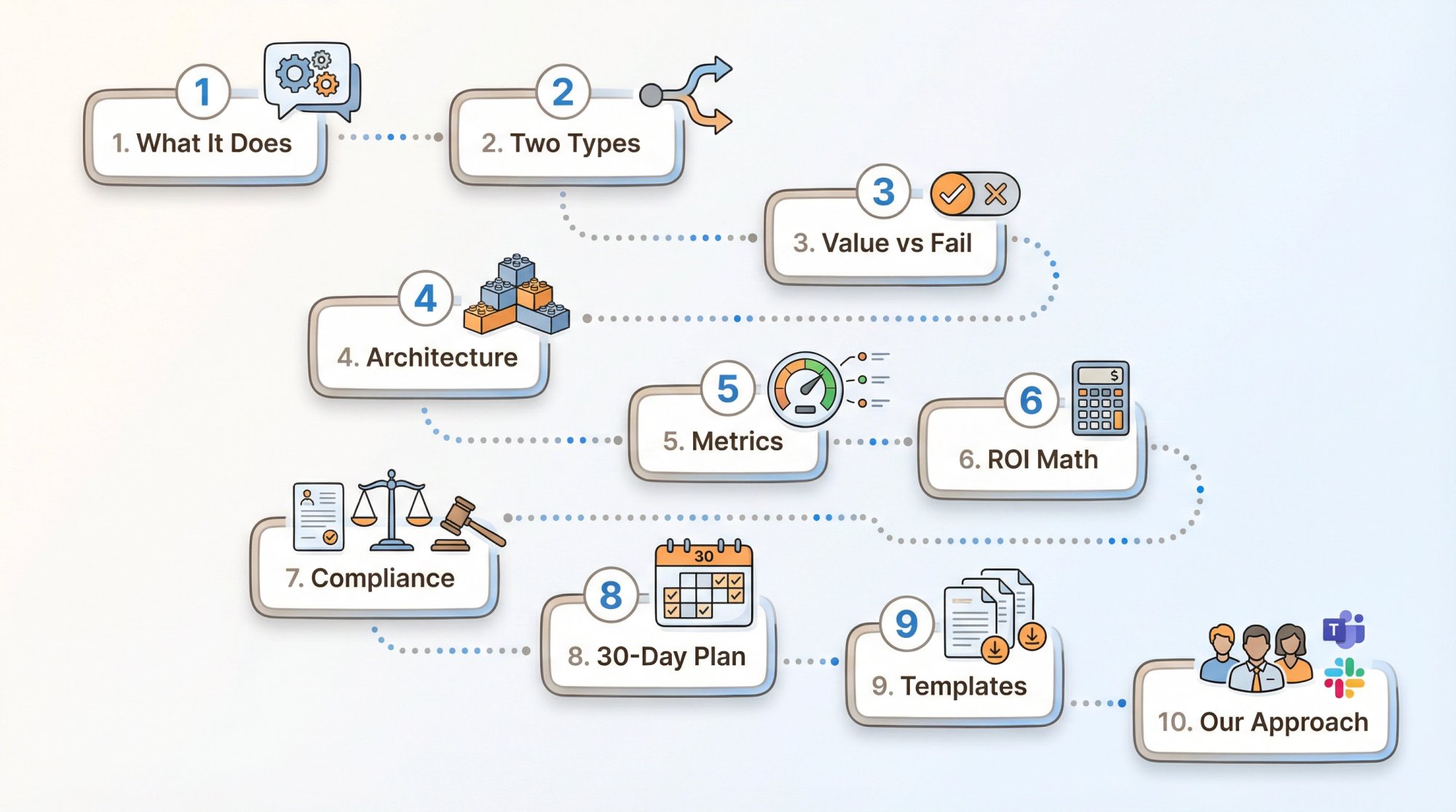
What an AI chatbot for HR actually does (not marketing speak)
The two types of HR chatbots you need to keep separate
Where these tools create real value vs. where they fail
The architecture that makes HR chatbots reliable
Metrics that actually matter for HR automation
Real ROI calculations you can use
Compliance updates (EU AI Act, Colorado, NYC, EEOC)
30-day implementation roadmap
Practical templates you can copy
How we approach HR chatbots at Social Intents
What Is an AI Chatbot for HR and How Does It Work?
Most people think an HR chatbot is "a robot that answers questions." That's too simple, and it's why a lot of implementations fail.
A better mental model:
An HR chatbot sits between employees and your HR systems of record. It handles three jobs:
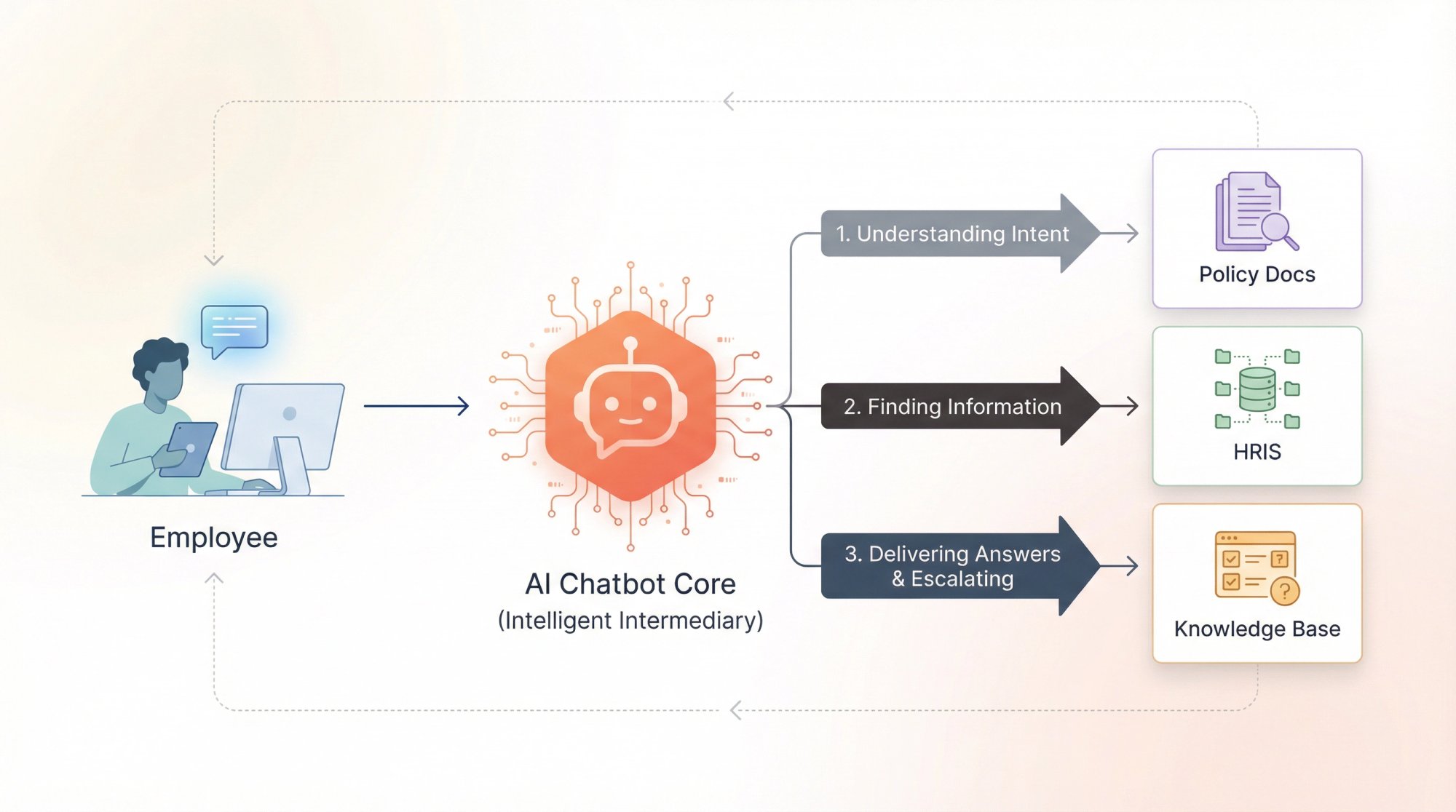
• Understanding intent (what the employee is actually trying to accomplish)
• Finding the right information (from policy docs, your HRIS, ticketing system, knowledge base)
• Delivering an answer or completing a task, and escalating to a human when needed
Why Are HR Chatbots Different From Customer Support Bots?
HR conversations aren't just "support." They involve:
Policy interpretation where mistakes can be expensive
Highly personal data like pay, leave, benefits, immigration status, health information
Emotionally charged situations including harassment, performance issues, conflicts, mental health concerns
So the goal isn't to "sound smart" or "have a conversation." The goal is simpler:
Be accurate. Stay within boundaries. Make escalation easy.
Employee Self-Service vs. Recruiting Assistant: Which Type of HR Chatbot Do You Need?
When people say "HR chatbot," they usually mean two completely different systems.
Type A vs Type B: Critical Differences
| Aspect | Type A: Employee Self-Service | Type B: Recruiting Assistant |
|---|---|---|
| Primary Purpose | Reduce HR queue volume by answering employee questions | Improve candidate experience and reduce recruiter back-and-forth |
| Typical Questions | "What's our parental leave policy?" / "Where do I update my W-4?" / "How many PTO days left?" | "Do you sponsor visas?" / "What's the interview process?" / "Can I schedule a screening?" |
| Risk Level | Low (stays close to documented policy) | Higher (can cross into employment decisions) |
| ROI Timeline | Immediate (safest starting point) | Variable (requires careful guardrails) |
| Legal Exposure | Minimal if policy-focused | Significant if screening/ranking candidates |
If your chatbot is doing anything like ranking candidates, screening applicants, or making recommendations, you're in a much higher-risk zone (both legally and reputationally).
Where Do HR Chatbots Actually Win? (And Where Should You Be Skeptical)
Not every HR task should be automated. Some things genuinely need human judgment. But there are sweet spots where automation consistently delivers value without creating drama.
High-Impact Use Cases That Work
| Use Case | What the Bot Does | Why It Works |
|---|---|---|
| Employee Policy Lookups | Surfaces exact policy sections (not vague summaries) | Faster than waiting for email; employees get answers instantly |
| Onboarding Support | Step-by-step checklists by role; tool access requests; laptop/badge setup | New hire first 30 days are repetitive at scale (perfect for automation) |
| HR Service Desk Triage | Categorizes requests through conversation; asks right intake questions; routes to specialists | Replaces confusing dropdown menus with natural conversation |
| Multi-Language HR Support | Real-time translation for global teams | Employees can read policies in their language without hesitation |
At Social Intents, we support real-time translation to help global teams access HR support in their preferred language.
Where You Should Be Skeptical (Or Add Strict Guardrails)
Employee Relations & Investigations
The bot can help with process and resources, but it shouldn't "advise" on specific situations.
Medical, Legal, Immigration Advice
Provide policy references and official contacts. Don't try to interpret.
Hiring Decisions
Even if you're not explicitly "deciding," a bot that screens candidates can create discrimination exposure.
The EEOC has made this clear: existing employment discrimination laws still apply when AI is used in employment decisions. There's already active litigation around AI-driven hiring tools (the Workday case being a prominent example).
What Makes HR Chatbots Reliable: The Three-Component Architecture
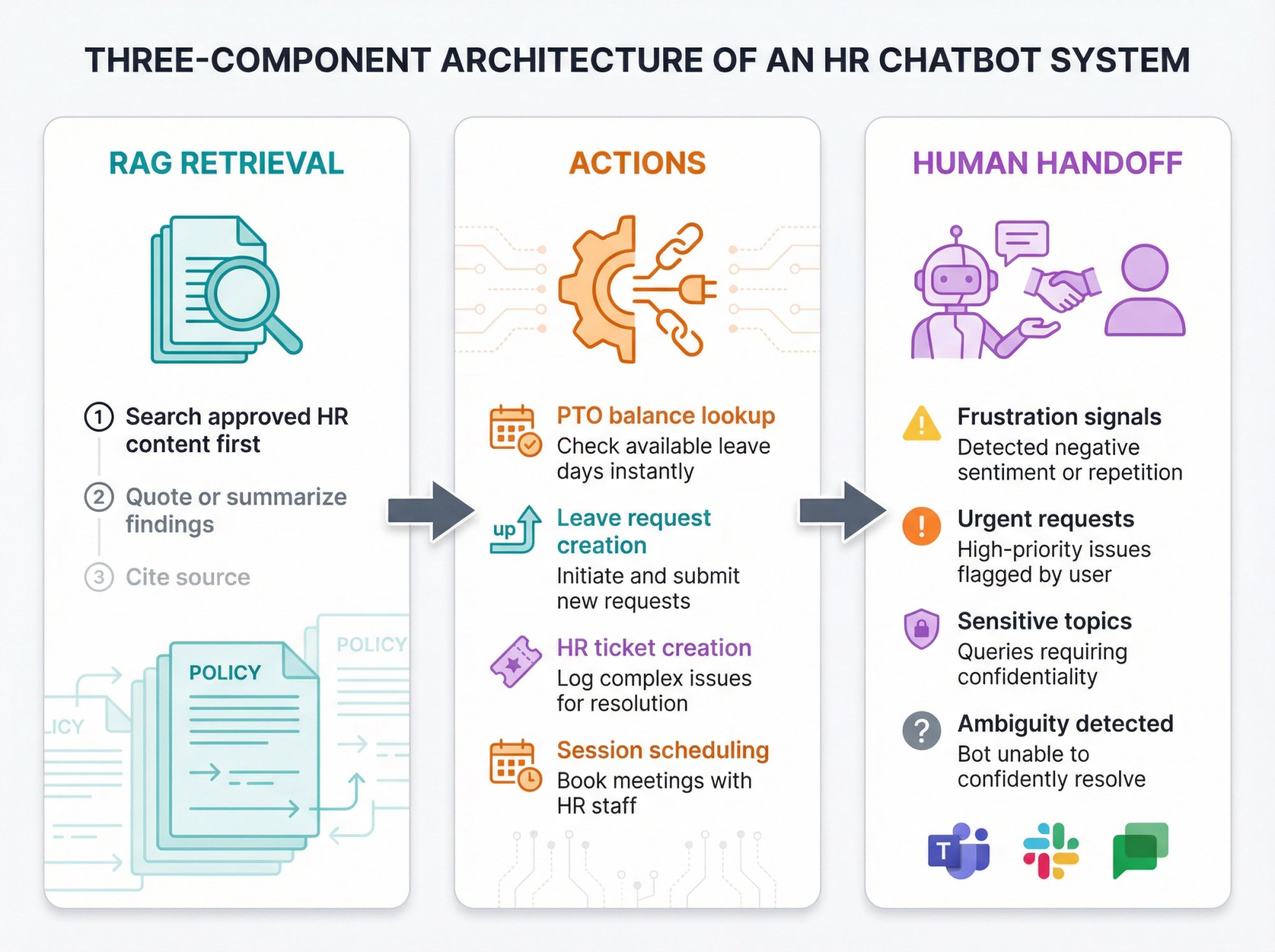
If you want accuracy high enough for HR use, you need three components working together.
Component 1: Retrieval (RAG)
Think of RAG (Retrieval-Augmented Generation) like an "open-book exam" for AI.
Instead of asking the model to invent answers from memory, you force it to:
① Search your approved HR content first
② Quote or summarize only what it finds
③ Cite or link to the source
This is how you avoid "hallucinated policy" where the bot makes up answers that sound plausible but are completely wrong.
At Social Intents, we support training chatbots on website content, PDFs, and documents so the bot pulls from your actual policies instead of guessing.
Component 2: Actions (Real Tasks, Not Just Answers)
HR bots become truly valuable when they complete simple, safe tasks:
• Check PTO balance (read-only lookup)
• Start a leave request (create a workflow)
• Create an HR ticket (structured intake with all the right fields)
• Book an onboarding session (calendar scheduling)
This requires actions (API calls to your systems).
We built Custom AI Actions specifically for these real-time integrations. Things like checking order status, pulling account info, creating tickets in your systems.
A lot of HR teams tell us this is where chatbots go from "nice to have" to "actually saving time."
Component 3: Human Handoff
A bot should never trap people. If someone is frustrated, urgent, or dealing with something sensitive, they need a human immediately.
A practical rule: If the user signals frustration, urgency, sensitivity, or ambiguity, escalate.
At Social Intents, we emphasize smooth human handoff by routing escalations directly into Microsoft Teams, Slack, or Google Chat where your HR team already works.
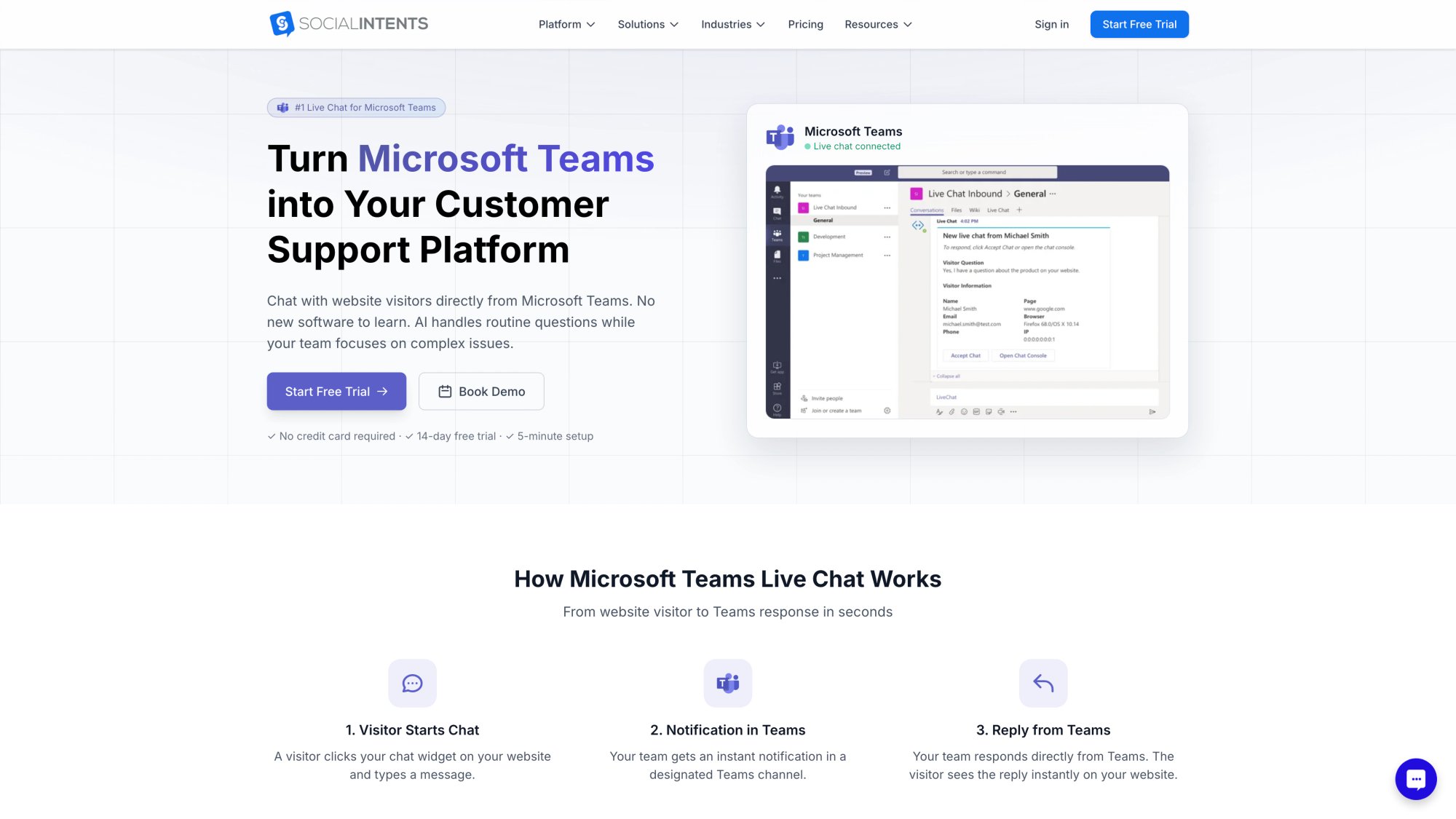
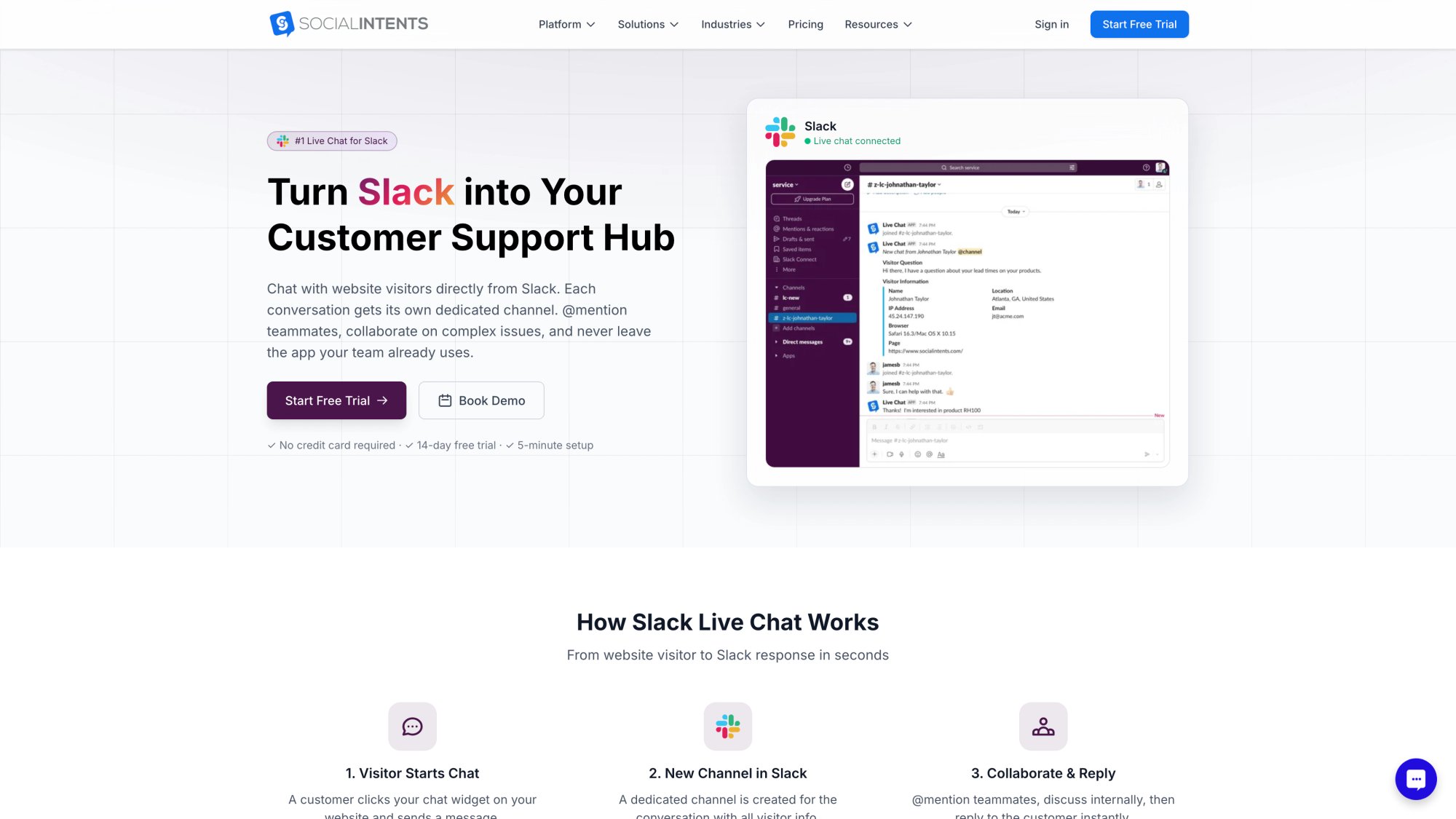
This matters because the "best" HR chatbot isn't the one that answers everything. It's the one that solves the right things automatically and hands off gracefully when needed.
What Metrics Actually Matter for HR Chatbots?
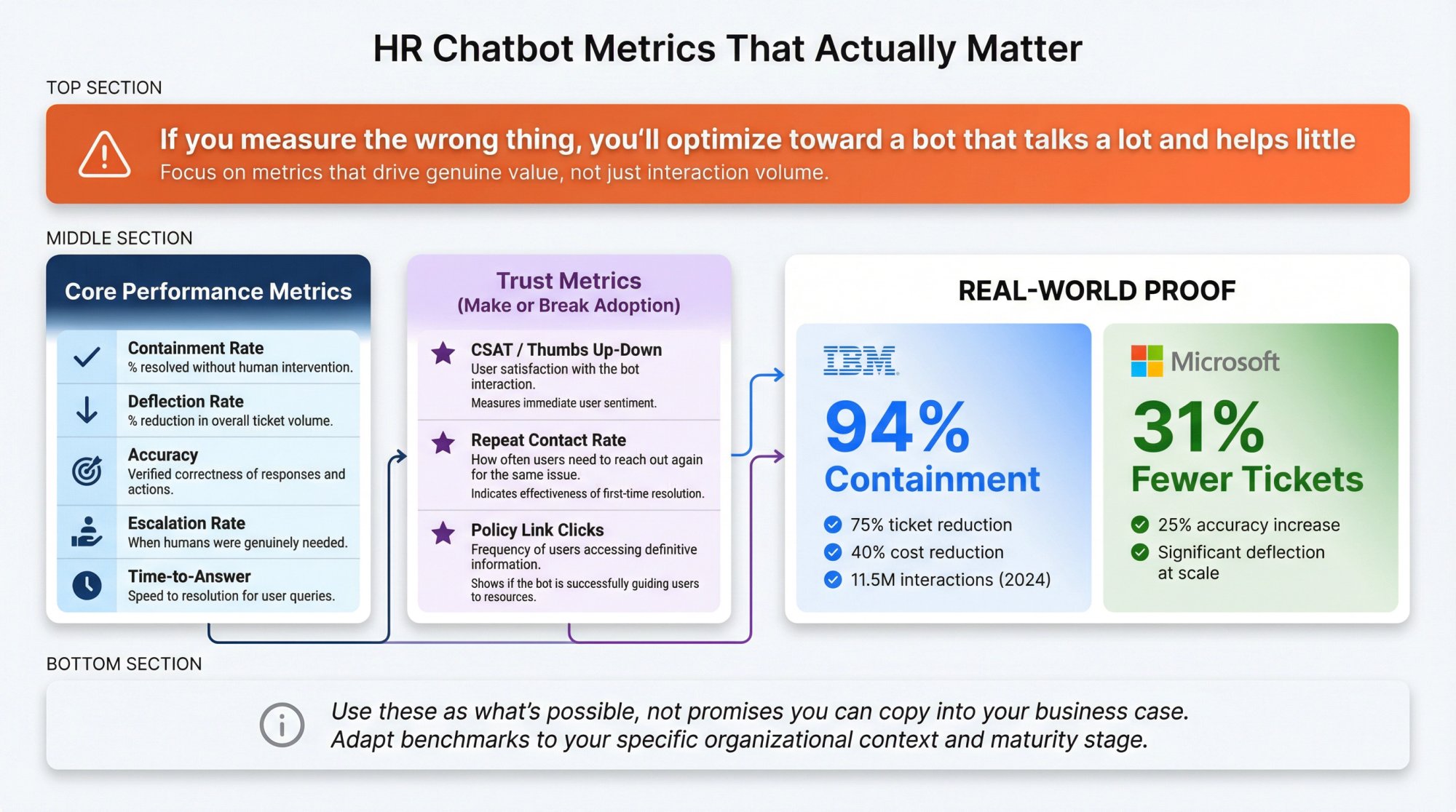
If you measure the wrong thing, you'll optimize toward a bot that talks a lot and helps little.
Core Performance Metrics
| Metric | What It Tells You |
|---|---|
| Containment Rate | % of conversations resolved without needing a human |
| Deflection Rate | % reduction in HR tickets or emails after deployment |
| Accuracy | Verified correctness on a test set of HR questions |
| Escalation Rate | When humans are needed (and whether escalation is smooth) |
| Time-to-Answer | How quickly employees get usable responses |
Trust Metrics (The Ones That Make or Break Adoption)
• CSAT / thumbs up-down per answer
• Repeat contact rate (did the person come back because the answer was wrong or incomplete?)
• Policy link clicks (actually a good sign in HR, shows people are seeing the source)
Real-World Benchmarks
Don't copy these blindly, but learn from them.
IBM's AskHR case study reports:
• 94% containment of common questions
• 75% reduction in support tickets since 2016
• 40% reduction in HR operational costs over four years
• 11.5 million employee interactions handled in 2024
Microsoft's Employee Self-Service Agent materials show:
• Up to 31% fewer support tickets
• 25% increase in response accuracy
• Significant HR ticket deflection at scale
(Source: Microsoft Tech Community)
Use these as "what's possible," not as promises you can copy into your own business case.
How to Calculate HR Chatbot ROI: A Real Business Case
Most HR chatbot ROI decks fail because they quietly assume "we'll replace HR staff." That's usually not the first win (or even a realistic goal).
A more honest ROI story focuses on:
• Better coverage (24/7 availability)
• Fewer repetitive tickets
• Faster resolution times
• Less back-and-forth email tennis
• Better onboarding throughput
We actually built a practical ROI framework based on containment, handle time, and total cost.
A Simple ROI Model You Can Use Today
Monthly Savings from Containment:
Savings = Monthly HR contacts × Containment rate × Cost per contact
Where:
Cost per contact = (Avg handle time in minutes ÷ 60) × Loaded hourly cost
Monthly Savings from Faster Handling (Even When Escalated):
Savings = Escalated contacts × Minutes saved per contact × (Loaded hourly cost ÷ 60)
Then subtract total costs:
• Platform subscription
• Implementation time
• Integrations
• Ongoing knowledge maintenance
• AI usage costs (variable based on volume)
Worked Example With Real Numbers
Let's say you have:
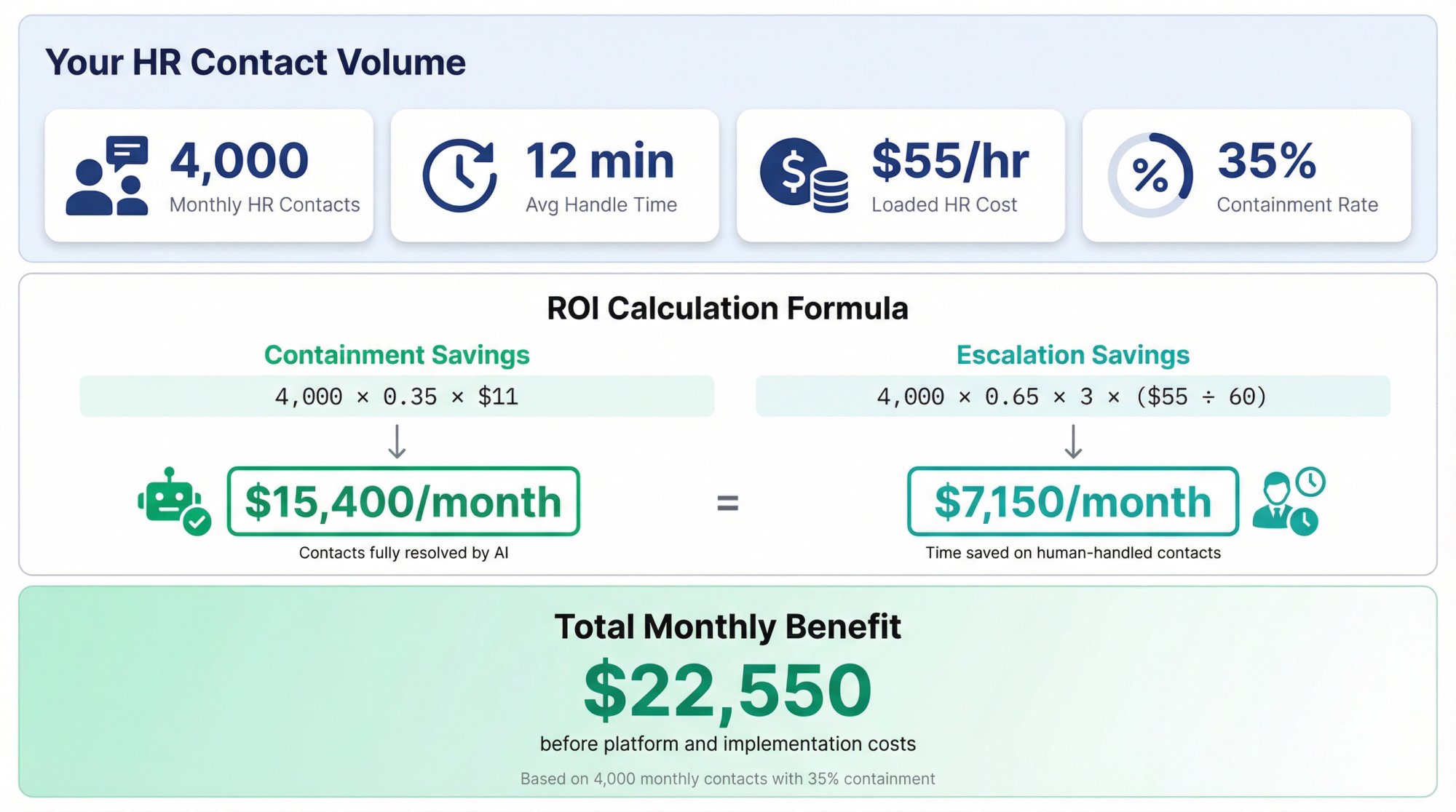
• 4,000 HR contacts per month
• Average handle time of 12 minutes
• Loaded HR cost of $55/hour
• Containment rate of 35% in phase 1
• 3 minutes saved on escalated contacts
The math:
Cost per contact = (12 ÷ 60) × 55 = $11
Containment savings = 4,000 × 0.35 × 11 = $15,400/month
Escalation savings = 4,000 × 0.65 × 3 × (55 ÷ 60) ≈ $7,150/month
Total monthly benefit ≈ $22,550 (before platform and implementation costs)
The important part isn't the specific number. It's the discipline:
① Baseline first
② Pilot with measurement
③ Only then scale
Why "Agentic AI" Hype Can Destroy Your ROI
If you jump straight to complex autonomous workflows without guardrails, you can blow your budget and lose employee trust.
Gartner publicly predicted that over 40% of agentic AI projects will be scrapped by 2027 due to costs, unclear value, and inadequate risk controls.
(Reported by Reuters, June 2025)
The smarter move: Start with boring wins, then expand.
AI Chatbot Compliance for HR: What Changed in 2024-2026
This isn't legal advice. It's a practical overview so you can talk to counsel and procurement intelligently about what's materially changed.
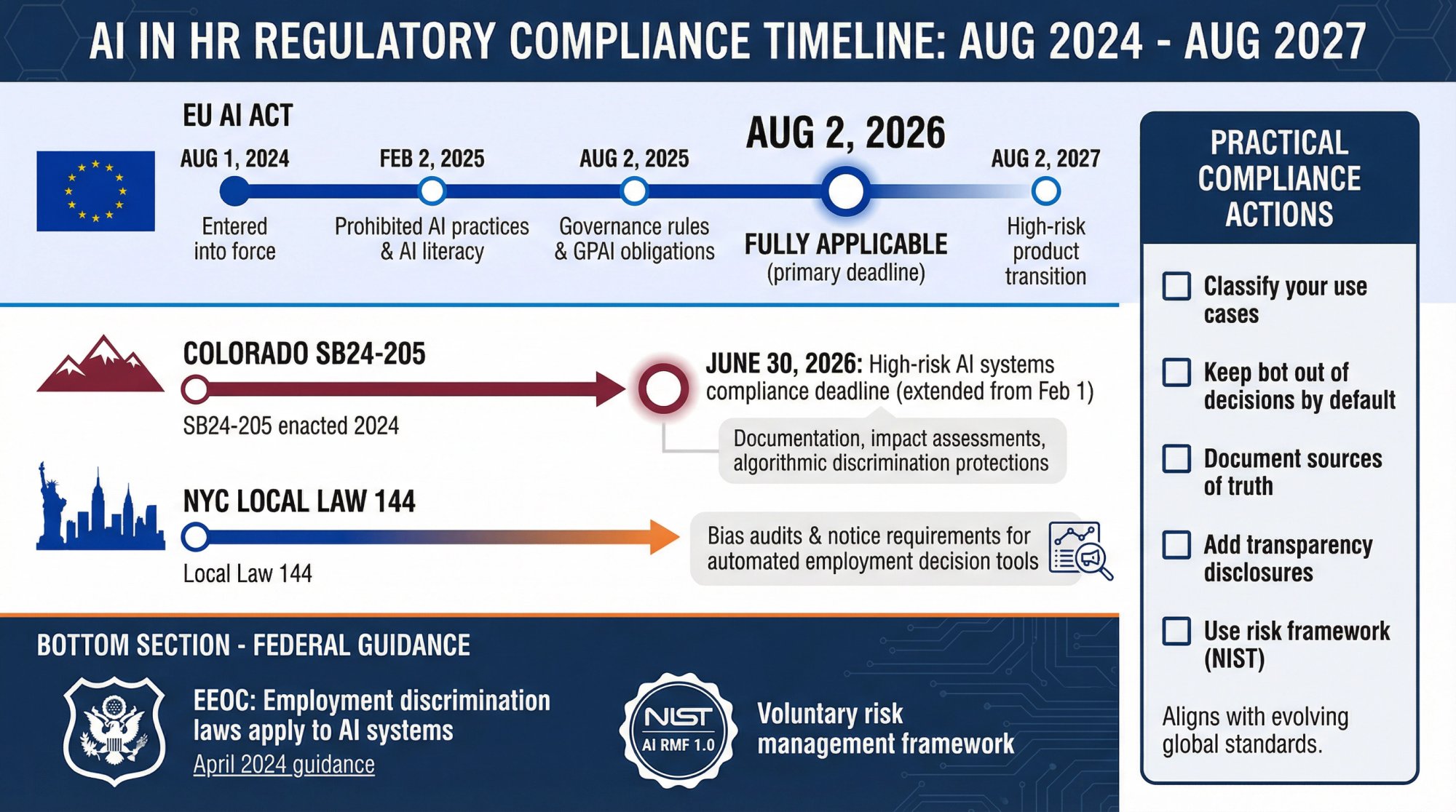
EU AI Act: Phased Deadlines That Matter to HR
The European Commission's AI Act timeline:
| Date | Requirement |
|---|---|
| Aug 1, 2024 | Entered into force |
| Feb 2, 2025 | Prohibited AI practices and AI literacy obligations |
| Aug 2, 2025 | Governance rules and GPAI model obligations |
| Aug 2, 2026 | Fully applicable |
| Aug 2, 2027 | Some high-risk rules for regulated products (transition) |
(Source: European Commission Digital Strategy)
Why HR should care:
AI used in employment contexts can be considered high risk depending on use case. The EU has issued guidance highlighting misuse by employers, including prohibited practices like employee emotion tracking in certain contexts.
Colorado AI Act: Disclosure and Discrimination Duties
Colorado's SB24-205 requires that starting June 30, 2026 (extended from Feb 1, 2026), developers and deployers of "high-risk" AI systems must use reasonable care to protect consumers from algorithmic discrimination.
This includes documentation, impact assessments, and disclosures when AI interacts with consumers.
(Colorado General Assembly and extension SB25B-004)
If you have employees in Colorado and your AI system impacts consequential employment decisions, you want counsel involved.
NYC Local Law 144: Hiring Automation and Bias Audits
New York City's Local Law 144 regulates "automated employment decision tools," including bias audit and notice requirements when used for employment decisions.
Even if your HR chatbot is "just answering questions," be careful if it starts screening candidates or recommending decisions.
EEOC: Discrimination Laws Still Apply With AI
The EEOC's worker-facing guidance makes the principle clear: employers remain responsible under federal discrimination laws even if an AI system is involved.
Practical Compliance Moves (What to Actually Do)
① Classify your use cases
"Answers and routing" is different from "decision support" which is different from "automated decisions."
② Keep the bot out of decisions by default
Let it explain process, gather info, route requests, and log conversations. If you go into screening or ranking, treat it as a regulated system.
③ Document your sources of truth
Which policies and systems does the bot rely on? Who owns updates?
④ Add transparency
Tell users they're interacting with an AI system. Give a clear path to reach a human.
⑤ Use a risk framework
NIST's AI Risk Management Framework is a widely cited, voluntary framework for governing AI risks.
30-Day HR Chatbot Implementation Roadmap
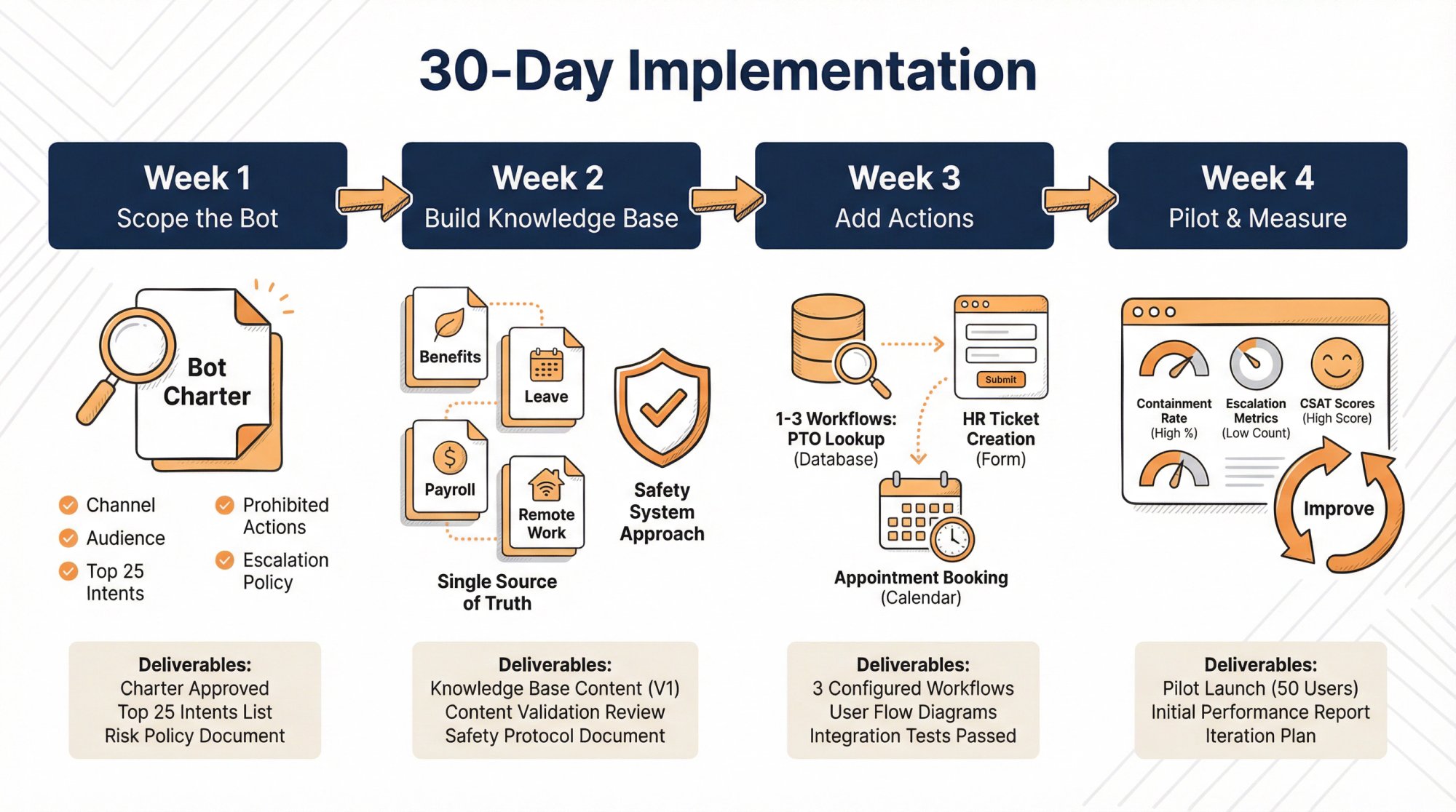
Here's a plan that assumes you want value fast, without betting your reputation on a moonshot.
| Week | Focus | Key Deliverables |
|---|---|---|
| Week 1 | Scope the Bot So It Can't Fail Catastrophically | One-page "Bot Charter" defining channel, audience, top 25 intents, prohibited actions, escalation policy |
| Week 2 | Build the Knowledge Base Like a Safety System | Single source of truth pages for benefits, leave, payroll, remote work, travel, expenses; FAQ entries; versioning process |
| Week 3 | Add Actions for Top 1-3 Workflows | Read-only PTO lookup, pay stub portal link, HR ticket creation, appointment booking |
| Week 4 | Pilot, Measure, and Tighten | Pilot with one location/department; measure containment, escalation, CSAT; iterative improvement loop |
Week 1: Scope the Bot So It Can't Fail Catastrophically
Deliverable: One-page "Bot Charter"
Define:
• Channel: Intranet widget, career site widget, Teams, Slack, or all of the above
• Audience: Employees, managers, candidates
• Top 25 intents: Based on actual HR ticket data and email tags
• What the bot must never do:
→ Promise outcomes
→ Give legal advice
→ Interpret medical situations
→ Make hiring decisions
• Escalation policy: Exactly when it hands off to a human
Week 2: Build the Knowledge Base Like a Safety System
Rule: If it's not written down in an approved document, the bot shouldn't improvise.
Create:
• Single source of truth pages for benefits, leave, payroll calendar, remote work, travel, expenses
• Short FAQ entries for common questions
• A versioning process so policy updates trigger content retraining
At Social Intents, we support training on website content and documents like PDFs and spreadsheets, so you can feed the bot your actual employee handbook and policy docs.
Week 3: Add Actions for Top 1-3 Workflows
Start with read-only or low-risk actions:
• Lookup PTO balance (read-only from your HRIS)
• Link to pay stub portal (not showing it in chat, just linking)
• Create an HR ticket with structured fields
• Book an appointment with HR
At Social Intents, our Custom AI Actions are designed exactly for these real-time lookups and workflow triggers.
Week 4: Pilot, Measure, and Tighten
Pilot with:
• One location, OR
• One department, OR
• Only new hires, OR
• Only candidates for one job family
Measure:
• Containment and escalation rates
• Top failure intents (where the bot can't help)
• User satisfaction scores
Then do the boring improvement loop:
• Add missing content for common failures
• Tighten system instructions
• Add "I don't know, here's the policy link + human option" responses
We have guidance specifically for reducing hallucinations and using Q&A improvements plus human handoff triggers.
HR Chatbot Templates You Can Copy
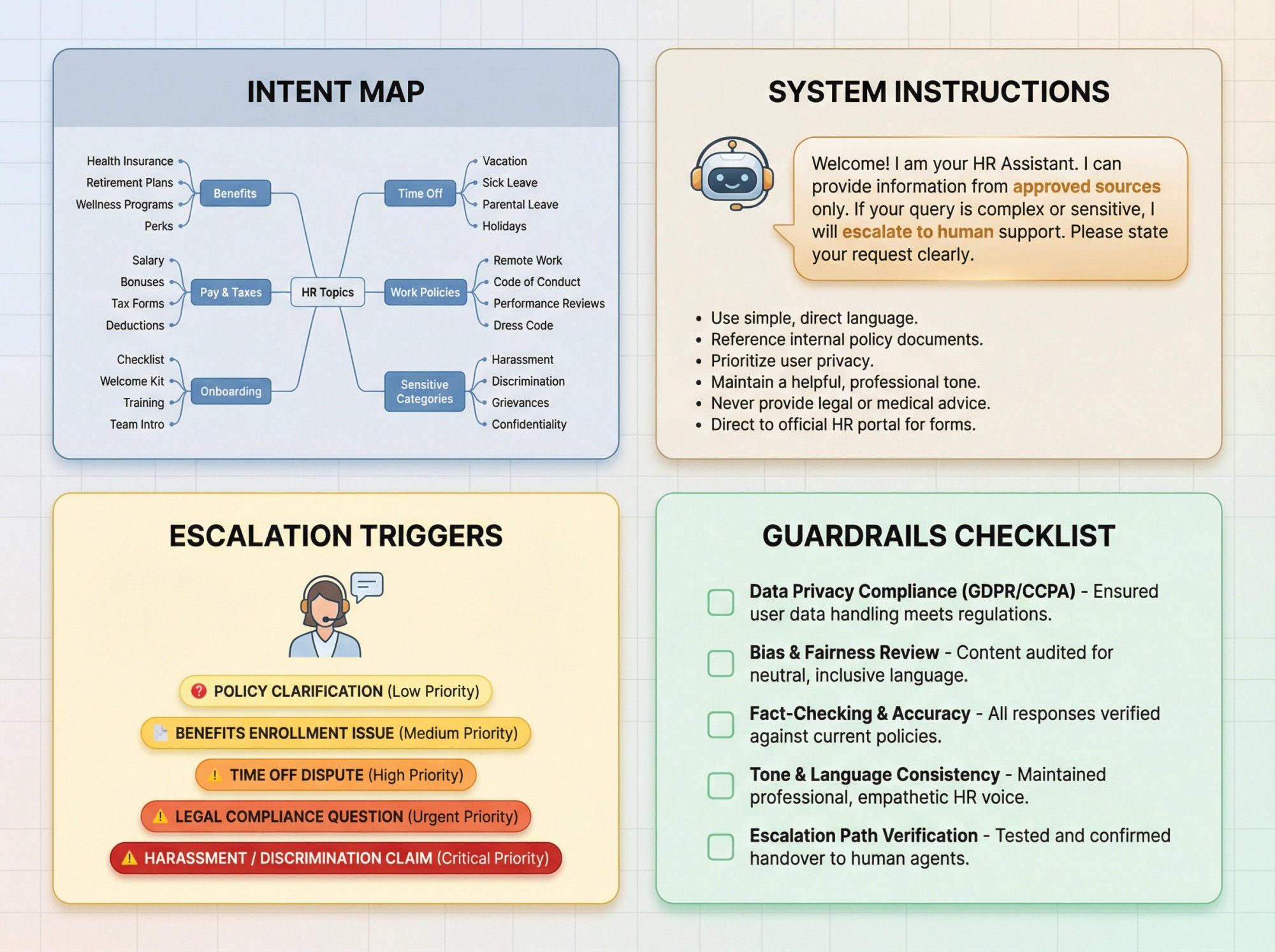
HR Chatbot Intent Map (Starter Set)
Use this as your initial taxonomy.
Benefits
• Medical, dental, vision
• Eligibility rules
• Dependents
• Open enrollment dates
• HSA/FSA details
Time Off and Leave
• PTO balance (action-based)
• Holiday schedule
• Sick leave policy
• Parental leave
• Unpaid leave (process + handoff)
Pay and Taxes
• Pay schedule
• Pay stub portal link
• W-4 / tax form updates
• Reimbursement timelines
Work Policies
• Remote work
• Travel and expenses
• Equipment and security
• Code of conduct
Onboarding
• First-day checklist
• IT setup
• Payroll setup
• Training links
Sensitive Categories (Default to Escalation)
• Harassment
• Discrimination
• Mental health emergencies
• Grievances and investigations
Safe System Instruction Template
Use this kind of instruction to keep the bot bounded:
You are an HR assistant. Use only approved HR sources provided. If you're not sure about something, say you're not sure and link to the closest official policy. Never give legal, medical, or immigration advice. For sensitive topics, encourage contacting HR directly and offer immediate escalation to a human.
At Social Intents, we support system-style guidance and instruction phrases to shape chatbot behavior.
Escalation Triggers List
Escalate immediately when the user says:
• "talk to a person"
• "this is urgent"
• "I'm being harassed"
• "my manager…"
• "discrimination"
• "legal"
• "I want to file a complaint"
• "this is wrong"
• Repeated "that didn't answer my question"
We support human escalation trigger phrases that automatically invite agents into the conversation.
HR Chatbot Guardrails Checklist
Before you go live, confirm:
You can identify your sources of truth per answer
You have a human escalation path that works in practice
You have a process to update policies and retrain content
You have a logging and retention policy for HR chats
You have a plan for bias and discrimination risk if used in hiring
How Social Intents Approaches HR Chatbots
A lot of HR chatbot projects fail because they add yet another inbox for your team to monitor.
We took a different approach: employees or candidates chat in a website widget, and your HR team responds from tools they already live in.
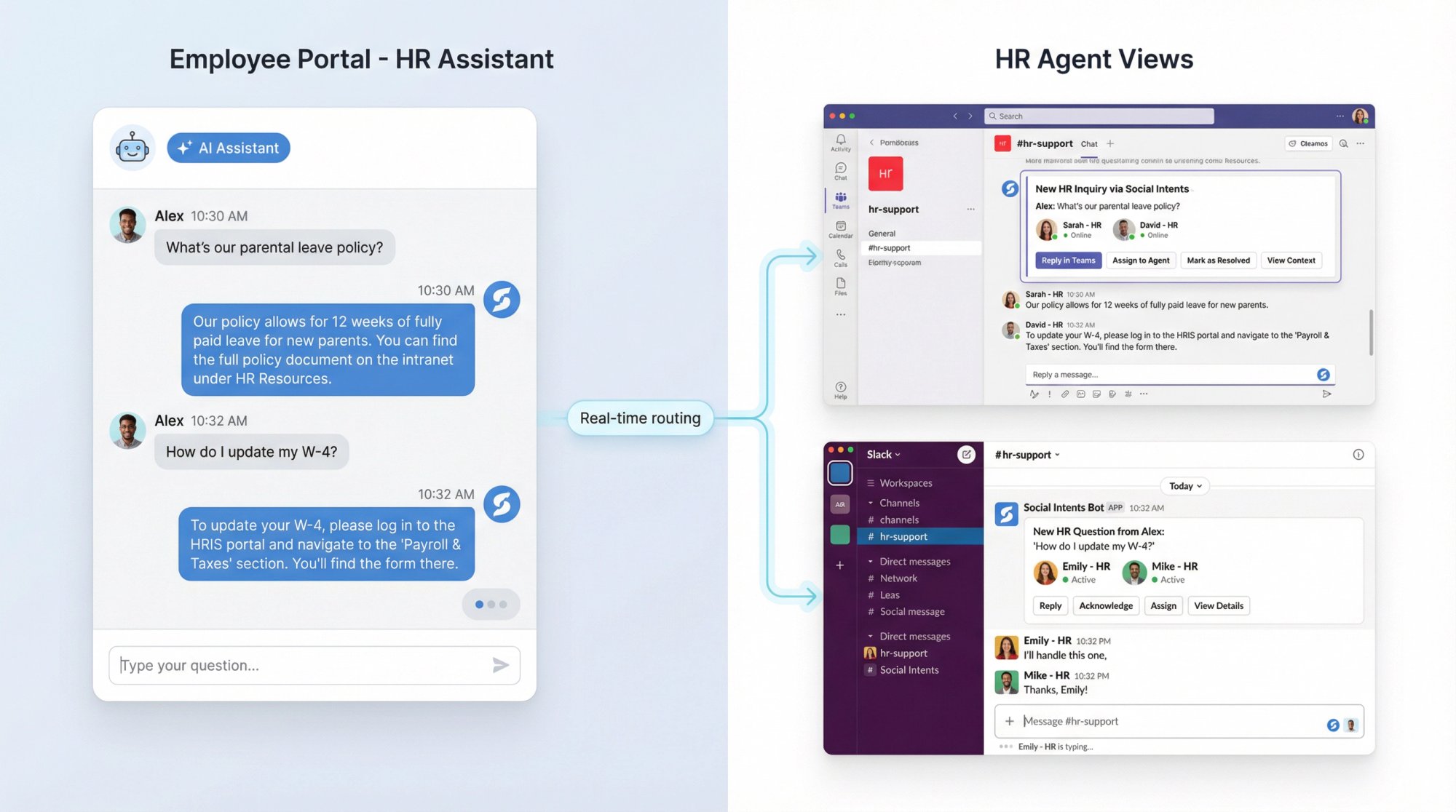
What We Offer That's Especially Relevant for HR
AI Chatbot + Human Handoff
Route conversations directly to Microsoft Teams, Slack, Google Chat, and other channels. Your team stays in their existing workflow.
Train on Your Content
Upload policy pages, PDFs, employee handbooks. The bot pulls from your actual documentation instead of making things up.
Custom AI Actions
Connect to HR systems or ticketing tools via API. Check PTO balances, create tickets, trigger workflows.
No Per-Seat Fees on Certain Plans
Unlimited agents on Basic and up, which matters when HR needs multiple stakeholders for escalations.
Simple "HR Chatbot on Your Portal" Setup Path
① Embed the chat widget on:
• Your HR portal (employee self-service), and/or
• Your careers page (candidate self-service)
② Train the bot on:
• HR policy pages
• Employee handbook PDF
• Benefits guides
• Onboarding checklists
③ Configure:
• Strict instructions (bounded answers)
• Escalation triggers
• Office hours and after-hours handling
④ Add 1-3 actions:
• Create HR ticket
• PTO lookup (read-only)
• Schedule HR appointment
We have detailed documentation on AI agents that escalate to humans and perform tasks.
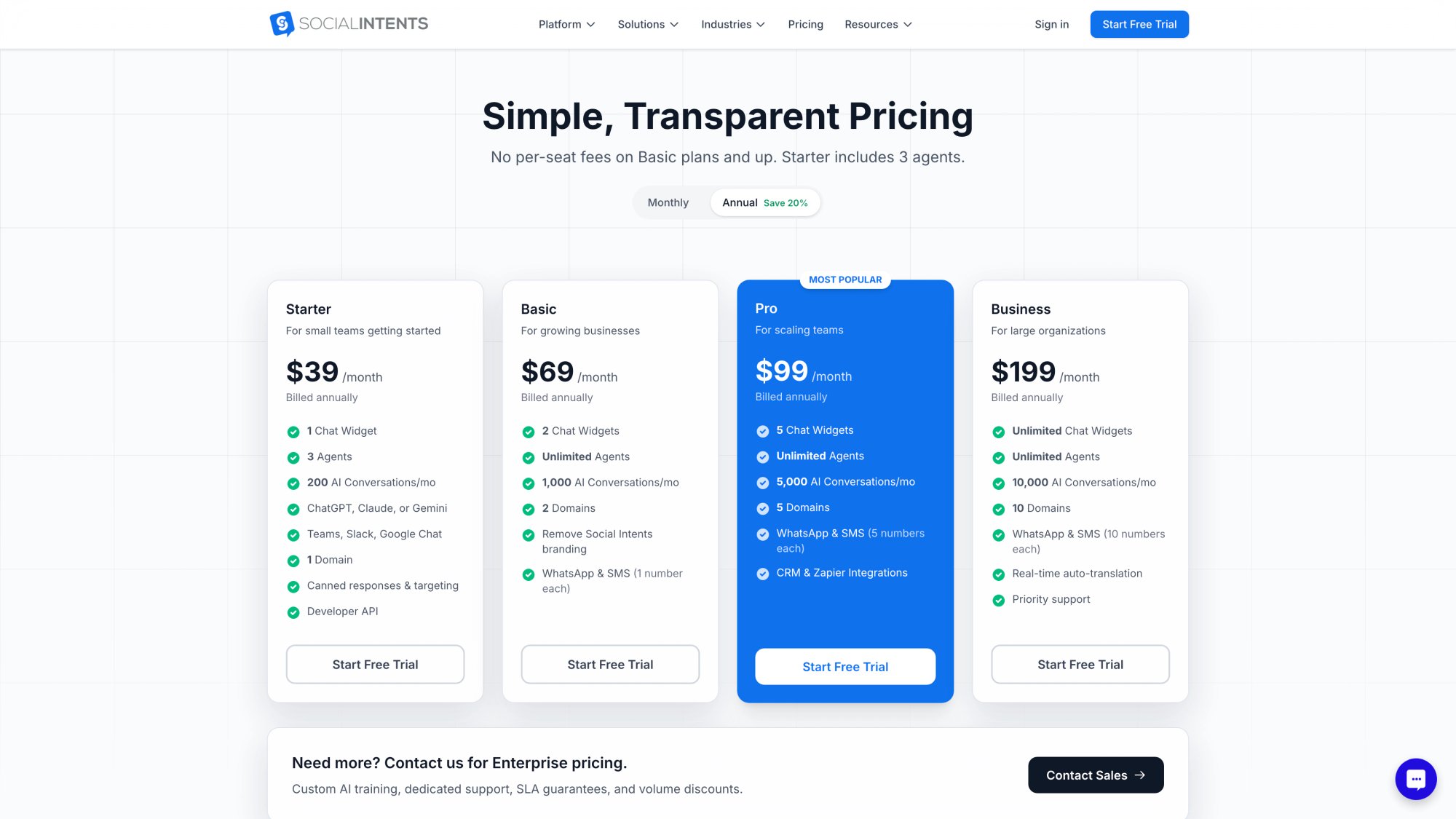
Current Pricing (February 2026)
Plans start at $39/month (billed annually) with higher tiers supporting more conversations and features.
Unlimited agents on Basic and up.
What Makes an HR Chatbot Actually World-Class
If you take one thing from this guide, make it this:
Build your HR chatbot like a safety system, not a demo.
It should be able to say "I don't know" without shame.
It should point to the policy source.
It should escalate smoothly.
It should get better every week because you measure failures, not just "messages sent."
That's how you end up with an HR chatbot people actually trust.
Frequently Asked Questions
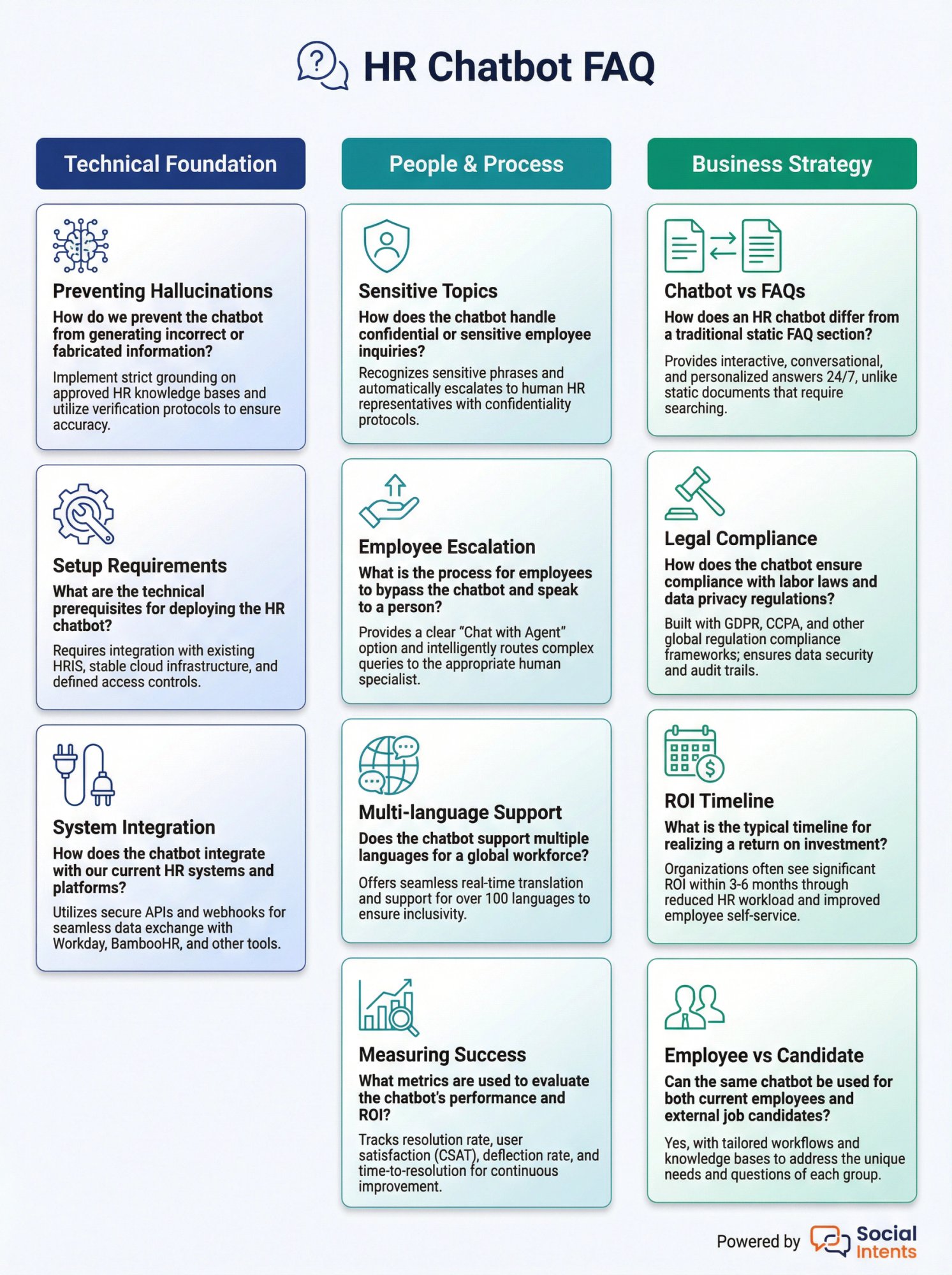
Can an AI chatbot really handle sensitive HR topics like harassment or discrimination complaints?
Not directly. The bot can provide process information ("here's how to file a complaint" or "here's who to contact"), but it should never try to advise on the situation itself. Immediate escalation to a human is the right move for anything involving harassment, discrimination, investigations, or legal matters. The bot's job is to get the person to the right resource fast, not to handle the case.
How do you prevent an HR chatbot from hallucinating incorrect policy information?
Use Retrieval-Augmented Generation (RAG). Instead of asking the AI to remember or guess policy details, you force it to search your approved documents first, then quote or summarize what it finds. At Social Intents, we support training chatbots on specific content sources (PDFs, web pages, documents) so the bot can only reference what you've explicitly provided. Plus, we have guidance on reducing hallucinations by using Q&A tuning and strict instruction sets.
What's the difference between an HR chatbot and just putting FAQs on your HR portal?
An HR chatbot understands intent and context. If someone asks "how many days off do I get?", the chatbot can figure out they're asking about PTO, search the relevant policy, and provide a specific answer with a link to the full document. With static FAQs, employees have to browse categories, guess which article might help, and read everything themselves. Plus, a good chatbot can complete tasks (like creating a ticket or looking up a PTO balance via API), not just answer questions.
Do you need IT or engineering resources to set up an HR chatbot?
It depends on complexity. For a basic implementation (widget on your HR portal + training on existing docs + simple escalation), most HR Ops teams can handle it with minimal IT support. At Social Intents, you can embed a chat widget and train the bot on your content without writing code. But if you want custom actions (like connecting to your HRIS for PTO lookups), you'll need someone comfortable with APIs or willing to use our Custom AI Actions framework.
What happens if an employee doesn't get the answer they need from the chatbot?
They should be able to escalate to a human immediately. At Social Intents, we route escalations directly into Microsoft Teams, Slack, or Google Chat so your HR team can jump in without switching tools. You can also set up trigger phrases (like "talk to a person" or "this is urgent") that automatically connect the employee to a live agent.
Can an HR chatbot work for global teams with employees in different languages?
Yes, with the right translation setup. At Social Intents, we support real-time translation where incoming and outgoing messages are automatically translated, so employees can chat in their language and your HR team responds in theirs. This is especially valuable for global teams where HR documents might exist in English but employees prefer their native language.
How do you measure if an HR chatbot is actually working?
Don't just count messages. Measure impact:
• Containment rate (% of conversations resolved without needing a human)
• Deflection rate (% reduction in HR tickets after deployment)
• Time-to-resolution (how fast employees get answers)
• User satisfaction (CSAT or thumbs up/down per answer)
• Repeat contact rate (did they have to come back because the answer was wrong?)
We built a practical ROI framework that calculates savings based on containment, handle time, and cost per contact.
Is it legal to use AI chatbots in HR and recruiting?
Yes, but with important caveats. Employment discrimination laws still apply even when AI is involved (the EEOC has made this very clear). If your chatbot is used in hiring decisions (screening, ranking, recommending candidates), you may be subject to regulations like NYC Local Law 144 (bias audits), Colorado's AI Act (algorithmic discrimination protections), and the EU AI Act (high-risk system requirements). For employee self-service use cases (policy questions, onboarding, ticket routing), the legal risk is much lower as long as you have proper data handling and privacy controls.
What's the ROI timeline for an HR chatbot?
Most teams see measurable impact within 60-90 days if they focus on high-volume, repetitive questions first. In our experience, the teams that succeed fastest:
① Start with a narrow scope (onboarding questions or benefits lookups)
② Measure baseline metrics (ticket volume, handle time) before launch
③ Pilot with one department or location
④ Iterate based on failure cases
⑤ Then scale
IBM's AskHR case study showed a 75% reduction in support tickets, but that took years of iteration. Start with smaller, faster wins.
Can an HR chatbot integrate with our existing HRIS or ticketing system?
Yes, through API integrations. At Social Intents, we support Custom AI Actions that let you connect the chatbot to external systems. Common examples include:
• Looking up PTO balances from Workday, BambooHR, or similar
• Creating tickets in ServiceNow, Jira Service Management, or Zendesk
• Pulling employee data from your HRIS for personalized responses
• Triggering workflows in your onboarding platform
The key is starting with read-only, low-risk actions (lookups and ticket creation) before expanding to more complex workflows.
What's the difference between using a chatbot for employees vs. candidates?
Employees (self-service assistant) is the safer, higher-ROI starting point. You're answering policy questions, routing requests, and helping with onboarding. The risk is low because you're mostly surfacing existing documentation.
Candidates (recruiting assistant) can be valuable for FAQs, scheduling, and process explanations. But if your chatbot starts screening, ranking, or making recommendations about candidates, you're now in regulated territory with higher legal risk (bias audits, discrimination concerns, EEOC oversight). Treat recruiting chatbots with more caution and stricter guardrails.
Ready to Get Started?
The best HR chatbots aren't the ones that try to do everything. They're the ones that handle repetitive questions reliably, escalate smoothly when needed, and get better over time based on real usage data.
If you want to see how Social Intents can help you deploy an AI chatbot that works with your existing HR workflow (not against it), start a free 14-day trial or check out our pricing and plans.
No credit card required. No per-seat fees on most plans. Just fast, practical HR automation that actually helps your team.