Think of a support chatbot as a digital front-line team member. It's a smart piece of software that automatically handles customer service questions, pointing users to the right answers and resources instantly, 24/7. This frees up your human agents to tackle the trickier issues that really need a personal touch.
What Is a Chatbot for Support

A support chatbot is a program built to mimic human conversation through text or even voice. It’s usually the first point of contact for customers, taking care of routine tasks and gathering initial details. For instance, when someone on your e-commerce site asks, "Where is my order?" a chatbot can pull up the tracking info in a heartbeat.
That kind of immediate help is a huge leap from the old way of doing things, where customers were stuck waiting on hold or for an email reply. By automating these common, simple interactions, businesses can deliver faster service and make their entire support operation run a whole lot smoother.
From Simple Scripts to Smart Conversations
Not all support chatbots are built the same. They generally fall into two main camps, and each works a bit differently.
-
Rule-Based Chatbots: These bots operate like a flowchart. They follow a fixed script of predefined rules and can only respond to specific keywords or commands. They are perfect for straightforward, predictable tasks like answering basic FAQs or booking appointments.
-
AI Chatbots: These are the more advanced players. They use technology like Natural Language Processing (NLP) to understand the meaning behind a user's words, not just the keywords themselves. This lets them handle a wider variety of questions in a much more natural, conversational way. Better yet, they learn from past interactions and get smarter over time.
For a closer look into the different kinds of bots out there, you can learn more about the various types of chatbots and how they operate. This distinction is important because the right chatbot for you depends entirely on what you need it to do for your support team.
Why Businesses Are Adopting Them
Let's be clear: the goal of a support chatbot is not to replace human agents. It’s about building a smarter, more responsive support system. The bot takes on the high volume of simple questions, which lets your human experts focus their time on issues that require empathy, critical thinking, and complex problem-solving.
This teamwork makes the entire support process better for everyone. To get a solid idea of these intelligent tools, you might want to check out this comprehensive guide to AI customer service chatbots.
The Business Impact of Integrating a Support Chatbot
Bringing a chatbot for support into your workflow is about much more than offloading a few customer questions. It’s about making a real, measurable impact on your business. By automating the routine stuff, these bots kick off a chain reaction of positive changes that touch everything from your bottom line to customer loyalty.
Just think about all the repetitive questions your support team gets swamped with daily. "Where's my order?" "How do I reset my password?" A chatbot can handle these in a heartbeat. This simple change frees up your human agents to work on the complex, high-stakes conversations that actually require a human touch.
Boosting Operational Efficiency
One of the first things you'll notice is a major leap in efficiency. A single chatbot can juggle thousands of conversations simultaneously without breaking a sweat, something that’s physically impossible for a human team. This kind of scalability means you can breeze through unexpected spikes in customer queries without scrambling to hire more people.
This automation translates directly into a more productive team. With bots fielding the common questions, your support agents can resolve the tougher tickets much faster. They get to shift from being simple information providers into true problem-solvers and relationship-builders.
A chatbot acts as a force multiplier for your support team. It doesn't replace them; it elevates their work by filtering out the noise and letting them concentrate on what matters most.
This shift does wonders for team morale and overall effectiveness. Agents are far less likely to burn out on monotonous tasks and can apply their skills to more engaging and challenging customer issues.
Driving Down Support Costs
When you automate a huge chunk of your customer interactions, the cost savings naturally follow. Businesses often see a significant drop in operational costs because one chatbot can do the work of several agents for just a fraction of the price.
Here's a quick look at where those savings come from:
- Reduced Staffing Needs: You can grow your customer base without having to proportionally increase your support headcount.
- Lower Training Expenses: While bots need some initial setup, they don't require the ongoing salaries, benefits, and training that human agents do.
- 24/7 Coverage: Offering around-the-clock support with a human team is incredibly expensive. A chatbot provides this service at no extra cost, getting rid of the need for pricey overnight shifts.
The numbers speak for themselves. In North America, about 92% of banks are already using AI chatbots. In the B2B world, bots handle 58% of AI-driven interactions, and 46% of SaaS companies are on track to implement them by 2025. You can dig deeper into these AI chatbot statistics to see just how widespread this trend is.
To put it all in perspective, here’s a quick comparison of the advantages chatbots bring to the table.
Chatbot Benefits at a Glance
This table breaks down the core benefits of adding a chatbot to your support strategy, showing how automation stacks up against the old-school, human-only model.
| Benefit Area | Impact of Chatbot for Support | Traditional Support Limitation |
|---|---|---|
| Availability | Provides instant, 24/7 support, even on holidays. | Limited to business hours or requires expensive after-hours staff. |
| Cost Efficiency | Handles thousands of queries at a fixed cost, reducing the need for a large team. | Costs scale directly with headcount, including salaries and benefits. |
| Scalability | Manages unlimited concurrent conversations without a drop in performance. | Agents can only handle a few conversations at once, leading to queues. |
| Agent Productivity | Automates repetitive tasks, freeing agents for high-value, complex issues. | Agents spend significant time on routine questions, leading to burnout. |
| Customer Experience | Delivers immediate answers, reducing wait times and frustration. | Customers often face long wait times, leading to dissatisfaction. |
| Data Collection | Gathers valuable insights from every interaction to improve products and services. | Data collection is manual, inconsistent, and difficult to analyze at scale. |
Ultimately, a well-integrated chatbot does more than cut costs. It creates a more resilient and responsive support ecosystem that benefits everyone.
Improving the Customer Experience
Beyond the numbers, a support chatbot fundamentally improves the customer journey. Today’s customers have zero patience for waiting; they expect answers now. Making them wait is one of the fastest ways to lose their business, and chatbots deliver that immediate response.
That 24/7 availability means customers can get help whenever they need it, whether it’s late at night or over a weekend. This level of convenience is a massive driver of customer satisfaction and long-term loyalty.
Plus, chatbots are data-gathering machines. With every single interaction, they log common questions, identify customer pain points, and collect feedback. You can analyze this treasure trove of information to improve your products, fine-tune your services, and beef up your knowledge base. This creates a powerful cycle of continuous improvement, helping you stay ahead of customer needs and make smarter business decisions.
Real-World Use Cases for Support Chatbots
The real power of a support chatbot clicks into place when you see it working in the wild. Across all sorts of industries, these bots are tackling specific, everyday problems for businesses and their customers alike. They aren't just a generic help tool; they're fine-tuned to meet the unique demands of each sector.
Let's look into a few key areas where support chatbots are making a huge difference. These examples aren't theoretical. They show how bots are solving common customer headaches and delivering real, measurable results.
E-commerce Order Management and Returns
For any online store, the most frequent customer questions are almost always about orders. People want to know where their package is, when it’s going to show up, or how to send something back. These are simple questions, but they can easily swamp a support team, especially during peak seasons.
An e-commerce chatbot is the perfect first line of defense. By plugging directly into your order management system, it can:
- Provide Instant Order Tracking: Customers just need to type in their order number to get real-time shipping updates. No human agent needed.
- Automate the Returns Process: The bot can walk a customer through starting a return, generate a shipping label, and provide instructions, all inside the chat window.
- Answer Product Questions: Bots can tap into product catalogs to answer questions about stock, sizing, or materials on the spot.
This kind of automation makes for a much smoother shopping experience. Customers get the fast answers they expect, freeing up your human support team to focus on more complex issues like damaged items or payment problems. To see a detailed breakdown of how this plays out, you can learn more about the role of a retail chatbot in the modern e-commerce world.
SaaS Product Onboarding and Troubleshooting
In the Software-as-a-Service (SaaS) space, a huge chunk of customer support is just helping people use the product. New users need a hand getting started, and even long-time customers can hit a technical snag.
A support chatbot here acts like an interactive product guide. It lives right inside the app, ready to help users the moment they get stuck.
For instance, a new user might ask, "How do I create my first project?" The chatbot can fire back a step-by-step tutorial, maybe with links to help docs or even a quick video. This kind of on-demand guidance cuts down on user frustration and gets them up to speed much faster.
When a customer hits a snag, the chatbot provides immediate, in-app assistance, turning a moment of frustration into a learning opportunity. This is a powerful way to increase product adoption and user retention.
The bot can also handle the initial troubleshooting for common tech issues. It can ask a few diagnostic questions to pinpoint the problem and suggest a fix. If things are too tricky for the bot, it gathers all the key details before passing the conversation smoothly to a human agent.
Financial Services Account Inquiries
Banks and other financial institutions get a ton of repetitive and sensitive customer questions. People are constantly checking account balances, looking at recent transactions, or asking about fees. In these conversations, security and accuracy are everything.
A support chatbot built for the financial sector is designed to handle these jobs securely and efficiently. By integrating with the bank’s core systems, it can:
- Provide Secure Account Information: Once a user is logged in and authenticated, a bot can safely pull up their current balance or a list of recent transactions.
- Answer Policy Questions: The bot can explain different fees, interest rates, or the perks of different account types without missing a beat.
- Assist with Basic Tasks: It can help a customer report a lost card or guide them through setting up automatic bill payments.
This instant self-service saves customers from having to visit a branch or wait on hold. For the bank, it dramatically cuts down on the simple queries flooding their call centers. This frees up human agents to put their expertise to work on more involved tasks, like loan applications or fraud investigations.
How to Implement Your First Support Chatbot
Getting your first support chatbot up and running might sound like a huge technical project, but it's really not. The best way to think about it is like training a new team member, one who's really good at handling repetitive tasks. It all starts with having a clear plan and ends with a tool that makes your customers' lives easier and your team more efficient.
The first step isn't about technology at all; it's about strategy. Before you even start browsing chatbot platforms, you need to answer one simple question: What problem are we trying to solve here? A clear answer will be your North Star for every decision that follows.
Define Your Chatbot's Goals
Start by looking at the most common, rinse-and-repeat questions your support team gets swamped with. Are people constantly asking about order status? Password resets? Pricing details? These are the perfect jobs to hand off to a chatbot.
Make sure your goals are specific and you can actually measure them. For instance, you could aim to:
- Reduce ticket volume for password resets by 50%. This frees up your agents to work on the trickier stuff.
- Decrease the average first response time to under one minute. A quick win that immediately improves the customer experience.
- Automate 80% of order tracking inquiries. This gives customers the instant gratification of a quick answer, no human needed.
Having clear targets like these helps you build a bot that delivers real value, not just another flashy gadget on your website.
Choose the Right Platform
Once you know what you want the bot to do, you can start shopping for the right tool to build it. Chatbot platforms typically come in two flavors, each built for different needs and technical comfort levels.
- No-Code Builders: These are made for people who aren't developers. They use simple drag-and-drop interfaces that make it surprisingly easy to map out conversations and get a bot live in no time. They’re a fantastic starting point if you're new to this.
- Customizable Frameworks: These are for teams with developers on hand. They give you way more flexibility, letting you build a highly specialized bot with advanced features that can integrate deeply with your other systems.
The investment can vary quite a bit, from $5,000 to $50,000, depending on the complexity and what you need it to accomplish.
Design the Conversation Flow
This is the creative part where you map out the actual conversations your bot will have. A great conversation flow feels like a helpful script that guides the user to a solution, not a frustrating, robotic dead-end.
Start by outlining the common requests you identified earlier. For each one, create a step-by-step path the bot can follow. It's best to use a mix of quick-reply buttons for simple choices and also allow users to type freely for more complex questions. If you're just starting out, we've got a great guide on how to build your first AI chatbot for free without any coding.
A successful chatbot conversation doesn't just provide an answer; it anticipates the user's next question. Always give the user clear next steps, whether that’s another question, a link to a resource, or an option to speak with a human agent.
This infographic breaks down the whole process, from setting goals to going live and keeping an eye on performance.
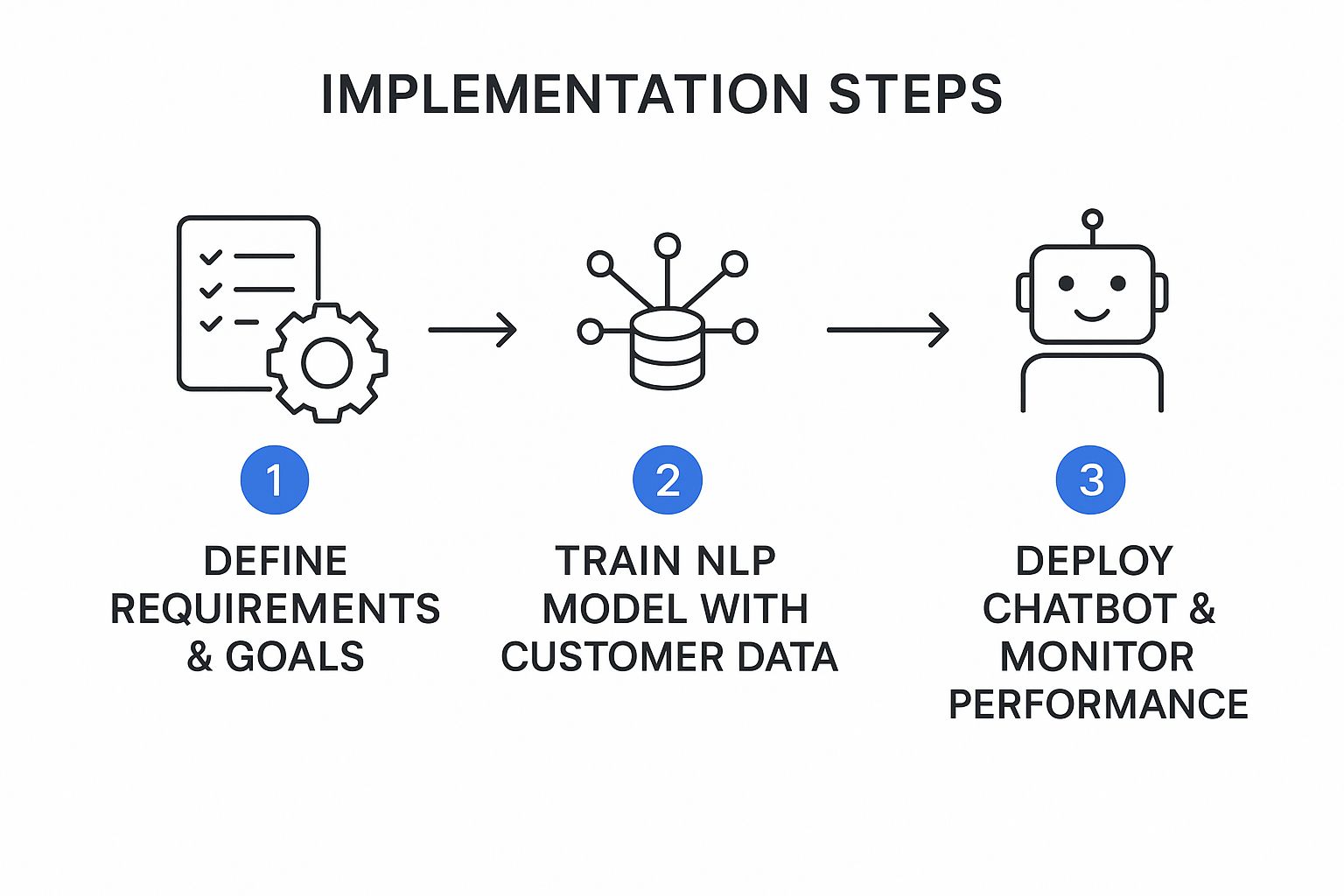
As you can see, it's a cycle. You define, train, and deploy, but then you continuously monitor and improve based on how people are using it.
Train, Test, and Launch Your Bot
With your conversation flows mapped out, it's time to get the bot trained up. This just means feeding it data from your existing resources, like your knowledge base, FAQs, and maybe even past support chats. The more high-quality info you give it, the smarter it will be.
Testing is the one step you absolutely cannot skip. Before you unleash your bot on your customers, have your own team try to break it. Tell them to ask weird questions, go off-script, and test every single path to make sure it works. This internal feedback is gold for ironing out the kinks.
When you're finally ready to launch, think about doing it in stages. You could start by putting the bot on a single page of your site or making it available to a small group of users first. This lets you get real-world feedback and make tweaks before the full rollout. And once it's live, make sure you tell your customers about it and ask them what they think
Best Practices for an Effective Support Chatbot

So, you’ve decided to launch a chatbot for support. That’s a great first step, but making it a tool that customers actually find helpful is a whole different ballgame. An effective chatbot does more than just spit out answers; it delivers a positive, efficient, and genuinely useful experience that actually builds customer trust.
Following a few key practices can be the difference between a bot that frustrates people and one that becomes a valuable asset. It all starts with making sure your chatbot reflects your brand and never leaves customers feeling trapped.
Give Your Chatbot a Personality
Your chatbot is often the first "voice" a customer interacts with, so its personality really matters. It should be a direct reflection of your company's overall tone. Are you a playful, informal brand? Or are you more buttoned-up and professional? Your bot's language should match.
A consistent brand voice helps create a much more cohesive customer experience. This small detail makes the whole interaction feel less robotic and more like a natural extension of your company.
Always Provide a Human Escalation Path
This one is non-negotiable. No matter how smart your bot is, there will always be questions it can't handle or sensitive situations that just need a human touch. A customer should never, ever feel cornered in a conversation with a bot.
Make the option to speak with a human agent clear, obvious, and available at any point. Think of it as an "escape hatch" that provides a safety net, building trust and stopping frustration from boiling over.
The goal of a support chatbot is not to block access to human agents. It's to solve simple issues quickly so that human agents are available for the complex problems that truly need them.
Offering this option shows you respect your customer’s time and are committed to solving their problem, one way or another.
Be Transparent and Set Expectations
Always be upfront that the user is talking to a bot. Trying to trick customers into thinking they're chatting with a person is a recipe for disaster. It only leads to frustration when the bot's limitations inevitably show.
A simple intro message does the trick: "Hi, I'm the support bot! I can help with X, Y, and Z. If I get stuck, I can connect you with a human agent." This sets clear expectations right from the start.
Balance Guided Flows with Free Text
The best support chatbots offer a mix of interaction styles to suit different people and different problems.
- Buttons and Quick Replies: These are perfect for guiding users through common tasks, like tracking an order or checking an account balance. They're fast, easy, and cut down on typos.
- Free Text Input: Letting users type their questions in their own words makes the chatbot feel more flexible and intelligent. This is where Natural Language Processing (NLP) really shines, helping the bot figure out what the user actually wants.
Combining both methods creates a more dynamic and user-friendly experience. A customer might click a button to start, then type out a more specific follow-up question.
This flexibility is so important because customer expectations for speed are sky-high. Data shows that 62% of people prefer chatbots over waiting for a human, mostly because they want answers fast. In fact, 59% of customers expect a reply in under five seconds. You can dig into more stats about user expectations for AI chatbots on fullview.io.
Continuously Analyze and Improve
A support chatbot is not a "set it and forget it" tool. The real work begins after you launch. Regularly digging into your chat logs is one of the best ways to find opportunities for improvement.
Look for patterns in the data:
- What are the most common unresolved questions? These are perfect candidates for new conversation flows or knowledge base articles.
- Where do users get stuck or frustrated? This can shine a light on confusing parts of your conversation design that need to be simplified.
- How often do users escalate to a human? If a specific topic has a high escalation rate, it’s a good sign the bot's current answer isn't cutting it.
This continuous feedback loop is what allows you to refine your bot's performance over time. Each tweak makes your chatbot a more effective and valuable part of your support team.
Your Top Questions About Support Chatbots, Answered
Alright, even with a solid plan, you're bound to have a few questions about adding a support chatbot to your setup. Let's tackle some of the most common ones that come up. Think of this as a quick-start guide to get you the direct answers you need.
How Much Does It Cost to Build a Chatbot for Support?
The price tag on a support chatbot can be all over the place. It really just depends on how much heavy lifting you need it to do.
On the simpler side, you can get started with a rule-based chatbot on a no-code platform for just a few hundred dollars a month. These are perfect for handling basic, repetitive questions right out of the gate.
But if you're looking for something more sophisticated, like an AI-powered bot that talks to your CRM and other business tools, you're looking at a bigger investment. Costs can range anywhere from $5,000 to over $50,000. For big companies with very specific needs, that number can go even higher. The final price really comes down to things like how many systems it needs to connect with, the level of AI you require, and the amount of ongoing maintenance it'll need.
Will a Chatbot Replace My Human Support Agents?
This is a big one, but the short answer is a definite no. The goal is not replacement; it's smart collaboration. The most effective setup is a hybrid model where bots and humans team up, each playing to their strengths.
Chatbots are absolute workhorses for the high-volume, predictable questions that tend to swamp a support team. Think "Where's my order?" or "How do I reset my password?" By automating these, you free up your human agents to pour their energy into the tricky, sensitive customer issues that require real empathy and creative thinking.
Your chatbot acts as the first line of defense, quickly filtering and solving simple requests. When a conversation gets too complex, it intelligently passes the issue—and all the important context—to the right human expert.
This kind of teamwork makes your entire support operation run smoother. Your agents get to focus on more engaging work, and your customers get faster answers, whether their problem is simple or complex.
How Do I Measure the Success of My Support Chatbot?
You can't improve what you don't measure. Tracking your support chatbot's performance is important for understanding the value it's bringing to the table. The best way to do this is by keeping a close eye on a few key performance indicators (KPIs).
Here are some of the most telling metrics to watch:
- Containment Rate: This is the percentage of chats the bot handles all on its own, without needing to loop in a human. A high containment rate is a great sign that the bot is doing its job effectively.
- Customer Satisfaction (CSAT): The easiest way to get this is with a quick thumbs-up or thumbs-down survey after the chat. It gives you a direct pulse on how users feel about the experience.
- Deflection Rate: This metric shows you the reduction in support tickets, calls, or emails your human team has to field. It's a clear measure of how much work the bot is taking off their plates.
- Average Resolution Time: How fast does the bot solve a customer's issue from start to finish? Quicker resolutions almost always lead to happier customers.
It's also a good idea to periodically review the chat logs yourself. Look for common questions where the bot seems to get stuck. This qualitative feedback is gold for figuring out where you need to make improvements.
What Is the Difference Between an AI Chatbot and a Rule-Based Chatbot?
The core difference is all about how they "think." A rule-based chatbot is like a very literal employee who follows a script to the letter. It operates on a predefined conversation flow, kind of like a digital flowchart. It can only understand and respond to specific keywords or commands it's been programmed to recognize.
An AI chatbot, on the other hand, is much more adaptable. It uses powerful technologies like Natural Language Processing (NLP) and Machine Learning (ML). This allows it to grasp the intent behind what a user is saying, even if they use slang, misspell a word, or phrase their question in an unexpected way.
Better yet, AI chatbots can learn from past conversations, getting smarter and more helpful over time. They can handle a much broader range of questions and provide a more natural, human-like conversation that people actually enjoy.
Ready to see how a blend of AI and human smarts can reshape your customer support? Social Intents offers a powerful live chat solution that works right inside the tools your team already loves, like Microsoft Teams and Slack. You can deploy a no-code AI chatbot to handle the routine questions and let your team focus on what they do best.